

Using Chart sheet events(worksheet especially for charts) is fairly simple. But when it comes to using events on embedded charts, It is not that simple. But I assure you that events with embedded charts are not that difficult to activate. It is much like creating application events. So without further delay, let's get started.
So, there are two steps to activate an embedded chart event. First is creating chart event class and defining events. Second is creating an object of that event class. That's it.
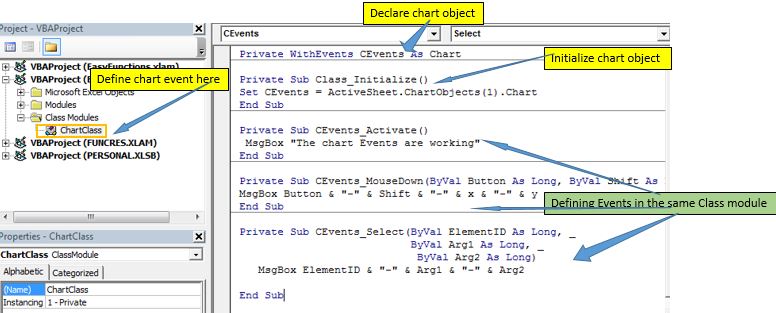
Step 1: Create Chart Event Class and Define Events
Private WithEvents CEvents As Chart
Private Sub Class_Initialize()
 Set CEvents = ActiveSheet.ChartObjects(1).Chart
End Sub
Here we are initializing the CEvents Chart with the first chart created on that sheet. The 1 is the index number of chart objects on the active sheet.
Private Sub CEvents_Activate()
 MsgBox "The chart Events are working"
End Sub
Our work here is done. You can create as many events you want from the available events for chart type here. But the events won't work yet because it's just a class. We need to create the object of this class in a sub in any normal module or the object module. Then run that sub. After that our event will start working.
Step 2: Create the Chart Class Object in Module.
Dim mychart As ChartClass
Sub activateChartEvent()
 Set mychart = New ChartClass
End Sub

And it is done. Now if you click on the first chart on the currently active sheet, it will show the message that the Chart Events are working.
Once you run the macro in the normal module, it will trigger always until you close the workbook that contains the events. But you may want to switch them on and off at your will. There are two ways to do this.
1. Nullifying The Event Object
In a separate subroutine, set the event object to Nothing
Private Sub StopEvents()
 Set Mychart= Nothing
End Sub
Once you run this code, the events will stop working. You can put it in a button on the worksheet to stop the events. Now you will have two buttons to start and stop these specific events. It will just stop events created by the AppE object.
2. Set EnableEvents to False
The second method is to disable the events. To make all events uncatchable we set the EnableEvents property of Application class to False.
Private Sub StopEvents()
 Application.EnableEvents= False
End Sub
The above code will disable all the events. Even the default excel events. They will not work until you start them again. Even if you run the StartEvents() subroutine (above), the event will not work. To make all events work again, you will have to set EnableEvents property again to True.
So if you want your events to work every time you start the events, add this line of code in the sub.
Private Sub StartEvents()
 Application.EnableEvents = True
 Set mychart = New ChartClass
End Sub
If you are developing a tool for end-user, you may want the events to work automatically. In that case, you can put the event starter in the Workbook object with Workbook_open() event, instead of in a normal module. This will make your event object initialized as soon as you open the workbook that contains the events.

So yeah guys, this how you can use the embedded chart event in excel. Let me know if this was explanatory enough and helped you understand Application-Level Events in Excel VBA. Write down your thoughts in the comments section below. If you have something to add to this, write that down too. You can ask your queries related to this article or any other excel VBA related topic in the comments section below.
Download the working file below:

Related Articles:
The Events in Excel VBA | There are seven types of Events in Excel. Each event deals in different scope. Application Event deals with on workbook level. Workbook on sheets level. Worksheet Event on Range level.
The Worksheet Events in Excel VBA |The worksheet event are really useful when you want your macros run when a specified event occurs on the sheet.
Workbook events using VBA in Microsoft Excel | The workbook events work on the entire workbook. Since all the sheets are part of the workbook, these events work on them too.
Prevent an automacro/eventmacro executes using VBA in Microsoft Excel | To prevent the run of auto_open macro use the shift key.
Chart object events using VBA in Microsoft Excel | The Charts are complex objects and there are several components that you attached to them. To make the Chart Events we use the Class module.
Popular Articles:
50 Excel Shortcuts to Increase Your Productivity | Get faster at your task. These 50 shortcuts will make your work even faster on Excel.
The VLOOKUP Function in Excel | This is one of the most used and popular functions of excel that is used to lookup value from different ranges and sheets.
COUNTIF in Excel 2016 | Count values with conditions using this amazing function. You don't need to filter your data to count specific value. Countif function is essential to prepare your dashboard.
How to Use SUMIF Function in Excel | This is another dashboard essential function. This helps you sum up values on specific conditions.
The applications/code on this site are distributed as is and without warranties or liability. In no event shall the owner of the copyrights, or the authors of the applications/code be liable for any loss of profit, any problems or any damage resulting from the use or evaluation of the applications/code.




Thanks a lot for your explanation. This is the first document, which I have understood and where I could follow the steps.
Our pleasure.