

In this article, we will create a macro for a union of multiple areas to a specified sheet.
Raw data consists of some sample data, which includes Name and Age. We have two areas which contain raw data. We want a union of both areas to the “Destination” sheet.

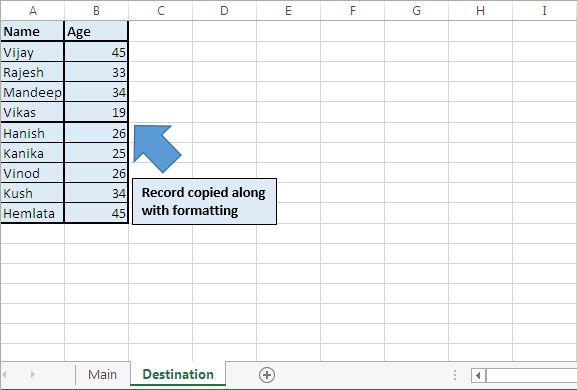
Clicking “Copy Record” button will do the union of data from both the areas, along with formatting.
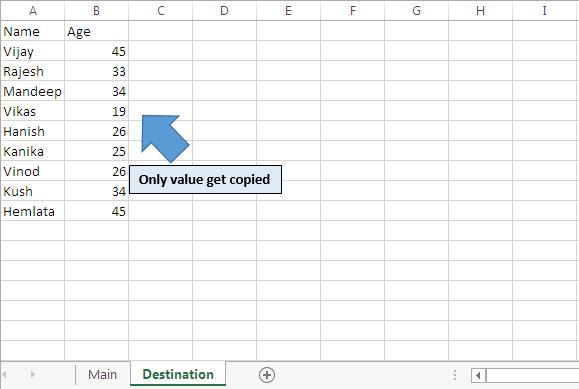
Clicking “Copy Value Only” button will also do the union of data from both areas, but without copying the format of the cell.
Code explanation
For Each Smallrng In Sheets("Main").Range("A9:B13,D16:E20").Areas
Next Smallrng
The above For Each loop is used to loop on defined areas.
Set DestRange = Sheets("Destination").Range("A" & LastRow)
The above code is used to create a range object of the last cell, where we want to copy the data.
Smallrng.Copy DestRange
The above code is used to copy data to the specified destination.
Please follow below for the code
Option Explicit

Sub CopyMultiArea()

'Declaring variables
Dim DestRange As Range
Dim Smallrng As Range
Dim LastRow As Long

'Looping through specified areas
For Each Smallrng In Sheets("Main").Range("A9:B13,D16:E20").Areas

    'Finding the row number of last cell
    LastRow = Sheets("Destination").Range("A1").SpecialCells(xlLastCell).Row + 1

    'Selecting the cell where records need to be copy
    If LastRow = 2 Then
        Set DestRange = Sheets("Destination").Range("A" & LastRow - 1)
    Else
        Set DestRange = Sheets("Destination").Range("A" & LastRow)
    End If

    'Copying records to specified destination range
    Smallrng.Copy DestRange

Next Smallrng

End Sub

Sub CopyMultiAreaValues()

'Declaring variables
Dim DestRange As Range
Dim Smallrng As Range
Dim LastRow As Long

'Looping through specified areas
For Each Smallrng In Sheets("Main").Range("A9:B13,D16:E20").Areas

    'Finding the row number of last cell
    LastRow = Sheets("Destination").Range("A1").SpecialCells(xlLastCell).Row + 1

    With Smallrng
        'Selecting the cell where records need to be copy
        If LastRow = 2 Then
            Set DestRange = Sheets("Destination").Range("A" & LastRow - 1).Resize(.Rows.Count, .Columns.Count)
        Else
            Set DestRange = Sheets("Destination").Range("A" & LastRow).Resize(.Rows.Count, .Columns.Count)
        End If
    End With

    'Assigning the values from source to destination
    DestRange.Value = Smallrng.Value

Next Smallrng

End Sub
If you liked this blog, share it with your friends on Facebook. Also, you can follow us on Twitter and Facebook.
We would love to hear from you, do let us know how we can improve our work and make it better for you. Write to us at info@exceltip.com
The applications/code on this site are distributed as is and without warranties or liability. In no event shall the owner of the copyrights, or the authors of the applications/code be liable for any loss of profit, any problems or any damage resulting from the use or evaluation of the applications/code.



