

Imagine you’ve written a VBA code that writes in a file, saves and closes it. Now, every time you run your code it shows a popup message in Excel like this (if the file already exists).
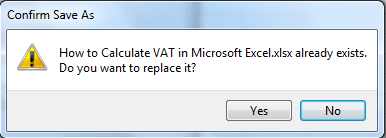
You can click OK for one time but if your code does the same for 100s of the time then it is not feasible to do so. You don’t want this to happen. You need to automate this process. To do so, just add these lines to your code.
| Sub DisablUpdates() With Application.DisplayAlerts = False 'Turns of alerts.AlertBeforeOverwriting = False 'Turns of overwrite alerts.ScreenUpdating = False 'Turns of screen updatingEnd With '*****************'Your Code here'***************** With Application.DisplayAlerts = True 'Turns back on alerts .AlertBeforeOverwriting = True 'Turns on Overwrite alerts .ScreenUpdating = True 'Turns on screen updating End With |
This code not only disables VBA alerts but also increases the time efficiency of the code. Let’s see how.
To use this code, you first need to enable VBA to excel of course.
At the beginning of the code, we disabled all unnecessary operations and in the end, we turned them on so that your system works as it was working before.
With Application: This line gives us access to all properties of the Application object. We can invoke them just by using ‘.’ (dot) operator if called using “With” Block.
.DisplayAlerts = False: This is a property of the application object. See here we have called it using “.” operator just.This line disables all alerts of the closing file, overwriting, or opening an already open file.
.AlertBeforeOverwriting = False: This line disables alert overwriting cells during drag down operation or any other on sheet alert.
.ScreenUpdating = False: in almost every code you move from one cell to another, one sheet to another and one workbook to another. If you don’t add this line, you will see screen flickering. Every movement you do on the system using VBA will be displayed. This causes time overhead and can cause your system to hang. To save time and resources always incorporate this line.
The bottom block must also be executed to turn your excel back to normal and to see results. You are doing nothing but turning every switch on you turned off in the Write this block before each End Sub and Exit Sub.
With Application
.DisplayAlerts = True
.AlertBeforeOverwriting = True
.ScreenUpdating = True
End With
This is one of the most common questions of Excel VBA Programmer Interviews. There is a 90% chance that you will be asked this question in Advanced Excel and VBA questions.
I hope you got your solution. If not, do use the comments section to ask a more personalised question.
Download file
Related Articles:
How to Change The Default Printer Using VBA in Microsoft Excel 2016
How to Display A Message On The Excel VBA Status Bar
How to Insert Pictures Using VBA In Microsoft Excel 2016
How to Add And Save New Workbook Using VBA In Microsoft Excel 2016
How to use the Conditional Formatting using VBA in Microsoft Excel
Popular Articles:
50 Excel Shortcuts to Increase Your Productivity
How to use the VLOOKUP Function in Excel
The applications/code on this site are distributed as is and without warranties or liability. In no event shall the owner of the copyrights, or the authors of the applications/code be liable for any loss of profit, any problems or any damage resulting from the use or evaluation of the applications/code.




?????? ??? ????? ????????
Note
When using the SaveAs method for workbooks to overwrite an existing file, the Confirm Save As dialog box has a default of No, while the Yes response is selected by Excel when the DisplayAlerts property is set to False. The Yes response overwrites the existing file.
When using the SaveAs method for workbooks to save a workbook that contains a Visual Basic for Applications (VBA) project in the Excel 5.0/95 file format, the Microsoft Excel dialog box has a default of Yes, while the Cancel response is selected by Excel when the DisplayAlerts property is set to False. You cannot save a workbook that contains a VBA project by using the Excel 5.0/95 file format.
https://docs.microsoft.com/en-us/office/vba/api/excel.application.displayalerts
Very simplified looping options, anyway very good thanks a lot. When we run vba code / macros in our excel files, we see a lot of screen flickering as the actions are being performed on the file.
Very simplified looping options, anyway very good thanks a lot. When we run vba code / macros in our excel files, we see a lot of screen flickering as the actions are being performed on the file.
This is not a bug. This is a security feature to prevent running malicious VBA code that is inserted into a file you open.
Seriously? Microsoft needs to fix this ASAP
I don't want to display disabl;e or enable Macro while opening excel work sheet. still i want to run the macro. i have written the macro through VB code
Excel VBA needs to have macros enabled to run the macro.
what you are asking the application to do is not going to be viable. A way round this i have found, add a worksheet at the start of the workbook, give the users a message in the middle of the page advising that macros need to be turned on and how to do it.set a macro to run on start up that hides this sheet and shows the rest. on close, hide all the other worksheets and show the message:
Private Sub Workbook_Open()
Dim i As Integer
For i = 1 To ActiveWorkbook.Sheets.count - 1
If Sheets(i).Visible = False Then
Sheets(i).Visible = True
End If
Next
Sheet1.Visible = xlSheetVeryHidden
End Sub
Private Sub Workbook_BeforeClose(Cancel As Boolean)
Dim i As Integer
For i = 1 To ActiveWorkbook.Sheets.count - 1
If Sheets(i).Visible = True Then
Sheets(i).Visible = xlSheetVeryHidden
End If
Next
Sheet1.Visible = xlSheetVisible
End Sub
When the user opens the workbook, if macros are enabled, it runs the code to show all the sheets, but hides the message.
If macros are disabled, it shows the message sheet.
hope this helps