

Sometimes we come across instances where we need to extract the filename from the file path in our excel files. We could be having an entire list of file paths and want only the filename with the extension for each of them. Its cumbersome to do this manually. We can do this using an excel formula very easily.
Considering you have the list of filenames in column A,
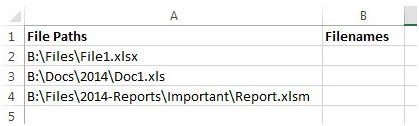
And you want to extract only the file names with their own extension, then use the following formula –

We will get the output as –

So irrespective of how long the file path is, we will still get the output as the file name. Now lets understand this formula –
So the formula will try to evaluate the MID function and each parameter of this function will be completed using the other functions. The syntax of the MID function is =MID(text,start_num,num_chars).
Now lets see how the rest of the formula fits in –
=MID(A2,FIND("*",SUBSTITUTE(A2,"\","*",LEN(A2)-LEN(SUBSTITUTE(A2,"\",""))))+1,LEN(A2))
Len(A2) is evaluated first which gives us the length of the entire string which is equal to 19.
=MID(A2,FIND("*",SUBSTITUTE(A2,"\","*",LEN(A2)-LEN(SUBSTITUTE(A2,"\",""))))+1,LEN(A2))
LEN(SUBSTITUTE(A2,”\”,””)) is evaluated next. The substitute function will replace all \ with empty spaces and the len function will calculate the length of it which is equal to 17.
So LEN(A2)-LEN(SUBSTITUTE(A2,"\","")) will give us 2.
Our function now looks like =MID(A2,FIND("*",SUBSTITUTE(A2,"\","*",2))+1,LEN(A2))
The next part to be evaluated is as highlighted below =MID(A2,FIND("*",SUBSTITUTE(A2,"\","*",2))+1,LEN(A2))
From the 2nd instance of the “\”, the substitute function will replace the \ with *. So our function now looks like
=MID(“B:\Files\File1.xlsx”,FIND("*",”B:\Files*File1.xlsx”)+1,LEN(A2))
The next part to be evaluated is the find function - =MID(“B:\Files\File1.xlsx”,FIND("*",”B:\Files*File1.xlsx”)+1,LEN(A2))
This gives us the output as 9+1 = 10 (The +1 is to exclude the * in the count).
Our function now looks like =MID(“B:\Files\File1.xlsx”,10,19) . So we have narrowed down to the MID function which will give us 19 characters from the string “B:\Files\File1.xlsx” starting from the 10th character. And we get the output as File1.xlsx.
This is how this multi-function formula works and gives you the output.
The applications/code on this site are distributed as is and without warranties or liability. In no event shall the owner of the copyrights, or the authors of the applications/code be liable for any loss of profit, any problems or any damage resulting from the use or evaluation of the applications/code.




This was a huge help! Thank you so much for taking the time to post this content. Your time and effort is very much appreciated!
This formula is good. Well, I am another question on the same topic. I have hyperlinked cell with a friendly name as below:
=HYPERLINK("C:\Test1\Test2\file_name.log","Test_Hyper_Link"
Please try it on excel file and help me get an answer with formula to extract the hyperlink address.
I tried with above formula and it shows "#VALUE!", whereas it works fine without this friendly name given.
Kindly help.
Thanks!
Can anyone comment on how to update Max's script from 27-Aug-13 without using the application.file.search command? I'm running Excel 2013 and it looks like that command is no longer accepted in the current VBA. Thanks!
"Try this code. Should work without a problem:
============================
Sub IndexFiles()
With Application.FileSearch
.LookIn = ""C:\MyMusic""
.FileType = msoFileTypeAllFiles
.SearchSubFolders = True
.Execute
End With
cnt = Application.FileSearch.FoundFiles.Count
For i = 1 To cnt
Rng = ""A"" & i
Range(Rng).Value = Application.FileSearch.FoundFiles.Item(i)
Next i
End Sub
============================="
"this looked very useful, so I tried it myself.
However, when I ran it (using Excel 2000) it didn't appear to do anything.
It paused for a second, and then returned me to the blank worksheet, with nothing listed.
I changed the path and triple checked that it is correct, and there are plenty of files there to find.
Did it work for anyone else?
Vikram - Do you have any ideas what may be stopping it working for me?
Thanks, "
Cool...thanks Vikram!
"In a new workbook, go to the VBA editor by hitting Alt+F11.
Next, select the current sheet in the project explorer on the left. Click Insert>Module.
Copy and paste the following code:
=================================
Sub IndexFiles()
With Application.FileSearch
.LookIn = ""C:\My Music""
.FileType = msoFileTypeAllFiles
.SearchSubFolders = True
.Execute
End With
End Sub
================================
Type in the correct directory path you want to evaluate in the .LookIn line.( I have typed in ""C:\My Music"" already).
Now close the VBA editor, and save the workbook.
Select cell A1 on the worksheet.
On the excel macro toolbar, click Run>Macro. You will see the name ""Indexfiles"" in the box that pops up.
Select it and run the macro. Be patient as it might take a while to complete since you say there are 3000 folders.
When it completes, you will have a full path listing of all files and folders in you main music directory.
The next part you can do yourself:
Use the Data>Text to Columns feature (on column A) to separate the names of the folders and files into individual cells. Once that is done you can delete any columns you dont want, format and export as you desire.
P.S Thanks to Stephen Hoadley of mrexcel.com for the giving me the code for a similar requirement."
"OK, here is the actual situation. I have digitized approximately 4,000 music CDs. So, there are about 3,000 'main' folders. Some artists...say, Led Zeppelin, have done many albums so each album name is under a single Led Zeppelin folder. Imagine entries that look like this:
C:\My Music\Led Zeppelin\Houses of the Holy\Song 1
C:\My Music\Led Zeppelin\Greatest Hits\Song 1
What I want is an easy to way to share the contents of my music library with others. A spreadsheet is a good way. From there, I could export the data to a nice HTML file and post it to my server.
At a minimum, I want to show every artist...and if there are multiple albums attributed to a particular artist then I would like to show that as well. I do not necessarily need to list every song in each album. Just artist and album name would be fine."
"Kelly, you will have to use a combination of VBA code and Excel's text to columns function to achieve what you want. Firstly, elaborate on the 3000 folders. Are they all at a single level, or do some or all have sub folders too?
Secondly, will you need the names of the files in the folders as well? And thirdly, what do you intend to do with the folder names once they are in excel? "
"This tip is excellent to extract the file name from the path. How does one extract the names of the folders?
I have a set of paths in Column A like
C:\WINDOWS\Desktop\Countries\States\Cities\File.txt
I need to extract the folder name ""Countries"" into column B, ""States"" into column C, ""Cities"" into column D and so on. How is this done?"
"The HYPERLINK function doesn't work correctly in a conditional statement. For example:IF(B8=""Y"",HYPERLINK(D8,C8),C8)
If true a link should be created but if false no link should exist....doesn't work this way...it always creates a link."
"Try this code. Should work without a problem:
============================
Sub IndexFiles()
With Application.FileSearch
.LookIn = ""C:\MyMusic""
.FileType = msoFileTypeAllFiles
.SearchSubFolders = True
.Execute
End With
cnt = Application.FileSearch.FoundFiles.Count
For i = 1 To cnt
Rng = ""A"" & i
Range(Rng).Value = Application.FileSearch.FoundFiles.Item(i)
Next i
End Sub "
"Hi Vikram / Kelly,
this looked very useful, so I tried it myself.
However, when I ran it (using Excel 2000) it didn't appear to do anything.
It paused for a second, and then returned me to the blank worksheet, with nothing listed.I changed the path and triple checked that it is correct, and there are plenty of files there to find.
Did it work for anyone else?
Vikram - Do you have any ideas what may be stopping it working for me?
Thanks,
Alan."
"In a new workbook, go to the VBA editor by hitting Alt+F11.
Next, select the current sheet in the project explorer on the left. Click Insert>Module.
Copy and paste the following code:
Sub IndexFiles()
With Application.FileSearch
.LookIn = ""C:\My Music""
.FileType = msoFileTypeAllFiles
.SearchSubFolders = True
.Execute
End With
End Sub
Type in the correct directory path you want to evaluate in the .LookIn line.( I have typed in ""C:\My Music"" already).
Now close the VBA editor, and save the workbook.
Select cell A1 on the worksheet.
On the excel macro toolbar, click Run>Macro. You will see the name ""Indexfiles"" in the box that pops up.
Select it and run the macro. Be patient as it might take a while to complete since you say there are 3000 folders.
When it completes, you will have a full path listing of all files and folders in you main music directory.
The next part you can do yourself:
Use the Data>Text to Columns feature (on column A) to separate the names of the folders and files into individual cells. Once that is done you can delete any columns you dont want, format and export as you desire.
P.S Thanks to Stephen Hoadley of mrexcel.com for the giving me the code for a similar requirement.
thank you!
Kelly Smith Posted on: 31-12-1969
Cool...thanks Vikram!"
"OK, here is the actual situation. I have digitized approximately 4,000 music CDs. So, there are about 3,000 'main' folders. Some artists...say, Led Zeppelin, have done many albums so each album name is under a single Led Zeppelin folder. Imagine entries that look like this:
C:\My Music\Led Zeppelin\Houses of the Holy\Song 1
C:\My Music\Led Zeppelin\Greatest Hits\Song 1
What I want is an easy to way to share the contents of my music library with others. A spreadsheet is a good way. From there, I could export the data to a nice HTML file and post it to my server.
At a minimum, I want to show every artist...and if there are multiple albums attributed to a particular artist then I would like to show that as well. I do not necessarily need to list every song in each album. Just artist and album name would be fine."
"Kelly, you will have to use a combination of VBA code and Excel's text to columns function to achieve what you want. Firstly, elaborate on the 3000 folders. Are they all at a single level, or do some or all have sub folders too?
Secondly, will you need the names of the files in the folders as well? And thirdly, what do you intend to do with the folder names once they are in excel? "
I to have to figure out how to get names of 3000 folders from Windows Explorer into Excel. Any ideas?
"This tip is excellent to extract the file name from the path. How does one extract the names of the folders?
I have a set of paths in Column A like C:\WINDOWS\Desktop\Countries\States\Cities\File.txt I need to extract the folder name ""Countries"" into column B, ""States"" into column C, ""Cities"" into column D and so on. How is this done?"