

Excel sorts data according to specific sort order rules. We can sort the number data as per ascending order and descending order. And sort the text according to alphabets A to Z and Z to A. We can sort by font color and cell color in Microsoft Excel 2010.
This option is available, in the Data Tab under the Sort & Filter group.

We can sort the data as follows:-
Numeric Values:-
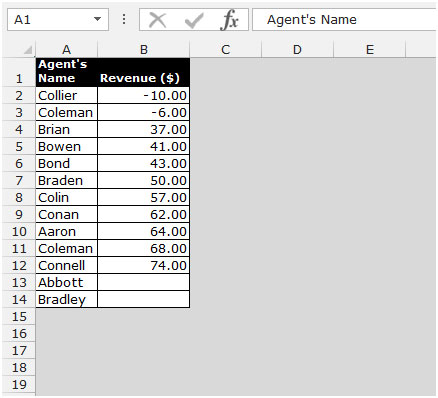
Numeric values, including date and time, are sorted from lowest (negative) to highest (positive). Excel does not consider the format of the cell, only its contents.
Date and time are sorted by their numeric values.
Text:-
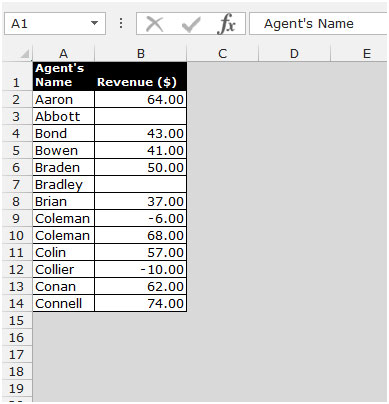
Text is sorted as per the letters that come first in the order, and that would show in ascending or descending order.
Empty cells:-
Empty cells are always sorted last. Sort descending changes the sort order from the last to the first, except of empty cells, which are always sorted last.
Let’s take an example to understand how we can sort the data as per above mentioned methods.
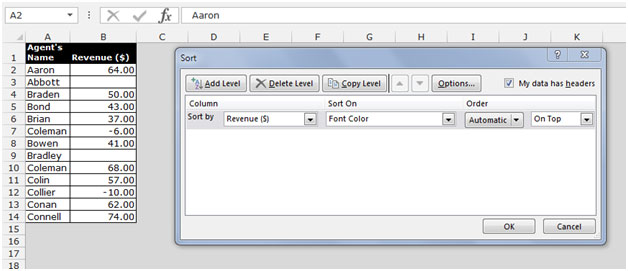
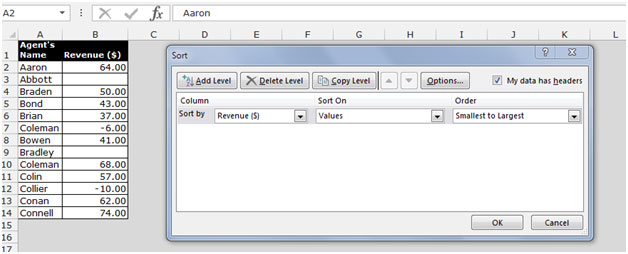
We have data in range A1:B14. Column A contains Agents' names, and column B contains Revenue.

To sort the data as per numbers, follow below given steps:-
To sort the data as per the text, follow below given steps:-

The applications/code on this site are distributed as is and without warranties or liability. In no event shall the owner of the copyrights, or the authors of the applications/code be liable for any loss of profit, any problems or any damage resulting from the use or evaluation of the applications/code.




If you are interested, I have discovered that when using Excel 2013, there is a VERY quick way to sort IP addresses in about 6 clicks. If it is useful please use it. http://answers.microsoft.com/en-us/office/forum/office_2013_release-excel/possibly-the-easiest-fastest-way-to-sort-ip/f94d0429-f12d-44f1-a29e-ba2001a625a0
'ol codger. April 2015
"The sort function in excel only allows me to sort 3 columns at one particular time and I have 7 columns that I need sorted! I tried recording the sort function into a macro and altering it so that it will consider all the columns I have. The macro is as follow but another tip or suggestion would be appreciated! Sub UWI()
'
' Sort_UWI Macro
Range(""D1"").Select
Selection.Sort _
Key1:=Range(""F2""), Order1:=xlAscending, _
Key2:=Range(""E2""), Order2:=xlAscending, _
Key3:=Range(""D2""), Order3:=xlAscending, _
Key4:=Range(""C2""), Order4:=xlAscending, _
Key5:=Range(""B2""), Order5:=xlAscending, _
Key6:=Range(""A2""), Order6:=xlAscending, _
Key7:=Range(""G2""), Order7:=xlAscending, _
Header:=xlGuess, OrderCustom:=1, MatchCase:=False, Orientation:=xlTopToBottom
End Sub"
I have some linking in MS Excel with date. and I would like to sort it using function. (I cannot sort it by Data>Sort because those are linking and it is different every time when I enter a search
"the concatenate function enables you to combine the text from various cells eg [=CONCATENATE(A8,""."",B8,""."" etc). Hope this is useful.
Thanks for Mych Dubil for the delimiting tip - very helpful. I guess I'll have to write a macro so that a column will auto-update, unless anyone knows any alternative solutions etc?! Actually I think there may be some text formulaewhich may useful, but I'll look at them some other time"
"Thanks to John Foster from Yorkshire, UK who posted a comment on a way of separating First Names and Surnames....
Select the column with your Section/Subsection numbers or in my case IP numbers and then select Text to Columns from the Data menu. This will set off a wizard that is self explanitory. In the case of Sections/SubSection and IP numbers you would choose Delimitors which in both cases is the""."" you then state which column the convertion needs to be placed into.
I was messing around with Formulas, Functions, you name it... all the time the answer was there all the time. Now my problem is trying to sort the IP.... I cant sort over 4 colums so some how I need to make each column 3 characters length (padding out any 1 or 2 characters with ""0"" in front) and then combine the 4 columns into one and then sort on this column.
Any help would be apprecieated"