

The status bar in excel can be used as a code monitor. When your VBA code is lengthy and you do several tasks using VBA, you often disable the screen update so that you don’t see that screen flickering. But due to this, you don’t get to know what is going on in your code.
If you don’t know where is the status bar in excel, here it is:
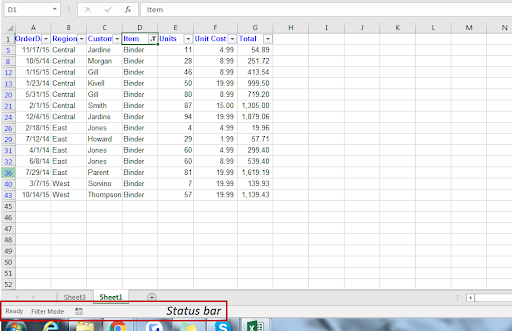
You can use a status bar of excel to get information from Excel without interfering execution of code. You can display stages of your Marco on the status bar or use it as progress bar.
VBA Code to display messages on Status Bar of Excel
Application.StatusBar = "Message"
StatusBar is a property of Application object that takes text as input.
In this example, I am just showing which function is running...
Sub DisplayMessageOnStatusBar()
Application.ScreenUpdating = False
Application.StatusBar = "Calling function one "

' call function_1

Application.Wait (Now + TimeValue("00:00:2"))
Application.StatusBar = "Calling function two"

'Call function_2

Application.Wait (Now + TimeValue("00:00:2"))
Application.StatusBar = "Calling function Three"

'Call function_3

Application.Wait (Now + TimeValue("00:00:2"))
Application.StatusBar = ""

Application.ScreenUpdating = True
End Sub
In this example, the screen updating is set False in the beginning.
Now, before calling the function_1, I am displaying a message that is calling function one.
Application.Wait (Now + TimeValue("00:00:2")) this line of code is just to fake a lengthy function call so that I get 2 seconds to see this on my status bar.
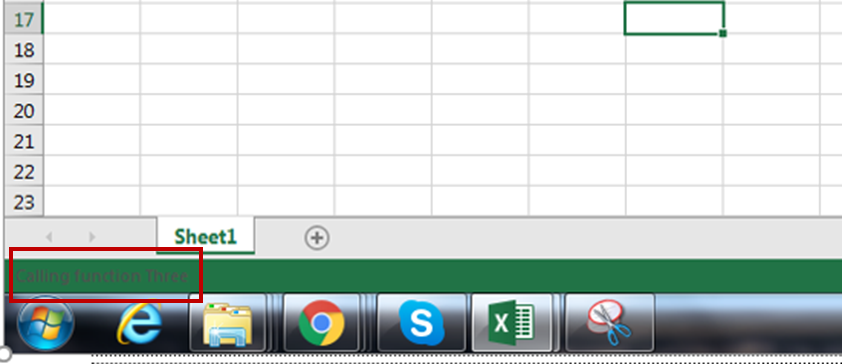
I did it before all function calls and in the end, I set the status bar to blank (“”).
The status bar messages are quite useful to display messages while working with lengthy code. When your code goes through multiple stages or runs a long loop, you can show that on status bar so that user knows the code is running. Otherwise, the user may think that the system has hanged or something.
Now you can smartly get information on the status bar using VBA of Excel 2016, 2013, 2010 and 2007 using this one-liner.
OLD POST
Certain vba macros / codes take a long time to run or execute the actions required. If you have turned off screen updating using the line Application.ScreenUpdating = False at the beginning of your code, then if any user runs the code, they will not know what is going on and think that the computer system is not responding. You can ask the code to display a status message on the status bar so that the user is informed about the current status of the code.
Here is a simple code which gives a message box showing the values in column A starting from row 2 to the last row. The status bar will show the message “Macro running” as the code is running, and once the code is done, it will show “Ready” which is one of the default Excel messages.
Option Explicit

Sub macro1()
Dim i As Long, lrow As Long

Application.ScreenUpdating = False
Application.DisplayAlerts = False

Application.DisplayStatusBar = True

With Worksheets(“Sheet1”)
lrow = .Range(“A” & .Rows.Count).End(xlUp).Row
For i = 2 to lrow
Application.StatusBar = “Macro running”
Msgbox .Range(“A” &i).Value
Next i
End With

Application.StatusBar = “”
Application.ScreenUpdating = True
Application.DisplayAlerts = True

End Sub
To copy the above code to your file,
You can see the code posted in the module below -

Now lets understand what each line of the code does -
So first we set DISPLAYSTATUSBAR to true and then we set the message for the status bar. Once we use Application.StatusBar = “” at the end of the code, it will revert to the default Excel message which is READY.
Here is a pic of the status bar while the macro is running.
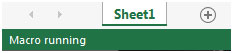
After the macro is finished, the status bar will show as follows –

So similarly, you can update the status bar at different parts of the code, so that the user knows what is happening as the macro is running. Sometimes, there could be one or more macros which cover multiple processes and this status bar will be useful to know at which process, the macro has reached.
If you liked our blogs, share it with your friends on Facebook. And also you can follow us on Twitter and Facebook.
We would love to hear from you, do let us know how we can improve, complement or innovate our work and make it better for you. Write us at info@exceltip.com
Popular Articles:
50 Excel Shortcuts to Increase Your Productivity
How to use the VLOOKUP Function in Excel
The applications/code on this site are distributed as is and without warranties or liability. In no event shall the owner of the copyrights, or the authors of the applications/code be liable for any loss of profit, any problems or any damage resulting from the use or evaluation of the applications/code.




Handy tip, thanks!
NOTE: I'm not sure what the specifics are (code page?), but I had to change all the double-quote characters from their "italic" form to standard - from (“) and (”) to (") - to let VBA use the code.
The code page is the where we write code. Yes the text uses smart quotes, you user may need to change it to dumb quotes.
In your screenshot above with the red box around the status, it's really hard to read the status, is there any way to make the status bar wording more visible? Thanks
I believe if you set screenupdating to FALSE, the statusbar will not reflect the latest message.
The workaround is, switch screenupdating to TRUE before the statusbar message, then switch it to FALSE again.
Screen updates do not need to be set true.
hey dear this code is not working
"I am using under give code to track change made in trial balance to untaalied/balance talling/profit or loss amt.
1) can i coloured the final result value in statusbar based on criteria.
2) i am also not able to target other range in ""worksheet_change range"".
Private Sub Worksheet_Calculate()
Worksheet_Change Range(""Tally"")
End Sub
Private Sub Worksheet_Change(ByVal Target As Excel.Range)
Dim TBer As String, BSer As String, PLrs As String
Dim Rng As Range, rng1 As Range
Application.DisplayStatusBar = True
If Target.Address = Range(""Tally"").Address Then
Select Case Target.Value
Case 0
msg = MsgBox(""Tallied "" & Target.Value, vbOKOnly, ""DRbharucha"")
End Select
TBer = ""TB Error >>Rs. ""
BSer = ""<>Rs. ""
PLrs = ""<>Rs. ""
Set Rng = Application.Range(""BS"")
Set rng1 = Application.Range(""PorL"")
Application.StatusBar = TBer & Target.Value & BSer & Round(Rng, 2) & PLrs & rng1
End If
End Sub
Thank you "