

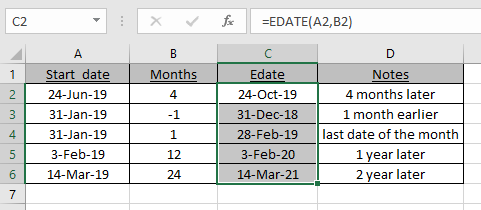
In this article, we will learn How to Excel Add months to date.
Scenario:
If you want to add months to a date in excel, you can’t just simply do addition to add months. Let's assume If you add some months as a number to a date it will actually add days. If you add multiples of 30 (30 day = 1 month) to date then it will give incorrect answers as you don't know to add 30, 31, 28 or even 29.. To add months to a date in excel, let's use excel functions to read date values and extract required results.
Add months Formula using EDATE function in Excel
EDATE function in excel returns the serial number of the date after adding the number of months to a given date.
Formula syntax
| =EDATE(start_date,num_of_months) |
Start_date: the date in which you want to add months.
Num_of_months: The number of months you want to add in start date.
Add months Formula using DATE function in Excel
We extracted year, month and date from the date using the respective excel function of the same name. Added 5 months MONTH(A2)+5. And then integrated year, month and date using the DATE function of excel. This gave us a new date of 5 months ahead.
Formula syntax
| =DATE(YEAR(date), MONTH(date)+ months ,DAY(date)) |
date : the date in which you want to add years.
months : the number of years you want to add.
Example :
All of these might be confusing to understand. Let's understand how to use the function using an example. Here we have some dates and we need to find the Date value for the given dates and months.
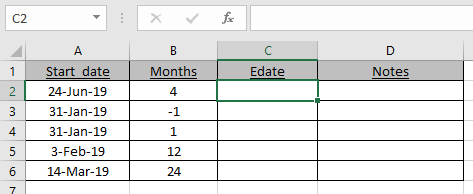
Use the formula:
| =EDATE(A2,B2) |
A2 : Given date
B2 : number of months
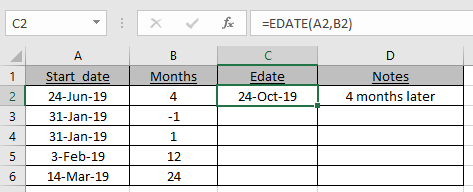
As you can see the new_date or EDATE is here.
Now use the formula to the remaining cells to get the EDATE for a given date.
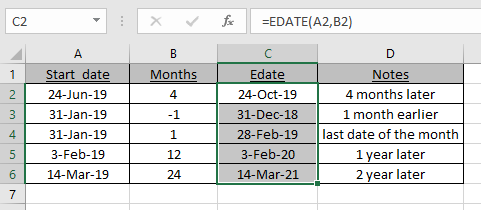
As you can see in C4 cell, 31st Jan becomes 28th Feb as 28th is the last date of the Feb.
EDATE formula gets you the date of expiry, maturity dates or other due dates.
More about edate function
For this example we have this data, in A2 there is a start date, in B2 a number of months to add and in C2 we will write a formula for adding months to this date.
Write this formula in C2
| =EDATE(A2,B2) |
This will return the serial number of date which is not much readable for a normal user.
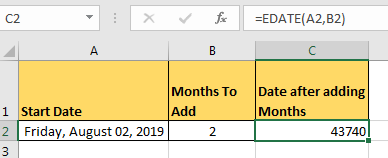
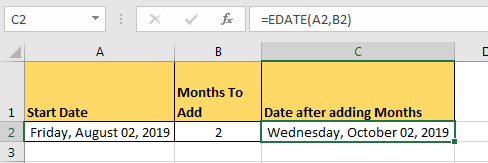
To make it readable change the text format to date of cell C2. You can copy format from cell A2 and paste it on C2. whichever way you like, you do it yourself.
Finally you’ll have this readable date.
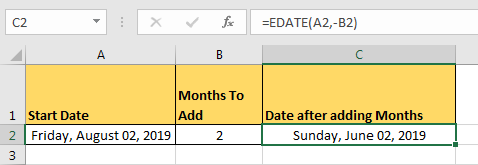
To subtract months just add minus sign before number of months,
| =EDATE(A2,-B2) |
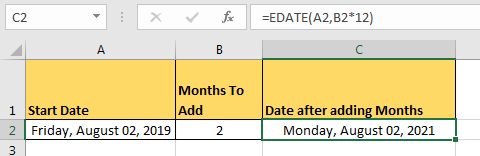
As we all know that each year has 12 months in it. So that’s it. In the EDATE function, at the place of num_of_months write the number of years and multiply it by 12.
For example if I want to add 2 year in Friday, August 02, 2019 i will write this formula to add years in excel.
Use the formula:
| =EDATE(A2,B2*12) |
Same goes for subtracting years from a date.
Here are all the observational notes using the formula in Excel
Notes :
Hope this article about How to Excel Add months to date is explanatory. Find more articles on calculating values and related Excel formulas here. If you liked our blogs, share it with your friends on Facebook. And also you can follow us on Twitter and Facebook. We would love to hear from you, do let us know how we can improve, complement or innovate our work and make it better for you. Write to us at info@exceltip.com.
Related Articles :
Extract days between dates ignoring years in Excel : count the days between the two dates using different functions and mathematical operation in Excel.
Count holidays between dates in Excel : count non working days between the two given dates using the DATEDIF and NETWORKDAYS function in Excel.
How to Convert date to text in Excel : In this article we learned how to convert text into date, but how do you convert an excel date into text. To convert an excel date into text we have a few techniques.
Count Birth Dates By Month in Excel : count the number of dates lying in a particular month using the SUMPRODUCT and MONTH function in Excel.
How to use the NETWORKDAYS function in Excel : Returns the working days between the two given dates using the NETWORKDAYS function.
Popular Articles :
50 Excel Shortcuts to Increase Your Productivity : Get faster at your tasks in Excel. These shortcuts will help you increase your work efficiency in Excel.
How to use the VLOOKUP Function in Excel : This is one of the most used and popular functions of excel that is used to lookup value from different ranges and sheets.
How to use the IF Function in Excel : The IF statement in Excel checks the condition and returns a specific value if the condition is TRUE or returns another specific value if FALSE.
How to use the SUMIF Function in Excel : This is another dashboard essential function. This helps you sum up values on specific conditions.
How to use the COUNTIF Function in Excel : Count values with conditions using this amazing function. You don't need to filter your data to count specific values. Countif function is essential to prepare your dashboard.
The applications/code on this site are distributed as is and without warranties or liability. In no event shall the owner of the copyrights, or the authors of the applications/code be liable for any loss of profit, any problems or any damage resulting from the use or evaluation of the applications/code.



