Excel Tip > Technology > 9 NetSuite Alternatives for Small Business: Month-to-Month, No $25k Implementation
9 NetSuite Alternatives for Small Business: Month-to-Month, No $25k Implementation
Looking for NetSuite alternatives for small businesses that don’t start with a $25,000 consulting bill? Implementation guides put that at the low end of a small-team rollout. If you mainly need tighter inventory control, smarter purchasing, or light manufacturing, not global consolidations, that number stings.
This guide spotlights nine cloud platforms. Eight of them launch on true month-to-month terms, with a free trial, transparent pricing, and the freedom to cancel anytime. The ninth, Organizely, takes a different approach: AI agents for manufacturers, priced through a demo. Let’s find the option that matches your workflow and budget.
Which alternative fits your business?
Skip the nine deep dives for a moment. Start with one of six common scenarios, launch a free trial, and confirm fit before you commit.
Your situation
First platform to test
Manufacturer that wants AI agents to plan purchasing, production, and labor across existing systems
Organizely
Multichannel inventory, no complex manufacturing
Zoho Inventory
Production planning with routings and BOMs
MRPeasy
Small-batch maker focused on ingredient costs
Stocksmith
QuickBooks Online plus inventory/light manufacturing
SOS Inventory
One configurable suite for several departments
Odoo or ERPNext
Treat this table as a signpost, not a ranking. If two rows resonate (for example, you run a Shopify shop and also assemble kits), start with the simpler tool, and add complexity only if the trial reveals a gap. Making that call up front shaves weeks of setup and saves thousands of dollars in first-year cost.
Next, you’ll see how each product scored, what it really costs, and why the lowest headline price rarely tells the full story.
What counts as a NetSuite alternative for a small business?
“Alternative” can describe anything from a full ERP suite to a simple inventory plug-in. To keep the term useful, we group tools into three buckets:
Full ERP. Accounting, CRM, inventory, manufacturing, and HR share one login. Odoo and ERPNext belong here. They match NetSuite’s breadth but require real setup time.
Operational platform. These systems manage purchasing, stock, warehouses, or production while QuickBooks or Xero remains your ledger. Zoho Inventory and MRPeasy sit in this lane.
Point solution. A single-purpose app fixes one pain point, often inventory accuracy, and leaves your ledger where it is. Stocksmith, SOS, and inFlow fill this role; SOS and inFlow also sync figures to QuickBooks. Organizely sits beside these buckets rather than inside one: it deploys AI agents that coordinate work across a manufacturer's team and existing systems.
Scope shapes both cost and timeline. Swapping NetSuite finance is a different project from replacing only its inventory module.
Before you launch a trial, ask yourself:
Is finance broken, or is inventory the main headache?
Do we manufacture items that need routings and shop-floor reporting?
Will we stay on Shopify or add wholesale channels next year?
Do we have the capacity and desire for an ERP project?
Answering these questions steers you toward the right bucket and prevents paying for power you will never use or, worse, under-buying and hitting a wall six months in.
How we evaluated each alternative
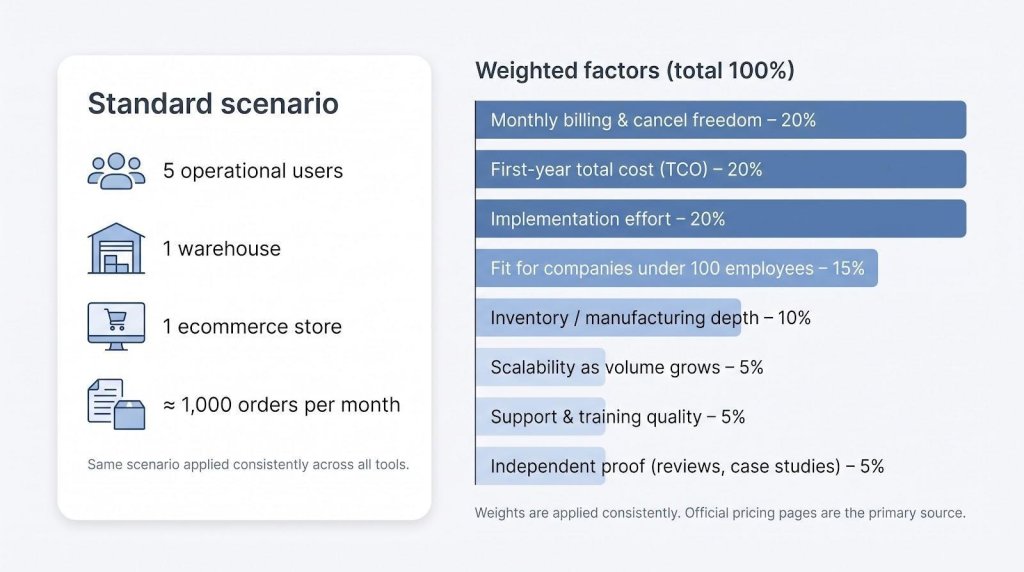
Sticker prices alone mislead. Add users or connectors and a “$39 plan” can triple by month two. To compare tools fairly, we applied one standard scenario and an eight-factor scorecard.
Standard scenario
5 operational users
1 warehouse
1 ecommerce store
? 1,000 orders per month
Weighted factors
Monthly-billing transparency and freedom to cancel: 20 percent
First-year total cost of ownership (TCO): 20 percent
Implementation effort (hours or weeks, not dollars alone): 20 percent
Fit for companies under 100 employees: 15 percent
Depth of inventory or manufacturing features: 10 percent
Scalability as order volume grows: 5 percent
Quality of included support and training: 5 percent
Independent proof (reviews or case studies): 5 percent
Evidence hierarchy
Official pricing pages outrank every other source. Independent review sites follow, while community threads add color but never overrule published numbers. If a vendor hides behind “Contact sales,” we subtract points for opacity.
This process creates a neutral scorecard that shows both cost and expected time saved once the system is live. The next section puts those numbers side by side so you can see the spread at a glance.
The shortlist at a glance
The table below compares the nine contenders on the three factors that often decide the deal: true monthly entry price, freedom to cancel, and whether onboarding is mandatory.
Alternative
Best for
Monthly entry*
Free trial
Cancel anytime
Mandatory onboarding
Shopify
QBO / Xero
Neutral score
Organizely
Manufacturers adding AI agents
Pricing via demo
Demo
Not published
Not published
Not published
Not published
Not scored‡
Zoho Inventory
General multichannel
$39
14 days
??
No
??
??
91.5
MRPeasy
Small manufacturers
$49 per user
30 days
??
No
??
??
91.0
Stocksmith
Small-batch makers
$49
14 days
??
No
??
??†
90.7
SOS Inventory
QBO + inventory
$69.95
14 days
??
No
??
?? (native)
86.1
inFlow Inventory
Wholesale / WMS
$161
14 days
??
No
??
??
81.6
Odoo
One-vendor suite
$31.10 per user
Free trial
??
No
?? via connector
?? via connector
79.0
Katana
Manufacturing depth
$299 base + add-ons
Free plan
??
Optional $2,000
??
??
78.9
ERPNext
Open-source ERP
from $5 hosting
14 days
??
Self or partner
?? custom
?? custom
75.3
Prices verified September 21 2026, monthly billing where available. † Real-time QBO sync begins on the Growth tier. ‡ Organizely does not publish prices or plan terms, so it is not scored on the month-to-month scenario.
The lowest headline fee is rarely the lowest usable cost. For example, Katana’s $299 base seems high until you consider that it includes unlimited users, while inFlow’s Small Business tier covers five seats.
Every option with published terms in the contract column lets you cancel with 30 days’ notice or faster, a strict filter that removed more than a dozen other ERP brands during research.
Keep this table close as we review each platform. You’ll see how the numbers shift once limits on orders, locations, or integrations come into play.
Organizely: best for manufacturers adding AI agents to planning
Organizely takes a different route from the other eight. It is not a like-for-like NetSuite replacement. Instead, it deploys AI agents for manufacturing that work across your team and existing systems. The agents connect materials, equipment, and labor, then turn that context into coordinated purchasing, scheduling, and work plans for your team to review and approve. That covers Organizely purchase order management work such as planning purchases around shortages before they interrupt the floor and handling supplier follow-ups.
Organizely does not publish prices. You book a demo and discuss your workflows, deployment needs, and pricing with the team, so it does not fit the self-serve, month-to-month pattern of the rest of this list.
What you get:
Materials. Agents connect demand, stock, incoming deliveries, and production requirements, flag shortages, and plan purchases before they interrupt the floor.
Equipment. Work is planned around the equipment and workstations available, with a view of how a capacity constraint or maintenance event affects the jobs ahead.
Labor. Work is coordinated around your team’s availability and skills, and people get clear instructions with the context they need to start.
Order by order. When an order arrives, an agent maps the materials, machines, and people it needs, flags gaps before work starts, drafts the plan for your approval, and reworks it when the floor changes.
Deployment starts with a conversation about where work gets stuck in your operation. Your team stays in control: the agents draft plans, and people approve them.
Limits to note: Organizely is not an accounting system or a full ERP, and it does not publish prices, customer names, or a list of the systems it connects to. If you need a self-serve tool you can trial this week, or consolidated accounting, start with another option on this list.
For manufacturers where purchasing, scheduling, and labor planning keep colliding, Organizely is worth a demo alongside whichever system you keep for inventory and finance.
Zoho Inventory: best general-purpose value
Juggling Shopify, Amazon, and a growing wholesale channel often needs more than a spreadsheet but less than a full ERP. Zoho Inventory fills that gap.
Trial and pricing. Sign up for a 14-day live trial, then move to a monthly plan that starts at $39 (price verified September 21 2026). No contract, and no “pay yearly” bait-and-switch; upgrade only when order or warehouse limits require it.
Core features. Multi-warehouse stock, bins, purchase orders, serial or batch tracking, automated reorders, and one-click connections to Shopify, Amazon, eBay, Walmart, or Etsy. Accounting connectors for QuickBooks Online, Xero, and Zoho Books keep the ledger clean.
Typical setup. Most teams import SKUs, map warehouses, and place the first purchase order in an afternoon. Need guidance? An optional Jumpstart session starts at $499 (check Zoho’s site for updates).
Watch-outs. Composite items handle simple assemblies, but Zoho is not a full MRP engine. Exceed the order ceiling and you will jump tiers quickly, although pricing stays gentle compared with ERP suites.
If you want broad channel coverage, accounting sync, and the freedom to cancel with 30 days’ notice, Zoho Inventory is the easiest first test.
MRPeasy: best for small manufacturers
Spreadsheets collapse once you juggle raw materials, routings, and lot traceability. MRPeasy delivers full MRP power without a six-figure budget.
Pricing and trial. Starter tier is $49 per user per month (price verified September 21 2026). Add or drop seats anytime; no contract and no setup fee. A 15-day trial, extendable to 30 days, lets you build a sandbox BOM and run live production orders before paying.
Core workflow. Item masters, multi-level BOMs, and work-center calendars guide you from sales order to finished goods. MRPeasy back-propagates material demand, reserves stock, and schedules tasks in seconds. Built-in lot or serial tracking eases FDA or ISO audits.
Implementation. The main effort is data hygiene, not code. Clean products and routings in CSV, import them, reconcile on-hand counts, and you are operational. Optional coaching is $150 an hour, cheaper than on-site consulting.
Integrations. Native wizards connect Shopify, WooCommerce, BigCommerce, QuickBooks, and Xero, keeping finance and ecommerce aligned without middleware.
Watch-outs. Per-user pricing scales linearly (10 planners = $490/month). Advanced tools such as demand forecasting sit on higher plans.
Compared with a NetSuite starter project that often runs $25,000 to $35,000, MRPeasy offers the simplest prototype for a job shop or batch producer ready to modernize without straining the factory budget.
Stocksmith: best for small-batch makers and true product cost
Soap, candles, cosmetics, and food share the same headache: raw materials flow into short production runs, and you need airtight traceability plus rock-solid cost of goods. Stocksmith (formerly Craftybase) exists for exactly that niche.
Pricing. Plans start at $49 a month on Studio and rise to $99 for the popular Indie tier (prices verified September 21 2026). No contracts or onboarding fees, and every paid plan includes unlimited users, useful when the whole workshop records batches and adjustments.
Workflow. Define recipes, build batches, and let Stocksmith back-flush raw materials while capturing labour, overhead, and packaging. Finished items sync to Shopify, Etsy, or Faire to keep channels aligned.
Post-Stocky landing pad. Shopify retired Stocky on August 31 2026; Stocksmith imports products, variants, and historical POs so you keep selling without gaps.
Watch-outs. Indie covers 1,000 order lines per month; a single order with 10 SKUs counts as 10 lines. Real-time QuickBooks sync starts on the Growth tier at $349 a month, so budget for it if accounting integration is critical.
If you care more about accurate COGS than multi-entity finance, Stocksmith delivers manufacturing depth without ERP overhead, and you can cancel with 30 days’ notice.
SOS Inventory: best for QuickBooks Online users who need inventory and light manufacturing
QuickBooks covers small-business accounting but stalls when real stock enters the picture. SOS Inventory fills that gap without forcing a full ERP migration.
Trial and pricing. Begin with a 14-day trial linked to your existing QBO file. Companion is $69.95 for two users; Plus is $139.95 for three users and richer warehouse tools; Pro is $194.95 for five users and adds work orders, WIP, and a customer portal (prices verified September 21 2026). Extra users and ecommerce connectors cost $25 each.
Deep QBO sync. Purchase orders turn into bills, assemblies roll finished goods into COGS, and serial moves hit the ledger automatically, so there is no double entry and no audit worry.
Operational gains. Multi-warehouse stock, bins, lot or serial tracking, and multilevel BOMs let you scan a barcode at receiving and watch inventory update in QBO seconds later, often saving more than the subscription in avoided spreadsheet errors.
Implementation. Import items and open POs via CSV, confirm opening balances, and go live. Optional file-cleanup services are available but not required.
Watch-outs. Shopify or BigCommerce connectors add cost, raising the real price for multichannel sellers. SOS is QBO-first; Xero shops should test Zoho Inventory or MRPeasy instead.
If your accountant lives in QuickBooks and you need reliable inventory plus light manufacturing, SOS Inventory provides the cleanest bridge, and you can cancel with 30 days’ notice.
inFlow Inventory: best for wholesale and warehouse operations
If pallets, pick faces, and barcode scanners dominate your day, inFlow Inventory speaks your language. Think of it as a warehouse-ready layer that connects to Shopify and QuickBooks, not a finance-heavy ERP.
Pricing. The Entrepreneur plan is $161 per month on monthly billing and includes two full users, mobile picking, and unlimited SKUs (price verified September 21 2026). The Small Business tier at $436 per month packs five seats.
Mobile-first workflow. Scan a location, scan an item, enter quantity, and inventory updates in real time. Pick-pack-ship screens guide workers to the next bin, trimming minutes from each order and eliminating paper pick lists.
Ecosystem. More than 95 integrations link Shopify, QBO, shipping carriers, and EDI hubs. Scope add-ons early; API access, serial tracking, or extra integrations can raise the monthly bill quickly.
Limits. Manufacturing depth lags; a separate Manufacturing product costs extra and still trails MRPeasy or Katana. inFlow also lacks full accounting, so QuickBooks or Xero remains in play.
If accurate stock, fast picking, and clean wholesale paperwork matter more than multi-entity finance or deep MRP, inFlow offers warehouse control with minimal fuss, provided you budget for the add-ons you need.
Odoo: best full suite for businesses that can self-configure
Sometimes the goal extends beyond stock accuracy. You need accounting, CRM, ecommerce, projects, HR, and manufacturing in one login without a $25,000 kickoff fee. Odoo covers that range.
Pricing. One app is free forever. Most teams start with Inventory or Accounting, then move to the Standard plan at $31.10 per user per month on monthly billing, shown against a $38.90 list price (verified September 21 2026, no lock-in).
Breadth. Create a help-desk ticket, link it to a return order, and push warranty costs to the ledger using native modules. Add a theme and sell on a built-in ecommerce site that syncs with accounting.
Stay focused. Every screen is configurable, so hold custom work until processes are stable. For phase one, import items, map warehouses, connect Shopify or QuickBooks through official connectors, and run for a month before adding extras.
Hosting and support. Cloud hosting covers automatic updates, tickets, and live chat. Certified partners are optional if you outgrow DIY.
Watch the extras. Per-user costs rise once the whole office logs in, and some third-party connectors add their own subscription. Budget both before claiming you saved on NetSuite.
If you need one suite that reaches from inventory to HR and still lets you cancel anytime, Odoo is the most mature option here. Keep configuration simple to avoid recreating the complexity you left behind.
Katana: best for manufacturers willing to pay for add-ons
Visual production boards, unlimited users, and real-time inventory make Katana attractive to growing manufacturers, but the sticker price is only the first chapter.
Pricing. Core costs $299 per month and includes unlimited users, SKUs, and integrations plus one inventory location (prices verified September 21 2026). Core omits routings, batch traceability, and a mobile WMS. Adding those features costs $199, $249, and $149 respectively. Stack all three and you reach $896/month before usage-based order and location fees.
Why pay. Drag a sales order on the visual timeline and Katana adjusts purchase requirements, allocates materials, and recalculates delivery dates in seconds. Barcode scans feed real-time progress, and planners watch capacity balance itself without spreadsheets.
Implementation. Follow a guided checklist: import products, map BOMs, connect Shopify or QuickBooks, run five sample orders, and go live. Optional onboarding runs $2,000 if you want help with best-practice setup.
Guardrails. Clean BOM and routing data before import, because poor data still produces poor results. Forecast order volume honestly, since overage fees arrive monthly.
Choose Katana if you want a modern interface and unlimited users and you are comfortable paying for the deep manufacturing tools that turn a simple inventory app into true production control.
ERPNext: best open-source option for technical teams
Freedom is the headline: ERPNext is fully open source, so you pay only for hosting, support, or partner help. Frappe Cloud’s starter plan begins at $5 per month (price verified September 21 2026), but that fee is closer to renting a shell than buying a turnkey home; the build-out is on you.
Functionally, ERPNext rivals mid-market ERPs: accounting, CRM, inventory, manufacturing, HR, and projects come ready to enable. You can edit forms, add fields, and tweak workflows in-browser; if deeper work is needed, the Python-based framework and active community stand ready.
The hurdle is effort, not license cost. Map processes, clean data, and configure the system yourself or hire a partner. Paid partner help is available, but most small businesses depend on an in-house champion who enjoys hands-on work.
Integrations follow the same DIY approach. APIs and community apps link Shopify, QuickBooks, or Xero, yet you own the wiring and ongoing maintenance: ideal for technical teams, challenging for everyone else.
Choose ERPNext if you want deep customization, dislike per-user pricing, and have developer talent on staff. Skip it if you need turnkey simplicity or if an unexpected upgrade breaking a custom script would cause major disruption.
How to choose the right alternative
You probably have two or three contenders circled. Narrow the field with four quick filters.
Accounting. If your general ledger is happy in QuickBooks or Xero, leave it there. Use inventory-first tools such as Zoho Inventory, MRPeasy, SOS, or inFlow. Move to a full suite only when finance itself hurts.
Manufacturing.
Light assemblies, no routings ? Stocksmith
AI agents to coordinate purchasing, scheduling, and labor on top of the systems you already run ? Organizely
Full production planning and shop-floor tracking ? MRPeasy or Katana
Open-source fans with development talent ? ERPNext
Channels. Shopify-only stores can start with a tool that connects to Shopify natively, such as Zoho Inventory or Stocksmith; multichannel sellers juggling Amazon and wholesale need the connector breadth of Zoho, inFlow, or Katana.
Project appetite. Odoo and ERPNext reward teams that enjoy configuration and iteration. Need to go live in a week? Pick a self-serve platform with a tight onboarding checklist.
Still unsure? Run a proof of concept: import 50 SKUs, process 10 orders, and close one month-end. The system that feels natural in that test will cause the least friction long term.
Eight of the nine tools above already clear the published-terms tests in the shortlist table (Organizely, which prices through a demo, is the exception): month-to-month billing, a free trial, cancel anytime, and no mandatory onboarding. Put any vendor that is not on this list through the same seven pass-or-fail checks. One “no” removes it:
Monthly billing: Can I pay month to month at checkout?
Data ownership: Can I export everything without paying a consultant?
Integrations priced: Are API access and key connectors included or clearly priced?
Published limits: Does the vendor disclose hard order, user, and location caps?
Onboarding cost: Is mandatory onboarding under $10,000?
Support scope: Will standard support answer configuration questions, not just bugs?
Scalability: Does the platform still make sense if we double order volume next year?
A vendor that ticks every box belongs on the same shortlist.
Implementation and migration plan
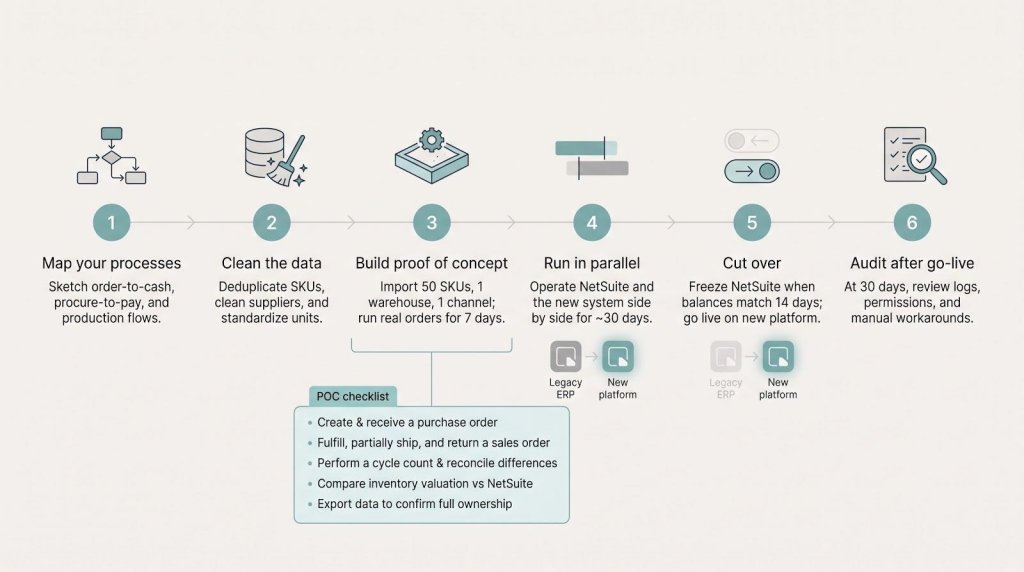
Buying software is easy; making it run your business takes a focused playbook. Use this condensed roadmap when you move from NetSuite to a lighter platform.
Map your processes. Sketch order-to-cash, procure-to-pay, and production flows on one page. Highlight NetSuite scripts, saved searches, or manual exports you must replicate or retire.
Clean the data. Remove duplicate SKUs, inactive suppliers, and half-built BOMs. Standardize units of measure and flag any fields required for tax or compliance.
Build a proof of concept. Import 50 SKUs, one warehouse, and one sales channel. Run real transactions for 7 days to expose edge cases early.
Run an inventory-valuation report and compare it with NetSuite
Export all data to confirm full ownership
Run in parallel. Operate one location or product line in both systems for 30 days. Freeze configuration changes so mismatches reveal process gaps, not moving targets.
Cut over. When daily balances match to the cent for 14 consecutive days, freeze NetSuite transactions, import final open orders, and go live. Keep NetSuite read-only until year-end close for historical reference.
Audit after go-live. At 30 days, review integration logs, check user-permission hygiene, and document any manual workarounds. Fix them while memories are fresh.
Follow this sequence to replace a drawn-out ERP project with a series of quick, verifiable wins that protect both cash flow and sanity.
The real first-year cost checklist
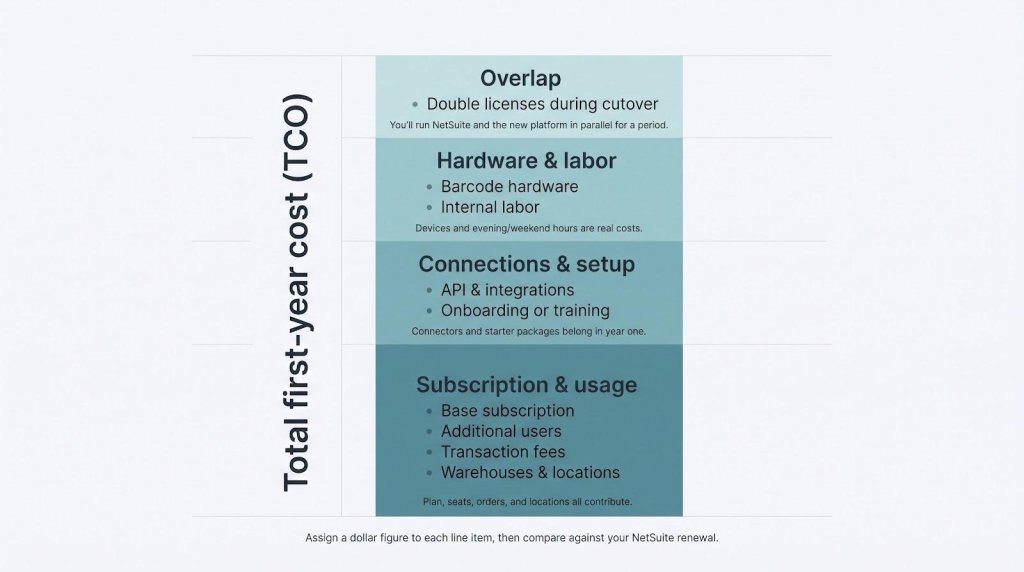
Software price alone seldom sinks a project; hidden extras do. Spend 20 minutes with this list and note a dollar figure next to each line. Those few minutes can prevent 12 months of budget pain.
Subscription and usage
Base subscription.
Additional users. Five users on a per-seat plan can double the headline rate.
Transaction fees. Some vendors meter orders or order lines, so multiply by peak-season volume, not last month’s lull.
Warehouses and locations. A second 3PL or pop-up store can trigger a higher tier or per-location fee.
Connections and setup
API and integrations. Shopify, Amazon, EDI, or shipping connectors often add $20–$50 per month each.
Onboarding or training. If the vendor requires a starter package, include it in year one even when it is billed as “one-time.”
Hardware and labor
Barcode hardware. Scanners, label printers, and tablets rarely come included; they usually hit the same credit card as the software.
Internal labor. Data cleanup and a parallel run cost evenings and weekends, so price those hours conservatively.
Overlap
Double licenses during cutover. You will run NetSuite and the new system side by side for one month or more; budget both.
Total the column. If the figure still beats your NetSuite renewal quote, the switch is financially sound. If not, adjust scope or negotiate now. Surprises after go-live cost more than tough questions up front.
Frequently asked questions
What is the single best NetSuite alternative?
No single tool fits every case. Zoho offers multichannel breadth, MRPeasy delivers manufacturing depth, and Organizely adds AI agents for manufacturers that want planning coordinated across their existing systems. Match your need to the product, not to headline rankings.
Is there a cheaper version of NetSuite?
NetSuite pricing is quote-based, so the savings come from choosing a narrower platform and skipping the implementation project, which guides commonly put at about $25,000 for a lean team.
Can QuickBooks replace NetSuite?
Partly. QuickBooks handles accounting, not operations. Pair it with SOS, Zoho Inventory, or inFlow to manage stock, purchasing, and light manufacturing while finance stays intact.
Which options let me pay month to month without an annual contract?
Eight of the nine on our shortlist. Organizely prices through a demo rather than a published plan. If checkout forces annual billing, you are looking at a different plan or a different vendor.
How long does migration take?
Inventory-only moves can finish in weeks when data is clean. Full ERP replacements usually take months because finance, HR, and custom workflows need parallel testing.
Will I lose functionality by leaving NetSuite?
Yes, especially multi-entity finance, advanced revenue recognition, and built-in audit trails. If those are critical, refine NetSuite instead of switching.
Still have questions? Let us know; we refresh this guide every month with reader feedback.
The applications/code on this site are distributed as is and without warranties or liability. In no event shall the owner of the copyrights, or the authors of the applications/code be liable for any loss of profit, any problems or any damage resulting from the use or evaluation of the applications/code.
Google serves cookies to analyse traffic to this site. Information about your use of our site is shared with Google for that purpose
This website uses cookies so that we can provide you with the best user experience possible. Cookie information is stored in your browser and performs functions such as recognising you when you return to our website and helping our team to understand which sections of the website you find most interesting and useful.
You can adjust all of your cookie settings by navigating the tabs on the left hand side.
Strictly Necessary Cookies
Strictly Necessary Cookie should be enabled at all times so that we can save your preferences for cookie settings.
If you disable this cookie, we will not be able to save your preferences. This means that every time you visit this website you will need to enable or disable cookies again.