

You may want to run your macro/VBA snippet when a cell changes its value, when a double click happens, when a sheet is selected, etc. In all these cases we use Worksheet Event Handler. The Event Handler helps us run VBA code whenever a certain event occurs.
In this article, we will learn briefly about each Worksheet Event Handler.
A worksheet event handler is a subroutine that is local to a worksheet module.
Where to write Worksheet Event Handler Code?
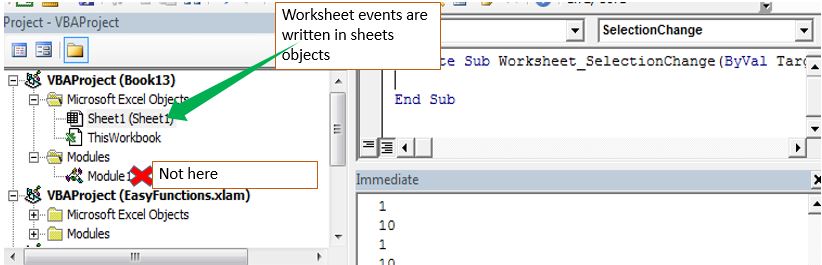
The worksheet Events are written in sheets objects only. If you write a worksheet event in some module or class module, there will be no error but they will just won't work.
To write in the sheet object. Double click on it or right-click and click on view code. The code writing area will be shown.
How to write code for a specific event on the worksheet?
Now when you are in the editing mode, in the top-left corner dropdown menu you will see general. Click on the drop-down and select worksheet. Now in the top-right corner dropdown, all events will show. Choose whichever you need and a skeletal code for that event will be written for you.
Each event has a fixed procedure name. These are the reserved subroutine names. You can't use them for other subroutines on a sheet. In a module, they will work as a normal subroutine.
Important: Each subroutine from that list will run on the specified event.
One type of worksheet event procedure can be written only once on one sheet. If you write two same event handling procedures on one sheet, it will result in an error and none of them will be executed. Of course, the error will be ambiguous subroutines.
Let's learn briefly about each of the events.
This event triggers when we make any change to containing worksheets (formatting excluded). If you want to do something if any change made in the entire sheet then the code will be:
Private Sub Worksheet_Change(ByVal Target As Range)
  'do somehting
  Msgbox "done something"
End Sub
The "Target" is the Active cell always.
Another example: You may want to put date and time in Cell B1 if A1 changes. In that case, we use the worksheet_change event. The code would look like this:
Private Sub Worksheet_Change(ByVal Target As Range)
 If Target.Address = "$A$1" Then
  Range("B1").Value2 = Format(Now(), "hh:mm:ss")
 End If
End Sub
This will target only the cell A1.
If you want to target a range then use the below example:
Run Macro If Any Change Made on Sheet in Specified Range
As the name suggests, this event triggers when the selection changes. In other words, if your cursor is in Cell A1 and it moves to some other cell, the code in this subroutine will run.
The below code will change the active cells color if whenever it changes and if it is an even row.
Private Sub Worksheet_SelectionChange(ByVal Target As Range)
 If Target.Row Mod 2 = 0 Then
    Target.Interior.ColorIndex = 22
 End If
End Sub
Now, whenever my cursor will move on even row, it will be colored. Odd row cells will be spared.

Another Example of the Worksheet_SelectionChange event:
Simplest VBA Code to Highlight Current Row and Column Using
This event is triggered when the event code containing sheet activates. The skeletal code for this event is:
Private Sub Worksheet_Activate()

End Sub
A simple example is showing the sheet name when it gets selected.
Private Sub Worksheet_Activate()

  MsgBox "You are on " & ActiveSheet.Name

End Sub
As soon as you will come on the sheet that contains this code, the event will run and will be shown a message that "You are on sheet name" (sheet2 is in my case).
This event triggers when leaving the code containing sheet. In other words, if you want to do something, like hiding rows or anything when you leave the sheet, use this VBA event. The syntax is:
Private Sub Worksheet_Deactivate()
'your code
'
End Sub
The below example Worksheet_Deativate event will simply pop up a message that you have left the master sheet, when you will leave this sheet.
Private Sub Worksheet_Deactivate()
  MsgBox "You Left The Master Sheet"
End Sub

This event triggers when you confirm the deletion of the VBA event containing sheet. The syntax is simple:
Private Sub Worksheet_BeforeDelete()

End Sub
The below code will ask you if you want to copy the content of the about-to-delete sheet.
Private Sub Worksheet_BeforeDelete()
    ans = MsgBox("Do you want to copy the content of this sheet to a new sheet?", vbYesNo)
    If ans = True Then
    'code to copy
 End If
End Sub
This event triggers when you double click on the targeted cell. The syntax of this VBA Worksheet Event is:
Private Sub Worksheet_BeforeDoubleClick(ByVal Target As Range, Cancel As Boolean)

End Sub
If you don't set the target cell or range, it will fire on every double click on the sheet.
The Cancel variable is a boolean variable. If you set it True, the default action won't happen. It means if you double click on the cell it won't get into editing mode.
The below code will make the cell fill with a color if you double click on any cell.
Private Sub Worksheet_BeforeDoubleClick(ByVal Target As Range, Cancel As Boolean)

Cancel = True
Target.Interior.ColorIndex = 7

End Sub
The below code targets the cell A1. If it is already filled with the specified color then it will vanish the color. It is much like a like button or check box.
Private Sub Worksheet_BeforeDoubleClick(ByVal Target As Range, Cancel As Boolean)
   If Target.Address = "$A$1" Then

   Cancel = True
    If Target.Interior.ColorIndex = 4 Then
        Target.Interior.ColorIndex = xlColorIndexNone
    Else
        Target.Interior.ColorIndex = 4
    End If

   End If

End Sub

This event triggers when you Right-Click on the targeted cell. The syntax of this VBA Worksheet Event is:
Private Sub Worksheet_BeforeRightClick(ByVal Target As Range, Cancel As Boolean)
   Cancel = True
   '
   'your code
   '
End Sub
The below code will fill the cell with value 1 if you right-click on it. It won't show the default right-click options since we have set the "Cancel" Operator to True.
Private Sub Worksheet_BeforeRightClick(ByVal Target As Range, Cancel As Boolean)
   Cancel = True
   Target.Value = 1
End Sub
If you want something to happen when a excel calculates a sheet, use this event. It will trigger whenever excel calculates a sheet. The syntax is simple:
Private Sub Worksheet_Calculate()
  '
   'your code
   '
End Sub
This procedure will run when you click on a hyperlink on the sheet. The basic syntax of this event handler is:
Private Sub Worksheet_FollowHyperlink(ByVal Target As Hyperlink)
    '
   'your code
   '

End Sub
You can set the target hyperlink if you want. If you don't set the target hyperlink, it will get executed if you click on any hyperlink on the code containing sheet.
So yeah guys, these were some basic worksheet events that will be handy if you know about them. Below are some related articles that you may like to read.
If you have any doubts regarding this article or any other excel/VBA related article, let us know in the comments section below.
Related Articles:
Using Worksheet Change Event To Run Macro When any Change is Made | So to run your macro whenever the sheet updates, we use the Worksheet Events of VBA.
Run Macro If Any Change Made on Sheet in Specified Range | To run your macro code when the value in a specified range changes, use this VBA code. It detects any change made in the specified range and will fire the event.
Simplest VBA Code to Highlight Current Row and Column Using | Use this small VBA snippet to highlight the current row and column of the sheet.
Popular Articles:
50 Excel Shortcuts to Increase Your Productivity | Get faster at your task. These 50 shortcuts will make your work even faster on Excel.
The VLOOKUP Function in Excel | This is one of the most used and popular functions of excel that is used to lookup value from different ranges and sheets.
COUNTIF in Excel 2016 | Count values with conditions using this amazing function. You don't need to filter your data to count specific value. Countif function is essential to prepare your dashboard.
How to Use SUMIF Function in Excel | This is another dashboard essential function. This helps you sum up values on specific conditions.
The applications/code on this site are distributed as is and without warranties or liability. In no event shall the owner of the copyrights, or the authors of the applications/code be liable for any loss of profit, any problems or any damage resulting from the use or evaluation of the applications/code.



