

In this article we will learn how we can retrieve the column header of the largest value in a row in Excel 2010.
If you want to recover the column header of the largest value in a row, you can use a combination of "INDEX", "MATCH" & "MAX" functions to extract the output.
"INDEX": Returns a value or reference of the cell at the intersection of a particular row and column, in a given range.
Syntax: =INDEX(array,row_num,column_num)
"MATCH" function searches for a specified item in a selected range of cells, and then returns the relative position of that item in the range.
Syntax =MATCH(lookup_value,lookup_array,match_type)
"MAX": Returns the maximum number from a range of cells or array. For example,if a list of numbers contains 5, 6, 7, 8, 9 & 10, then the output will be 10.
Syntax =MAX(number1,number2,...)
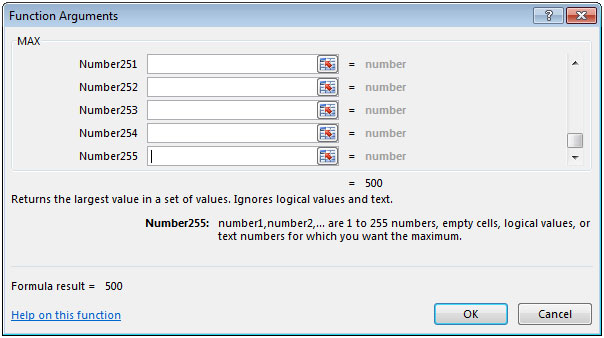
There can be a maximum 255 arguments. Refer below shown screenshot:
Let us take an example:
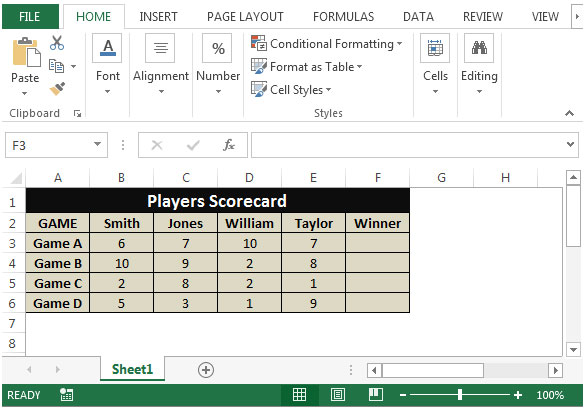
We have 4 players scorecard for 4 games. Column A contains 4 Games while column B to E contain scores of 4 players. In column F, we need to find the winner of each row out of the scores of 4 players.
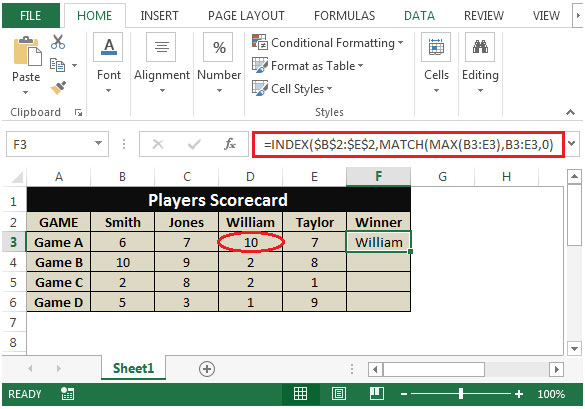
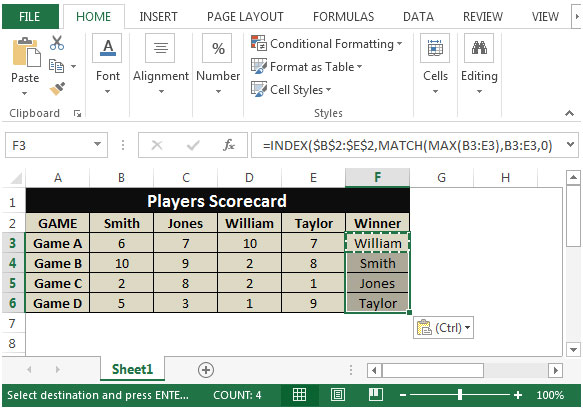
This is the way we can retrieve the column header of the largest value in a row in Microsoft Excel by using the Index, Match and Max function in combination.
The applications/code on this site are distributed as is and without warranties or liability. In no event shall the owner of the copyrights, or the authors of the applications/code be liable for any loss of profit, any problems or any damage resulting from the use or evaluation of the applications/code.




Could you show how to find the winner if they were listed by rows instead of columns? Thanks!
Find result in column D from MAX in column A. Row 3 is a projected payment, alphanumeric code is placed in column A when cleared thru the bank. 9AB is the MAX, 750.00 is result.
A B C D
1 9AA DEP 1000.00 1000.00
2 9AB 1078 -250.00 750.00
3. ACH - 30.00 720.00
Sorry, this didn’t post as I typed it. I need a formula for the previous post. MAX wont find alphanumeric. Only numbers. I tried MAXA, didn’t work on excel mobile or 360.
What happens if there is a tie ? Is there a way to report 2 or more scorers if they have equal scores ?
Can you plz show me how this is done using the
IF and MAX function