

In Microsoft Excel, getting information from a closed workbook is one of the most time-saving ways to get accurate data using VBA code. In this article, we will learn how to read information from a closed workbook using VBA in Microsoft Excel.
If you are getting multiple files through email or any other source & you want to get information stored in a particular cell, then you should read this tutorial.
To understand this example, we need to create some sample files in a path which we will use in VBA code; here, we have saved couple of files (North & West files) in “D:\testing” path.
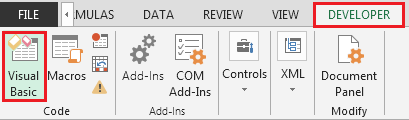
To extract data from all the excel files in a folder, we need to follow the below steps to launch VB editor:
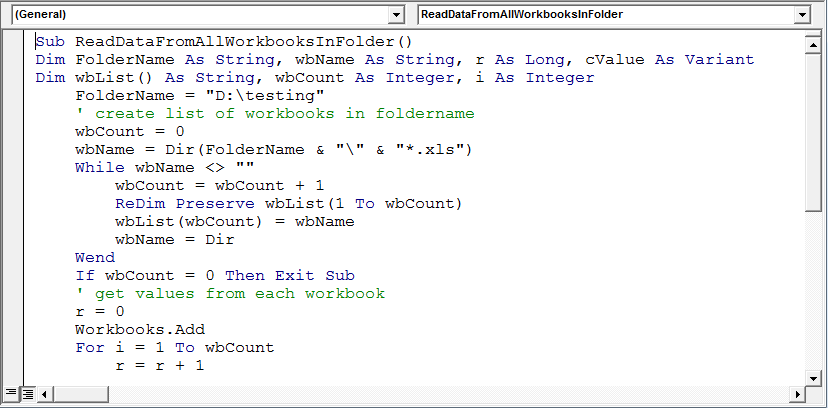
Sub ReadDataFromAllWorkbooksInFolder()
Dim FolderName As String, wbName As String, r As Long, cValue As Variant
Dim wbList() As String, wbCount As Integer, i As Integer
    FolderName = "D:\testing"
    ' create list of workbooks in foldername' --- Comment
    wbCount = 0
    wbName = Dir(FolderName & "\" & "*.xls")
    While wbName <> ""
        wbCount = wbCount + 1
        ReDim Preserve wbList(1 To wbCount)
        wbList(wbCount) = wbName
        wbName = Dir
    Wend
    If wbCount = 0 Then Exit Sub
    ' get values from each workbook' --- Comment
    r = 0
    Workbooks.Add
    For i = 1 To wbCount
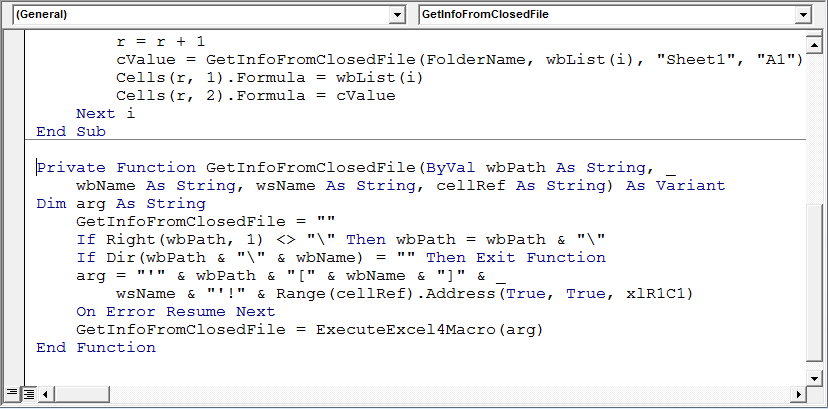
        r = r + 1
        cValue = GetInfoFromClosedFile(FolderName, wbList(i), "Sheet1", "A1")
        Cells(r, 1).Formula = wbList(i)
        Cells(r, 2).Formula = cValue
    Next i
End Sub

Private Function GetInfoFromClosedFile(ByVal wbPath As String, _
    wbName As String, wsName As String, cellRef As String) As Variant
Dim arg As String
    GetInfoFromClosedFile = ""
    If Right(wbPath, 1) <> "\" Then wbPath = wbPath & "\"
    If Dir(wbPath & "\" & wbName) = "" Then Exit Function
    arg = "'" & wbPath & "[" & wbName & "]" & _
        wsName & "'!" & Range(cellRef).Address(True, True, xlR1C1)
    On Error Resume Next
    GetInfoFromClosedFile = ExecuteExcel4Macro(arg)
End Function
We need to run the macro & following will be the snapshot of result:
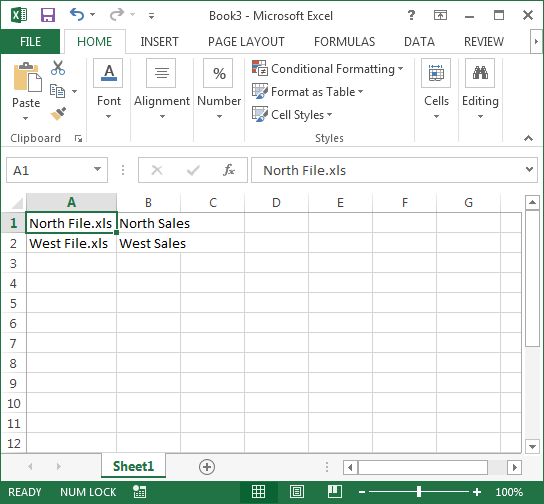
Conclusion: Using above code, we can get data from closed workbook from a specific cell.
Note: Cell A1 is used as an example; if you want to retrieve data from any other cell, then you simply need to mention that cell.

If you liked our blogs, share it with your friends on Facebook. And also you can follow us on Twitter and Facebook.
We would love to hear from you, do let us know how we can improve, complement or innovate our work and make it better for you. Write us at info@exceltip.com
The applications/code on this site are distributed as is and without warranties or liability. In no event shall the owner of the copyrights, or the authors of the applications/code be liable for any loss of profit, any problems or any damage resulting from the use or evaluation of the applications/code.




Hi,
Your routine (if i can get it to work) to extract a single cell from every workbook in a folder will be perfect for me. Unfortunately every time i try and load it to run i get a Syntax error on this line;
wbName = Dir(FolderName & "\" & "*.xls") "" with the following comment also, Compile error: Expected end of statement
Appreciate any help/guidance you can give me 🙂
Thanks in advance,
Adrian
There's an Extra "" in the line. Just write this.
Hi, I am wondering for code to read entire excel sheet data. I searched a lot but unfortunately did not get a code to read and print entire data from an excel sheet. Can any one help me ? Thanks in advance.
Yogi
Hi, I am wondering for code to read entire excel sheet data. I searched a lot but unfortunately did not get a code to read and print entire data from an excal sheet. Can any one help me ? Thanks in advance.
Yogi
How would I alter this to get A1 to A500?
When the line Workboks.open is executed, a VBAProject(Filename) is added to the Project-VBAProject list.
Is there a way to supress this?
Thanks
As an alternative, I use JetSQL to pull data from closed Workbooks very fast...
dear sir, when i followed your article useing the method2, I got an error when it run at
With ThisWorkbook.Worksheets("xxxx")
It return "Out of array range index"
But when I replace it with
With ThisWorkbook.ActiveSheet
Then it ran without error, but no data can got load.
Usage of DIR is explained well.
wbName = Dir() also works fine.
Sub GetDataFromClosedWorkbook() is very useful.
Thanks.