

We can export the data from Microsoft Excel to Microsoft Access by using VBA. Below is the VBA code and process which you need to paste in the code module of the file.
1. Open Excel
2. Press ALT + F11
3. VBA Editor will OPEN
4. Click anywhere in the Project Window
5. Click on Insert
6. Click on Module

7. In the Code Window, Copy and Paste the below mentioned Code
Sub ADOFromExcelToAccess()
' exports data from the active worksheet to a table in an Access database
' this procedure must be edited before use
Dim cn As ADODB.Connection, rs As ADODB.Recordset, r As Long
' connect to the Access database
Set cn = New ADODB.Connection
cn.Open "Provider=Microsoft.Jet.OLEDB.4.0; " & _
"Data Source=C:\FolderName\DataBaseName.mdb;"
' open a recordset
Set rs = New ADODB.Recordset
rs.Open "TableName", cn, adOpenKeyset, adLockOptimistic, adCmdTable
' all records in a table
r = 3 ' the start row in the worksheet
Do While Len(Range("A" & r).Formula) > 0
' repeat until first empty cell in column A
With rs
.AddNew ' create a new record
' add values to each field in the record
.Fields("FieldName1") = Range("A" & r).Value
.Fields("FieldName2") = Range("B" & r).Value
.Fields("FieldNameN") = Range("C" & r).Value
' add more fields if necessary...
.Update ' stores the new record
End With
r = r + 1 ' next row
Loop
rs.Close
Set rs = Nothing
cn.Close
Set cn = Nothing
End Sub
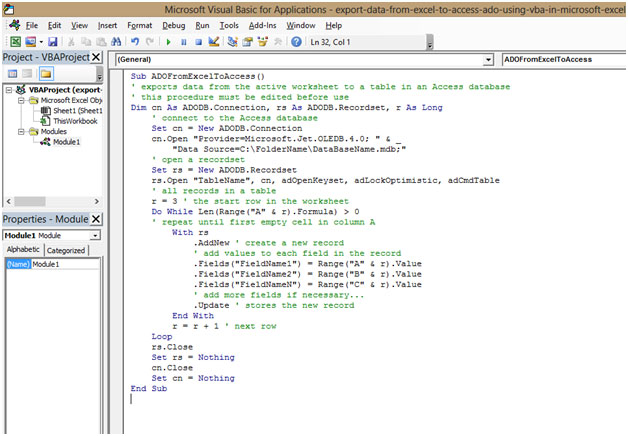
8. Once this is pasted, go to the Excel file
9. Click on the VIEW Tab on the ribbon
10. Click on Macros
11. Click on View Macros
12. The Shortcut Key to View Macros is ALT + F8
13. A Window will popup
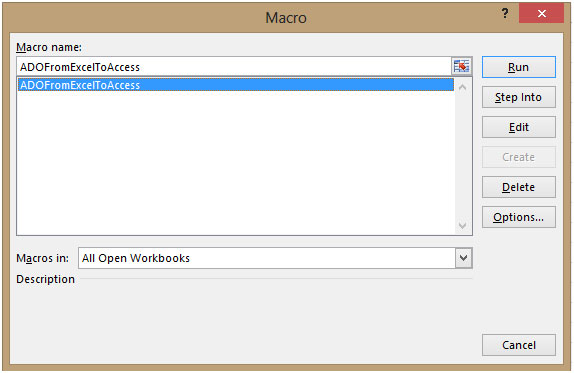
14. Select the Macro
15. Here the Macro is named as “ADOFromExcelToAccess”
16. Select the Macro “ADOFromExcelToAccess”
17. Click on Run
18. Click OK to close the Box
This is how we can Export data from Excel to Access by using VBA in Microsoft Excel.
The applications/code on this site are distributed as is and without warranties or liability. In no event shall the owner of the copyrights, or the authors of the applications/code be liable for any loss of profit, any problems or any damage resulting from the use or evaluation of the applications/code.




hi
i want stock mainten excel with access incoming - 100 out invoice- 50 balance - 50 i want vba code plz sent me
Hi,
I have pasted in the code and made the necessary changes but am getting an error stating that I cannot open or write to the DB I have specified. How do I correct this issue?
Sub pGetData()
Dim strUrl As String
Dim strResponseText As String
Dim lngStart As Long
Dim lngEnd As Long
Dim strLink As String
Dim strDescription As String
Dim strPrice As String
Dim lngPageNumber As Long
Dim spos As Long
Dim lngLoop1 As Long
Dim strRating As String
Dim strProduct As String
Dim strBrand As String
strProduct = "Laptops"
strBrand = "HP"
' strProduct = "Desktops & Monitors"
' strBrand = "LG"
strUrl = ThisWorkbook.Worksheets("Sheet1").Range("a1").Value
With ThisWorkbook.Worksheets("Sheet2").Range("a1").CurrentRegion
.Offset(1).Resize(.Rows.Count).Clear
End With
strResponseText = fResponseText(strUrl)
lngEnd = InStr(strResponseText, "Category")
lngStart = InStrRev(strResponseText, "href=", lngEnd)
lngEnd = InStr(lngStart, strResponseText, "class")
strLink = Mid(strResponseText, lngStart, lngEnd - lngStart)
strLink = strUrl & midtext(strLink, 1, "'", "'")
'=====================================================
strResponseText = fResponseText(strLink)
lngEnd = InStr(strResponseText, strProduct & "")
lngStart = InStrRev(strResponseText, "href=", lngEnd)
lngEnd = InStr(lngStart, strResponseText, "class")
strLink = WorksheetFunction.Substitute(Mid(strResponseText, lngStart, lngEnd - lngStart), "amp;", "")
strLink = strUrl & midtext(strLink, 1, "'", "'")
'======================================================
strResponseText = fResponseText(strLink)
lngStart = InStr(strResponseText, "Brands")
lngEnd = InStr(lngStart, strResponseText, strBrand & "")
lngStart = InStrRev(strResponseText, "href=", lngEnd)
lngEnd = InStr(lngStart, strResponseText, "class")
strLink = WorksheetFunction.Substitute(Mid(strResponseText, lngStart, lngEnd - lngStart), "amp;", "")
strLink = strUrl & midtext(strLink, 1, """", """")
'============================================================
strResponseText = fResponseText(strLink)
CaptureAGAin:
lngStart = 0
For lngLoop1 = 1 To 1000
spos = InStr(spos + 10, strResponseText, "h2 class=")
If spos ")
lngEnd = InStr(lngStart, strResponseText, "")
strDescription = Mid(strResponseText, lngStart, lngEnd - lngStart)
strDescription = WorksheetFunction.Substitute(strDescription, ">", "")
lngStart = InStr(lngStart, strResponseText, "currencyINR")
If lngStart < 1 Then GoTo skip
lngStart = InStr(lngStart, strResponseText, "")
lngEnd = InStr(lngStart + 5, strResponseText, "")
strPrice = Mid(strResponseText, lngStart, lngEnd - lngStart)
strPrice = WorksheetFunction.Substitute(strPrice, "", "")
lngEnd = InStr(lngStart, strResponseText, "5 stars")
If lngEnd ", lngEnd)
' lngEnd = InStr(lngStart + 2, strResponseText, "")
strRating = Mid(strResponseText, lngStart, lngEnd - lngStart)
strRating = midtext(strRating, 1, """>", " out of ")
'If strRating = 5 Then Stop
Call pPrintOutPut(strDescription, strPrice, strRating, strProduct, strBrand)
skip:
strRating = ""
Next lngLoop1
If InStr(1, strResponseText, "id=""pagnNextLink") > 0 Then
spos = InStr(1, strResponseText, "id=""pagnNextLink")
strLink = strUrl & Replace(midtext(strResponseText, spos, "href=""", """>"), "&", "&")
strResponseText = fResponseText(strLink)
GoTo CaptureAGAin
End If
End Sub
Sub pPrintOutPut(strDescription As String, strPrice As String, strRating, strProduct As String, strBrand As String)
Dim wksSheet As Worksheet
Dim lngLastRow As Long
Set wksSheet = Worksheets("Sheet2")
With wksSheet
lngLastRow = .Range("A" & Rows.Count).End(xlUp).Row + 1
.Cells(lngLastRow, 1) = strDescription
.Cells(lngLastRow, 2) = strPrice
.Cells(lngLastRow, 3) = strRating
.Cells(lngLastRow, 4) = strProduct
.Cells(lngLastRow, 5) = strBrand
End With
End Sub
" SELECT * INTO " & strDBTable & _
" FROM [TempRange] IN '" & wkbtemp.FullName & "' 'Excel 8.0;HDR=Yes;'"
Excellent
thanks a lot for this
Option Explicit
Sub pTest()
Dim varData As Variant
Dim wksSheet As Worksheet
Dim lngLoop As Long
Dim lngLoop2 As Long
Dim strTimeStamp As String
Dim strProduct As String
Dim strArrayProduct() As Variant
Dim lngCtr As Long
Application.DisplayAlerts = False
varData = ThisWorkbook.Worksheets("Sheet1").Range("a1").CurrentRegion
With ThisWorkbook.Worksheets("Sheet1")
.AutoFilterMode = False
.Range("A1").CurrentRegion.AutoFilter Field:=5, Criteria1:="FINAL"
' If strFLSM "National- Total Portugal" Then
' .Range("A1").CurrentRegion.AutoFilter Field:=7, Criteria1:=strFLSM
' Else
' .Range("A1").CurrentRegion.AutoFilter Field:=7
' .Range("A1").CurrentRegion.AutoFilter Field:=6
' End If
'
' If strTerritory "All" Then
' .Range("A1").CurrentRegion.AutoFilter Field:=6, Criteria1:=strTerritory
' Else
' .Range("A1").CurrentRegion.AutoFilter Field:=6
' End If
Set wksSheet = Worksheets.Add
.Range("A1").CurrentRegion.SpecialCells(xlCellTypeVisible).Copy wksSheet.Range("A1")
End With
varData = wksSheet.Range("a1").CurrentRegion
For lngLoop = LBound(varData, 1) + 1 To UBound(varData, 1)
strTimeStamp = varData(lngLoop, 1)
For lngLoop2 = LBound(varData, 1) + 1 To UBound(varData, 1)
If strTimeStamp = varData(lngLoop2, 1) Then
strProduct = strProduct & "," & varData(lngLoop2, 2)
End If
Next lngLoop2
ReDim Preserve strArrayProduct(0 To lngCtr, 0 To 1)
strArrayProduct(lngCtr, 0) = strTimeStamp
strArrayProduct(lngCtr, 1) = strProduct
lngCtr = lngCtr + 1
Next lngLoop
wksSheet.Delete
Application.DisplayAlerts = False
End Sub
Sub pPopulateFinalOutPut()
Dim lngLoop As Long
Dim rngFinalOutPut As Range
Dim rngTemp As Range
Dim strSheetName As String
If fSheetExists("Temp_Sheet1") Then
strSheetName = "Temp_Sheet1"
Else
strSheetName = "Temp_Sheet"
End If
Set rngFinalOutPut = shtOutPut.Range("rngOutPut").CurrentRegion
For lngLoop = 1 To rngFinalOutPut.Columns.Count
Set rngTemp = rngFinalOutPut.Cells(1, lngLoop)
Call pAdvanceFilter(rngTemp, False, strSheetName)
Next lngLoop
End Sub
===========================================================================================================================================
Sub pAdvanceFilter(rngdestRange As Range, Optional blnIsUnique As Boolean = True, Optional strSheetName As String = "Rawdata")
Dim rngDataRange As Range
Set rngDataRange = ThisWorkbook.Worksheets(strSheetName).Range("a1").CurrentRegion
Range("E11").Select
'Pasting Unique Value
rngDataRange.AdvancedFilter Action:=xlFilterCopy, _
CopyToRange:=rngdestRange, Unique:=blnIsUnique
'Release Memory
Set rngDataRange = Nothing
End Sub
'=======================Export to Word=================
Attribute VB_Name = "modExportDataToWord"
Option Explicit
'Excporting data Into Word.
Public Sub GetDataOnWordOption()
Dim cmbMenu As CommandBar
Dim intIndex As Integer
'Set reference to popup
Set cmbMenu = FN_cmbNewCommandBar("Popup_RunWordExport")
'Add a button for each option
intIndex = FN_intAddButtonToCommandBar(cmbMenu, "All", "All Records", "GetDataOnWordOption_GetAll", True, True)
intIndex = FN_intAddButtonToCommandBar(cmbMenu, "Sel", "Selected Records", "GetDataOnWordOption_GetSelected", True, True)
'Show popup menu
cmbMenu.ShowPopup
End Sub
Public Sub GetDataOnWordOption_GetAll()
ExportDataToWord True
End Sub
Public Sub GetDataOnWordOption_GetSelected()
ExportDataToWord False
End Sub
Sub ExportDataToWord(ByVal blnAllSelected As Boolean)
Dim rngCell As Range
Dim rngData As Range
Dim lngLoop As Long
Dim wordApp As Object
Dim objDoc As Document
Dim rngLastPara As Word.Paragraph
Const cstrFolder As String = "\Audit Records"
Dim strFilePath As String
Dim strfileName As String
Dim strUniqueTimeDate As String
Dim rngTemp As Range
Dim blnCheckSelected As Boolean
Dim lngRowCounter As Long
Dim tblDataTable As Word.Table
Dim lngWordCounter As Long
Dim lngWordTotalCounter As Long
Application.ScreenUpdating = False
blnCheckSelected = False
If shtOutPut.Range("Header_IndicProduct").CurrentRegion.Rows.Count = 1 Then
MsgBox "No Records for exporting to Word!"
GoTo endsub
End If
'strFilePath = ThisWorkbook.Path & cstrFolder
strFilePath = Environ("Temp") & cstrFolder
Call RemoveCompleteFolder(strFilePath)
If Dir(strFilePath, vbDirectory) = "" Then
MkDir strFilePath
End If
Set wordApp = Nothing
Set objDoc = Nothing
Set wordApp = CreateObject("Word.Application") 'New Word.Application '
'wordApp.Visible = True
Set objDoc = wordApp.Documents.Add
Call pDocPageSetup(objDoc)
lngWordTotalCounter = 0
lngWordCounter = 0
shtWordTemplate.Visible = xlSheetVisible
If blnAllSelected = False Then
With shtOutPut.Range("Header_IndicProduct").CurrentRegion
Set rngTemp = .Offset(1, .Columns.Count - 1).Resize(, .Columns.Count - (.Columns.Count - 1))
End With
For Each rngCell In rngTemp.Cells
If rngCell.Value "" Then
blnCheckSelected = True
lngWordTotalCounter = lngWordTotalCounter + 1
End If
Next
If blnCheckSelected = False Then
MsgBox "Please select records to export!"
GoTo endsub
End If
For Each rngCell In rngTemp.Cells
If rngCell.Value "" Then
lngWordCounter = lngWordCounter + 1
Call modProgress.ShowProgress(lngWordCounter, lngWordTotalCounter, "Exporting Records number " & lngWordCounter + 1, False)
lngRowCounter = Val(rngCell.Row - shtOutPut.Range("Header_IndicProduct").Row) + 1
shtWordTemplate.Range("rngFormulaCounter").Value = lngRowCounter
shtWordTemplate.Calculate
'copy paste
shtWordTemplate.Range("rngWordTable").CurrentRegion.Copy
objDoc.Paragraphs.Add (objDoc.Paragraphs(objDoc.Paragraphs.Count))
Set rngLastPara = objDoc.Paragraphs(objDoc.Paragraphs.Count)
rngLastPara.Range.Paste
Application.CutCopyMode = False
Set tblDataTable = objDoc.Tables(objDoc.Tables.Count)
With tblDataTable
.AutoFitBehavior (wdAutoFitWindow)
.Rows.HeightRule = wdRowHeightAuto
.Range.Paragraphs.Format.SpaceAfter = 0
.Range.Paragraphs.Format.SpaceBefore = 0
.Range.Paragraphs.KeepWithNext = False
End With
End If
Next
ElseIf blnAllSelected = True Then
With shtOutPut.Range("Header_IndicProduct").CurrentRegion
Set rngTemp = .Offset(1, .Columns.Count - 1).Resize(.Rows.Count - 1, .Columns.Count - (.Columns.Count - 1))
End With
lngWordTotalCounter = rngTemp.Rows.Count
For Each rngCell In rngTemp.Cells
lngWordCounter = lngWordCounter + 1
Call modProgress.ShowProgress(lngWordCounter, lngWordTotalCounter, "Exporting Records number " & lngWordCounter + 1, False)
lngRowCounter = Val(rngCell.Row - shtOutPut.Range("Header_IndicProduct").Row) + 1
shtWordTemplate.Range("rngFormulaCounter").Value = lngRowCounter
shtWordTemplate.Calculate
'copy paste
shtWordTemplate.Range("rngWordTable").CurrentRegion.Copy
objDoc.Paragraphs.Add (objDoc.Paragraphs(objDoc.Paragraphs.Count))
Set rngLastPara = objDoc.Paragraphs(objDoc.Paragraphs.Count)
rngLastPara.Range.Paste
Application.CutCopyMode = False
Set tblDataTable = objDoc.Tables(objDoc.Tables.Count)
With tblDataTable
.AutoFitBehavior (wdAutoFitWindow)
.Rows.HeightRule = wdRowHeightAuto
.Range.Paragraphs.Format.SpaceAfter = 0
.Range.Paragraphs.Format.SpaceBefore = 0
.Range.Paragraphs.KeepWithNext = False
End With
Next
End If
Unload ufProgress
objDoc.ShowGrammaticalErrors = False
objDoc.ShowSpellingErrors = False
'Insert Page Number in document
Dim rngPageNo As Word.Range
objDoc.ActiveWindow.View.SeekView = wdSeekCurrentPageFooter
Set rngPageNo = objDoc.Sections(1).Footers(wdHeaderFooterPrimary).Range
rngPageNo.Fields.Add Range:=rngPageNo, Type:=wdFieldEmpty, Text:="PAGE ", PreserveFormatting:=True
rngPageNo.InsertBefore "Page "
rngPageNo.InsertAfter " of "
rngPageNo.Start = rngPageNo.End
rngPageNo.Fields.Add Range:=rngPageNo, Type:=wdFieldEmpty, Text:="NUMPAGES ", PreserveFormatting:=True
rngPageNo.Paragraphs.Alignment = wdAlignParagraphRight
objDoc.Windows(1).View.SeekView = wdSeekMainDocument
''objDoc.Tables(1).Rows(1).Range.Rows.HeadingFormat = True
Call pCreateHeader(objDoc)
Dim tblHeaderTable As Word.Table
Set tblHeaderTable = objDoc.Sections(1).Headers(wdHeaderFooterPrimary).Range.Tables(1)
With tblHeaderTable
shtControls.Shapes("logoGSK").Copy
.Cell(1, 1).Range.Paste
.Cell(1, 2).Range.Text = shtOutPut.Range("rngMsg").Text
'' shtControls.Shapes("logoGSKBlue").Copy
'' .Cell(1, 3).Range.Paste
End With
objDoc.Windows(1).View.SeekView = wdSeekMainDocument
objDoc.ActiveWindow.VerticalPercentScrolled = 0
' Application.Wait (Now + TimeValue("0:00:08"))
strUniqueTimeDate = Format(Now(), "ddmmyyyy hhssmm")
strfileName = "Audit Records" & " - " & strUniqueTimeDate
objDoc.SaveAs (strFilePath & "\" & strfileName)
wordApp.Visible = True
wordApp.WindowState = wdWindowStateMinimize
wordApp.WindowState = wdWindowStateMaximize
Application.ScreenUpdating = True
Set objDoc = Nothing
Set wordApp = Nothing
Set rngCell = Nothing
Set rngData = Nothing
endsub:
shtWordTemplate.Visible = xlSheetVeryHidden
End Sub
Sub RemoveCompleteFolder(strFolderPath As String)
Dim fso As Object
Dim fleEach
Set fso = CreateObject("Scripting.FileSystemObject")
On Error Resume Next
For Each fleEach In fso.GetFolder(strFolderPath).Files
fleEach.Delete
Next
RmDir strFolderPath
'' If Err.Number 0 Then
'' MsgBox Err.Number & vbCrLf & vbCrLf & Err.Description
'' End If
Err.Clear: On Error GoTo 0: On Error GoTo -1
End Sub
Sub pDocPageSetup(ByVal aDoc As Document)
With aDoc.PageSetup
.PaperSize = wdPaperLetter
.Orientation = wdOrientLandscape
.TopMargin = Application.InchesToPoints(0.5)
.BottomMargin = Application.InchesToPoints(1)
.LeftMargin = Application.InchesToPoints(0.5)
.RightMargin = Application.InchesToPoints(0.5)
.HeaderDistance = Application.InchesToPoints(0.3)
End With
aDoc.ActiveWindow.View.TableGridlines = False
Set aDoc = Nothing
End Sub
Sub pCreateHeader(ByVal aDoc As Word.Document)
Dim rngHeaderRange As Word.Range
Dim tblHeader As Word.Table
Set rngHeaderRange = aDoc.Sections(1).Headers(wdHeaderFooterPrimary).Range
Set tblHeader = rngHeaderRange.Tables.Add(rngHeaderRange, 1, 3, wdWord9TableBehavior, wdAutoFitWindow)
tblHeader.LeftPadding = 0
tblHeader.RightPadding = 0
tblHeader.Cell(1, 1).Range.ParagraphFormat.Alignment = wdAlignParagraphLeft
tblHeader.Cell(1, 2).Range.ParagraphFormat.Alignment = wdAlignParagraphCenter
tblHeader.Cell(1, 2).Range.Font.Bold = True
tblHeader.Cell(1, 3).Range.ParagraphFormat.Alignment = wdAlignParagraphRight
tblHeader.PreferredWidthType = wdPreferredWidthPoints
With aDoc.PageSetup
tblHeader.Columns.PreferredWidthType = wdPreferredWidthPoints
tblHeader.Columns(1).Width = Application.InchesToPoints(1.2)
tblHeader.Columns(3).Width = Application.InchesToPoints(0.2)
tblHeader.Columns(2).PreferredWidth = (.PageWidth - (.LeftMargin + .RightMargin)) - (tblHeader.Columns(1).Width + tblHeader.Columns(3).Width)
tblHeader.PreferredWidth = (.PageWidth - (.LeftMargin + .RightMargin))
End With
With tblHeader
.Borders(wdBorderLeft).LineStyle = wdLineStyleNone
.Borders(wdBorderRight).LineStyle = wdLineStyleNone
.Borders(wdBorderTop).LineStyle = wdLineStyleNone
.Borders(wdBorderBottom).LineStyle = wdLineStyleNone
.Borders(wdBorderVertical).LineStyle = wdLineStyleNone
.Borders(wdBorderDiagonalDown).LineStyle = wdLineStyleNone
.Borders(wdBorderDiagonalUp).LineStyle = wdLineStyleNone
.Borders.Shadow = False
End With
End Sub
Sub pMainDataTableFormat(ByVal tblDataTable As Word.Table, ByVal varColumnWidth As Variant, intTableWidth As Integer)
Dim intColumnCounter As Integer
tblDataTable.AllowAutoFit = False
tblDataTable.PreferredWidthType = wdPreferredWidthPoints
tblDataTable.PreferredWidth = Application.InchesToPoints(intTableWidth)
tblDataTable.LeftPadding = Application.InchesToPoints(0.04)
tblDataTable.RightPadding = Application.InchesToPoints(0.04)
If tblDataTable.Columns.Count = UBound(varColumnWidth) Then
For intColumnCounter = 1 To tblDataTable.Columns.Count
tblDataTable.Columns(intColumnCounter).PreferredWidthType = wdPreferredWidthPoints
tblDataTable.Columns(intColumnCounter).PreferredWidth = Application.InchesToPoints(varColumnWidth(intColumnCounter))
Next intColumnCounter
End If
End Sub
Sub pInsertPageNumber(ByVal aDoc As Word.Document)
Dim rngPageNo As Word.Range
aDoc.Activate
aDoc.Windows(1).View.SeekView = wdSeekCurrentPageFooter
'ActiveDocument.Sections(1).Footers(wdHeaderFooterPrimary).Range.Select
Set rngPageNo = ActiveDocument.Sections(1).Footers(wdHeaderFooterPrimary).Range
With Selection
.Paragraphs(1).Alignment = wdAlignParagraphRight
.TypeText Text:="Page "
.Fields.Add Range:=Selection.Range, Type:=wdFieldEmpty, Text:="PAGE ", PreserveFormatting:=True
.TypeText Text:=" of "
.Fields.Add Range:=Selection.Range, Type:=wdFieldEmpty, Text:="NUMPAGES ", PreserveFormatting:=True
End With
aDoc.Windows(1).View.SeekView = wdSeekMainDocument
End Sub
'================Create pop up menu===================
Attribute VB_Name = "vbmPopup"
Option Explicit
Option Private Module
'***********************************************************************************************************************
'*** GENERAL ROUTINES FOR ADDING THE COMMAND BAR & CONTROLS
'***********************************************************************************************************************
Public Function FN_cmbNewCommandBar(strTitle As String) As CommandBar
On Error Resume Next
Dim cmbMenu As CommandBar
'Attempt to set reference
Set cmbMenu = Application.CommandBars(strTitle)
'Create popup if it doesn't exist already
If Err.Number 0 Then
Err.Clear
Set cmbMenu = Application.CommandBars.Add(strTitle, msoBarPopup, False, True)
Else
cmbMenu.Enabled = True
End If
'Delete any existing controls
Do Until cmbMenu.Controls.Count = 0
cmbMenu.Controls(1).Delete
Loop
'Finally set reference
Set FN_cmbNewCommandBar = cmbMenu
End Function
Public Function FN_intAddPopupToCommandBar(ByVal cmbMenu As CommandBar, ByVal strTag As String, ByVal strCaption As String, ByVal booBeginGroup As Boolean, _
ByVal booEnable As Boolean) As Integer
Dim cbbNewPopup As CommandBarPopup
Set cbbNewPopup = cmbMenu.Controls.Add(msoControlPopup, , , , True)
With cbbNewPopup
.Tag = strTag
.Caption = strCaption
.BeginGroup = booBeginGroup
.Enabled = booEnable
End With
FN_intAddPopupToCommandBar = cbbNewPopup.Index
End Function
Public Function FN_intAddButtonToCommandBar(ByVal cmbMenu As CommandBar, ByVal strTag As String, ByVal strCaption As String, ByVal strOnAction As String, _
ByVal booBeginGroup As Boolean, ByVal booEnable As Boolean, Optional booTick As Boolean) As Integer
Dim cbbNewButton As CommandBarButton
Set cbbNewButton = cmbMenu.Controls.Add(msoControlButton, , , , True)
With cbbNewButton
.Tag = strTag
.Caption = strCaption
.OnAction = strOnAction
.BeginGroup = booBeginGroup
.Enabled = booEnable
If booTick Then .State = msoButtonDown Else .State = msoButtonUp
End With
FN_intAddButtonToCommandBar = cbbNewButton.Index
End Function
Public Function FN_intAddButtonToPopup(ByVal cbpPopup As CommandBarPopup, ByVal strTag As String, ByVal strCaption As String, ByVal strOnAction As String, _
ByVal booBeginGroup As Boolean, ByVal booEnable As Boolean, Optional booTick As Boolean) As Integer
Dim cbbNewButton As CommandBarButton
Set cbbNewButton = cbpPopup.Controls.Add(msoControlButton, , , , True)
With cbbNewButton
.Tag = strTag
.Caption = strCaption
.OnAction = strOnAction
.BeginGroup = booBeginGroup
.Enabled = booEnable
End With
FN_intAddButtonToPopup = cbbNewButton.Index
End Function
Public Function FN_strTickMark() As String
FN_strTickMark = CStr(shtControls.Range("Control_TickMark").Value)
End Function
' Delete all task using VBS
http://www.vbsedit.com/scripts/os/tasks/scr_1044.asp
'Create Seduler
https://msdn.microsoft.com/en-us/library/windows/desktop/aa446862(v=vs.85).aspx
https://social.technet.microsoft.com/Forums/en-US/d9465815-87e2-43df-a0fe-4a23c16dca99/need-a-time-schedule-in-vbs-script-to-execute-something?forum=ITCG
Public WithEvents objChart As Chart
Private Sub objChart_MouseDown(ByVal Button As Long, ByVal Shift As Long, ByVal x As Long, ByVal y As Long)
'Created in May-2011
Dim strAltText As String
If Not blnStopZoom Then
strAltText = objChart.Parent.ShapeRange.AlternativeText
If strAltText = "" Then
Call ZoomIn(objChart.Parent)
Else
If InStr(1, strAltText, "TRUE") Then
Call ZoomIn(objChart.Parent)
Else
Call ZoomOut(objChart.Parent)
End If
End If
End If
End Sub
Sub ZoomIn(ByRef objChartObject As ChartObject)
Dim lngLoop As Long
Dim rngVisible As Range
Dim objObject As Object
Dim shpChart As Shape
Dim strTemp As String
Dim strAltText As String
Dim strShp As String
Dim OldCSFS As String
Dim OldCAFS As Single
Dim NewCAFS As Single
Dim OldCTFS As Single
Dim NewCTFS As Single
Dim NewCSFS() As Single
Dim SplitText As Variant
Dim SplitAddr As Variant
Dim SplitCSFS As Variant
Dim strNewCSFS As String
Dim strSAold As String
Dim strVsblRngAddr As String
Dim ChtAreaOldColor As Long
' Const ZoomInChartAreaFontSize As Long = 20
' Const ZoomInWidthAdjustment As Long = 25
' Const ZoomInHeightAdjustment As Long = 15
' Const ZoomInShapeFontSize As Long = 20
Const ZoomInChartAreaColor As Long = 16777215
Set rngVisible = ActiveWindow.VisibleRange
strVsblRngAddr = rngVisible.Address
With objChartObject
If .Parent.ProtectContents Then
MsgBox "'" & UCase$(.Parent.Name) & "' is protected. Unprotect the sheet and try again", 64, "GSK KC, India"
Exit Sub
End If
End With
On Error GoTo QuickExit
If Len(objChartObject.ShapeRange.AlternativeText) = 0 Then
With objChartObject
strTemp = CSng(.Left) & ":" & CSng(.Width) & ":" & CSng(.Top) & ":" & CSng(.Height) & "|TRUE"
strTemp = strTemp & vbLf & "CA FS=" & .Chart.ChartArea.Font.Size & Space(10)
If .Chart.HasTitle Then strTemp = strTemp & vbLf & "CT FS=" & .Chart.ChartTitle.Font.Size & Space(10)
If .Chart.Shapes.Count Then
strShp = "CS FS="
For Each shpChart In .Chart.Shapes
strShp = strShp & ";" & shpChart.TextFrame.Characters.Font.Size
Next
strShp = Replace(strShp, "=;", "=") & Space(50)
strTemp = strTemp & vbLf & strShp
End If
strSAold = .Parent.ScrollArea
strTemp = strTemp & vbLf & "AS SA=" & IIf(Len(strSAold), strSAold & Space(20), "Nill" & Space(20))
ChtAreaOldColor = objChartObject.Chart.ChartArea.Format.Fill.ForeColor.RGB
strTemp = strTemp & vbLf & "CA FC=" & ChtAreaOldColor & Space(10)
strTemp = strTemp & vbLf & " © Krishnakumar @ GSK KC, India"
.ShapeRange.AlternativeText = strTemp
End With
End If
strAltText = objChartObject.ShapeRange.AlternativeText
SplitAddr = Split(rngVisible.Address, ":")
With objChartObject.Chart
NewCAFS = .ChartArea.Font.Size
If .HasTitle Then NewCTFS = .ChartTitle.Font.Size
If .Shapes.Count Then
For lngLoop = 1 To .Shapes.Count
ReDim Preserve NewCSFS(1 To lngLoop)
NewCSFS(lngLoop) = CSng(.Shapes(lngLoop).TextFrame.Characters.Font.Size)
Next
End If
'Application.GoTo .Parent.TopLeftCell
End With
With objChartObject
.Chart.ChartArea.Font.Size = ZoomInChartAreaFontSize
.Left = Range(SplitAddr(0)).Left + 1
.Width = rngVisible.Columns.Width - ZoomInWidthAdjustment
.Top = Range(SplitAddr(0)).Top + 1
.Height = rngVisible.Rows.Height - ZoomInHeightAdjustment
.ShapeRange.AlternativeText = Replace(strAltText, "TRUE", "FALSE")
If Not .BringToFront Then .BringToFront
.Parent.ScrollArea = vbNullString
.Parent.ScrollArea = strVsblRngAddr
End With
strAltText = objChartObject.ShapeRange.AlternativeText
If objChartObject.Chart.ChartArea.Format.Fill.ForeColor.RGB = ZoomInChartAreaColor Then
objChartObject.Chart.ChartArea.Format.Fill.ForeColor.RGB = ZoomInChartAreaColor
End If
OldCAFS = CSng(Trim$(Mid$(strAltText, InStr(1, strAltText, "CA FS=") + 6, 10)))
If OldCAFS NewCAFS Then _
strAltText = Replace(strAltText, "CA FS=" & OldCAFS, "CA FS=" & NewCAFS)
If InStr(1, strAltText, "CT FS=") Then
OldCTFS = CSng(Trim(Mid$(strAltText, InStr(1, strAltText, "CT FS=") + 6, 10)))
If OldCTFS NewCTFS Then _
strAltText = Replace(strAltText, "CT FS=" & OldCTFS, "CT FS=" & NewCTFS)
End If
If InStr(1, strAltText, "CS FS=") Then
OldCSFS = Trim(Mid$(strAltText, InStr(1, strAltText, "CS FS=") + 6, 50))
SplitCSFS = Split(OldCSFS, ";")
For lngLoop = 1 To objChartObject.Chart.Shapes.Count
If lngLoop <= 1 + UBound(SplitCSFS) Then
If SplitCSFS(lngLoop - 1) NewCSFS(lngLoop) Then
strNewCSFS = strNewCSFS & ";" & NewCSFS(lngLoop)
Else
strNewCSFS = strNewCSFS & ";" & NewCSFS(lngLoop)
End If
Else
strNewCSFS = strNewCSFS & ";" & NewCSFS(lngLoop)
End If
objChartObject.Chart.Shapes(lngLoop).TextFrame.Characters.Font.Size = ZoomInShapeFontSize
Next
If Len(strNewCSFS) > 1 Then strNewCSFS = Mid$(strNewCSFS, 2)
strAltText = Replace(strAltText, "CS FS=" & OldCSFS, "CS FS=" & strNewCSFS)
End If
objChartObject.ShapeRange.AlternativeText = strAltText
If objChartObject.Parent.OLEObjects.Count Then
For Each objObject In objChartObject.Parent.OLEObjects
objObject.SendToBack
Next
End If
QuickExit:
If Err.Number 0 Then
MsgBox "Error #" & Err.Number & vbLf & Err.Description, 64, "GSK KC, India"
objChartObject.ShapeRange.AlternativeText = ""
Err.Clear: On Error GoTo 0
End If
End Sub
Sub ZoomOut(ByRef objChartObject As ChartObject)
Dim lngBlnPos As Long
Dim lngLoop As Long
Dim rngVisible As Range
Dim objObject As Object
Dim shpChart As Shape
Dim strTemp As String
Dim strAltText As String
Dim strShp As String
Dim OldCSFS As String
Dim OldCAFS As Single
Dim NewCAFS As Single
Dim OldCTFS As Single
Dim NewCTFS As Single
Dim NewCSFS() As Single
Dim SplitText As Variant
Dim SplitAddr As Variant
Dim SplitCSFS As Variant
Dim strNewCSFS As String
Dim strSAold As String
Dim strVsblRngAddr As String
Dim ChtAreaOldColor As Long
Set rngVisible = ActiveWindow.VisibleRange
strVsblRngAddr = rngVisible.Address
With objChartObject
If .Parent.ProtectContents Then
MsgBox "'" & UCase$(.Parent.Name) & "' is protected. Unprotect the sheet and try again", 64, "GSK KC, India"
Exit Sub
End If
End With
On Error GoTo QuickExit
strAltText = objChartObject.ShapeRange.AlternativeText
SplitAddr = Split(rngVisible.Address, ":")
With objChartObject.Chart
NewCAFS = .ChartArea.Font.Size
If .HasTitle Then NewCTFS = .ChartTitle.Font.Size
If .Shapes.Count Then
For lngLoop = 1 To .Shapes.Count
ReDim Preserve NewCSFS(1 To lngLoop)
NewCSFS(lngLoop) = CSng(.Shapes(lngLoop).TextFrame.Characters.Font.Size)
Next
End If
' Application.GoTo .Parent.TopLeftCell
End With
SplitText = Split(Split(strAltText, "|")(0), ":")
With objChartObject
.Left = SplitText(0)
.Width = SplitText(1)
.Top = SplitText(2)
.Height = SplitText(3)
.ShapeRange.AlternativeText = Replace(strAltText, "FALSE", "TRUE")
If Not .SendToBack Then .SendToBack
strAltText = objChartObject.ShapeRange.AlternativeText
.Chart.ChartArea.Font.Size = CSng(Trim(Mid$(strAltText, InStr(1, strAltText, "CA FS=") + 6, 10)))
.Chart.ChartArea.Interior.Color = CLng(Trim(Mid$(strAltText, InStr(1, strAltText, "CA FC=") + 6, 10)))
If .Chart.HasTitle Then .Chart.ChartTitle.Font.Size = CSng(Trim(Mid$(strAltText, InStr(1, strAltText, "CT FS=") + 6, 10)))
If .Chart.Shapes.Count Then
If InStr(1, strAltText, "CS FS=") Then
OldCSFS = Trim(Mid$(strAltText, InStr(1, strAltText, "CS FS=") + 6, 50))
SplitCSFS = Split(OldCSFS, ";")
For lngLoop = 0 To UBound(SplitCSFS)
.Chart.Shapes(lngLoop + 1).TextFrame.Characters.Font.Size = CSng(SplitCSFS(lngLoop))
Next
End If
End If
strSAold = Trim(Mid$(strAltText, InStr(1, strAltText, "AS SA=") + 6, 50))
strSAold = Trim$(Left$(strSAold, InStr(1, strSAold & Chr(32), Chr(32))))
If strSAold "Nill" Then
.Parent.ScrollArea = strSAold
Else
.Parent.ScrollArea = ""
End If
.ShapeRange.AlternativeText = ""
End With
QuickExit:
If Err.Number 0 Then
MsgBox "Error #" & Err.Number & vbLf & Err.Description, 64, "GSK KC, India"
objChartObject.ShapeRange.AlternativeText = ""
Err.Clear: On Error GoTo 0
End If
End Sub
' ================================================================
'===============Chart Zoomer=============================================
' ================================================================
'step 1 add below code in class class name clsChart
Public WithEvents objChart As Chart
Private Sub objChart_MouseDown(ByVal Button As Long, ByVal Shift As Long, ByVal x As Long, ByVal y As Long)
'Created in May-2011
Dim strAltText As String
If Not blnStopZoom Then
strAltText = objChart.Parent.ShapeRange.AlternativeText
If strAltText = "" Then
Call ZoomIn(objChart.Parent)
Else
If InStr(1, strAltText, "TRUE") Then
Call ZoomIn(objChart.Parent)
Else
Call ZoomOut(objChart.Parent)
End If
End If
End If
End Sub
Sub ZoomIn(ByRef objChartObject As ChartObject)
Dim lngLoop As Long
Dim rngVisible As Range
Dim objObject As Object
Dim shpChart As Shape
Dim strTemp As String
Dim strAltText As String
Dim strShp As String
Dim OldCSFS As String
Dim OldCAFS As Single
Dim NewCAFS As Single
Dim OldCTFS As Single
Dim NewCTFS As Single
Dim NewCSFS() As Single
Dim SplitText As Variant
Dim SplitAddr As Variant
Dim SplitCSFS As Variant
Dim strNewCSFS As String
Dim strSAold As String
Dim strVsblRngAddr As String
Dim ChtAreaOldColor As Long
' Const ZoomInChartAreaFontSize As Long = 20
' Const ZoomInWidthAdjustment As Long = 25
' Const ZoomInHeightAdjustment As Long = 15
' Const ZoomInShapeFontSize As Long = 20
Const ZoomInChartAreaColor As Long = 16777215
Set rngVisible = ActiveWindow.VisibleRange
strVsblRngAddr = rngVisible.Address
With objChartObject
If .Parent.ProtectContents Then
MsgBox "'" & UCase$(.Parent.Name) & "' is protected. Unprotect the sheet and try again", 64, "GSK KC, India"
Exit Sub
End If
End With
On Error GoTo QuickExit
If Len(objChartObject.ShapeRange.AlternativeText) = 0 Then
With objChartObject
strTemp = CSng(.Left) & ":" & CSng(.Width) & ":" & CSng(.Top) & ":" & CSng(.Height) & "|TRUE"
strTemp = strTemp & vbLf & "CA FS=" & .Chart.ChartArea.Font.Size & Space(10)
If .Chart.HasTitle Then strTemp = strTemp & vbLf & "CT FS=" & .Chart.ChartTitle.Font.Size & Space(10)
If .Chart.Shapes.Count Then
strShp = "CS FS="
For Each shpChart In .Chart.Shapes
strShp = strShp & ";" & shpChart.TextFrame.Characters.Font.Size
Next
strShp = Replace(strShp, "=;", "=") & Space(50)
strTemp = strTemp & vbLf & strShp
End If
strSAold = .Parent.ScrollArea
strTemp = strTemp & vbLf & "AS SA=" & IIf(Len(strSAold), strSAold & Space(20), "Nill" & Space(20))
ChtAreaOldColor = objChartObject.Chart.ChartArea.Format.Fill.ForeColor.RGB
strTemp = strTemp & vbLf & "CA FC=" & ChtAreaOldColor & Space(10)
strTemp = strTemp & vbLf & " © Krishnakumar @ GSK KC, India"
.ShapeRange.AlternativeText = strTemp
End With
End If
strAltText = objChartObject.ShapeRange.AlternativeText
SplitAddr = Split(rngVisible.Address, ":")
With objChartObject.Chart
NewCAFS = .ChartArea.Font.Size
If .HasTitle Then NewCTFS = .ChartTitle.Font.Size
If .Shapes.Count Then
For lngLoop = 1 To .Shapes.Count
ReDim Preserve NewCSFS(1 To lngLoop)
NewCSFS(lngLoop) = CSng(.Shapes(lngLoop).TextFrame.Characters.Font.Size)
Next
End If
'Application.GoTo .Parent.TopLeftCell
End With
With objChartObject
.Chart.ChartArea.Font.Size = ZoomInChartAreaFontSize
.Left = Range(SplitAddr(0)).Left + 1
.Width = rngVisible.Columns.Width - ZoomInWidthAdjustment
.Top = Range(SplitAddr(0)).Top + 1
.Height = rngVisible.Rows.Height - ZoomInHeightAdjustment
.ShapeRange.AlternativeText = Replace(strAltText, "TRUE", "FALSE")
If Not .BringToFront Then .BringToFront
.Parent.ScrollArea = vbNullString
.Parent.ScrollArea = strVsblRngAddr
End With
strAltText = objChartObject.ShapeRange.AlternativeText
If objChartObject.Chart.ChartArea.Format.Fill.ForeColor.RGB = ZoomInChartAreaColor Then
objChartObject.Chart.ChartArea.Format.Fill.ForeColor.RGB = ZoomInChartAreaColor
End If
OldCAFS = CSng(Trim$(Mid$(strAltText, InStr(1, strAltText, "CA FS=") + 6, 10)))
If OldCAFS NewCAFS Then _
strAltText = Replace(strAltText, "CA FS=" & OldCAFS, "CA FS=" & NewCAFS)
If InStr(1, strAltText, "CT FS=") Then
OldCTFS = CSng(Trim(Mid$(strAltText, InStr(1, strAltText, "CT FS=") + 6, 10)))
If OldCTFS NewCTFS Then _
strAltText = Replace(strAltText, "CT FS=" & OldCTFS, "CT FS=" & NewCTFS)
End If
If InStr(1, strAltText, "CS FS=") Then
OldCSFS = Trim(Mid$(strAltText, InStr(1, strAltText, "CS FS=") + 6, 50))
SplitCSFS = Split(OldCSFS, ";")
For lngLoop = 1 To objChartObject.Chart.Shapes.Count
If lngLoop <= 1 + UBound(SplitCSFS) Then
If SplitCSFS(lngLoop - 1) NewCSFS(lngLoop) Then
strNewCSFS = strNewCSFS & ";" & NewCSFS(lngLoop)
Else
strNewCSFS = strNewCSFS & ";" & NewCSFS(lngLoop)
End If
Else
strNewCSFS = strNewCSFS & ";" & NewCSFS(lngLoop)
End If
objChartObject.Chart.Shapes(lngLoop).TextFrame.Characters.Font.Size = ZoomInShapeFontSize
Next
If Len(strNewCSFS) > 1 Then strNewCSFS = Mid$(strNewCSFS, 2)
strAltText = Replace(strAltText, "CS FS=" & OldCSFS, "CS FS=" & strNewCSFS)
End If
objChartObject.ShapeRange.AlternativeText = strAltText
If objChartObject.Parent.OLEObjects.Count Then
For Each objObject In objChartObject.Parent.OLEObjects
objObject.SendToBack
Next
End If
QuickExit:
If Err.Number 0 Then
MsgBox "Error #" & Err.Number & vbLf & Err.Description, 64, "GSK KC, India"
objChartObject.ShapeRange.AlternativeText = ""
Err.Clear: On Error GoTo 0
End If
End Sub
Sub ZoomOut(ByRef objChartObject As ChartObject)
Dim lngBlnPos As Long
Dim lngLoop As Long
Dim rngVisible As Range
Dim objObject As Object
Dim shpChart As Shape
Dim strTemp As String
Dim strAltText As String
Dim strShp As String
Dim OldCSFS As String
Dim OldCAFS As Single
Dim NewCAFS As Single
Dim OldCTFS As Single
Dim NewCTFS As Single
Dim NewCSFS() As Single
Dim SplitText As Variant
Dim SplitAddr As Variant
Dim SplitCSFS As Variant
Dim strNewCSFS As String
Dim strSAold As String
Dim strVsblRngAddr As String
Dim ChtAreaOldColor As Long
Set rngVisible = ActiveWindow.VisibleRange
strVsblRngAddr = rngVisible.Address
With objChartObject
If .Parent.ProtectContents Then
MsgBox "'" & UCase$(.Parent.Name) & "' is protected. Unprotect the sheet and try again", 64, "GSK KC, India"
Exit Sub
End If
End With
On Error GoTo QuickExit
strAltText = objChartObject.ShapeRange.AlternativeText
SplitAddr = Split(rngVisible.Address, ":")
With objChartObject.Chart
NewCAFS = .ChartArea.Font.Size
If .HasTitle Then NewCTFS = .ChartTitle.Font.Size
If .Shapes.Count Then
For lngLoop = 1 To .Shapes.Count
ReDim Preserve NewCSFS(1 To lngLoop)
NewCSFS(lngLoop) = CSng(.Shapes(lngLoop).TextFrame.Characters.Font.Size)
Next
End If
' Application.GoTo .Parent.TopLeftCell
End With
SplitText = Split(Split(strAltText, "|")(0), ":")
With objChartObject
.Left = SplitText(0)
.Width = SplitText(1)
.Top = SplitText(2)
.Height = SplitText(3)
.ShapeRange.AlternativeText = Replace(strAltText, "FALSE", "TRUE")
If Not .SendToBack Then .SendToBack
strAltText = objChartObject.ShapeRange.AlternativeText
.Chart.ChartArea.Font.Size = CSng(Trim(Mid$(strAltText, InStr(1, strAltText, "CA FS=") + 6, 10)))
.Chart.ChartArea.Interior.Color = CLng(Trim(Mid$(strAltText, InStr(1, strAltText, "CA FC=") + 6, 10)))
If .Chart.HasTitle Then .Chart.ChartTitle.Font.Size = CSng(Trim(Mid$(strAltText, InStr(1, strAltText, "CT FS=") + 6, 10)))
If .Chart.Shapes.Count Then
If InStr(1, strAltText, "CS FS=") Then
OldCSFS = Trim(Mid$(strAltText, InStr(1, strAltText, "CS FS=") + 6, 50))
SplitCSFS = Split(OldCSFS, ";")
For lngLoop = 0 To UBound(SplitCSFS)
.Chart.Shapes(lngLoop + 1).TextFrame.Characters.Font.Size = CSng(SplitCSFS(lngLoop))
Next
End If
End If
strSAold = Trim(Mid$(strAltText, InStr(1, strAltText, "AS SA=") + 6, 50))
strSAold = Trim$(Left$(strSAold, InStr(1, strSAold & Chr(32), Chr(32))))
If strSAold "Nill" Then
.Parent.ScrollArea = strSAold
Else
.Parent.ScrollArea = ""
End If
.ShapeRange.AlternativeText = ""
End With
QuickExit:
If Err.Number 0 Then
MsgBox "Error #" & Err.Number & vbLf & Err.Description, 64, "GSK KC, India"
objChartObject.ShapeRange.AlternativeText = ""
Err.Clear: On Error GoTo 0
End If
End Sub
'add below code in module mod_ChartZoomerSetupNew
Dim objChartClass() As clsChart
Public blnStopZoom As Boolean
Sub GetChartObjects(ByRef wksActive As Worksheet, ParamArray ChartsToExclude() As Variant)
Dim lngLoop As Long
Dim lngChartCount As Long
Dim lngChartCounter As Long
Dim blnChartsToExclude As Boolean
Dim varChartsToExclude
Dim varFound
blnChartsToExclude = Not IsMissing(ChartsToExclude)
If blnChartsToExclude Then varChartsToExclude = ChartsToExclude
lngChartCount = wksActive.ChartObjects.Count
If lngChartCount Then
For lngLoop = 1 To lngChartCount
If blnChartsToExclude Then
varFound = Application.Match(wksActive.ChartObjects(lngLoop).Name, varChartsToExclude, 0)
If IsError(varFound) Then
lngChartCounter = lngChartCounter + 1
ReDim Preserve objChartClass(lngChartCounter)
Set objChartClass(lngChartCounter) = New clsChart
Set objChartClass(lngChartCounter).objChart = wksActive.ChartObjects(lngLoop).Chart
End If
End If
Next
End If
End Sub
Sub ToggleZoom()
blnStopZoom = Not blnStopZoom
ActiveSheet.ScrollArea = vbNullString
If Not blnStopZoom Then
GetSheetCharts
End If
End Sub
'add below code in module
Option Explicit
'********************* User Settings**********************************************************
Global Const ZoomInChartAreaFontSize As Long = 20 'Font size while the chart in ZoomIn mode
Global Const ZoomInWidthAdjustment As Long = 25 'Adjust the width.
Global Const ZoomInHeightAdjustment As Long = 15 'Adjust the height
Global Const ZoomInShapeFontSize As Long = 20 'Font size while the chart in ZoomIn mode
'********************* End of User Settings***************************************************
Public Sub GetSheetCharts()
'All the charts will zoom
' GetChartObjects ActiveSheet
'Chart4 will not Zoom
GetChartObjects ActiveSheet, "Chart4"
'Chart4, Chart2 and Chart3 will not Zoom
' GetChartObjects ActiveSheet, "Chart4", "Chart2", "Chart3"
End Sub
'// Copy the following code > Double click on 'ThisWorkbook' > Paste > Uncomment the pasted code
'// If Option Explicit is already there on the top of 'ThisWorkbook', DON'T copy it !
'Option Explicit
'
'Private Sub Workbook_Open()
'
' GetSheetCharts
'
'End Sub
'
'Private Sub Workbook_SheetActivate(ByVal Sh As Object)
'
' GetSheetCharts
'
'End Sub
'''add below code in Thisworkbook
Option Explicit
Private Sub Workbook_Open()
GetSheetCharts
End Sub
Private Sub Workbook_SheetActivate(ByVal Sh As Object)
GetSheetCharts
End Sub
'=============Add a single Event to All Control at once.=================
'====User form======'
Option Explicit
Dim TextArray() As New Class1 'Create Instance of the Class
Private Sub UserForm_Initialize()
Dim lngLoop As Integer
Dim ctrMyControl As Control
For Each ctrMyControl In Me.Controls
If TypeOf ctrMyControl Is MSForms.TextBox Then
lngLoop = lngLoop + 1
ReDim Preserve TextArray(1 To lngLoop)
Set TextArray(lngLoop).TextBoxEvents = ctrMyControl
End If
Next ctrMyControl
Set ctrMyControl = Nothing
End Sub
'==========================================
'======== Class1 Code===========
Option Explicit
Public WithEvents TextBoxEvents As MSForms.TextBox
Private Sub TextBoxEvents_KeyPress(ByVal KeyAscii As MSForms.ReturnInteger)
Select Case KeyAscii
Case 46, 48 To 57
Case Else
KeyAscii = 0
MsgBox "Only numbers allowed"
End Select
End Sub
Option Explicit
'==============Index HDDN TEMP===============
Sub pIndexHDDN()
Dim varData As Variant
Dim lngLoop As Long
Dim lngLoop2 As Long
Dim dblSum As Double
Dim dblAve As Double
Dim blnSum As Boolean
With sht1.Range("a1").CurrentRegion
varData = .Resize(.Rows.Count, .Columns.Count + 4)
End With
For lngLoop = LBound(varData, 1) + 1 To UBound(varData, 1)
On Error Resume Next
If (Not varData(lngLoop, 9) = "OOR" And Not varData(lngLoop, 9) = varData(lngLoop + 1, 9)) Then
For lngLoop2 = lngLoop To lngLoop - varData(lngLoop, 11) + 1 Step -1
dblSum = dblSum + varData(lngLoop2, 7)
On Error GoTo 0
'varData(lngLoop, 1) = WorksheetFunction.Average(offset
Next lngLoop2
If Not dblSum = 0 Then
dblAve = dblSum / varData(lngLoop, 11)
varData(lngLoop, 12) = dblAve
End If
Else
varData(lngLoop, 12) = 0
End If
varData(lngLoop, 12) = dblAve
dblAve = 0
dblSum = 0
' If lngLoop = 43 Then Stop
If Not varData(lngLoop, 9) = "OOR" Then
varData(lngLoop, 13) = WorksheetFunction.Max(0, varData(lngLoop, 12) - varData(lngLoop, 10))
End If
If Not varData(lngLoop, 9) = "OOR" Then
varData(lngLoop, 14) = varData(lngLoop, 13) + varData(lngLoop - 1, 14)
End If
Next lngLoop
With sht1.Range("a1").CurrentRegion
.Resize(UBound(varData, 1), UBound(varData, 2)) = varData
End With
End Sub
Sub pValdationSum(frmUserform As UserForm, strControlName As String, dblTotalSum As Double, lngNumberPhase As Long)
Dim lngLoop As Long
'Dim dblTotalSum As Double
Dim dblSum As Double
' If Not IsNumeric(textTotalSum.Value) Then
' MsgBox "Please enter the value in Total Sum"
' Exit Sub
' End If
'dblTotalSum = textTotalSum.Value
For lngLoop = 1 To lngNumberPhase
dblSum = dblSum + frmUserform.Controls("txtSum" & lngLoop).Value
Next lngLoop
If dblSum > dblTotalSum Then
MsgBox "sum cannot exceed to total value"
For lngLoop = 1 To lngNumberPhase
'txtSum1.BackColor
frmUserform.Controls("txtSum" & lngLoop).BackColor = vbRed
Next lngLoop
Exit Sub
End If
If dblSum <= dblTotalSum Then
For lngLoop = 1 To lngNumberPhase
'txtSum1.BackColor
UserForm1.Controls("txtSum" & lngLoop).BackColor = vbWhite
Next lngLoop
End If
End Sub
'====Index CDD===== Part 2
For lngLoop = LBound(varData, 1) + 1 To UBound(varData, 1)
If lngLoop2 = 603 Then Stop
On Error Resume Next
If (varData(lngLoop, 7) = "OOR" Or varData(lngLoop, 9) = 0) Or _
varData(lngLoop, 9) > varData(lngLoop - 1, 9) And varData(lngLoop + 1, 9) > varData(lngLoop, 9) Then
varData(lngLoop, 10) = 0
On Error GoTo 0
ElseIf (varData(lngLoop, 9) > 16) Then
varData(lngLoop, 10) = (varData(lngLoop, 9) - 16) * lngNotional
Else
varData(lngLoop, 10) = 0
End If
Next lngLoop
With Sheet1.Range("a1").CurrentRegion
.Resize(UBound(varData, 1), UBound(varData, 2)) = varData
End With
End Sub
'====Index CDD===== Part 1
Sub Index3_CDD()
Dim varData As Variant
Dim lngLoop As Long
Dim lngLoop2 As Long
Dim lngDry As Double
Dim lngDryMM As Long
Dim lngNotional As Double
lngNotional = 35.7142857142857
lngDry = 2.5
lngDryMM = 10
varData = Sheet1.Range("a1").CurrentRegion
With Sheet1.Range("a1").CurrentRegion
varData = .Resize(.Rows.Count, .Columns.Count + 4)
End With
For lngLoop = LBound(varData, 1) + 1 To UBound(varData, 1)
If (Not varData(lngLoop, 7) = "OOR" And varData(lngLoop, 6) <= lngDry) Or _
(varData(lngLoop - 1, 8) = 1 And (varData(lngLoop - 1, 9) = 14 Or varData(lngLoop - 1, 9) = 15) And varData(lngLoop, 6) < lngDryMM) Or _
(varData(lngLoop - 1, 8) = 1 And (varData(lngLoop - 1, 9) = 17 Or varData(lngLoop - 1, 9) = 18) And varData(lngLoop, 6) < lngDryMM) Then
' If lngLoop = 598 Then Stop
varData(lngLoop, 8) = 1
Else
varData(lngLoop, 8) = 0
End If
If varData(lngLoop, 8) = 0 Then
varData(lngLoop, 9) = 0
ElseIf varData(lngLoop - 1, 8) = 1 Then
varData(lngLoop, 9) = varData(lngLoop, 8) + varData(lngLoop - 1, 9)
Else
varData(lngLoop, 9) = 1
End If
Next lngLoop
Option Explicit
'====Index CDD=====
Sub Index3_CDD()
Dim varData As Variant
Dim lngLoop As Long
Dim lngLoop2 As Long
Dim lngDry As Double
Dim lngDryMM As Long
Dim lngNotional As Double
lngNotional = 35.7142857142857
lngDry = 2.5
lngDryMM = 10
varData = Sheet1.Range("a1").CurrentRegion
With Sheet1.Range("a1").CurrentRegion
varData = .Resize(.Rows.Count, .Columns.Count + 4)
End With
For lngLoop = LBound(varData, 1) + 1 To UBound(varData, 1)
If (Not varData(lngLoop, 7) = "OOR" And varData(lngLoop, 6) <= lngDry) Or (varData(lngLoop - 1, 8) = 1 And (varData(lngLoop - 1, 9) = 14 Or varData(lngLoop - 1, 9) = 15) And varData(lngLoop, 6) < lngDryMM) Or (varData(lngLoop - 1, 8) = 1 And (varData(lngLoop - 1, 9) = 17 Or varData(lngLoop - 1, 9) = 18) And varData(lngLoop, 6) varData(lngLoop - 1, 9) And varData(lngLoop + 1, 9) > varData(lngLoop, 9) Then
varData(lngLoop, 10) = 0
On Error GoTo 0
ElseIf (varData(lngLoop, 9) > 16) Then
varData(lngLoop, 10) = (varData(lngLoop, 9) - 16) * lngNotional
Else
varData(lngLoop, 10) = 0
End If
Next lngLoop
With Sheet1.Range("a1").CurrentRegion
.Resize(UBound(varData, 1), UBound(varData, 2)) = varData
End With
End Sub
Option Explicit
'====Index CDD=======================================
Sub Index3_CDD()
Dim varData As Variant
Dim lngLoop As Long
Dim lngLoop2 As Long
Dim lngDry As Double
Dim lngDryMM As Long
Dim lngNotional As Double
lngNotional = 35.7142857142857
lngDry = 2.5
lngDryMM = 10
varData = Sheet1.Range("a1").CurrentRegion
With Sheet1.Range("a1").CurrentRegion
varData = .Resize(.Rows.Count, .Columns.Count + 4)
End With
For lngLoop = LBound(varData, 1) + 1 To UBound(varData, 1)
If (Not varData(lngLoop, 7) = "OOR" And varData(lngLoop, 6) <= lngDry) Or _
(varData(lngLoop - 1, 8) = 1 And (varData(lngLoop - 1, 9) = 14 Or varData(lngLoop - 1, 9) = 15) And varData(lngLoop, 6) < lngDryMM) Or _
(varData(lngLoop - 1, 8) = 1 And (varData(lngLoop - 1, 9) = 17 Or varData(lngLoop - 1, 9) = 18) And varData(lngLoop, 6) varData(lngLoop - 1, 9) And varData(lngLoop + 1, 9) > varData(lngLoop, 9) Then
varData(lngLoop, 10) = 0
On Error GoTo 0
ElseIf (varData(lngLoop, 9) > 16) Then
varData(lngLoop, 10) = (varData(lngLoop, 9) - 16) * lngNotional
Else
varData(lngLoop, 10) = 0
End If
Next lngLoop
With Sheet1.Range("a1").CurrentRegion
.Resize(UBound(varData, 1), UBound(varData, 2)) = varData
End With
End Sub
Option Explicit
'====Index CDD=====
Sub Index3_CDD()
Dim varData As Variant
Dim lngLoop As Long
Dim lngLoop2 As Long
Dim lngDry As Double
Dim lngDryMM As Long
Dim lngNotional As Double
lngNotional = 35.7142857142857
lngDry = 2.5
lngDryMM = 10
varData = Sheet1.Range("a1").CurrentRegion
With Sheet1.Range("a1").CurrentRegion
varData = .Resize(.Rows.Count, .Columns.Count + 4)
End With
For lngLoop = LBound(varData, 1) + 1 To UBound(varData, 1)
If (Not varData(lngLoop, 7) = "OOR" And varData(lngLoop, 6) <= lngDry) Or _
(varData(lngLoop - 1, 8) = 1 And (varData(lngLoop - 1, 9) = 14 Or varData(lngLoop - 1, 9) = 15) And varData(lngLoop, 6) < lngDryMM) Or _
(varData(lngLoop - 1, 8) = 1 And (varData(lngLoop - 1, 9) = 17 Or varData(lngLoop - 1, 9) = 18) And varData(lngLoop, 6) varData(lngLoop - 1, 9) And varData(lngLoop + 1, 9) > varData(lngLoop, 9) Then
varData(lngLoop, 10) = 0
On Error GoTo 0
ElseIf (varData(lngLoop, 9) > 16) Then
varData(lngLoop, 10) = (varData(lngLoop, 9) - 16) * lngNotional
Else
varData(lngLoop, 10) = 0
End If
Next lngLoop
With Sheet1.Range("a1").CurrentRegion
.Resize(UBound(varData, 1), UBound(varData, 2)) = varData
End With
End Sub
Sub test()
Dim vardata As Variant
Dim vardata1 As Variant
Dim vardata2 As Variant
Dim lngLoop As Variant
Dim lngLoop2 As Variant
Dim rng As Range
With Sheet1.Range("DATA").CurrentRegion
vardata = .Resize(.Rows.Count, .Columns.Count + 1).Value2
End With
Set rng = Sheet1.Range("M1:O4")
Sheet1.Range("RANGE1").CurrentRegion.Name = "vardata1"
vardata2 = Sheet1.Range("RANGE1").CurrentRegion.Value2
For lngLoop = LBound(vardata, 1) To UBound(vardata, 1)
On Error Resume Next
vardata(lngLoop, 2) = WorksheetFunction.VLookup(vardata(lngLoop, 1), vardata2, 2, 1)
On Error GoTo 0
Next lngLoop
With Sheet1.Range("DATA").CurrentRegion
.Resize(UBound(vardata, 1), UBound(vardata, 2)) = vardata
End With
End Sub
Sub test()
Dim varData As Variant
Dim lngLoop As Long
Dim dblSum As Double
varData = Sheet3.Range("a1").CurrentRegion
With Sheet3.Range("a1").CurrentRegion
varData = .Resize(.Rows.Count, .Columns.Count + 2)
End With
For lngLoop = LBound(varData, 1) + 2 To UBound(varData, 1)
If Not varData(lngLoop, 8) = "OOR" And varData(lngLoop, 8) = varData(lngLoop - 1, 8) And varData(lngLoop, 8) = varData(lngLoop - 2, 8) Then
varData(lngLoop, 11) = Evaluate(varData(lngLoop, 7) + varData(lngLoop - 1, 7) + varData(lngLoop - 2, 7))
End If
Next lngLoop
Sheet3.Range("a1").CurrentRegion.Resize(UBound(varData, 1), UBound(varData, 2)) = varData
'Call ptest1(varData)
Stop
End Sub
Sub ptest1()
Dim varData As Variant
Dim rngSum As Range
Dim rngCri1 As Range
Dim rngCri2 As Range
varData = Sheet4.Range("a1").CurrentRegion
Set rngSum = Sheet3.Range("k:k")
Set rngCri1 = Sheet3.Range("d:d")
Set rngCri1 = Sheet3.Range("h:h")
End Sub
'==========================
Sub pHide(strFrameName As String, strControlName As String, frmUserForm As UserForm)
Dim lngLoop2 As Long
For lngLoop2 = 1 To frmUserForm.Controls(strFrameName).Controls.Count
frmUserForm.Controls(strControlName & lngLoop2).Visible = False
Next lngLoop2
End Sub
Sub pUnhide(strFrameName As String, strControlName As String, lngCount As Long, frmUserForm As UserForm)
Dim lngLoop2 As Long
For lngLoop2 = 1 To lngCount
frmUserForm.Controls(strControlName & lngLoop2).Visible = True
Next lngLoop2
End Sub
Sub pHideUnhideMultipage(lngIndexCount1 As Long)
Dim lngLoop2 As Long
For lngLoop2 = 0 To UserForm4.MultiPage1.Pages.Count - 1
UserForm4.MultiPage1.Pages(lngLoop2).Visible = False
Next lngLoop2
For lngLoop2 = 0 To lngIndexCount1
UserForm4.MultiPage1.Pages(lngLoop2).Visible = True
Next lngLoop2
End Sub
Private Sub Application_ItemSend(ByVal Item As Object, Cancel As Boolean)
Dim strSubject As String
'strSubject = Item.Subject
strBody = Item.Body
If InStr(strSubject, "abcd") Then
'MsgBox "yes"
If MsgBox(Prompt$, vbYesNo + vbQuestion + vbMsgBoxSetForeground, "Check for Subject") = vbNo Then
Cancel = True
End If
End If
End Sub
'Hideunhide Controls within the Frame
Private Sub ComboBox1_Change()
Dim lngLoop As Long
Dim lngLoop2 As Long
Dim lngLoop3 As Long
Dim lngListValue As Long
Dim lngListLableValue As Long
Dim ctrlFrame As Control
Dim frmFrame As Frame
Set frmFrame = Frame1
lngListLableValue = Me.ComboBox1.Value
For lngLoop2 = 1 To Me.Frame1.Controls.Count
Me.Controls("TextBox" & lngLoop2).Visible = False
Next lngLoop2
For lngLoop2 = 1 To lngListLableValue
Me.Controls("TextBox" & lngLoop2).Visible = True
Next lngLoop2
End Sub
www.tarleton.edu/ORG/cricketclub/documents/presentaion_basics.ppt
'=================================================================''
'' Populate drop down based on selection
Private Sub cboCountry_Change()
Dim varData As Variant
Dim lngLoop As Long
Dim objDic As Object
varData = Range("k1").CurrentRegion
Set objDic = CreateObject("Scripting.Dictionary")
For lngLoop = 1 To UBound(varData, 1)
If UCase(varData(lngLoop, 1)) = UCase(Me.cboCountry.Value) Then
objDic.Item(varData(lngLoop, 2)) = ""
End If
Next lngLoop
Me.cboGender.List = objDic.keys
End Sub
Private Sub cboGender_Change()
Dim varData As Variant
Dim lngLoop As Long
Dim objDic As Object
varData = Range("k1").CurrentRegion
Set objDic = CreateObject("Scripting.Dictionary")
For lngLoop = 1 To UBound(varData, 1)
If UCase(varData(lngLoop, 1)) = UCase(Me.cboCountry.Value) And _
UCase(varData(lngLoop, 2)) = UCase(Me.cboGender.Value) Then
objDic.Item(varData(lngLoop, 3)) = ""
End If
Next lngLoop
Me.cboOccupation.List = objDic.keys
End Sub
Private Sub cboOccupation_Change()
Dim varData As Variant
Dim lngLoop As Long
Dim objDic As Object
varData = Range("k1").CurrentRegion
Set objDic = CreateObject("Scripting.Dictionary")
For lngLoop = 1 To UBound(varData, 1)
If UCase(varData(lngLoop, 1)) = UCase(Me.cboCountry.Value) And _
UCase(varData(lngLoop, 2)) = UCase(Me.cboGender.Value) And _
UCase(varData(lngLoop, 3)) = UCase(Me.cboOccupation.Value) Then
objDic.Item(varData(lngLoop, 4)) = ""
End If
Next lngLoop
Me.cboName.List = objDic.keys
End Sub
Private Sub UserForm_Activate()
Dim varData As Variant
Dim lngLoop As Long
Dim objDic As Object
varData = Range("k1").CurrentRegion
Set objDic = CreateObject("Scripting.Dictionary")
For lngLoop = 1 To UBound(varData, 1)
objDic.Item(varData(lngLoop, 1)) = ""
Next lngLoop
Me.cboCountry.List = objDic.keys
End Sub
With Me.Frame1
'This will create a vertical scrollbar
.ScrollBars = fmScrollBarsVertical
'Change the values of 2 as Per your requirements
.ScrollHeight = .InsideHeight * 2
.ScrollWidth = .InsideWidth * 9
End With
'=========================
With Me
'This will create a vertical scrollbar
.ScrollBars = fmScrollBarsVertical
'Change the values of 2 as Per your requirements
.ScrollHeight = .InsideHeight * 2
.ScrollWidth = .InsideWidth * 9
End With
End Sub
'=========================================================='
'''Create Access on run time'''
'=========================================================='
Option Explicit
'//----------------CREATE CHARTS DATA FOR AUDIT SHEET
'//----------------CREATE TEMP DATABASE AND GETTING DATA FOR THE CHARTS
'//----------------ARYA - 20170820
Public Sub pCreateTempDB()
'// [1]
'//-------------------------Creating temp data base for raw data and some mappings
Dim strConnection As String
Dim objAccess As Object
Dim strSQL As String
Dim intFieldCounter As Integer
Dim objConnection As Object
'Define File Name
If Len(Dir(fStrDBPath)) > 0 Then Kill fStrDBPath
strConnection = "Provider=Microsoft.Jet.OLEDB.4.0;Data Source=" & fStrDBPath & ";"
'Create new DB
Set objAccess = CreateObject("ADOX.Catalog")
objAccess.Create strConnection
Set objAccess = Nothing
Set objConnection = CreateObject("ADODB.Connection")
objConnection.Open strConnection
'Creating New Table for Raw data
strSQL = fQuery(shtAuditMappings.Range("rngTempRawSchema").CurrentRegion, "TEMP_RAW")
objConnection.Execute strSQL
'Creating New Table for Map Region Sort
strSQL = fQuery(shtAuditMappings.Range("rngMap_Region_Order").CurrentRegion, "MAP_REGION_SORT")
objConnection.Execute strSQL
'Creating New Table for Map Year Sort
strSQL = fQuery(shtAuditMappings.Range("rngMap_Year_Order").CurrentRegion, "MAP_YEAR_SORT")
objConnection.Execute strSQL
'Creating New Table for Map Region Country
strSQL = fQuery(shtAuditMappings.Range("rngMap_Region_Country_Order").CurrentRegion, "MAP_REGION_COUNTRY_SORT")
objConnection.Execute strSQL
ClearMemory:
strConnection = vbNullString
strSQL = vbNullString
Set objAccess = Nothing
Set objConnection = Nothing
End Sub
Public Sub pAddDataToDB()
'// [2]
'//---------------------Adding data in temp database
Dim strSQL As String
Dim rngRawData As Range
Dim strSourceFile As String
With shtRawData.Range("rngRawData").CurrentRegion
Set rngRawData = .Offset(1).Resize(.Rows.Count - 1)
End With
strSourceFile = ThisWorkbook.Path & Application.PathSeparator & ThisWorkbook.Name
If Len(Dir(fStrDBPath)) = 0 Then Exit Sub
'Adding RAW Data
Call pExportRangeToAccess(rngRawData, fStrDBPath, "TEMP_RAW")
'Fetching Top 3 Years
Call pGetTop3Year
'Adding Mapping Region Sort Data
With shtAuditMappings.Range("rngMapRegionSort").CurrentRegion
Set rngRawData = .Offset(1).Resize(.Rows.Count - 1)
End With
Call pExportRangeToAccess(rngRawData, fStrDBPath, "MAP_REGION_SORT")
'Adding Mapping Year Sort Data
With shtAuditMappings.Range("rngMapYearSort").CurrentRegion
Set rngRawData = .Offset(1).Resize(.Rows.Count - 1)
End With
Call pExportRangeToAccess(rngRawData, fStrDBPath, "MAP_YEAR_SORT")
'CreateMapping for Region and Country from "RADAR" Sheet
pCreateRegionCountryMapping
'Adding Mapping Region and Country Sort Data
With shtAuditMappings.Range("rngMapRegionCountrySort").CurrentRegion
Set rngRawData = .Offset(1).Resize(.Rows.Count - 1)
End With
Call pExportRangeToAccess(rngRawData, fStrDBPath, "MAP_REGION_COUNTRY_SORT")
Call CloseDB
ClearMemory:
Set rngRawData = Nothing
strSQL = vbNullString
strSourceFile = vbNullString
End Sub
Public Sub pGetTop3Year(Optional ByVal intTop As Integer = 3)
'// [3]
'//-------------Get top 3 years from the temp data to get the data as required as per seleted year
Dim strSQL As String
Dim varYear As Variant
strSQL = "SELECT DISTINCT TOP " & intTop & " [Year] FROM TEMP_RAW ORDER BY [Year] DESC"
varYear = Application.Transpose(fGetDataFromDB(strSQL, fStrDBPath).GetRows)
With shtAuditMappings.Range("rngMapYearSort")
With .CurrentRegion
If .Rows.Count > 1 Then
.Offset(1).Resize(.Rows.Count - 1).ClearContents
End If
End With
.Offset(1, 1).Resize(UBound(varYear)).Value = varYear
With .Offset(1).Resize(UBound(varYear))
.Value = "=Row(A1)"
.Value = .Value
End With
End With
ClearMemory:
If IsArray(varYear) Then Erase varYear
strSQL = vbNullString
End Sub
Public Function fChart1_Data() As Long
'//Total number of Findings by Audit/Inspection Level
'//-----------------------------Getting Data for Chart 1
Dim varRagionSortData As Variant
Dim intCounter As Integer
Dim varTempData As Variant
Dim objTempData As Object
Dim varYear As Variant
Dim strSQL As String
Dim strRegion As String
Dim rngChart1Data As Range
Dim intColOffset As Integer
Dim strHeader() As String
Dim tmpRange As Range
fChart1_Data = 0
Set rngChart1Data = shtAuditBackendData.Range("rngChart1Raw")
'Getting Audit count as per [Level] and Top 3 [Year]
strSQL = "TRANSFORM IIF(ISNULL(COUNT(TR.[Audit Record Id])),'',COUNT(TR.[Audit Record Id]))" & vbNewLine
strSQL = strSQL & "SELECT [Level] FROM (" & vbNewLine
strSQL = strSQL & "SELECT * FROM (" & vbNewLine
strSQL = strSQL & "SELECT MYS.[ID] AS YID, [YEAR] As Yr1, MRS.[ID] AS RID, [REGION] AS Rg1 From" & vbNewLine
strSQL = strSQL & "MAP_YEAR_SORT AS MYS, MAP_REGION_SORT AS MRS" & vbNewLine
strSQL = strSQL & ") AS GD" & vbNewLine
strSQL = strSQL & "Left Join" & vbNewLine
strSQL = strSQL & "(SELECT * FROM TEMP_RAW) AS TR" & vbNewLine
strSQL = strSQL & "ON (GD.[Rg1]=TR.[REGION]) AND (GD.[Yr1]=TR.[YEAR])) AS MyTABLE" & vbNewLine
strSQL = strSQL & "GROUP BY MyTABLE.[Level]" & vbNewLine
strSQL = strSQL & "ORDER BY Format(MyTABLE.[RID],'0000') & MyTABLE.[YID] & '|' & MyTABLE.[Yr1] & '|' & MyTABLE.[Rg1]" & vbNewLine
strSQL = strSQL & "PIVOT Format(MyTABLE.[RID],'0000') & MyTABLE.[YID] & '|' & MyTABLE.[Yr1] & '|' & MyTABLE.[Rg1]"
Set objTempData = fGetDataFromDB(strSQL, fStrDBPath)
objTempData.Filter = "Level ''"
With rngChart1Data.Offset(, 1)
If .Value vbNullString Then
.CurrentRegion.ClearContents
End If
End With
fChart1_Data = objTempData.RecordCount
If fChart1_Data 1 Then
rngChart1Data.Offset(2).Resize(UBound(varTempData, 1), UBound(varTempData, 2)).Value = varTempData
Else
rngChart1Data.Offset(2).Resize(, UBound(varTempData, 1)).Value = varTempData
End If
'Placing Headers
intColOffset = 0
For intCounter = 1 To objTempData.Fields.Count - 1
intColOffset = intColOffset + 1
strHeader = Split(objTempData.Fields(intCounter).Name, "|", , vbTextCompare)
rngChart1Data.Offset(0, intColOffset).Value = strHeader(2)
rngChart1Data.Offset(1, intColOffset).Value = strHeader(1)
Next intCounter
ClearMemory:
Call CloseDB
If IsArray(varRagionSortData) Then Erase varRagionSortData
If IsArray(varTempData) Then Erase varTempData
If IsArray(varYear) Then Erase varYear
If IsArray(strHeader) Then Erase strHeader
Set rngChart1Data = Nothing
Set objTempData = Nothing
Set tmpRange = Nothing
strSQL = vbNullString
strRegion = vbNullString
End Function
Public Function fChart2_Data(Optional ByVal strLevel As String = vbNullString) As Long
'//Number of Audits/Inspections
'//-----------------------------Getting Data for Chart 2
Dim intCounter As Integer
Dim varTempData As Variant
Dim objTempData As Object
Dim varYear As Variant
Dim strSQL As String
Dim rngChart2Data As Range
Dim intColOffset As Integer
Dim strHeader() As String
Dim tmpRange As Range
Dim intLatestYear As Integer
fChart2_Data = 0
intLatestYear = CInt(WorksheetFunction.Min(shtAuditMappings.Range("rngAuditMap_Year")))
Set rngChart2Data = shtAuditBackendData.Range("rngChart2Raw")
'[1] - Getting Audit Count on the basis of selected Level and Finding FOR Top 3 [Year]
strSQL = "TRANSFORM IIF(ISNULL(COUNT(TR.[Audit Record Id])),'',COUNT(TR.[Audit Record Id]))" & vbNewLine
strSQL = strSQL & "SELECT [Finding] FROM (" & vbNewLine
strSQL = strSQL & "SELECT * FROM (" & vbNewLine
strSQL = strSQL & "SELECT MYS.[ID] AS YID, [YEAR] As Yr1, MRS.[ID] AS RID, [REGION] AS Rg1 From" & vbNewLine
strSQL = strSQL & "MAP_YEAR_SORT AS MYS," & vbNewLine
strSQL = strSQL & "(" & vbNewLine
strSQL = strSQL & "SELECT DISTINCT MRS1.[ID], TR1.[REGION] FROM TEMP_RAW TR1" & vbNewLine
strSQL = strSQL & "INNER JOIN MAP_REGION_SORT AS MRS1 ON TR1.[REGION]=MRS1.[REGION]" & vbNewLine
strSQL = strSQL & "WHERE TR1.[YEAR] IN (SELECT [YEAR] FROM MAP_YEAR_SORT)" & vbNewLine
If strLevel vbNullString Then
strSQL = strSQL & "AND TR1.[LEVEL]='" & strLevel & "'" & vbNewLine
End If
strSQL = strSQL & ") AS MRS" & vbNewLine
strSQL = strSQL & ") AS GD" & vbNewLine
strSQL = strSQL & "Left Join" & vbNewLine
strSQL = strSQL & "(SELECT * FROM TEMP_RAW "
If strLevel vbNullString Then
strSQL = strSQL & "WHERE [Level]='" & strLevel & "'"
End If
strSQL = strSQL & ") AS TR" & vbNewLine
strSQL = strSQL & "ON (GD.[Rg1]=TR.[REGION]) AND (GD.[Yr1]=TR.[YEAR])) AS MyTABLE" & vbNewLine
strSQL = strSQL & "GROUP BY MyTABLE.[Finding]" & vbNewLine
strSQL = strSQL & "ORDER BY Format(MyTABLE.[RID],'0000') & MyTABLE.[YID] & '|' & MyTABLE.[Yr1] & '|' & MyTABLE.[Rg1]" & vbNewLine
strSQL = strSQL & "PIVOT Format(MyTABLE.[RID],'0000') & MyTABLE.[YID] & '|' & MyTABLE.[Yr1] & '|' & MyTABLE.[Rg1]"
Set objTempData = fGetDataFromDB(strSQL, fStrDBPath)
objTempData.Filter = "Finding ''"
fChart2_Data = objTempData.RecordCount
If fChart2_Data <= 0 Then
Call pNoDataForChart(shtAuditDashboard.Shapes("shpNoData_Chart2"), , , False)
GoTo ClearMemory
Else
Call pNoDataForChart(shtAuditDashboard.Shapes("shpNoData_Chart2"))
End If
varTempData = Application.Transpose(objTempData.GetRows)
With rngChart2Data.Offset(, 1)
If .Value vbNullString Then
.CurrentRegion.ClearContents
End If
End With
If fChart2_Data > 1 Then
rngChart2Data.Offset(3).Resize(UBound(varTempData, 1), UBound(varTempData, 2)).Value = varTempData
Else
rngChart2Data.Offset(3).Resize(, UBound(varTempData, 1)).Value = varTempData
End If
'Placing Headers
intColOffset = 0
For intCounter = 1 To objTempData.Fields.Count - 1
intColOffset = intColOffset + 1
strHeader = Split(objTempData.Fields(intCounter).Name, "|", , vbTextCompare)
rngChart2Data.Offset(0, intColOffset).Value = strHeader(2)
rngChart2Data.Offset(1, intColOffset).Value = strHeader(1)
Next intCounter
'Getting Distinct Audit Count on the basis of selected Level and Finding for Top 3 [Year]
strSQL = "TRANSFORM IIF(COUNT(A.[Audit Record Id])=0,'',COUNT(A.[Audit Record Id]))" & vbNewLine
strSQL = strSQL & "SELECT '" & gcstrTempRowHeader & "' FROM (" & vbNewLine
strSQL = strSQL & "SELECT * FROM (Select MYS.[ID] as YID, [YEAR] AS Yr1, [MRS].[ID] as RID, [Region] AS Rgn1 FROM" & vbNewLine
strSQL = strSQL & "MAP_YEAR_SORT AS MYS," & vbNewLine
strSQL = strSQL & "(" & vbNewLine
strSQL = strSQL & "SELECT DISTINCT MRS1.[ID], TR1.[REGION] FROM TEMP_RAW TR1" & vbNewLine
strSQL = strSQL & "INNER JOIN MAP_REGION_SORT AS MRS1 ON TR1.[REGION]=MRS1.[REGION]" & vbNewLine
strSQL = strSQL & "WHERE TR1.[Year] IN (SELECT [YEAR] FROM MAP_YEAR_SORT)" & vbNewLine
If strLevel vbNullString Then
strSQL = strSQL & "AND TR1.[Level]='" & strLevel & "'" & vbNewLine
End If
strSQL = strSQL & ") AS MRS" & vbNewLine
strSQL = strSQL & ") AS GD" & vbNewLine
strSQL = strSQL & "Left Join" & vbNewLine
strSQL = strSQL & "(SELECT * FROM (SELECT TR.[Audit Record Id],RS.[ID] as IDR,YS.[ID] as IDY,TR.[Year],TR.[Region]" & vbNewLine
strSQL = strSQL & "FROM((TEMP_RAW AS TR INNER JOIN MAP_REGION_SORT AS RS ON TR.[Region]=RS.[Region])" & vbNewLine
strSQL = strSQL & "INNER JOIN MAP_YEAR_SORT AS YS ON TR.[Year]=YS.[Year])" & vbNewLine
If strLevel vbNullString Then
strSQL = strSQL & "WHERE TR.[Level]='" & strLevel & "'" & vbNewLine
End If
strSQL = strSQL & "GROUP BY TR.[Audit Record Id],RS.[ID],YS.[ID],TR.[Year],TR.[Region]" & vbNewLine
strSQL = strSQL & "))AS FD" & vbNewLine
strSQL = strSQL & "ON (GD.[Yr1]=FD.[YEAR]) AND (GD.[Rgn1]=FD.[Region])" & vbNewLine
strSQL = strSQL & ") AS A" & vbNewLine
strSQL = strSQL & "Group BY '" & gcstrTempRowHeader & "'" & vbNewLine
strSQL = strSQL & "ORDER BY A.[RID] & A.[YID] & '|' & A.[Yr1] & '|' & A.[Rgn1]" & vbNewLine
strSQL = strSQL & "PIVOT A.[RID] & A.[YID] & '|' & A.[Yr1] & '|' & A.[Rgn1]"
Set objTempData = fGetDataFromDB(strSQL, fStrDBPath)
varTempData = Application.Transpose(objTempData.GetRows)
rngChart2Data.Offset(2).Resize(, UBound(varTempData)).Value = varTempData
ClearMemory:
Call CloseDB
If IsArray(varTempData) Then Erase varTempData
If IsArray(varYear) Then Erase varYear
If IsArray(strHeader) Then Erase strHeader
Set rngChart2Data = Nothing
Set objTempData = Nothing
Set tmpRange = Nothing
strSQL = vbNullString
End Function
Sub Test_fChart3_Data()
Call fChart3_Data("Adriatic Cluster") ', "L4")
End Sub
Public Function fChart3_Data(ByVal strRegion As String, Optional ByVal strLevel As String = vbNullString) As Long
'//Number of inspections and Number of findings in a country
'//-----------------------------Getting Data for Chart 3
Dim intCounter As Integer
Dim varTempData As Variant
Dim objTempData As Object
Dim strSQL As String
Dim rngChart3Data As Range
Dim intColOffset As Integer
Dim strHeader() As String
Dim tmpRange As Range
Dim intLatestYear As Integer
fChart3_Data = 0
intLatestYear = CInt(WorksheetFunction.Min(shtAuditMappings.Range("rngAuditMap_Year")))
Set rngChart3Data = shtAuditBackendData.Range("rngChart3Raw")
'[1] - Getting Audit Count on the basis of selected [Region], [Level] and [Finding]
strSQL = "TRANSFORM IIF(ISNULL(COUNT(MyTABLE.[Audit Record Id])),'',COUNT(MyTABLE.[Audit Record Id]))" & vbNewLine
strSQL = strSQL & "SELECT [Finding] FROM (" & vbNewLine
strSQL = strSQL & "SELECT YS.YEAR AS YSYEAR, YS.[Country] as YSCountry, YS.[YID], YS.[CID] , TR.*" & vbNewLine
strSQL = strSQL & "FROM" & vbNewLine
strSQL = strSQL & "(Select MY.[ID] as YID, [YEAR]," & vbNewLine
strSQL = strSQL & "MRCS.[CountryID] as CID, [COUNTRY] From" & vbNewLine
strSQL = strSQL & "MAP_YEAR_SORT AS MY, (" & vbNewLine
strSQL = strSQL & "SELECT DISTINCT TR1.[COUNTRY], MRCS1.[CountryID] FROM TEMP_RAW TR1" & vbNewLine
strSQL = strSQL & "INNER JOIN MAP_REGION_COUNTRY_SORT AS MRCS1 ON TR1.[COUNTRY]=MRCS1.[COUNTRY]" & vbNewLine
strSQL = strSQL & "WHERE" & vbNewLine
strSQL = strSQL & "TR1.[Region]='" & strRegion & "'" & vbNewLine
strSQL = strSQL & "AND TR1.[Year] IN (SELECT [YEAR] FROM MAP_YEAR_SORT)" & vbNewLine
'intLatestYear
If strLevel vbNullString Then
strSQL = strSQL & "AND TR1.[Level]='" & strLevel & "'" & vbNewLine
End If
strSQL = strSQL & ") AS MRCS" & vbNewLine
strSQL = strSQL & ") AS YS" & vbNewLine
strSQL = strSQL & "Left Join" & vbNewLine
strSQL = strSQL & "(SELECT * FROM TEMP_RAW WHERE [Region]='" & strRegion & "'" & vbNewLine
If strLevel vbNullString Then
strSQL = strSQL & "And [Level]='" & strLevel & "'" & vbNewLine
End If
strSQL = strSQL & ") AS TR" & vbNewLine
strSQL = strSQL & "ON (YS.[Country]=TR.[Country]) AND (YS.[YEAR]=TR.[YEAR])" & vbNewLine
strSQL = strSQL & ") AS MyTABLE" & vbNewLine
strSQL = strSQL & "GROUP BY MyTABLE.[Finding]" & vbNewLine
strSQL = strSQL & "ORDER BY Format(MyTABLE.[CID],'0000') & MyTABLE.[YID] & '|' & MyTABLE.[YSYEAR] & '|' & MyTABLE.[YSCountry]" & vbNewLine
strSQL = strSQL & "PIVOT Format(MyTABLE.[CID],'0000') & MyTABLE.[YID] & '|' & MyTABLE.[YSYEAR] & '|' & MyTABLE.[YSCountry]"
Set objTempData = fGetDataFromDB(strSQL, fStrDBPath)
objTempData.Filter = "Finding ''"
If rngChart3Data.Offset(, 1).Value vbNullString Then
rngChart3Data.CurrentRegion.ClearContents
End If
fChart3_Data = objTempData.RecordCount
If fChart3_Data 1 Then
rngChart3Data.Offset(3).Resize(UBound(varTempData, 1), UBound(varTempData, 2)).Value = varTempData
Else
rngChart3Data.Offset(3).Resize(, UBound(varTempData, 1)).Value = varTempData
End If
'[2] - Getting Distinct Audit Count on the basis of selected [Region], [Level] and [Finding]
strSQL = "TRANSFORM IIF(COUNT(MyTABLE.[ARID])=0,'',COUNT(MyTABLE.[ARID]))" & vbNewLine
strSQL = strSQL & "SELECT 'Number of Audits/Inspections' FROM (" & vbNewLine
strSQL = strSQL & "SELECT YS.[YEAR] AS YSYEAR , YS.[Country] as YSCountry," & vbNewLine
strSQL = strSQL & "YS.[YID] as YID, YS.[CID] as CID, TR.[Audit Record Id] as [ARID]" & vbNewLine
strSQL = strSQL & "FROM (" & vbNewLine
strSQL = strSQL & "SELECT MY.[ID] AS YID, [YEAR], [MRCS].[CountryID] AS CID, [Country]" & vbNewLine
strSQL = strSQL & "FROM MAP_YEAR_SORT AS MY, (" & vbNewLine
strSQL = strSQL & "SELECT DISTINCT TR1.[COUNTRY], MRCS1.[CountryID] FROM TEMP_RAW TR1" & vbNewLine
strSQL = strSQL & "INNER JOIN MAP_REGION_COUNTRY_SORT AS MRCS1 ON TR1.[COUNTRY]=MRCS1.[COUNTRY]" & vbNewLine
strSQL = strSQL & "WHERE" & vbNewLine
strSQL = strSQL & "TR1.[Region]='" & strRegion & "'" & vbNewLine
strSQL = strSQL & "AND TR1.[Year] IN (SELECT [YEAR] FROM MAP_YEAR_SORT)" & vbNewLine
If strLevel vbNullString Then
strSQL = strSQL & "AND TR1.[Level]='" & strLevel & "'" & vbNewLine
End If
strSQL = strSQL & ") AS MRCS" & vbNewLine
strSQL = strSQL & ") AS YS" & vbNewLine
strSQL = strSQL & "LEFT JOIN (" & vbNewLine
strSQL = strSQL & "SELECT * FROM TEMP_RAW WHERE" & vbNewLine
strSQL = strSQL & "[Region]='" & strRegion & "'" & vbNewLine
If strLevel vbNullString Then
strSQL = strSQL & "AND [Level]='" & strLevel & "'" & vbNewLine
End If
strSQL = strSQL & ") AS TR" & vbNewLine
strSQL = strSQL & "ON (YS.[YEAR]=TR.[YEAR]) AND (YS.[Country]=TR.[Country])" & vbNewLine
strSQL = strSQL & "GROUP BY YS.[YEAR], YS.[Country], YS.[YID], YS.[CID], TR.[Audit Record Id]" & vbNewLine
strSQL = strSQL & ") as MyTABLE" & vbNewLine
strSQL = strSQL & "Group BY 'Number of Audits/Inspections'" & vbNewLine
strSQL = strSQL & "ORDER BY Format(MyTABLE.[CID],'0000') & MyTABLE.[YID] & '|' & MyTABLE.[YSYEAR] & '|' & MyTABLE.[YSCountry]" & vbNewLine
strSQL = strSQL & "PIVOT Format(MyTABLE.[CID],'0000') & MyTABLE.[YID] & '|' & MyTABLE.[YSYEAR] & '|' & MyTABLE.[YSCountry]"
Set objTempData = fGetDataFromDB(strSQL, fStrDBPath)
varTempData = Application.Transpose(objTempData.GetRows)
rngChart3Data.Offset(2).Resize(, UBound(varTempData)).Value = varTempData
intColOffset = 0
For intCounter = 1 To objTempData.Fields.Count - 1
intColOffset = intColOffset + 1
strHeader = Split(objTempData.Fields(intCounter).Name, "|", , vbTextCompare)
rngChart3Data.Offset(0, intColOffset).Value = strHeader(2)
rngChart3Data.Offset(1, intColOffset).Value = strHeader(1)
Next intCounter
ClearMemory:
Call CloseDB
If IsArray(varTempData) Then Erase varTempData
If IsArray(strHeader) Then Erase strHeader
Set rngChart3Data = Nothing
Set objTempData = Nothing
Set tmpRange = Nothing
strSQL = vbNullString
End Function
Public Function fChart4_Data(ByVal strRegion As String, ByVal strCountry As String, ByVal intYear As Integer, Optional ByVal strLevel As String = vbNullString) As Long
'//Country level analysis - Number of findings in an inspection
'//-----------------------------Getting Data for Chart 4
Dim intCounter As Integer
Dim varTempData As Variant
Dim objTempData As Object
Dim strSQL As String
Dim rngChart4Data As Range
Dim intColOffset As Integer
Dim strHeader() As String
Dim tmpRange As Range
Dim chtAuditChart4_Column As Chart
Dim chtAuditChart4_PIE As Chart
fChart4_Data = 0
Set chtAuditChart4_Column = shtAuditDashboard.Shapes("chtAuditChart4_Column").Chart
Set chtAuditChart4_PIE = shtAuditDashboard.Shapes("chtAuditChart4_PIE").Chart
Set rngChart4Data = shtAuditBackendData.Range("rngChart4Raw")
strSQL = "TRANSFORM IIF(ISNULL(SUM([FindingCount])),'',SUM([FindingCount]))" & vbNewLine
strSQL = strSQL & "SELECT [Finding]" & vbNewLine
strSQL = strSQL & "FROM (" & vbNewLine
strSQL = strSQL & "SELECT [Audit Record Id], [Region], [Country], [Year],"
strSQL = strSQL & "[Level],[Finding], COUNT([Finding]) AS [FindingCount]" & vbNewLine
strSQL = strSQL & "FROM TEMP_RAW" & vbNewLine
strSQL = strSQL & "WHERE" & vbNewLine
strSQL = strSQL & "Region='" & strRegion & "'" & vbNewLine
strSQL = strSQL & "AND Country='" & strCountry & "'" & vbNewLine
strSQL = strSQL & "AND Year=" & intYear & vbNewLine
If strLevel vbNullString Then
strSQL = strSQL & "AND Level='" & strLevel & "'" & vbNewLine
End If
strSQL = strSQL & "GROUP BY [Audit Record Id], [Region], [Country], [Year], [Level], [Finding])" & vbNewLine
strSQL = strSQL & "GROUP BY [Finding]" & vbNewLine
strSQL = strSQL & "PIVOT [Audit Record Id]" & vbNewLine
If rngChart4Data.Offset(, 1).Value vbNullString Then
rngChart4Data.CurrentRegion.ClearContents
End If
Set objTempData = fGetDataFromDB(strSQL, fStrDBPath)
fChart4_Data = objTempData.RecordCount
If fChart4_Data <= 0 Then
Call pNoDataForChart(shtAuditDashboard.Shapes("shpNoData_Chart4"), chtAuditChart4_Column, chtAuditChart4_PIE, False)
GoTo ClearMemory
Else
Call pNoDataForChart(shtAuditDashboard.Shapes("shpNoData_Chart4"), chtAuditChart4_Column, chtAuditChart4_PIE)
End If
varTempData = Application.Transpose(objTempData.GetRows)
If fChart4_Data = 1 Then
rngChart4Data.Offset(1).Resize(, UBound(varTempData)).Value = varTempData
Else
rngChart4Data.Offset(1).Resize(UBound(varTempData, 1), UBound(varTempData, 2)).Value = varTempData
End If
intColOffset = 0
For intCounter = 1 To objTempData.Fields.Count - 1
intColOffset = intColOffset + 1
rngChart4Data.Offset(0, intColOffset).Value = objTempData.Fields(intCounter).Name
Next intCounter
ClearMemory:
Call CloseDB
If IsArray(varTempData) Then Erase varTempData
If IsArray(strHeader) Then Erase strHeader
Set rngChart4Data = Nothing
Set objTempData = Nothing
Set tmpRange = Nothing
strSQL = vbNullString
Set chtAuditChart4_Column = Nothing
Set chtAuditChart4_PIE = Nothing
End Function
Public Function fChart5_Data(ByVal strRegion As String, ByVal strCountry As String, ByVal intYear As Integer, Optional ByVal strFindings As String = vbNullString) As Long
'//Major Assessment Findings by Category and Sub-category
'//-----------------------------Getting Data for Chart 5
Dim rngChart5Data As Range
Dim strSQL As String
Dim objTempData As Object
Dim varTempData As Variant
Dim intColOffset As Integer
Dim intCounter As Integer
'Clear Old Data
Set rngChart5Data = shtAuditBackendData.Range("rngChart5Raw")
If rngChart5Data.Offset(, 1).Value vbNullString Then
rngChart5Data.CurrentRegion.ClearContents
End If
strSQL = "TRANSFORM IIF(ISNULL(COUNT([Finding Short Description])),'',COUNT([Finding Short Description]))" & vbNewLine
strSQL = strSQL & "SELECT [Finding Short Description] FROM (" & vbNewLine
strSQL = strSQL & "SELECT" & vbNewLine
strSQL = strSQL & "[Finding Short Description], [Expectation Title]" & vbNewLine
strSQL = strSQL & "FROM TEMP_RAW" & vbNewLine
strSQL = strSQL & "WHERE" & vbNewLine
strSQL = strSQL & "[Region]='" & strRegion & "'" & vbNewLine
strSQL = strSQL & "AND [Country]='" & strCountry & "'" & vbNewLine
strSQL = strSQL & "AND [Year]=" & intYear & vbNewLine
If strFindings vbNullString Then
strSQL = strSQL & "AND [Finding]='" & strFindings & "'"
Else
strSQL = strSQL & "AND [Finding]'" & gcOtherFinding & "'"
End If
strSQL = strSQL & ")" & vbNewLine
strSQL = strSQL & "WHERE [Finding Short Description]''"
strSQL = strSQL & "GROUP BY [Finding Short Description]" & vbNewLine
strSQL = strSQL & "PIVOT [Expectation Title]"
fChart5_Data = 0
Set objTempData = fGetDataFromDB(strSQL, fStrDBPath)
fChart5_Data = objTempData.RecordCount
If fChart5_Data <= 0 Then
Call pNoDataForChart(shtAuditDashboard.Shapes("shpNoData_Chart5"), , , False)
GoTo ClearMemory
Else
Call pNoDataForChart(shtAuditDashboard.Shapes("shpNoData_Chart5"))
End If
varTempData = Application.Transpose(objTempData.GetRows)
If fChart5_Data = 1 Then
rngChart5Data.Offset(1).Resize(, UBound(varTempData)).Value = varTempData
Else
rngChart5Data.Offset(1).Resize(UBound(varTempData, 1), UBound(varTempData, 2)).Value = varTempData
End If
intColOffset = 0
For intCounter = 1 To objTempData.Fields.Count - 1
intColOffset = intColOffset + 1
rngChart5Data.Offset(0, intColOffset).Value = objTempData.Fields(intCounter).Name
Next intCounter
ClearMemory:
Call CloseDB
strSQL = vbNullString
Set rngChart5Data = Nothing
Set objTempData = Nothing
If IsArray(varTempData) Then Erase varTempData
End Function
Public Function fQuery(ByVal rngFieldRange As Range, ByVal strTableName As String) As String
'//-------------------------Generate Create table query as per vales in range [Field Name and Type] from Mapping sheet
Dim varTempRawSchema As Variant
Dim strSQL As String
Dim intFieldCounter As Integer
varTempRawSchema = rngFieldRange.Value
'Creating New Table for Raw data
strSQL = "CREATE TABLE " & strTableName & "(" & vbNewLine
For intFieldCounter = LBound(varTempRawSchema) To UBound(varTempRawSchema)
strSQL = strSQL & "[" & varTempRawSchema(intFieldCounter, 1) & "]"
Select Case varTempRawSchema(intFieldCounter, 2)
Case "NUMBER"
strSQL = strSQL & " DOUBLE"
Case "DATE"
strSQL = strSQL & " DATE"
Case "MEMO"
strSQL = strSQL & " MEMO"
Case Else
strSQL = strSQL & " Text(150)"
End Select
If intFieldCounter 1 Then
.Offset(1).Resize(.Rows.Count - 1).ClearContents
End If
End With
'Setting Source Range [Region]
With shtRadar.Range("rngRegion").CurrentRegion
Set rngData_Source = .Resize(1).Offset(1, 0).Resize(.Rows.Count - 1)
End With
'Adding Target Range [Region]
With shtAuditMappings.Range("rngMapRegionCountrySort").Offset(1)
.Resize(rngData_Source.Rows.Count).Value = rngData_Source.Value
End With
'Setting Source Range [Country]
With shtRadar.Range("rngRegion").CurrentRegion
Set rngData_Source = .Resize(1).Offset(1, 2).Resize(.Rows.Count - 1)
End With
'Adding Target Range [Country]
With shtAuditMappings.Range("rngMapRegionCountrySort").Offset(1, 2)
.Resize(rngData_Source.Rows.Count).Value = rngData_Source.Value
End With
'Defining ID
With shtAuditMappings.Range("rngMapRegionCountrySort").Offset(1, 1).Resize(rngData_Source.Rows.Count)
.Value = "=Row(A1)"
.Value = .Value
End With
ClearMemory:
Set rngData_Source = Nothing
Set rngData_Target = Nothing
End Sub
Public Sub pAssignListToDropdown(ByVal wksWorksheet As Worksheet, ByVal strDropdownName As String, ByVal strTableName As String, ByVal strFieldForValue As String, Optional ByVal strWhere As String = vbNullString, Optional ByVal strSortField As String = vbNullString)
'//---------------------Assign list into Dropdown by specifying the control name, table name,
'//---------------------field name and some condition is there is any
Dim strSQL As String
Dim varFieldValue As Variant
Dim objTempRst As Object
Dim drpDropdownControl As DropDown
Dim blnScreenUpdate As Boolean
' blnScreenUpdate = Application.ScreenUpdating
' If blnScreenUpdate Then Application.ScreenUpdating = False
Set drpDropdownControl = wksWorksheet.DropDowns(strDropdownName)
strSQL = "SELECT " & strFieldForValue & " FROM " & strTableName
If strWhere vbNullString Then
strSQL = strSQL & vbNewLine & vbNewLine & "WHERE " & strWhere
End If
If strSortField vbNullString Then
strSQL = strSQL & vbNewLine & vbNewLine & "ORDER BY " & strSortField
End If
Set objTempRst = fGetDataFromDB(strSQL, fStrDBPath)
drpDropdownControl.RemoveAllItems
If objTempRst.RecordCount > 0 Then
varFieldValue = objTempRst.GetRows
drpDropdownControl.List = varFieldValue
drpDropdownControl.ListIndex = 1
End If
ClearMemory:
'Application.ScreenUpdating = blnScreenUpdate
strSQL = vbNullString
If IsArray(varFieldValue) Then Erase varFieldValue
Set objTempRst = Nothing
Set drpDropdownControl = Nothing
End Sub
Public Function fGetValueFromDropdown(ByVal shtSheet As Worksheet, ByVal drpDropdownName As String, Optional ByVal blnAllAt1st As Boolean = False) As String
'//-----------------Getting the selected value from the dropdown
fGetValueFromDropdown = vbNullString
With shtSheet.DropDowns(drpDropdownName)
If .ListIndex > 0 Then
fGetValueFromDropdown = .List(.ListIndex)
End If
If .ListIndex = 1 And blnAllAt1st And UCase(fGetValueFromDropdown) = UCase(gcstrAll) Then
fGetValueFromDropdown = vbNullString
End If
End With
End Function
'=========================================================='
'''excel juicer'''
'=========================================================='
Option Explicit
Public adoConnection As Object
Public Sub CloseDB()
If adoConnection Is Nothing Then Exit Sub
If adoConnection.State = 1 Then
adoConnection.Close
Set adoConnection = Nothing
End If
End Sub
Public Sub OpenAccessDB(ByVal strDBPath As String)
If adoConnection Is Nothing Then Set adoConnection = CreateObject("ADODB.Connection")
If adoConnection.State = 0 Then
adoConnection.Open "Provider=Microsoft.ACE.OLEDB.12.0; Data Source=" & strDBPath '& ";Jet OLEDB:Database Password="
End If
End Sub
Public Sub OpenExcelDB()
If adoConnection Is Nothing Then Set adoConnection = CreateObject("ADODB.Connection")
If adoConnection.State = 0 Then
adoConnection.Open "Provider=Microsoft.ACE.OLEDB.12.0; Data Source=" & ActiveWorkbook.FullName & "; Extended Properties=""Excel 12.0;HDR=Yes;"";Jet OLEDB:Engine Type=35;"
End If
End Sub
Sub pExportRangeToAccess(ByVal rngDataRange As Range, ByVal strDBPath As String, ByVal strTableName As String)
Dim strSQL As String
Dim lngRowCounter As Long
Dim lngColCounter As Long
Dim varCellValue As Variant
'On Error GoTo ErrHand
Call OpenAccessDB(strDBPath)
For lngRowCounter = 1 To rngDataRange.Rows.Count
strSQL = "INSERT INTO " & strTableName & " Values("
For lngColCounter = 1 To rngDataRange.Columns.Count
varCellValue = rngDataRange(lngRowCounter, lngColCounter).Value
If varCellValue = vbNullString Then
strSQL = strSQL & "NULL"
Else
Select Case UCase(TypeName(varCellValue))
Case "STRING"
varCellValue = Replace(varCellValue, "'", "''", , , vbTextCompare)
strSQL = strSQL & "'" & varCellValue & "'"
Case "DATE"
strSQL = strSQL & CDbl(varCellValue)
Case Else
strSQL = strSQL & varCellValue
End Select
End If
If lngColCounter < rngDataRange.Columns.Count Then
strSQL = strSQL & ", "
End If
Next lngColCounter
strSQL = strSQL & ")"
adoConnection.Execute strSQL
Next lngRowCounter
Call CloseDB
ClearMemory:
strSQL = vbNullString
Exit Sub
ErrHand:
Application.ScreenUpdating = True
MsgBox "The application got some Critical Error" & vbCrLf & "Contact Your Administrator!", vbCritical
End
End Sub
Public Function fGetDataFromDB(ByVal strSQL As String, ByVal strDBPath As String) As Object
Dim rstRecordSet As Object
Set rstRecordSet = CreateObject("ADODB.Recordset")
Set adoConnection = Nothing
Call OpenAccessDB(strDBPath)
With rstRecordSet
'.Open strSQL, adoConnection, adOpenStatic, adLockOptimistic, adCmdTable
.Open strSQL, adoConnection, 3, 3
End With
Set fGetDataFromDB = rstRecordSet
End Function
'=========================================================='
'''Error Handler'''
'=========================================================='
Option Explicit
Public Sub ShowError(strModule As String, strProcedure As String, _
lngErrorNumber As Long, strErrorDescription As String, _
blnCriticalError As Boolean, Optional strErrorLogPath As String)
Dim intLogFile As Integer
Dim intCriticalErrorFlag As Integer
Dim strMessage As String
Dim strCaption As String
Dim strSQL As String
On Error GoTo PROC_ERROR
'If the strErrorLogPath value is not empty then write to the error log file
strMessage = "Error Description: " & strErrorDescription & vbCr & _
"Error Number: " & lngErrorNumber & vbCr & vbCr & _
"Project Name: " & "BT_MDIDashboard" & vbCr & _
"Module: " & strModule & vbCr & _
"Procedure: " & strProcedure & vbCr & vbCr
'If the error is critical build critical message for user
If blnCriticalError = True Then
strMessage = strMessage & "A critical error has occurred. This macro has terminated." & _
vbCr & vbCr & _
"Try running this macro again. If the problem persists, please contact your help desk."
strCaption = "" & " Error Message - Macro Terminated"
''If the error is non-critical build non critical message for user
Else
strMessage = strMessage & "A non-critical error has occurred. The macro will continue running." & _
vbCr & vbCr & _
"If this error message reoccurs f[Iuently, please contact your help desk."
strCaption = "" & " Error Message"
End If
'Display user message
Application.ScreenUpdating = True
Application.Cursor = xlDefault
Application.EnableEvents = True
'Application.Calculation = lngCalc
'Call ReSetStatusBar
MsgBox strMessage, vbCritical, strCaption
End
PROC_EXIT:
strMessage = vbNullString
strCaption = vbNullString
strSQL = vbNullString
Exit Sub
PROC_ERROR:
Resume Next
End Sub
'=========================================================='
'''Chart Zoomer'''
'=========================================================='
Dim m_wksTarget As Worksheet
Public Sub CommonMacroChartZoomer(wksTarget As Worksheet, strChart As String)
Dim chtChart As Chart
Dim blnDisplayAlerts As Boolean
Dim varDimen As Variant
Dim lngZoomLvl As Long
blnDisplayAlerts = Application.DisplayAlerts
Application.DisplayAlerts = False
Set m_wksTarget = wksTarget
Call DeleteTempChart
Set chtChart = Charts.Add
chtChart.Name = "ClickedChart"
'Back Button
shtAuditMappings.Shapes("shpBack").Copy
chtChart.Paste
chtChart.Shapes("shpBack").Visible = msoCTrue
chtChart.Shapes("shpBack").Left = 0
chtChart.Shapes("shpBack").Top = 0
chtChart.Shapes("shpBack").OnAction = "evtBackButton"
'Print Button
shtAuditMappings.Shapes("shpPrint").Copy
chtChart.Paste
With chtChart.Shapes("shpPrint")
.Visible = msoCTrue
.Left = 40
.Top = 0
.OnAction = "pPrintZoomChart"
.ControlFormat.PrintObject = False
End With
' DataLabel Button
' shtMapping.Shapes("shpToggleDataLabel").Copy
' chtChart.Paste
' chtChart.Shapes("shpToggleDataLabel").Visible = msoCTrue
' chtChart.Shapes("shpToggleDataLabel").Left = chtChart.Shapes("shpBack").Left + _
' chtChart.Shapes("shpBack").Width + 8
' chtChart.Shapes("shpToggleDataLabel").Top = chtChart.Shapes("shpBack").Top
' chtChart.Shapes("shpToggleDataLabel").OnAction = "evtToggleDatalabel"
' Gridine Button
' shtMapping.Shapes("shpToggleGridLine").Copy
' chtChart.Paste
' chtChart.Shapes("shpToggleGridLine").Visible = msoCTrue
' chtChart.Shapes("shpToggleGridLine").Left = chtChart.Shapes("shpToggleDataLabel").Left + _
' chtChart.Shapes("shpToggleDataLabel").Width + 8
' chtChart.Shapes("shpToggleGridLine").Top = chtChart.Shapes("shpBack").Top
' chtChart.Shapes("shpToggleGridLine").OnAction = "evtToggleGridLine"
' ActiveSheet.Protect DrawingObjects:=False, Contents:=False, Scenarios:=True, userinterfaceonly:=True
' Print/PPT Button
' shtMapping.Shapes("shpPPT").Copy
' chtChart.Paste
' chtChart.Shapes("shpPPT").Visible = msoCTrue
' chtChart.Shapes("shpPPT").Left = chtChart.ChartArea.Width - chtChart.Shapes("shpPPT").Width - 8
' chtChart.Shapes("shpPPT").Top = chtChart.Shapes("shpBack").Top
' chtChart.Shapes("shpPPT").OnAction = "evtPPPT_Click"
' ActiveSheet.Protect DrawingObjects:=False, Contents:=False, Scenarios:=True, userinterfaceonly:=True
Application.ScreenUpdating = False
With wksTarget
.ChartObjects(strChart).Copy
lngZoomLvl = ActiveWindow.Zoom
With chtChart
.Visible = True
.ChartArea.Clear
.Activate
ActiveWindow.Zoom = lngZoomLvl
.Paste
If ActiveChart.HasTitle Then
ActiveChart.ChartTitle.Left = ActiveChart.ChartArea.Width
ActiveChart.ChartTitle.Left = ActiveChart.ChartTitle.Left / 2
End If
DoEvents
.ChartArea.Width = ActiveWindow.Width - 225
ActiveWindow.Zoom = True
End With
End With
chtChart.Activate
Application.DisplayAlerts = blnDisplayAlerts
' Application.OnKey "{ESC}", "BackButton"
End Sub
Public Function DeleteTempChart()
On Error Resume Next
ThisWorkbook.Sheets("ClickedChart").Visible = xlSheetVisible
ThisWorkbook.Sheets("ClickedChart").Delete
End Function
Sub evtBackButton()
With ThisWorkbook.Charts("ClickedChart")
.ChartArea.Clear
.Visible = xlSheetVeryHidden
End With
Application.DisplayFullScreen = False
End Sub
Sub evtToggleDatalabel()
Dim ser As Series
For Each ser In ThisWorkbook.Charts("ClickedChart").SeriesCollection
If ser.HasDataLabels = True Then
ser.HasDataLabels = False
ser.MarkerStyle = xlMarkerStyleNone
Else
ser.HasDataLabels = True
ser.MarkerStyle = xlMarkerStyleAutomatic
End If
Next ser
End Sub
Sub evtToggleGridline()
If ThisWorkbook.Charts("ClickedChart").Axes(xlValue).HasMajorGridlines = True Then
ThisWorkbook.Charts("ClickedChart").Axes(xlValue).HasMajorGridlines = False
Else
ThisWorkbook.Charts("ClickedChart").Axes(xlValue).HasMajorGridlines = True
End If
End Sub
Sub ZoomInOut(wksTarget As Worksheet, strChartName As String)
Dim blnScreenUpdating As Boolean
Dim blnProtection As Boolean
Application.DisplayFullScreen = True
blnScreenUpdating = Application.ScreenUpdating
Application.ScreenUpdating = False
blnProtection = wksTarget.ProtectContents
wksTarget.Unprotect "wtt"
Call CommonMacroChartZoomer(wksTarget, strChartName)
If blnProtection Then wksTarget.Protect "wtt"
Application.ScreenUpdating = blnScreenUpdating
End Sub
'Private Sub ShowChartInterFLSM()
' Call shpShowData1_Click
' With ActiveWorkbook.Charts("ClickedChart")
' .ChartArea.Clear
' .Visible = xlSheetVeryHidden
' End With
'
'End Sub
'
'Private Sub ShowChartMarketClick()
' UnProtectSheet shtMain
' Call chartMarketClick
' ProtectSheet shtMain
' With ActiveWorkbook.Charts("ClickedChart")
' .ChartArea.Clear
' .Visible = xlSheetVeryHidden
' End With
'End Sub
'
'Private Sub ShowChartSalesClick()
' UnProtectSheet shtMain
' Call chartSalesClick
' ProtectSheet shtMain
' With ActiveWorkbook.Charts("ClickedChart")
' .ChartArea.Clear
' .Visible = xlSheetVeryHidden
' End With
'End Sub
'
'Private Sub ShowChartTargetClick()
' UnProtectSheet shtMain
' Call chartTargetClick
' ProtectSheet shtMain
' With ActiveWorkbook.Charts("ClickedChart")
' .ChartArea.Clear
' .Visible = xlSheetVeryHidden
' End With
'End Sub
'
'Private Sub ShowChartRegionClick()
' If chartZoom.strSelectedSeries = "" Then
' MsgBox "Please select a FLSM", vbInformation, gc_strProjectTitle
' Exit Sub
' End If
' Application.ScreenUpdating = False
' UnProtectSheet shtMain
' Call chartRegionClick(chartZoom.strSelectedSeries)
' ProtectSheet shtMain
' With ActiveWorkbook.Charts("ClickedChart")
' .ChartArea.Clear
' .Visible = xlSheetVeryHidden
' End With
' Application.ScreenUpdating = True
'End Sub
'
'Private Sub ShowChartNationalClick()
' If chartZoom.strSelectedSeries = "" Then
' MsgBox "Please select a FLSM", vbInformation, gc_strProjectTitle
' Exit Sub
' End If
' Application.ScreenUpdating = False
' UnProtectSheet shtMain
' Call chartNationalClick(chartZoom.strSelectedSeries)
' ProtectSheet shtMain
' With ActiveWorkbook.Charts("ClickedChart")
' .ChartArea.Clear
' .Visible = xlSheetVeryHidden
' End With
' shtMain.Activate
' Application.ScreenUpdating = True
'End Sub
Option Explicit
'=========================Calculating Average Starting from Bottom=======================================================
Function fGetAverage(lngYearCount As Long, strPhase As String)
Dim vardata As Variant
Dim varLable As Variant
Dim lngLoop As Long
Dim lngFoundCol As Long
Dim dblSum As Double
Dim blnSum As Boolean
Set vardata = Sheet1.Range("a1").CurrentRegion
With Sheet1.Range("a1").CurrentRegion
varLable = .Rows(1).Resize(, .Columns.Count)
End With
vardata = Sheet1.Range("a1").CurrentRegion
For lngLoop = LBound(varLable, 2) To UBound(varLable, 2)
If varLable(1, lngLoop) = strPhase Then
lngFoundCol = lngLoop
End If
Next lngLoop
lngLoop = 0
For lngLoop = UBound(vardata, 1) To UBound(vardata, 1) - lngYearCount + 1 Step -1
dblSum = dblSum + vardata(lngLoop, lngFoundCol)
blnSum = True
Next lngLoop
If blnSum = True Then
fGetAverage = dblSum / lngYearCount
Else
fGetAverage = 0
End If
End Function
Sub test()
Dim dblAve As Double
dblAve = fGetAverage(5, "e")
Stop
End Sub
'==============================================================================================================
'Callback for grpPageSetup getVisible
Sub GetVisiblePageSetup(control As IRibbonControl, ByRef blnVisible)
blnVisible = blnShowGroupPageSetup
End Sub
'Callback for chbShowVisiXLToggle getPressed
Sub GetPressedShowVisiXLToggleGroup(control As IRibbonControl, ByRef blnPressed)
On Error Resume Next
blnPressed = (Dir(STRLocation & "chbShowVisiXLToggle" & strExtension) "")
blnShowGroupVisiXLToggle = blnPressed
objRibbonAlpha.InvalidateControl "grpVisiXLToggle"
End Sub
'Callback for chbShowVisiXLToggle onAction
Sub OnActionShowVisiXLToggleGroup(control As IRibbonControl, blnPressed As Boolean)
On Error Resume Next
blnShowGroupVisiXLToggle = blnPressed
If blnShowGroupVisiXLToggle Then
CreateObject("Scripting.FileSystemObject").CreateTextFile STRLocation & "chbShowVisiXLToggle" & strExtension
Else
Kill STRLocation & "chbShowVisiXLToggle" & strExtension
End If
objRibbonAlpha.InvalidateControl "grpVisiXLToggle"
End Sub
'Callback for grpVisiXLToggle getVisible
Sub GetVisibleVisiXLToggle(control As IRibbonControl, ByRef blnVisible)
blnVisible = blnShowGroupVisiXLToggle
End Sub
'Callback for chbShowDocumentLocation getPressed
Sub GetPressedShowDocumentLocationGroup(control As IRibbonControl, ByRef blnPressed)
On Error Resume Next
blnPressed = (Dir(STRLocation & "chbShowDocumentLocation" & strExtension) "")
blnShowGroupDocumentLocation = blnPressed
objRibbonAlpha.InvalidateControl "grpDocumentLocation"
End Sub
'Callback for chbShowDocumentLocation onAction
Sub OnActionShowDocumentLocationGroup(control As IRibbonControl, blnPressed As Boolean)
On Error Resume Next
blnShowGroupDocumentLocation = blnPressed
If blnShowGroupDocumentLocation Then
CreateObject("Scripting.FileSystemObject").CreateTextFile STRLocation & "chbShowDocumentLocation" & strExtension
Else
Kill STRLocation & "chbShowDocumentLocation" & strExtension
End If
objRibbonAlpha.InvalidateControl "grpDocumentLocation"
End Sub
'Callback for grpDocumentLocation getVisible
Sub GetVisibleDocumentLocation(control As IRibbonControl, ByRef blnVisible)
blnVisible = blnShowGroupDocumentLocation
End Sub
'Callback for chbShowScrollPick getPressed
Sub GetPressedShowScrollPickGroup(control As IRibbonControl, ByRef blnPressed)
On Error Resume Next
blnPressed = (Dir(STRLocation & "chbShowScrollPick" & strExtension) "")
blnShowGroupScrollPick = blnPressed
objRibbonAlpha.InvalidateControl "grpScrollLock"
End Sub
'Callback for chbShowScrollPick onAction
Sub OnActionShowScrollPickGroup(control As IRibbonControl, blnPressed As Boolean)
On Error Resume Next
blnShowGroupScrollPick = blnPressed
If blnShowGroupScrollPick Then
CreateObject("Scripting.FileSystemObject").CreateTextFile STRLocation & "chbShowScrollPick" & strExtension
Else
Kill STRLocation & "chbShowScrollPick" & strExtension
End If
objRibbonAlpha.InvalidateControl "grpScrollLock"
End Sub
'Callback for grpScrollLock getVisible
Sub GetVisibleScrollPick(control As IRibbonControl, ByRef blnVisible)
blnVisible = blnShowGroupScrollPick
End Sub
'Callback for chbShowTraceSteps getPressed
Sub GetPressedShowTraceStepsGroup(control As IRibbonControl, ByRef blnPressed)
On Error Resume Next
blnPressed = (Dir(STRLocation & "chbShowTraceSteps" & strExtension) "")
blnShowGroupTraceSteps = blnPressed
objRibbonAlpha.InvalidateControl "grpSheetHistory"
End Sub
'Callback for chbShowTraceSteps onAction
Sub OnActionShowTraceStepsGroup(control As IRibbonControl, blnPressed As Boolean)
On Error Resume Next
blnShowGroupTraceSteps = blnPressed
If blnShowGroupTraceSteps Then
CreateObject("Scripting.FileSystemObject").CreateTextFile STRLocation & "chbShowTraceSteps" & strExtension
Else
Kill STRLocation & "chbShowTraceSteps" & strExtension
End If
objRibbonAlpha.InvalidateControl "grpSheetHistory"
End Sub
'Callback for grpSheetHistory getVisible
Sub GetVisibleTraceSteps(control As IRibbonControl, ByRef blnVisible)
blnVisible = blnShowGroupTraceSteps
End Sub
'Callback for chbShowFormulaToValue getPressed
Sub GetPressedShowFormulaToValueGroup(control As IRibbonControl, ByRef blnPressed)
On Error Resume Next
blnPressed = (Dir(STRLocation & "chbShowFormulaToValue" & strExtension) "")
blnShowGroupFormulaToValue = blnPressed
objRibbonAlpha.InvalidateControl "grpTouchFormulaToValue"
End Sub
'Callback for chbShowFormulaToValue onAction
Sub OnActionShowFormulaToValueGroup(control As IRibbonControl, blnPressed As Boolean)
On Error Resume Next
blnShowGroupFormulaToValue = blnPressed
If blnShowGroupFormulaToValue Then
CreateObject("Scripting.FileSystemObject").CreateTextFile STRLocation & "chbShowFormulaToValue" & strExtension
Else
Kill STRLocation & "chbShowFormulaToValue" & strExtension
End If
objRibbonAlpha.InvalidateControl "grpTouchFormulaToValue"
End Sub
'Callback for grpTouchFormulaToValue getVisible
Sub GetVisibleTouchFormulaToValue(control As IRibbonControl, ByRef blnVisible)
blnVisible = blnShowGroupFormulaToValue
End Sub
'Callback for chbShowClassic getVisible
Sub GetVisibleCheckBoxShowClassic(control As IRibbonControl, ByRef blnVisible)
blnVisible = blnShowGroupCheckBoxes
End Sub
'Callback for chbShowPageSetupGroup getVisible
Sub GetVisibleCheckBoxShowPageSetupGroup(control As IRibbonControl, ByRef blnVisible)
blnVisible = blnShowGroupCheckBoxes
End Sub
'Callback for chbShowVisiXLToggle getVisible
Sub GetVisibleCheckBoxShowVisiXLToggleGroup(control As IRibbonControl, ByRef blnVisible)
blnVisible = blnShowGroupCheckBoxes
End Sub
'Callback for chbShowDocumentLocation getVisible
Sub GetVisibleCheckBoxShowDocumentLocationGroup(control As IRibbonControl, ByRef blnVisible)
blnVisible = blnShowGroupCheckBoxes
End Sub
'Callback for chbShowScrollPick getVisible
Sub GetVisibleCheckBoxShowScrollPickGroup(control As IRibbonControl, ByRef blnVisible)
blnVisible = blnShowGroupCheckBoxes
End Sub
'Callback for chbShowTraceSteps getVisible
Sub GetVisibleCheckBoxShowTraceStepsGroup(control As IRibbonControl, ByRef blnVisible)
blnVisible = blnShowGroupCheckBoxes
End Sub
'Callback for chbShowFormulaToValue getVisible
Sub GetVisibleCheckBoxShowFormulaToValueGroup(control As IRibbonControl, ByRef blnVisible)
blnVisible = blnShowGroupCheckBoxes
End Sub
'Callback for CustomizerShowCheckBoxes onAction
Sub OnActionCustomizerShowCheckBoxes(control As IRibbonControl)
On Error Resume Next
blnShowGroupCheckBoxes = True
With objRibbonAlpha
.InvalidateControl "chbShowClassic"
.InvalidateControl "chbShowPageSetupGroup"
.InvalidateControl "chbShowVisiXLToggle"
.InvalidateControl "chbShowDocumentLocation"
.InvalidateControl "chbShowScrollPick"
.InvalidateControl "chbShowTraceSteps"
.InvalidateControl "chbShowFormulaToValue"
.InvalidateControl "CustomizerShowCheckBoxes"
.InvalidateControl "CustomizerHideCheckBoxes"
End With
End Sub
'Callback for CustomizerShowCheckBoxes getEnabled
Sub GetEnabledCustomizerShowCheckBoxes(control As IRibbonControl, ByRef blnEnabled)
blnEnabled = Not blnShowGroupCheckBoxes
End Sub
'Callback for CustomizerHideCheckBoxes onAction
Sub OnActionCustomizerHideCheckBoxes(control As IRibbonControl)
On Error Resume Next
blnShowGroupCheckBoxes = False
With objRibbonAlpha
.InvalidateControl "chbShowClassic"
.InvalidateControl "chbShowPageSetupGroup"
.InvalidateControl "chbShowVisiXLToggle"
.InvalidateControl "chbShowDocumentLocation"
.InvalidateControl "chbShowScrollPick"
.InvalidateControl "chbShowTraceSteps"
.InvalidateControl "chbShowFormulaToValue"
.InvalidateControl "CustomizerShowCheckBoxes"
.InvalidateControl "CustomizerHideCheckBoxes"
End With
End Sub
'Callback for CustomizerHideCheckBoxes getEnabled
Sub GetEnabledCustomizerHideCheckBoxes(control As IRibbonControl, ByRef blnEnabled)
blnEnabled = blnShowGroupCheckBoxes
End Sub
'Callback for CustomizerShowAllCheckBoxes onAction
Sub OnActionCustomizerShowAllCheckBoxes(control As IRibbonControl)
On Error Resume Next
blnShowGroupCheckBoxes = False
blnShowGroupPageSetup = Not blnShowGroupCheckBoxes
blnShowGroupVisiXLToggle = Not blnShowGroupCheckBoxes
blnShowGroupDocumentLocation = Not blnShowGroupCheckBoxes
blnShowGroupScrollPick = Not blnShowGroupCheckBoxes
blnShowGroupTraceSteps = Not blnShowGroupCheckBoxes
blnShowGroupFormulaToValue = Not blnShowGroupCheckBoxes
With objRibbonAlpha
.InvalidateControl "chbShowClassic"
.InvalidateControl "chbShowPageSetupGroup"
.InvalidateControl "chbShowVisiXLToggle"
.InvalidateControl "chbShowDocumentLocation"
.InvalidateControl "chbShowScrollPick"
.InvalidateControl "chbShowTraceSteps"
.InvalidateControl "chbShowFormulaToValue"
End With
With CreateObject("Scripting.FileSystemObject")
.CreateTextFile STRLocation & "chbShowClassic" & strExtension
.CreateTextFile STRLocation & "chbShowPageSetupGroup" & strExtension
.CreateTextFile STRLocation & "chbShowVisiXLToggle" & strExtension
.CreateTextFile STRLocation & "chbShowDocumentLocation" & strExtension
.CreateTextFile STRLocation & "chbShowScrollPick" & strExtension
.CreateTextFile STRLocation & "chbShowTraceSteps" & strExtension
.CreateTextFile STRLocation & "chbShowFormulaToValue" & strExtension
End With
With objRibbonAlpha
.InvalidateControl "grpPageSetup"
.InvalidateControl "grpVisiXLToggle"
.InvalidateControl "grpDocumentLocation"
.InvalidateControl "grpScrollLock"
.InvalidateControl "grpSheetHistory"
.InvalidateControl "grpTouchFormulaToValue"
.InvalidateControl "CustomizerShowCheckBoxes"
.InvalidateControl "CustomizerHideCheckBoxes"
End With
End Sub
'Callback for CustomizerShowAllCheckBoxes getEnabled
Sub GetEnabledCustomizerShowAllCheckBoxes(control As IRibbonControl, ByRef blnEnabled)
blnEnabled = True
End Sub
'Callback for CustomizerHideAllCheckBoxes onAction
Sub OnActionCustomizerHideAllCheckBoxes(control As IRibbonControl)
On Error Resume Next
Kill STRLocation & "chbShowClassic" & strExtension
Kill STRLocation & "chbShowPageSetupGroup" & strExtension
Kill STRLocation & "chbShowVisiXLToggle" & strExtension
Kill STRLocation & "chbShowDocumentLocation" & strExtension
Kill STRLocation & "chbShowScrollPick" & strExtension
Kill STRLocation & "chbShowTraceSteps" & strExtension
Kill STRLocation & "chbShowFormulaToValue" & strExtension
blnShowGroupCheckBoxes = True
With objRibbonAlpha
.InvalidateControl "chbShowClassic"
.InvalidateControl "chbShowPageSetupGroup"
.InvalidateControl "chbShowVisiXLToggle"
.InvalidateControl "chbShowDocumentLocation"
.InvalidateControl "chbShowScrollPick"
.InvalidateControl "chbShowTraceSteps"
.InvalidateControl "chbShowFormulaToValue"
.InvalidateControl "CustomizerShowCheckBoxes"
.InvalidateControl "CustomizerHideCheckBoxes"
End With
End Sub
'Callback for CustomizerHideAllCheckBoxes getEnabled
Sub GetEnabledCustomizerHideAllCheckBoxes(control As IRibbonControl, ByRef blnEnabled)
blnEnabled = True
End Sub
'Callback for btnAboutTool onAction
Sub ShowAbout(control As IRibbonControl)
modAboutShell.AboutToolShow
End Sub
'Callback for btnResetTouchPoint onAction
Sub ResetTouchPoint(control As IRibbonControl)
'Application.OnTime Now() + TimeValue("00:00:00"), "TouchPointReset"
If objRibbonAlpha Is Nothing Then
'lngRibbonPointer = ThisWorkbook.CustomDocumentProperties("TouchPointPointer").Value
lngRibbonPointer = ThisWorkbook.Sheets(1).Cells(1).Value
Set objRibbonAlpha = GetRibbon(lngRibbonPointer)
Set AppClass.App = Application
End If
End Sub
Sub TouchPointReset()
MsgBox "TouchPoint will now be reset. Please enable macro whilst the file reloads.", vbOKOnly, "TouchPoint"
Application.OnTime Now() + TimeValue("00:00:03"), "OpenAfterReset"
ThisWorkbook.Close 0
End Sub
Sub OpenAfterReset()
If Err.Number 0 Then
MsgBox "Unable to reset TouchPoint. Please restart Excel", vbOKOnly, "TouchPoint"
Else
MsgBox "TouchPoint has been reset!", vbOKOnly, "TouchPoint"
End If
End Sub
Function NamesInSheet() As Long
Dim lngLoop As Long
Dim lngNamesCount As Long
Dim lngNamesCountInVar As Long
Dim strText As String
Dim strRange As String
ReDim varNamesInActiveSheet(0 To 255)
For lngLoop = 1 To ActiveWorkbook.Names.Count
On Error Resume Next
lngNamesCount = lngNamesCount + (Len(ActiveSheet.Range(ActiveWorkbook.Names(lngLoop).Name).Address) > 0) * -1
If Err.Number = 0 Then
strText = ActiveWorkbook.Names(lngLoop).Name & "|"
strRange = Mid(strText, InStr(1, strText, "!") + 1, InStr(1, strText, "|") - InStr(1, strText, "!") - 1)
varNamesInActiveSheet(lngNamesCountInVar) = IIf(ActiveWorkbook.Names(lngLoop).Parent.Name = ActiveSheet.Name, "L> ", "G> ") & strRange
lngNamesCountInVar = lngNamesCountInVar + 1
End If
Err.Clear: On Error GoTo -1: On Error GoTo 0
Next lngLoop
NamesInSheet = lngNamesCount
ReDim Preserve varNamesInActiveSheet(0 To lngNamesCount - 1)
lngLoop = Empty
lngNamesCount = Empty
End Function
'==============='==============='==============='==============='==============='===============
Option Explicit
Sub FillEmptyCells()
Dim rngD As Range
Dim varArrVal As Variant
Dim lngC As Long
Dim lngC1 As Long
Dim lngR As Long
On Error GoTo ErrH
If Selection.Rows.Count > 1 Then
lngC = Selection.Columns.Count
If lngC > 1 Then
varArrVal = Application.Transpose(Application.Transpose(Selection.Formula))
For lngR = LBound(varArrVal, 1) + 1 To UBound(varArrVal, 1)
For lngC1 = LBound(varArrVal, 2) To UBound(varArrVal, 2)
If Len(varArrVal(lngR, lngC1)) = 0 Then
varArrVal(lngR, lngC1) = varArrVal(lngR - 1, lngC1)
End If
Next lngC1
Next lngR
Selection.Formula = varArrVal
Else
varArrVal = Application.Transpose(Selection.Formula)
For lngC1 = LBound(varArrVal) + 1 To UBound(varArrVal)
If Len(varArrVal(lngC1)) = 0 Then
varArrVal(lngC1) = varArrVal(lngC1 - 1)
End If
Next lngC1
Selection.Formula = Application.Transpose(varArrVal)
End If
Else
MsgBox "At least 2 rows required for this operation!", vbOKOnly + vbInformation, "Fill Empty Cells"
End If
Exit Sub
ErrH:
MsgBox "You seemed to have selected an item that is either protected, or that cannot be modified or is not editable!" & vbLf & vbLf & _
"If neither of that, Excel is not able to determine the cause of error. Please try again after changing any limitations that may be causing the error.", vbOKOnly + vbInformation, "Fill Empty Cells"
Err.Clear: On Error GoTo 0: On Error GoTo -1
End Sub
Public Sub FillEmptyCellButton()
On Error Resume Next
Dim cbrButton As CommandBarButton
With Application
.CommandBars("Cell").Controls("Fil&l Empty").Delete
Set cbrButton = .CommandBars("Cell").Controls.Add(Temporary:=True, Before:=.CommandBars("Cell").Controls("Filt&er").Index)
End With
With cbrButton
.Style = msoButtonIconAndCaption
.Caption = "Fil&l Empty"
'.FaceId = 1243
.OnAction = ThisWorkbook.Name & "!" & "FillEmptyCells"
End With
Set cbrButton = Nothing
Err.Clear: On Error GoTo 0: On Error GoTo -1
End Sub
'==============='==============='==============='==============='==============='===============
Option Explicit
Sub FileKill()
If ActiveWorkbook Is Nothing Then
MsgBox "There is no active workbook!", vbOKOnly + vbInformation, "Delete File"
Exit Sub
End If
If vbYes = MsgBox("Do you want to delete this file?", vbYesNo + vbQuestion, "Delete " & ActiveWorkbook.Name) Then
If ActiveWorkbook.MultiUserEditing Then
MsgBox "The activeworkbook is a shared file, and hence it is recommended not to delete the same." & vbLf & vbLf & _
"Remove workbook sharing, and try again.", vbOKOnly + vbInformation, "Shared File"
Else
If InStr(1, ActiveWorkbook.FullName, Application.PathSeparator) > 0 Then
If ActiveWorkbook.ReadOnly = False Then
If Not ActiveWorkbook.Saved Then
If vbCancel = MsgBox("This workbook hasn't been saved. In case you intended for it to be saved, this is to warn you that it isn't." & _
vbLf & vbLf & "In any case you wanted to delete the file, right? So this message is probably irrelevant anyway." & _
vbLf & vbLf & "So deleting file....") Then
Exit Sub
Else
ActiveWorkbook.Saved = True
End If
End If
ActiveWorkbook.ChangeFileAccess xlReadOnly
Kill ActiveWorkbook.FullName
ActiveWorkbook.Close 0
End If
Else
MsgBox "This file doesn't seem to have been saved ever!" & vbLf & vbLf & "Why don't you just close it?!", vbOKOnly + vbExclamation, "New Workbook - " & ActiveWorkbook.FullName
End If
End If
End If
End Sub
Sub HideOrShowSheetTabs()
On Error GoTo ReRoute
ActiveWindow.DisplayWorkbookTabs = Not ActiveWindow.DisplayWorkbookTabs
Exit Sub
ReRoute:
Select Case Err.Number
Case 91
strMessage = "No workbooks are active!"
intStyle = vbOKOnly + vbExclamation
MsgBox strMessage, intStyle, strTitle
Case Else
strMessage = "Unknown error."
intStyle = vbCritical
MsgBox strMessage, intStyle, strTitle
End Select
Err.Clear: On Error GoTo -1: On Error GoTo 0
End Sub
'-===============================================
Option Explicit
Private Const strMENU_ITEM_CAPTION As String = "Sheet Visibility..."
Sub ShowSheetVisibility()
Call BuildVisibleSheetNamesList
Call DisplayUserForm
End Sub
Private Sub BuildVisibleSheetNamesList()
Dim shtSheet As Variant
Dim strMessage As String
Dim intStyle As Integer
Dim strTitle As String
On Error GoTo ErrorHandler
' append lists with worksheet names
For Each shtSheet In ActiveWorkbook.Sheets
Select Case shtSheet.Visible
Case xlSheetVisible
frmSheetVisibility.lstShown.AddItem shtSheet.Name
Case xlSheetHidden
frmSheetVisibility.lstHidden.AddItem shtSheet.Name
Case xlSheetVeryHidden
frmSheetVisibility.lstVeryHidden.AddItem shtSheet.Name
Case Else
' do nothing
End Select
Next shtSheet
Exit Sub
ErrorHandler:
strTitle = "Sheet Visibility"
Select Case Err.Number
Case 91
strMessage = "No workbooks are active."
intStyle = vbExclamation
MsgBox strMessage, intStyle, strTitle
Case Else
strMessage = "Unknown error."
intStyle = vbCritical
MsgBox strMessage, intStyle, strTitle
End Select
Unload frmSheetVisibility
Err.Clear: On Error GoTo 0: On Error GoTo -1
End
End Sub
Private Sub DisplayUserForm()
frmSheetVisibility.Show
End Sub
'==============='==============='==============='==============='==============='===============
Option Explicit
Private Const strMENU_ITEM_CAPTION As String = "Sheet Visibility..."
Sub ShowSheetVisibility()
Call BuildVisibleSheetNamesList
Call DisplayUserForm
End Sub
Private Sub BuildVisibleSheetNamesList()
Dim shtSheet As Variant
Dim strMessage As String
Dim intStyle As Integer
Dim strTitle As String
On Error GoTo ErrorHandler
' append lists with worksheet names
For Each shtSheet In ActiveWorkbook.Sheets
Select Case shtSheet.Visible
Case xlSheetVisible
frmSheetVisibility.lstShown.AddItem shtSheet.Name
Case xlSheetHidden
frmSheetVisibility.lstHidden.AddItem shtSheet.Name
Case xlSheetVeryHidden
frmSheetVisibility.lstVeryHidden.AddItem shtSheet.Name
Case Else
' do nothing
End Select
Next shtSheet
Exit Sub
ErrorHandler:
strTitle = "Sheet Visibility"
Select Case Err.Number
Case 91
strMessage = "No workbooks are active."
intStyle = vbExclamation
MsgBox strMessage, intStyle, strTitle
Case Else
strMessage = "Unknown error."
intStyle = vbCritical
MsgBox strMessage, intStyle, strTitle
End Select
Unload frmSheetVisibility
Err.Clear: On Error GoTo 0: On Error GoTo -1
End
End Sub
Private Sub DisplayUserForm()
frmSheetVisibility.Show
End Sub
'==============='==============='==============='==============='==============='===============
Option Explicit
Sub ShowSheetProtection()
Call BuildProtectedSheetNamesList
Call DisplaySheetProtectionUserForm
End Sub
Private Sub BuildProtectedSheetNamesList()
Dim wks As Worksheet
Dim strMessage As String
Dim intStyle As Integer
Dim strTitle As String
On Error GoTo ErrorHandler
For Each wks In ActiveWorkbook.Worksheets
Select Case wks.ProtectContents
Case True
frmProtection.ProtectedList.AddItem wks.Name
Case Else
frmProtection.UnprotectedList.AddItem wks.Name
End Select
Next wks
With frmProtection
If .ProtectedList.ListCount = 0 Then
.CheckUsingPivotTables.Enabled = False
.CheckDeleteColumns.Enabled = False
.CheckDeleteRows.Enabled = False
.CheckEditObjects.Enabled = False
.CheckEditScenario.Enabled = False
.CheckFiltering.Enabled = False
.CheckFormatCells.Enabled = False
.CheckFormatColumns.Enabled = False
.CheckFormatRows.Enabled = False
.CheckInsertColumns.Enabled = False
.CheckInsertHyperlinks.Enabled = False
.CheckInsertRows.Enabled = False
.CheckSorting.Enabled = False
.CheckSelectLockedCells.Enabled = False
.CheckSelectUnlockedCells.Enabled = False
Else
Call EnableAll
If .UnprotectedList.ListCount = 0 Then
.CommandAllowCritical.Enabled = True
End If
End If
.CommandRemoveHiddenSheets.Enabled = True
.CommandShowHiddenSheets.Enabled = False
End With
Set wks = Nothing
strMessage = vbNullString
intStyle = Empty
strTitle = vbNullString
Exit Sub
ErrorHandler:
strTitle = "Workbook and Sheet Protection"
Select Case Err.Number
Case 91
strMessage = "No workbooks are active!"
intStyle = vbExclamation
MsgBox strMessage, intStyle, strTitle
Case Else
strMessage = "Unknown error."
intStyle = vbCritical
MsgBox strMessage, intStyle, strTitle
End Select
End
End Sub
Private Sub DisplaySheetProtectionUserForm()
frmProtection.Show
End Sub
Public Sub IfProtectedListIsEmpty()
With frmProtection
If .ProtectedList.ListCount = 0 Then
.CheckDeleteColumns.Enabled = False
.CheckDeleteRows.Enabled = False
.CheckEditObjects.Enabled = False
.CheckEditScenario.Enabled = False
.CheckFiltering.Enabled = False
.CheckFormatCells.Enabled = False
.CheckFormatColumns.Enabled = False
.CheckFormatRows.Enabled = False
.CheckInsertColumns.Enabled = False
.CheckInsertHyperlinks.Enabled = False
.CheckInsertRows.Enabled = False
.CheckSorting.Enabled = False
.CheckUsingPivotTables.Enabled = False
.CheckSelectLockedCells.Enabled = False
.CheckSelectUnlockedCells.Enabled = False
.CommandAllowCritical.Enabled = False
.CheckUsingPivotTables.Value = False
.CheckDeleteColumns.Value = False
.CheckDeleteRows.Value = False
.CheckEditObjects.Value = False
.CheckEditScenario.Value = False
.CheckFiltering.Value = False
.CheckFormatCells.Value = False
.CheckFormatColumns.Value = False
.CheckFormatRows.Value = False
.CheckInsertColumns.Value = False
.CheckInsertHyperlinks.Value = False
.CheckInsertRows.Value = False
.CheckSorting.Value = False
.CheckSelectLockedCells.Value = False
.CheckSelectUnlockedCells.Value = False
Else
Call EnableAll
End If
End With
End Sub
Public Sub EnableAll()
With frmProtection
.CheckDeleteColumns.Enabled = True
.CheckDeleteRows.Enabled = True
.CheckEditObjects.Enabled = True
.CheckEditScenario.Enabled = True
.CheckFiltering.Enabled = True
.CheckFormatCells.Enabled = True
.CheckFormatColumns.Enabled = True
.CheckFormatRows.Enabled = True
.CheckInsertColumns.Enabled = True
.CheckInsertHyperlinks.Enabled = True
.CheckInsertRows.Enabled = True
.CheckSorting.Enabled = True
.CheckUsingPivotTables.Enabled = True
.CheckSelectLockedCells.Enabled = True
.CheckSelectUnlockedCells.Enabled = True
.CommandAllowCritical.Enabled = True
.CheckSelectLockedCells.Value = True
.CheckSelectUnlockedCells.Value = True
.CheckEditObjects.Value = True
.CheckEditScenario.Value = True
End With
End Sub
'==============='==============='==============='==============='==============='===============
Option Explicit
Sub ShowSelectionList()
Dim objCmdBar As CommandBar
Dim objCmdBarCtrl As CommandBarControl
On Error Resume Next
Application.CommandBars("MyNavigator").Delete
Err.Clear: On Error GoTo -1: On Error GoTo 0
Set objCmdBar = Application.CommandBars.Add(Name:="myNavigator", Position:=msoBarTop, Temporary:=True)
With objCmdBar
.Visible = True
Set objCmdBarCtrl = .Controls.Add(Type:=msoControlButton, Temporary:=True)
With objCmdBarCtrl
.Style = msoButtonCaption
.Caption = "Refresh Worksheet List"
.OnAction = ThisWorkbook.Name & "!refreshthesheets"
End With
Set objCmdBarCtrl = .Controls.Add(Type:=msoControlComboBox, Temporary:=True)
With objCmdBarCtrl
.Width = 300
.AddItem "Click Refresh First"
.OnAction = ThisWorkbook.Name & "!changethesheet"
.Tag = "__wksnames__"
End With
End With
Set objCmdBar = Nothing
Set objCmdBarCtrl = Nothing
End Sub
Sub ChangeTheSheet()
Dim strShtName As String
Dim sht As Object 'To Compensate for both Worksheet and Sheet
With Application.CommandBars.ActionControl
If .ListIndex = 0 Then
MsgBox "Please select an existing sheet"
Exit Sub
Else
strShtName = .List(.ListIndex)
End If
End With
Set sht = Nothing
On Error Resume Next
Set sht = ActiveWorkbook.Sheets(strShtName)
Err.Clear: On Error GoTo -1: On Error GoTo 0
If sht Is Nothing Then
Call RefreshTheSheets
MsgBox "Please try again"
Else
sht.Select
End If
strShtName = vbNullString
Set sht = Nothing
End Sub
Sub RefreshTheSheets()
Dim objCmdBarCtrl As CommandBarControl
Dim sht As Object 'To Compensate for both Worksheet and Sheet
Set objCmdBarCtrl = Application.CommandBars("myNavigator").FindControl(Tag:="__wksnames__")
objCmdBarCtrl.Clear
On Error GoTo ReRoute
For Each sht In ActiveWorkbook.Sheets
If sht.Visible = xlSheetVisible Then
objCmdBarCtrl.AddItem sht.Name
End If
Next sht
Set objCmdBarCtrl = Nothing
Set sht = Nothing
Exit Sub
ReRoute:
Set objCmdBarCtrl = Nothing
Set sht = Nothing
Select Case Err.Number
Case 91
strMessage = "No workbooks are active!"
intStyle = vbExclamation
MsgBox strMessage, intStyle, strTitle
Case Else
strMessage = "Unknown error."
intStyle = vbCritical
MsgBox strMessage, intStyle, strTitle
End Select
End Sub
'==============='==============='==============='==============='==============='===============
Option Explicit
Sub ShowScrollLockList()
Dim objComBar As CommandBar
Dim objComBarCtrl As CommandBarControl
On Error Resume Next
Application.CommandBars("My Scroll Lock").Delete
Err.Clear: On Error GoTo 0: On Error GoTo -1
If Application.CommandBars(1).Controls("GSK Knowledge Center &Macro Menu").Controls(7).Caption = "Scroll &Lock: Show" Then
Application.CommandBars(1).Controls("GSK Knowledge Center &Macro Menu").Controls(7).Caption = "Scroll &Lock: Hide"
Set objComBar = Application.CommandBars.Add(Name:="My Scroll Lock", Position:=msoBarBottom, Temporary:=True)
With objComBar
.Visible = True
.RowIndex = 1
Set objComBarCtrl = .Controls.Add(Type:=msoControlButton, Temporary:=True)
With objComBarCtrl
.Style = msoButtonCaption
If .Caption = "Scroll Lock Engaged" Then
.Caption = "Scroll Lock Disengaged"
Else
.Caption = "Scroll Lock Engaged"
End If
.OnAction = ThisWorkbook.Name & "!LockOption"
End With
Set objComBarCtrl = .Controls.Add(Type:=msoControlComboBox, Temporary:=True)
With objComBarCtrl
.AddItem Replace(ActiveSheet.ScrollArea, "$", "")
.OnAction = ThisWorkbook.Name & "!SetScrollLock"
End With
Set objComBarCtrl = .Controls.Add(Type:=msoControlButton, Temporary:=True)
With objComBarCtrl
.Style = msoButtonCaption
.Caption = "Remove Scroll Lock"
.OnAction = ThisWorkbook.Name & "!removescrolllock"
.TooltipText = "Temporarily removes the scroll lock of this sheet"
End With
Set objComBarCtrl = .Controls.Add(Type:=msoControlButton, Temporary:=True)
With objComBarCtrl
.Style = msoButtonCaption
.Caption = "Hard Code"
.TooltipText = "The scroll area displayed in the field will be hard coded to the sheet's code module" & vbCrLf & "Please ensure that Tools > Options > Security > Macro Security > Trusted Sources > 'Trust Access to Visual Basic Project' is Checked"
.OnAction = ThisWorkbook.Name & "!ReplaceScrLockProc"
End With
End With
Else
Application.CommandBars(1).Controls("GSK Knowledge Center &Macro Menu").Controls(7).Caption = "Scroll &Lock: Show"
End If
End Sub
Public Sub RemoveScrollLock()
On Error GoTo ReRoute
strActiveScrollArea = vbNullString
ActiveSheet.ScrollArea = vbNullString
Exit Sub
ReRoute:
Select Case Err.Number
Case 91
strMessage = "No workbooks are active!"
intStyle = vbExclamation
MsgBox strMessage, intStyle, strTitle
Case Else
strMessage = "Unknown error."
intStyle = vbCritical
MsgBox strMessage, intStyle, strTitle
End Select
End Sub
Public Sub SetScrollLock()
On Error GoTo ReRoute
With Application.CommandBars("My Scroll Lock").Controls(2)
ActiveSheet.ScrollArea = .Text
.Clear
.Text = Replace(ActiveSheet.ScrollArea, "$", "")
End With
Exit Sub
ReRoute:
Select Case Err.Number
Case 91
strMessage = "No workbooks are active!"
intStyle = vbExclamation
MsgBox strMessage, intStyle, strTitle
Case Else
strMessage = "The scroll area '" & Application.CommandBars("My Scroll Lock").Controls(2).Text & "' that you have provided is inappropriate."
strMessage = strMessage & vbCrLf & vbCrLf
strMessage = strMessage & "Please ensure that you have set the scroll area appropriately."
intStyle = vbCritical
MsgBox strMessage, intStyle, "Scroll Area"
Application.CommandBars("My Scroll Lock").Controls(2).Clear
End Select
End Sub
Sub ReplaceScrLockProc()
'Microsoft Visual Basic For Applications Extensibility 5.3
Dim strVBCode As String
Dim strScrollArea As String
Dim objVBCodeMod As Object 'CodeModule
Dim lngStartLine As Long
Dim lngHowManyLines As Long
Const vbext_pk_Proc = 0
If strActiveScrollArea = "" Then
MsgBox "No Scroll Area defined. Please define the Scroll Area."
Else
strScrollArea = strActiveScrollArea
On Error GoTo ErrHandler:
strVBCode = "Private Sub Worksheet_Activate()" & vbCrLf & vbCrLf
strVBCode = strVBCode & vbTab & "Range(""A1"").Activate" & vbCrLf
strVBCode = strVBCode & vbTab & "Me.ScrollArea = """
strVBCode = strVBCode & strScrollArea & vbCrLf & vbCrLf
strVBCode = strVBCode & "End Sub"
Set objVBCodeMod = ActiveWorkbook.VBProject.VBComponents(ActiveWorkbook.ActiveSheet.CodeName).CodeModule
With objVBCodeMod
lngStartLine = .ProcStartLine("Worksheet_Activate", vbext_pk_Proc)
lngHowManyLines = .ProcCountLines("Worksheet_Activate", vbext_pk_Proc)
End With
ErrNext:
If lngHowManyLines = 0 Then
ActiveWorkbook.VBProject.VBComponents(ActiveWorkbook.ActiveSheet.CodeName).CodeModule.AddFromString (strVBCode)
Else
If lngHowManyLines > 4 Then
strScrollArea = MsgBox("The Worksheet_Activate procedure of this sheet contains " & lngHowManyLines & " code lines." & vbCrLf & vbCrLf & "To avoid over-writing of codes, VBA recommends manual coding." & vbCrLf & vbCrLf & "Click OK to over-write the procedure or Cancel to exit without over-writing.", vbOKCancel, "Caution: Auto Coding")
If strScrollArea = 1 Then
objVBCodeMod.DeleteLines lngStartLine, lngHowManyLines
ActiveWorkbook.VBProject.VBComponents(ActiveWorkbook.ActiveSheet.CodeName).CodeModule.AddFromString (strVBCode)
Else
Exit Sub
End If
Else
objVBCodeMod.DeleteLines lngStartLine, lngHowManyLines
ActiveWorkbook.VBProject.VBComponents(ActiveWorkbook.ActiveSheet.CodeName).CodeModule.AddFromString (strVBCode)
End If
End If
Exit Sub
ErrHandler:
If Err.Number = 35 Then
'If procedure does not exist, then write it
GoTo ErrNext
End If
End If
End Sub
Public Sub RefreshSheet()
On Error Resume Next
With Application.CommandBars("My Scroll Lock").Controls(2)
.Clear
.Text = Replace(ActiveSheet.ScrollArea, "$", "")
End With
End Sub
Sub LockOption()
On Error Resume Next
With Application.CommandBars("My Scroll Lock")
If .Controls(1).Caption = "Scroll Lock Engaged" Then
.Controls(1).Caption = "Scroll Lock Disengaged"
.Controls(2).Visible = False
.Controls(3).Visible = False
ActiveSheet.ScrollArea = ""
Else
.Controls(1).Caption = "Scroll Lock Engaged"
.Controls(2).Visible = True
.Controls(3).Visible = True
End If
End With
End Sub
'==============='==============='==============='==============='==============='===============
Option Explicit
Sub HideOrShowRowColumn()
Dim wks As Worksheet
Dim strarrSheets As String
Dim intEnableEvents As Integer
Dim intScreenUpdating As Integer
intEnableEvents = Application.EnableEvents
intScreenUpdating = Application.ScreenUpdating
Application.EnableEvents = False
Application.ScreenUpdating = False
On Error GoTo ReRoute
strarrSheets = ActiveWorkbook.ActiveSheet.Name
For Each wks In ActiveWorkbook.Worksheets
If wks.Visible = xlSheetVisible And wks.Name ActiveWorkbook.ActiveSheet.Name Then
strarrSheets = strarrSheets & "|" & wks.Name
End If
Next wks
ActiveWorkbook.Sheets(Split(strarrSheets, "|")).Select
ActiveWindow.DisplayHeadings = Not ActiveWindow.DisplayHeadings
Set wks = Nothing
ActiveWorkbook.ActiveSheet.Select
Application.EnableEvents = intEnableEvents
Application.ScreenUpdating = intScreenUpdating
Exit Sub
ReRoute:
Application.EnableEvents = intEnableEvents
Application.ScreenUpdating = intScreenUpdating
Select Case Err.Number
Case 91
strMessage = "No workbooks are active!"
intStyle = vbExclamation
MsgBox strMessage, intStyle, strTitle
Case Else
strMessage = "Unknown error."
intStyle = vbCritical
MsgBox strMessage, intStyle, strTitle
End Select
End Sub
Sub HideOrShowRowColumnInActiveSheet()
Dim wks As Worksheet
On Error GoTo ReRoute
ActiveWindow.DisplayHeadings = Not ActiveWindow.DisplayHeadings
Exit Sub
ReRoute:
Select Case Err.Number
Case 91
strMessage = "No workbooks are active!"
intStyle = vbExclamation
MsgBox strMessage, intStyle, strTitle
Case Else
strMessage = "Unknown error."
intStyle = vbCritical
MsgBox strMessage, intStyle, strTitle
End Select
Err.Clear: On Error GoTo -1: On Error GoTo 0
End Sub
'==============='==============='==============='==============='==============='===============
Option Explicit
Public Const CHILDID_SELF As Long = &H0&
Private Const STATE_SYSTEM_UNAVAILABLE As Long = &H1&
Private Const STATE_SYSTEM_INVISIBLE As Long = &H8000&
Private Const STATE_SYSTEM_SELECTED As Long = &H2&
Public Enum RoleNumber
ROLE_SYSTEM_CLIENT = &HA&
ROLE_SYSTEM_PANE = &H10&
ROLE_SYSTEM_GROUPING = &H14&
ROLE_SYSTEM_TOOLBAR = &H16&
ROLE_SYSTEM_PROPERTYPAGE = &H26&
ROLE_SYSTEM_GRAPHIC = &H28&
ROLE_SYSTEM_STATICTEXT = &H29&
ROLE_SYSTEM_Text = &H2A&
ROLE_SYSTEM_PAGETABLIST = &H3C&
End Enum
Private Enum NavigationDirection
NAVDIR_FIRSTCHILD = &H7&
End Enum
Private Declare Function AccessibleChildren _
Lib "oleacc.dll" _
(ByVal paccContainer As Object, _
ByVal iChildStart As Long, _
ByVal cChildren As Long, _
rgvarChildren As Variant, _
pcObtained As Long) _
As Long
Private Declare Function GetRoleText _
Lib "oleacc.dll" _
Alias "GetRoleTextA" _
(ByVal dwRole As Long, _
lpszRole As Any, _
ByVal cchRoleMax As Long) _
As Long
Public Type ChildList
Objects() As IAccessible
Levels() As Long
SelectedIndex As Long
End Type
Private Const NoControls As String = "(no available controls)"
Private Const ExecuteControl As String = "Execute selected Control"
Private Const NoExecuteControl As String = "Text control: can't execute"
Private RibbonPropPage As IAccessible
Private ActiveTabPropPage As IAccessible
Private TabInfo As ChildList
Private GroupInfo As ChildList
Private ItemInfo As ChildList
Public strActiveTab As String
Public arrTabs() As String
Public lngTabPosition As Long
Public Sub ActivateTab(strTabLabel As String)
Dim PageTabListClient As IAccessible
Dim NamesAndRoles() As Variant
Dim RibbonTab As IAccessible
Set RibbonPropPage = GetAccessible(CommandBars("Ribbon"), ROLE_SYSTEM_PROPERTYPAGE, "Ribbon")
Set PageTabListClient = GetAccessible(RibbonPropPage, ROLE_SYSTEM_PAGETABLIST, "Ribbon Tabs", True)
TabInfo = GetListOfChildren(PageTabListClient)
NamesAndRoles = NameAndRoleText(TabInfo)
strActiveTab = NamesAndRoles(0)(TabInfo.SelectedIndex)
arrTabs = NamesAndRoles(0)
lngTabPosition = TabInfo.SelectedIndex
On Error Resume Next
lngTabPosition = WorksheetFunction.Match(strTabLabel, arrTabs, 0) - 1
Set RibbonTab = TabInfo.Objects(lngTabPosition)
RibbonTab.accDoDefaultAction CHILDID_SELF
Set PageTabListClient = Nothing
Erase NamesAndRoles
Set RibbonTab = Nothing
End Sub
Private Sub AddChildToList _
(Child As IAccessible, _
ChildInfo As ChildList)
' ' ' ' ' ' ' ' ' ' ' ' ' ' ' ' ' ' ' ' ' ' ' ' ' ' ' ' ' ' ' ' ' ' ' ' ' ' '
' Adds an array entry and fills it with the passed IAccessible object. If '
' the object is the currently selected one, the fact is recorded. '
' '
' Called by: GetListOfChildren '
' Calls: Nothing '
' ' ' ' ' ' ' ' ' ' ' ' ' ' ' ' ' ' ' ' ' ' ' ' ' ' ' ' ' ' ' ' ' ' ' ' ' ' '
With ChildInfo
If (Not .Objects) = True Then
ReDim .Objects(0 To 0)
ReDim .Levels(LBound(.Objects) To UBound(.Objects))
Else
ReDim Preserve .Objects(LBound(.Objects) To UBound(.Objects) + 1)
ReDim Preserve .Levels(LBound(.Objects) To UBound(.Objects))
End If
Set .Objects(UBound(.Objects)) = Child
If ((Child.accState(CHILDID_SELF) And (STATE_SYSTEM_SELECTED)) _
= STATE_SYSTEM_SELECTED) Then
.SelectedIndex = UBound(.Objects)
End If
End With ' ChildInfo
End Sub
Public Function RoleText _
(Role As RoleNumber) _
As String
' ' ' ' ' ' ' ' ' ' ' ' ' ' ' ' ' ' ' ' ' ' ' ' ' ' ' ' ' ' ' ' ' ' ' ' ' ' '
' Just a wrapper for the GetRoleText API. '
' '
' Called by: RibbonForm procedures wanting to display the text for '
' individual ribbon elements (buttons, etc.) '
' Calls: GetRoleText API - once to get the length and once to get the text. '
' ' ' ' ' ' ' ' ' ' ' ' ' ' ' ' ' ' ' ' ' ' ' ' ' ' ' ' ' ' ' ' ' ' ' ' ' ' '
Dim RoleTemp As String
Dim RoleTextLength As Long
Dim RoleChar() As Byte
Dim ndxRoleChar As Long
RoleTextLength = GetRoleText(Role, ByVal 0, 0&)
ReDim RoleChar(0 To RoleTextLength)
GetRoleText Role, RoleChar(LBound(RoleChar)), RoleTextLength + 1
For ndxRoleChar = LBound(RoleChar) To UBound(RoleChar) - 1
RoleTemp = RoleTemp & Chr(RoleChar(ndxRoleChar))
Next ndxRoleChar
RoleText = RoleTemp
End Function
Private Function NameAndRoleText _
(Info As ChildList, _
Optional IncludeRoleText As Boolean = False) _
As Variant()
' ' ' ' ' ' ' ' ' ' ' ' ' ' ' ' ' ' ' ' ' ' ' ' ' ' ' ' ' ' ' ' ' ' ' ' ' ' '
' Builds compound object names and role texts from an IAccessible object '
' and its ancestors up to the appropriate level, as previously determined. '
' The ancestors have not been stored, so are collected here into a simple '
' array before building up the strings. '
' '
' Called by: Procedures populating listboxes. '
' Calls: AppendToString to append text, if non-duplicate, and a separator, '
' if necessary, to a name or role string. '
' ' ' ' ' ' ' ' ' ' ' ' ' ' ' ' ' ' ' ' ' ' ' ' ' ' ' ' ' ' ' ' ' ' ' ' ' ' '
Dim ReturnArray(0 To 1)
Dim NamesArray() As String
Dim RolesArray() As String
ReDim NamesArray(LBound(Info.Objects) To UBound(Info.Objects))
If IncludeRoleText Then
ReDim RolesArray(LBound(Info.Objects) To UBound(Info.Objects))
End If
Dim Ancestry() As IAccessible
Dim AncestralName As String
Dim ndxObject As Long
Dim ndxAncestry As Long
For ndxObject = LBound(Info.Objects) To UBound(Info.Objects)
ReDim Ancestry(0 To Info.Levels(ndxObject))
Set Ancestry(LBound(Ancestry)) = Info.Objects(ndxObject)
For ndxAncestry = LBound(Ancestry) + 1 To UBound(Ancestry)
Set Ancestry(ndxAncestry) = Ancestry(ndxAncestry - 1).accParent
Next ndxAncestry
For ndxAncestry = UBound(Ancestry) To LBound(Ancestry) Step -1
AncestralName = ""
If ndxAncestry < UBound(Ancestry) Then
AncestralName = Ancestry(ndxAncestry + 1).accName(CHILDID_SELF)
End If
If Ancestry(ndxAncestry).accName(CHILDID_SELF) _
AncestralName Then
AppendToString NamesArray(ndxObject), _
Ancestry(ndxAncestry).accName(CHILDID_SELF)
End If
If IncludeRoleText Then
If Ancestry(ndxAncestry).accRole(CHILDID_SELF) _
ROLE_SYSTEM_GROUPING Then
AppendToString RolesArray(ndxObject), _
RoleText(Ancestry(ndxAncestry) _
.accRole(CHILDID_SELF))
End If
End If
Next ndxAncestry
Next ndxObject
NameAndRoleText = Array(NamesArray(), RolesArray())
End Function
Public Function GetAccessible _
(Element As IAccessible, _
RoleWanted As RoleNumber, _
NameWanted As String, _
Optional GetClient As Boolean) _
As IAccessible
' ' ' ' ' ' ' ' ' ' ' ' ' ' ' ' ' ' ' ' ' ' ' ' ' ' ' ' ' ' ' ' ' ' ' ' ' ' '
' This procedure recursively searches the accessibility hierarchy, starting '
' with the element given, for an object matching the given name and role. '
' If requested, the Client object, assumed to be the first child, will be '
' returned instead of its parent. '
' '
' Called by: RibbonForm procedures to get parent objects as required '
' Itself, recursively, to move down the hierarchy '
' Calls: GetChildren to, well, get children. '
' Itself, recursively, to move down the hierarchy '
' ' ' ' ' ' ' ' ' ' ' ' ' ' ' ' ' ' ' ' ' ' ' ' ' ' ' ' ' ' ' ' ' ' ' ' ' ' '
Dim ChildrenArray()
Dim Child As IAccessible
Dim ndxChild As Long
Dim ReturnElement As IAccessible
If Element.accRole(CHILDID_SELF) = RoleWanted _
And Element.accName(CHILDID_SELF) = NameWanted Then
Set ReturnElement = Element
Else ' not found yet
ChildrenArray = GetChildren(Element)
If (Not ChildrenArray) True Then
For ndxChild = LBound(ChildrenArray) To UBound(ChildrenArray)
If TypeOf ChildrenArray(ndxChild) Is IAccessible Then
Set Child = ChildrenArray(ndxChild)
Set ReturnElement = GetAccessible(Child, _
RoleWanted, _
NameWanted)
If Not ReturnElement Is Nothing Then Exit For
End If ' Child is IAccessible
Next ndxChild
End If ' there are children
End If ' still looking
If GetClient Then
Set ReturnElement = ReturnElement.accNavigate(NAVDIR_FIRSTCHILD, _
CHILDID_SELF)
End If
Set GetAccessible = ReturnElement
End Function
Public Function GetListOfChildren _
(Parent As IAccessible, _
Optional GetDescendents As Boolean = True) _
As ChildList
' ' ' ' ' ' ' ' ' ' ' ' ' ' ' ' ' ' ' ' ' ' ' ' ' ' ' ' ' ' ' ' ' ' ' ' ' ' '
' Given a parent IAccessible object, will return a (UDT ChildList) array of '
' its children. Each returned object will be the bottom one of a leg in the '
' Accessibility hierarchy, unless told not to look at children's children. '
' '
' Called by: RibbonForm procedures to populate listboxes '
' Itself, recursively, to get descendents '
' Calls: AddChildToList to populate the return array '
' Itself, recursively, to process descendents '
' ' ' ' ' ' ' ' ' ' ' ' ' ' ' ' ' ' ' ' ' ' ' ' ' ' ' ' ' ' ' ' ' ' ' ' ' ' '
Dim ChildInfo As ChildList
Dim ndxChild As Long
Dim Child As IAccessible
Dim LocalChildren() As Variant
Dim LocalAncestry() As IAccessible
Dim GrandChildInfo As ChildList
Dim ndxGrandChild As Long
Dim GrandChild As IAccessible
LocalChildren = GetChildren(Parent)
If (Not LocalChildren) True Then
For ndxChild = LBound(LocalChildren) To UBound(LocalChildren)
Set Child = LocalChildren(ndxChild)
If Child.accRole(CHILDID_SELF) ROLE_SYSTEM_GRAPHIC _
And Child.accRole(CHILDID_SELF) ROLE_SYSTEM_STATICTEXT Then
If ((Child.accState(CHILDID_SELF) _
And (STATE_SYSTEM_UNAVAILABLE _
Or STATE_SYSTEM_INVISIBLE)) = 0) Then
If Child.accChildCount = 0 _
Or GetDescendents = False Then
AddChildToList Child, ChildInfo
Else
GrandChildInfo = GetListOfChildren(Child)
If (Not GrandChildInfo.Objects) True Then
For ndxGrandChild = LBound(GrandChildInfo.Objects) _
To UBound(GrandChildInfo.Objects)
Set GrandChild _
= GrandChildInfo.Objects(ndxGrandChild)
AddChildToList GrandChild, ChildInfo
ChildInfo.Levels(UBound(ChildInfo.Objects)) _
= GrandChildInfo.Levels(ndxGrandChild) + 1
Next ndxGrandChild
End If ' Any grandchildren found?
End If ' Check for grandchildren?
End If ' Not unavailable
End If ' Not (graphic or text)
Next ndxChild
End If ' Any children?
GetListOfChildren = ChildInfo
End Function
Private Function GetChildren _
(Element As IAccessible) _
As Variant()
' ' ' ' ' ' ' ' ' ' ' ' ' ' ' ' ' ' ' ' ' ' ' ' ' ' ' ' ' ' ' ' ' ' ' ' ' ' '
' General purpose subroutine to get an array of children of an IAccessible '
' object. The returned array is Variant because the elements may be either '
' IAccessible objects or simple (Long) elements, and the caller must treat '
' them appropriately. '
' '
' Called by: GetAccessible when searching for an Accessible element '
' GetListOfChildren when retrieving a list of children '
' Calls: AccessibleChildren API '
' ' ' ' ' ' ' ' ' ' ' ' ' ' ' ' ' ' ' ' ' ' ' ' ' ' ' ' ' ' ' ' ' ' ' ' ' ' '
Const FirstChild As Long = 0&
Dim NumChildren As Long
Dim NumReturned As Long
Dim ChildrenArray()
NumChildren = Element.accChildCount
If NumChildren > 0 Then
ReDim ChildrenArray(NumChildren - 1)
AccessibleChildren Element, FirstChild, NumChildren, _
ChildrenArray(0), NumReturned
End If
GetChildren = ChildrenArray
End Function
Private Sub AppendToString(NameOrRole As String, Appendix As String)
' ' ' ' ' ' ' ' ' ' ' ' ' ' ' ' ' ' ' ' ' ' ' ' ' ' ' ' ' ' ' ' ' ' ' ' ' ' '
' Called from NameAndRoleText (q.v., above) to append appropriate text to a '
' name or role string. '
' ' ' ' ' ' ' ' ' ' ' ' ' ' ' ' ' ' ' ' ' ' ' ' ' ' ' ' ' ' ' ' ' ' ' ' ' ' '
Const TextSeparator As String = " - "
If NameOrRole "" Then
If Right(NameOrRole, Len(TextSeparator)) TextSeparator Then
NameOrRole = NameOrRole & TextSeparator
End If
End If
NameOrRole = NameOrRole & Appendix
End Sub
'==============='==============='==============='==============='==============='===============
Option Explicit
'Callback for Classic getVisible
Sub GetVisibleClassic(control As IRibbonControl, ByRef blnVisible)
If blnGetVisibleTouchPoint Then 'No need to show Classic, if TouchPoint itself is not visible
blnVisible = blnShowClassicMenu
End If
If blnShowClassicMenu Then
Application.OnTime Now(), "ActivateClassic"
End If
End Sub
Sub ActivateClassic()
ActivateTab "Classic"
End Sub
Sub rxZoomClassicGetText(control As IRibbonControl, ByRef ZoomVal)
On Error Resume Next
ZoomVal = "100%"
ZoomVal = ActiveWindow.Zoom & "%"
End Sub
Sub rxZoomClassicOnChange(control As IRibbonControl, ByRef ZoomVal)
If Right(ZoomVal, 1) = "%" Then
ZoomVal = Left(ZoomVal, Len(ZoomVal) - 1)
End If
If ZoomVal = "Selection" Then
ZoomVal = True
Else
If ZoomVal > 400 Then ZoomVal = 400
If ZoomVal < 10 Then ZoomVal = 10
End If
ActiveWindow.Zoom = ZoomVal
End Sub
Sub rxMsg_Comments(control As IRibbonControl)
MsgBox "Please see the Review tab", vbOKOnly, "Excel Classic Menu"
End Sub
Sub rxPasteValues(control As IRibbonControl)
On Error Resume Next
ActiveWindow.RangeSelection.PasteSpecial (xlPasteValues)
End Sub
Sub rxAutoCorrectDialog(control As IRibbonControl)
Application.Dialogs(xlDialogAutoCorrect).Show
End Sub
Sub rxPivotWizardDialog(control As IRibbonControl)
Application.Dialogs(xlDialogPivotTableWizard).Show
End Sub
Sub rxATPDialog(control As IRibbonControl)
Dim OK As Boolean
On Error Resume Next
OK = Application.Run("fDialog")
Err.Clear: On Error GoTo 0: On Error GoTo -1
If Not OK Then
MsgBox "Analysis Toolpack Add-in Disabled", vbExclamation, "Excel Classic Menu"
End If
End Sub
Sub rxExcelDisabledAddins(control As IRibbonControl)
Application.SendKeys "{ESC 5}%TOAA{TAB}{TAB}{TAB}D{TAB}{RETURN}"
End Sub
Sub rxResources(control As IRibbonControl)
Application.SendKeys "{ESC 5}%TOR"
End Sub
Sub rxOptionsListsAddDialog(control As IRibbonControl)
Application.Dialogs(xlDialogOptionsListsAdd).Show
End Sub
Sub rxOfficeAssistant(control As IRibbonControl)
Dim NavURL As String
NavURL = "http://en.wikipedia.org/wiki/Office_Assistant"
Call Nav_Link(NavURL) 'see below
End Sub
Sub rxHelpContactUs(control As IRibbonControl)
Dim NavURL As String
NavURL = "http://office.microsoft.com/en-us/FX101538731033.aspx?ofcresset=1"
Call Nav_Link(NavURL) 'see below
End Sub
Sub rxHelpMSonline(control As IRibbonControl)
Dim NavURL As String
NavURL = "http://office.microsoft.com/en-us/products/FX100649541033.aspx"
Call Nav_Link(NavURL) 'see below
End Sub
Sub rxHelpUpdates(control As IRibbonControl)
Dim NavURL As String
NavURL = "http://office.microsoft.com/en-us/downloads/default.aspx"
Call Nav_Link(NavURL) 'see below
End Sub
Sub rxHelpMSDNhome(control As IRibbonControl)
Dim NavURL As String
NavURL = "http://msdn.microsoft.com/en-us/default.aspx"
Call Nav_Link(NavURL) 'see below
End Sub
Sub rxHelpDialogs(control As IRibbonControl)
Dim NavURL As String
NavURL = "http://msdn.microsoft.com/en-us/library/bb211087.aspx"
Call Nav_Link(NavURL) 'see below
End Sub
Sub Nav_Link(link As String)
On Error GoTo ErrHand
ActiveWorkbook.FollowHyperlink Address:=link, NewWindow:=True
Exit Sub
ErrHand:
Err.Clear
MsgBox "Cannot Open: " & link
End Sub
'==============='==============='==============='==============='==============='===============
Private Declare Sub CopyMemory Lib "kernel32" Alias "RtlMoveMemory" (ByRef destination As Any, ByRef source As Any, ByVal length As Long)
'#End If
Dim AppClass As New clsEvent
'Callback for customUI.onLoad
Sub AlphaRibbonOnLoad(ribbon As IRibbonUI)
On Error Resume Next
Set AppClass.App = Application
blnGetVisibleTouchPoint = True 'Assuming TouchPoint is already registered
If Len(Dir(STRLocation & "TPCMS" & strExtension)) 0 Then
blnShowClassicMenu = True
End If
Set objRibbonAlpha = ribbon
lngRibbonPointer = ObjPtr(ribbon)
'ThisWorkbook.CustomDocumentProperties.Add Name:="TouchPointPointer", LinkToContent:=False, Value:=lngRibbonPointer, Type:=msoPropertyTypeString
ThisWorkbook.Sheets(1).Cells(1).Value = lngRibbonPointer
Call VersionControl
End Sub
#If VBA7 Then
Function GetRibbon(ByVal lRibbonPointer As LongPtr) As IRibbonUI
#Else
Function GetRibbon(ByVal lRibbonPointer As Long) As IRibbonUI
#End If
Dim objRibbon As IRibbonUI
CopyMemory objRibbon, lRibbonPointer, LenB(lRibbonPointer)
Set GetRibbon = objRibbon
Set objRibbon = Nothing
End Function
'Callback for btnEngageHistory getLabel
Sub GetLabelEngageSheetHistory(control As IRibbonControl, ByRef strDisplayText)
Dim strActiveWorkbookName As String
If strEngageSheetHistoryText = "Engage TraceSteps®" Then
strDisplayText = "Disengage TraceSteps®"
strEngageSheetHistoryText = "Disengage TraceSteps®"
blnSheetHistoryEngaged = True
Else
strDisplayText = "Engage TraceSteps®"
strEngageSheetHistoryText = "Engage TraceSteps®"
blnSheetHistoryEngaged = False
End If
If IsArray(strPreviousSheets) Then
Set strPreviousSheets = Nothing
End If
If IsArray(strNextSheets) Then
Set strNextSheets = Nothing
End If
strPreviousSheetScreenTip = vbNullString
strNextSheetScreenTip = vbNullString
blnPreviousSheetEnabled = False
blnNextSheetEnabled = False
On Error Resume Next
strActiveWorkbookName = ActiveWorkbook.Name
If strActiveWorkbookName = "" Then
strEngageSheetHistoryText = "Disengage TraceSteps®"
blnSheetHistoryEngaged = False
End If
With objRibbonAlpha
.InvalidateControl "btnClearHistory"
.InvalidateControl "btnPreviousSheet"
.InvalidateControl "btnNextSheet"
.InvalidateControl "chbShowClassic"
End With
End Sub
'Callback for btnEngageHistory onAction
Sub EngageHistory(control As IRibbonControl, blnPressed As Boolean)
Dim strActiveWorkbookName As String
On Error Resume Next
blnSheetHistoryEngaged = blnPressed
strActiveWorkbookName = ActiveWorkbook.Name
If Len(strActiveWorkbookName) = 0 Then
blnSheetHistoryEngaged = False
MsgBox "No workbook active!", vbOKOnly, "TraceSteps"
End If
objRibbonAlpha.InvalidateControl "btnEngageHistory"
End Sub
'Callback for btnEngageHistory getPressed
Sub GetPressedEngageHistory(control As IRibbonControl, ByRef blnPressed)
blnPressed = blnSheetHistoryEngaged
End Sub
'Callback for btnClearHistory onAction
Sub ClearHistory(control As IRibbonControl)
On Error Resume Next
modHistoryTracker.ShowSheetHistoryBar
strPreviousSheetScreenTip = vbNullString
strNextSheetScreenTip = vbNullString
blnPreviousSheetEnabled = False
blnNextSheetEnabled = False
With objRibbonAlpha
.InvalidateControl "btnPreviousSheet"
.InvalidateControl "btnNextSheet"
End With
End Sub
'Callback for btnClearHistory getVisible
Sub GetVisibleClearHistory(control As IRibbonControl, ByRef blnVisible)
blnVisible = blnSheetHistoryEngaged
End Sub
'Callback for btnPreviousSheet onAction
Sub GoToPreviousSheet(control As IRibbonControl)
modHistoryTracker.PreviousButton_Click
End Sub
'Callback for btnPreviousSheet getVisible
Sub GetVisiblePreviousSheet(control As IRibbonControl, ByRef blnVisible)
blnVisible = blnSheetHistoryEngaged
End Sub
'Callback for btnPreviousSheet getVisible
Sub GetVisibleNextSheet(control As IRibbonControl, ByRef blnVisible)
blnVisible = blnSheetHistoryEngaged
End Sub
'Callback for btnNextSheet getEnabled
Sub GetEnabledNextSheet(control As IRibbonControl, ByRef blnEnabled)
blnEnabled = blnNextSheetEnabled
End Sub
'Callback for btnPreviousSheet getEnabled
Sub GetEnabledPreviousSheet(control As IRibbonControl, ByRef blnEnabled)
blnEnabled = blnPreviousSheetEnabled
End Sub
'Callback for btnPreviousSheet getScreentip
Sub GetScreenTipPreviousSheet(control As IRibbonControl, ByRef strScreenTip)
On Error Resume Next
If strPreviousSheetScreenTip = "" Then
strScreenTip = "Go To Previous Sheet"
Else
strScreenTip = "Go To " & strPreviousSheetScreenTip
End If
End Sub
'Callback for btnNextSheet getScreentip
Sub GetScreenTipNextSheet(control As IRibbonControl, ByRef strScreenTip)
On Error Resume Next
If strNextSheetScreenTip = "" Then
strScreenTip = "Go To Next Sheet"
Else
strScreenTip = "Go To " & strNextSheetScreenTip
End If
End Sub
'Callback for btnNextSheet onAction
Sub GoToNextSheet(control As IRibbonControl)
modHistoryTracker.NextButton_Click
End Sub
'Callback for btnSelectionToValue onAction
Sub FormulaToValueSelection(control As IRibbonControl)
On Error Resume Next
modFormulaeToValues.ValueAllCellsInActiveCells
End Sub
'Callback for btnSheetToValue onAction
Sub FormulaToValueWorksheet(control As IRibbonControl)
On Error Resume Next
modFormulaeToValues.ValueAllCellsInActiveSheet
End Sub
'Callback for btnWorkbookToValue onAction
Sub FormulaToValueWorkbook(control As IRibbonControl)
On Error Resume Next
modFormulaeToValues.ValueAll
End Sub
'Callback for btnToggleViewFormulae onAction
Sub ToggleViewFormula(control As IRibbonControl)
On Error Resume Next
modDisplayFormulae.ToggleDisplayFormulae
End Sub
'Callback for cboActiveSheetNamedRange onChange
Sub ActiveSheetNamedRangeOnChange(control As IRibbonControl, strText As String)
Dim strRange As String
On Error Resume Next
strRange = Right(strText, Len(strText) - 3)
Application.GoTo ActiveSheet.Range(strRange)
strCurrentSelectedName = strRange
objRibbonAlpha.InvalidateControl "btnNamedRangeNameCopy"
End Sub
'Callback for cboActiveSheetNamedRange getItemCount
Sub ActiveSheetNamedRangeItemCount(control As IRibbonControl, ByRef lngItemCount)
On Error Resume Next
lngItemCount = NamesInSheet
End Sub
'Callback for cboActiveSheetNamedRange getItemLabel
Sub ActiveSheetNamedRangeItemLabel(control As IRibbonControl, intNameIndex As Integer, ByRef strNamesName)
On Error Resume Next
strNamesName = varNamesInActiveSheet(intNameIndex)
End Sub
'Callback for cboActiveSheetNamedRange getText
Sub ActiveSheetNamedRangeGetText(control As IRibbonControl, ByRef strName)
On Error Resume Next
NamesInSheet
strName = varNamesInActiveSheet(0)
strCurrentSelectedName = Mid(strName, 4, 255)
objRibbonAlpha.InvalidateControl "btnNamedRangeNameCopy"
End Sub
'Callback for cboActiveSheetNamedRange getItemID
Sub ActiveSheetNamedRangeItemID(control As IRibbonControl, intNameIndex As Integer, ByRef returnedVal)
On Error Resume Next
returnedVal = varNamesInActiveSheet(intNameIndex)
End Sub
'Callback for btnNamedRangeNameCopy getEnabled
Sub GetEnabledNamedRangeNameCopy(control As IRibbonControl, ByRef blnEnabled)
On Error Resume Next
blnEnabled = (strCurrentSelectedName "")
End Sub
'Callback for btnNamedRangeNameCopy onAction
Sub OnActionNamedRangeNameCopy(control As IRibbonControl)
Dim objData As DataObject
Set objData = New DataObject
With objData
.SetText ""
.PutInClipboard
.SetText strCurrentSelectedName
.PutInClipboard
End With
End Sub
'Callback for btnNamedRangeNameCopy getScreentip
Sub GetScreenTipNamedRangeNameCopy(control As IRibbonControl, ByRef strScreenTip)
On Error Resume Next
If strCurrentSelectedName = "" Then
strScreenTip = "There are no named ranges in the active sheet"
Else
strScreenTip = "Click to copy the selected named range in this sheet"
End If
End Sub
'Callback for btnRCShowHideSheet onAction
Sub RCShowHide(control As IRibbonControl)
On Error Resume Next
modRowColumnHeaders.HideOrShowRowColumnInActiveSheet
End Sub
'Callback for btnRCShowHideWorkbook onAction
Sub RCShowHide2(control As IRibbonControl)
On Error Resume Next
modRowColumnHeaders.HideOrShowRowColumn
End Sub
'Callback for btnSheetTabs onAction
Sub ShowHideSheetTabs(control As IRibbonControl)
On Error Resume Next
modSheetTabs.HideOrShowSheetTabs
End Sub
'Callback for btnVerticalScrollBar onAction
Sub ShowHideVerticalScrollBar(control As IRibbonControl)
On Error Resume Next
ActiveWindow.DisplayVerticalScrollBar = Not ActiveWindow.DisplayVerticalScrollBar
End Sub
'Callback for btnHorizontalScrollBar onAction
Sub ShowHideHorizontalScrollBar(control As IRibbonControl)
On Error Resume Next
ActiveWindow.DisplayHorizontalScrollBar = Not ActiveWindow.DisplayHorizontalScrollBar
End Sub
'Callback for chbShowClassic onAction
Sub ShowClassicOnAction(control As IRibbonControl, blnPressed As Boolean)
On Error Resume Next
blnShowClassicMenu = blnPressed
If blnShowClassicMenu Then
CreateObject("Scripting.FileSystemObject").CreateTextFile STRLocation & "TPCMS" & strExtension
Else
Kill STRLocation & "TPCMS" & strExtension
End If
objRibbonAlpha.InvalidateControl "Classic"
End Sub
'Callback for chbShowClassic getValue
Sub GetPressedShowClassic(control As IRibbonControl, ByRef blnGetPressed)
blnGetPressed = blnShowClassicMenu
End Sub
'Callback for btnProtectionSheet onAction
Sub ProtectionGrid(control As IRibbonControl)
On Error Resume Next
modSheetProtection.ShowSheetProtection
End Sub
'Callback for btnSheetVisibility onAction
Sub SheetVisibilityOnAction(control As IRibbonControl)
On Error Resume Next
modSheetVisibility.ShowSheetVisibility
End Sub
'Callback for btnPageSize onAction
Sub PageSize(control As IRibbonControl)
Dim obj As Object
On Error Resume Next
Set obj = ActiveSheet
If Not obj Is Nothing Then: Set obj = Nothing: modPaperSize.ShowSetPrintArea: Else: MsgBox "No workbooks are active", vbOKOnly + vbInformation, "Print Area"
End Sub
'Callback for btnPageOrientation onAction
Sub PageOrientation(control As IRibbonControl, blnPressed As Boolean)
On Error Resume Next
blnPageOrientationEngaged = blnPressed
With objRibbonAlpha
.InvalidateControl "txtBoxOrientation"
.InvalidateControl "txtPrintArea"
.InvalidateControl "grpShowHideRowColumnHeaderSeperator01"
.InvalidateControl "btnPageBreak"
End With
ActiveSheet.DisplayPageBreaks = False
End Sub
'Callback for txtBoxOrientation getText
Sub GetTextBoxOrientation(control As IRibbonControl, ByRef strOrientationAndPages)
If blnPageOrientationEngaged Then
strOrientationAndPages = POStatus
Else
strOrientationAndPages = ""
End If
End Sub
'Callback for btnPageBreak onAction
Sub ShowHidePageBreak(control As IRibbonControl)
On Error Resume Next
ActiveSheet.DisplayPageBreaks = Not ActiveSheet.DisplayPageBreaks
objRibbonAlpha.InvalidateControl "txtPrintArea"
End Sub
'Callback for txtPrintArea getText
Sub GetTextPrintArea(control As IRibbonControl, ByRef strPrintArea)
On Error Resume Next
strPrintArea = Replace(ActiveSheet.PageSetup.PrintArea, "$", "")
If strPrintArea = "" Then
strPrintArea = "Print Area Not Set"
End If
End Sub
'Callback for txtPrintArea getEnabled
Sub GetEnabledTextPrintArea(control As IRibbonControl, ByRef blnEnabled)
blnEnabled = False
End Sub
'Callback for txtBoxOrientation getEnabled
Sub GetEnabledBoxOrientation(control As IRibbonControl, ByRef blnEnabled)
blnEnabled = False
End Sub
'Callback for btnPageBreak getVisible
Sub GetVisibleShowHidePageBreak(control As IRibbonControl, ByRef blnVisible)
blnVisible = blnPageOrientationEngaged
End Sub
'Callback for btnPrint onAction
Sub PrintSheet(control As IRibbonControl)
PrintPrintAreasInOneSheet
End Sub
'Callback for grpShowHideRowColumnHeaderSeperator01 getVisible
Sub GetVisiblegrpShowHideRowColumnHeaderSeperator01(control As IRibbonControl, ByRef blnVisible)
blnVisible = blnPageOrientationEngaged
End Sub
'Callback for txtBoxOrientation getVisible
Sub GetVisibleBoxOrientation(control As IRibbonControl, ByRef blnVisible)
blnVisible = blnPageOrientationEngaged
End Sub
'Callback for txtPrintArea getVisible
Sub GetVisibleTextPrintArea(control As IRibbonControl, ByRef blnVisible)
blnVisible = blnPageOrientationEngaged
End Sub
'Callback for btnEngageDisengageScrollLock getLabel
Sub GetLabelEngageDisengageScrollLock(control As IRibbonControl, ByRef strDisplayText)
If blnDisengageScrollLock Then
strDisplayText = "Disengage Scroll Lock"
Else
strDisplayText = "Engage Scroll Lock"
End If
End Sub
'Callback for btnEngageDisengageScrollLock getVisible
Sub GetVisibleEngageDisengageScrollLock(control As IRibbonControl, ByRef blnVisible)
If strTag = "show" Then
blnVisible = True
Else
If control.Tag Like strTag Then
blnVisible = True
Else
blnVisible = False
End If
End If
End Sub
Sub RefreshRibbon(Tag As String)
strTag = Tag
If objRibbonAlpha Is Nothing Then
MsgBox "Error, Save/Restart your workbook"
Else
objRibbonAlpha.Invalidate
End If
End Sub
'Callback for btnEngageDisengageScrollLock onAction
Sub EngageDisengageScrollLock(control As IRibbonControl, blnPressed As Boolean)
On Error Resume Next
blnDisengageScrollLock = blnPressed
If blnPressed Then
ActiveSheet.ScrollArea = vbNullString
End If
With objRibbonAlpha
.InvalidateControl "btnEngageDisengageScrollLock"
.InvalidateControl "txtScrollArea"
End With
End Sub
'Callback for btnRemoveScrollArea onAction
Sub RemoveScrollArea(control As IRibbonControl)
On Error Resume Next
modScrollLock.RemoveScrollLock
objRibbonAlpha.InvalidateControl "txtScrollArea"
Err.Clear: On Error GoTo -1: On Error GoTo 0
End Sub
'Callback for txtScrollArea onChange
Sub DropDownCurrentScrollArea(control As IRibbonControl, strScrollArea As String)
On Error Resume Next
ActiveSheet.ScrollArea = strScrollArea
Err.Clear: On Error GoTo -1: On Error GoTo 0
End Sub
'Callback for txtScrollArea getText
Sub DropDownCurrentScrollAreaText(control As IRibbonControl, ByRef returnedVal)
On Error Resume Next
returnedVal = ActiveSheet.ScrollArea
End Sub
'Callback for btnHardCodeScrollArea onAction
Sub HardCodeScrollArea(control As IRibbonControl)
On Error Resume Next
strActiveScrollArea = ActiveSheet.ScrollArea
modScrollLock.ReplaceScrLockProc
End Sub
'Callback for btnGetSelectedArea onAction
Sub GetSelectedArea(control As IRibbonControl)
Dim strOriginalScrollArea As String
On Error Resume Next
ActiveSheet.ScrollArea = Selection.Address
objRibbonAlpha.InvalidateControl "txtScrollArea"
End Sub
'Callback for cboSheetName getText
Sub SheetNameGetText(control As IRibbonControl, ByRef strActiveSheetName)
On Error Resume Next
strActiveSheetName = ActiveSheet.Name
If Err.Number 0 Then
strActiveSheetName = ""
End If
Err.Clear: On Error GoTo -1: On Error GoTo 0
End Sub
'Callback for cboSheetName getVisible
Sub SheetNameGetVisible(control As IRibbonControl, ByRef blnVisible)
'This is permanently hidden for want of space. If you need this, please create additional public variable and use it as required
blnVisible = False
End Sub
'Callback for ddNavigator getItemCount
Sub ItemCountNavigate(control As IRibbonControl, ByRef lngItemCount)
On Error Resume Next
lngItemCount = ActiveWorkbook.Sheets.Count
End Sub
'Callback for ddNavigator getItemLabel
Sub ItemLabelNavigate(control As IRibbonControl, intSheetIndex As Integer, ByRef strSheetName)
On Error Resume Next
strSheetName = ActiveWorkbook.Sheets(intSheetIndex + 1).Name
End Sub
'Callback for ddNavigator getSelectedItemIndex
Sub SelectedItemIndexNavigate(control As IRibbonControl, ByRef intSheetIndex)
On Error Resume Next
intSheetIndex = ActiveSheet.Index - 1
strCurrentSelectedSheet = ActiveSheet.Name
End Sub
'Callback for ddNavigator onAction
Sub OnActionNavigate(control As IRibbonControl, id As String, intSheetIndex As Integer)
On Error Resume Next
'Method 01
strCurrentSelectedSheet = ActiveWorkbook.Sheets(intSheetIndex + 1).Name
'Method 02
' Call ItemLabelNavigate(control, intSheetIndex, strCurrentSelectedSheet)
ActiveWorkbook.Sheets(strCurrentSelectedSheet).Activate
End Sub
'Callback for cboDocumentLocation getText
Sub DocumentLocationGetText(control As IRibbonControl, ByRef strActiveWorkbookFullName)
Dim strNetworkPath As String
On Error Resume Next
If ActiveWorkbook.Name = ActiveWorkbook.FullName Then
strActiveWorkbookFullName = ActiveWorkbook.FullName
Else
With CreateObject("Scripting.FileSystemObject").GetFile(ActiveWorkbook.FullName)
strNetworkPath = Trim$(CStr(Replace(fGetUNCPath(.Drive), vbNullChar, "")))
strActiveWorkbookFullName = IIf(strNetworkPath = "", .Drive, strNetworkPath) & Right(ActiveWorkbook.FullName, Len(ActiveWorkbook.FullName) - Len(.Drive))
End With
If Err.Number 0 Then
strActiveWorkbookFullName = ""
End If
End If
strCurrentActiveFileFullName = strActiveWorkbookFullName
If ActiveWorkbook.FullName = "" Then
objRibbonAlpha.Invalidate
Else
With objRibbonAlpha
.InvalidateControl "btnDocumentLocationOpenFolder"
.InvalidateControl "btnDocumentLocationCopyPath"
.InvalidateControl "btnDocumentLocationKillFile"
End With
End If
Err.Clear: On Error GoTo -1: On Error GoTo 0
End Sub
'Callback for cboDocumentLocation getSupertip
Sub GetSuperTipDocumentLocation(control As IRibbonControl, ByRef strPath)
Dim strNetworkPath As String
On Error Resume Next
With CreateObject("Scripting.FileSystemObject").GetFile(ActiveWorkbook.FullName)
strNetworkPath = Trim$(CStr(Replace(fGetUNCPath(.Drive), vbNullChar, "")))
strPath = IIf(strNetworkPath = "", .Drive, strNetworkPath) & Right(ActiveWorkbook.FullName, Len(ActiveWorkbook.FullName) - Len(.Drive))
End With
If strPath = "" Then strPath = ActiveWorkbook.FullName
End Sub
'Callback for btnDocumentLocationOpenFolder onAction
Sub OnActionDocumentLocationOpenFolder(control As IRibbonControl)
On Error Resume Next
If ActiveWorkbook.Name ActiveWorkbook.FullName Then
Call Shell("Explorer.exe /SELECT," & ActiveWorkbook.FullName, 3) 'vbMaximizedFocus
Else
MsgBox "File location not defined as file is not saved!", vbOKOnly + vbInformation, "Open File Location"
End If
End Sub
'Callback for btnDocumentLocationOpenFolder getEnabled
Sub GetEnabledDocumentLocationOpenFolder(control As IRibbonControl, ByRef blnEnabled)
On Error Resume Next
blnEnabled = (ActiveWorkbook.Name ActiveWorkbook.FullName)
End Sub
'Callback for btnDocumentLocationCopyPath getEnabled
Sub GetEnabledDocumentLocationCopyPath(control As IRibbonControl, ByRef blnEnabled)
On Error Resume Next
blnEnabled = (ActiveWorkbook.Name ActiveWorkbook.FullName)
End Sub
'Callback for btnDocumentLocationCopyPath onAction
Sub OnActionDocumentLocationCopyPath(control As IRibbonControl)
Dim strNetworkPath As String
Dim strActiveWorkbookFullName As String
On Error Resume Next
With CreateObject("Scripting.FileSystemObject").GetFile(ActiveWorkbook.FullName)
strNetworkPath = Trim$(CStr(Replace(fGetUNCPath(.Drive), vbNullChar, "")))
strActiveWorkbookFullName = IIf(strNetworkPath = "", .Drive, strNetworkPath) & Right(ActiveWorkbook.FullName, Len(ActiveWorkbook.FullName) - Len(.Drive))
End With
If strActiveWorkbookFullName = "" Then strActiveWorkbookFullName = ActiveWorkbook.FullName
Dim objData As DataObject
Set objData = New DataObject
With objData
.SetText ""
.PutInClipboard
.SetText strActiveWorkbookFullName
.PutInClipboard
End With
End Sub
'Callback for btnDocumentLocationKillFile getEnabled
Sub GetEnabledDocumentLocationKillFile(control As IRibbonControl, ByRef blnEnabled)
On Error Resume Next
blnEnabled = (Not ActiveWorkbook Is Nothing)
End Sub
'Callback for btnDocumentLocationKillFile onAction
Sub OnActionDocumentLocationKillFile(control As IRibbonControl)
FileKill
End Sub
'Callback for chbShowPageSetupGroup getPressed
Sub GetPressedShowPageSetupGroup(control As IRibbonControl, ByRef blnPressed)
On Error Resume Next
blnPressed = (Dir(STRLocation & "chbShowPageSetupGroup" & strExtension) "")
blnShowGroupPageSetup = blnPressed
objRibbonAlpha.InvalidateControl "grpPageSetup"
End Sub
'Callback for chbShowPageSetupGroup onAction
Sub OnActionShowPageSetupGroup(control As IRibbonControl, blnPressed As Boolean)
On Error Resume Next
blnShowGroupPageSetup = blnPressed
If blnShowGroupPageSetup Then
CreateObject("Scripting.FileSystemObject").CreateTextFile STRLocation & "chbShowPageSetupGroup" & strExtension
Else
Kill STRLocation & "chbShowPageSetupGroup" & strExtension
End If
objRibbonAlpha.InvalidateControl "grpPageSetup"
End Sub
'Callback for grpPageSetup getVisible
Sub GetVisiblePageSetup(control As IRibbonControl, ByRef blnVisible)
blnVisible = blnShowGroupPageSetup
End Sub
'Callback for chbShowVisiXLToggle getPressed
Sub GetPressedShowVisiXLToggleGroup(control As IRibbonControl, ByRef blnPressed)
On Error Resume Next
blnPressed = (D
''''''''''''''''''''''''''''''''''''''''''''''''''''''''''''
'=====================Unprotect============== '
''''''''''''''''''''''''''''''''''''''''''''''''''''''''''''
'===============================modFunction=========
Option Explicit
Declare Sub MoveMemory Lib "kernel32" Alias "RtlMoveMemory" (Destination As Long, Source As Long, ByVal Length As Long)
Declare Function VirtualProtect Lib "kernel32" (lpAddress As Long, ByVal dwSize As Long, ByVal flNewProtect As Long, lpflOldProtect As Long) As Long
Declare Function GetModuleHandleA Lib "kernel32" (ByVal lpModuleName As String) As Long
Declare Function GetProcAddress Lib "kernel32" (ByVal hModule As Long, ByVal lpProcName As String) As Long
Declare Function DialogBoxParam Lib "user32" Alias "DialogBoxParamA" (ByVal hInstance As Long, ByVal pTemplateName As Long, ByVal hWndParent As Long, ByVal lpDialogFunc As Long, ByVal dwInitParam As Long) As Integer
Dim HookBytes(0 To 5) As Byte
Dim OriginBytes(0 To 5) As Byte
Dim pFunc As Long
Dim Flag As Boolean
Function GetPtr(ByVal Value As Long) As Long
GetPtr = Value
End Function
Sub RecoverBytes()
If Flag Then
MoveMemory ByVal pFunc, ByVal VarPtr(OriginBytes(0)), 6
'MsgBox "VBA Project window protected enabled.", vbInformation, gcstrProjectName
End If
Flag = Not Flag
End Sub
Function Hook() As Boolean
Dim TmpBytes(0 To 5) As Byte
Dim p As Long
Dim OriginProtect As Long
Hook = False
pFunc = GetProcAddress(GetModuleHandleA("user32.dll"), "DialogBoxParamA")
If VirtualProtect(ByVal pFunc, 6, &H40, OriginProtect) 0 Then
MoveMemory ByVal VarPtr(TmpBytes(0)), ByVal pFunc, 6
If TmpBytes(0) &H68 Then
MoveMemory ByVal VarPtr(OriginBytes(0)), ByVal pFunc, 6
p = GetPtr(AddressOf MyDialogBoxParam)
HookBytes(0) = &H68
MoveMemory ByVal VarPtr(HookBytes(1)), ByVal VarPtr(p), 4
HookBytes(5) = &HC3
MoveMemory ByVal pFunc, ByVal VarPtr(HookBytes(0)), 6
Flag = True
Hook = True
End If
End If
End Function
Function MyDialogBoxParam(ByVal hInstance As Long, _
ByVal pTemplateName As Long, ByVal hWndParent As Long, _
ByVal lpDialogFunc As Long, ByVal dwInitParam As Long) As Integer
If pTemplateName = 4070 Then
MyDialogBoxParam = 1
Else
RecoverBytes
MyDialogBoxParam = DialogBoxParam(hInstance, pTemplateName, hWndParent, lpDialogFunc, dwInitParam)
Hook
End If
End Function
'=============================modHook===========================
Option Explicit
Sub evt_RemoveBypass()
RecoverBytes
End Sub
Sub evt_RemoveVBAPassword()
Call Hook
' If Hook Then
' MsgBox "VBA Project window protected disabled.", vbInformation, gcstrProjectName
' End If
End Sub
'===========================modRibbon===================
Option Explicit
Public Const gcstrProjectName As String = "VBA Project Protection"
Public gblnProtected As Boolean
Public Rib As IRibbonUI
Public myId As String
Public Const gcstrGRPName As String = "gpVBAProtection"
Public Const gcstrPBTName As String = "btProtect"
Public Const gcstrUNPBTName As String = "btUnProtect"
Sub ResetTool()
MsgBox "Tool is recoverd successfully!!!", vbInformation, gcstrProjectName
End Sub
Sub RibbonOnLoad(control As IRibbonUI)
Set Rib = control
gblnProtected = Not gblnProtected
End Sub
Sub VBAProtection(control As IRibbonControl)
If gblnProtected Then
Call evt_RemoveBypass
Call evt_RemoveVBAPassword
Else
Call evt_RemoveBypass
End If
gblnProtected = Not gblnProtected
'Call RefreshRibbon(Id:=gcstrGRPName)
Call RefreshRibbon(Id:=gcstrPBTName)
Call RefreshRibbon(Id:=gcstrUNPBTName)
End Sub
Sub GetVisibleProtect(control As IRibbonControl, ByRef visible)
If gblnProtected Then
visible = True
Else
visible = False
End If
End Sub
Sub GetVisibleUnProtect(control As IRibbonControl, ByRef visible)
If gblnProtected Then
visible = False
Else
visible = True
End If
End Sub
Function GetImageMso(control As IRibbonControl) As String
On Error Resume Next
If control.Id = gcstrPBTName Then
If gblnProtected Then
GetImageMso = "AcceptInvitation"
Else
GetImageMso = "DeclineInvitation"
End If
End If
If Err.Number 0 Then
GetImageMso = "AcceptInvitation"
gblnProtected = True
End If
On Error GoTo -1: On Error GoTo 0: Err.Clear
End Function
Sub RefreshRibbon(Id As String)
On Error Resume Next
myId = Id
If Rib Is Nothing Then
MsgBox "Something goes wrong. Tool is not going to recoverd from this error.", vbCritical, gcstrProjectName
Application.OnTime Now + TimeValue("00:00:2"), "'" & ThisWorkbook.FullName & "'!ResetTool"
ThisWorkbook.Close 0
Else
Rib.Invalidate
End If
On Error GoTo -1: On Error GoTo 0: Err.Clear
End Sub
'==============Loop Through Controls=====================
Option Explicit
Private Sub CommandButton1_Click()
'Loop Through controls in Frame
Dim ctrlFrame As Control
Dim frmFrame As Frame
Set frmFrame = Frame1
For Each ctrlFrame In Frame1.Controls
'frmFrame.Controls
MsgBox ctrlFrame.Name
Next ctrlFrame
End Sub
Private Sub ListBox1_Click()
Dim lngLoop As Long
Dim lngLoop2 As Long
Dim lngLoop3 As Long
Dim lngListValue As Long
Dim lngListLableValue As Long
Dim ctrlFrame As Control
Dim ctrlFrame1 As Control
Dim frmFrame As Frame
Set frmFrame = Frame1
' For Each ctrlFrame In Frame7.Controls
' 'frmFrame.Controls
'
' 'MsgBox ctrlFrame.Name
' Next ctrlFrame
lngListLableValue = ListBox2.Value
For lngLoop2 = 0 To Frame7.Controls.Count
If TypeName(Controls(lngLoop2)) = "Frame" Then
'MsgBox Controls(lngLoop2).Name
'For lngLoop3 = 0 To Controls(lngLoop2).Controls.Count - 1
For lngLoop3 = 1 To lngListLableValue
Controls(lngLoop2).Controls("Label" & lngLoop3).Visible = False
'MsgBox Controls(lngLoop2).Controls(lngLoop3).Name
Next lngLoop3
End If
Next lngLoop2
'Hide unhihde Frame as per user selection
lngListValue = ListBox1.Value
For lngLoop = 1 To ListBox1.ListCount
UserForm1.Controls("Frame" & lngLoop).Visible = False
Next lngLoop
For lngLoop = 1 To lngListValue
UserForm1.Controls("Frame" & lngLoop).Visible = True
Next lngLoop
End Sub
Private Sub UserForm_Activate()
Dim vardata As Variant
Dim vardata1 As Variant
vardata = Sheet1.Range("a1").CurrentRegion
vardata1 = Sheet1.Range("d1").CurrentRegion
ListBox1.List = vardata
ListBox2.List = vardata1
End Sub
'Allow user to only Enter Number
'Private Sub TextBox1_KeyPress(ByVal KeyAscii As MSForms.ReturnInteger)
'Select Case KeyAscii
' 'Case 46, 48 To 57
' Case 48 To 57
' Case Else
' KeyAscii = 0
' MsgBox "Only numbers allowed"
'End Select
'End Sub
'Private Sub TextBox1_KeyPress(ByVal KeyAscii As MSForms.ReturnInteger)
' If (KeyAscii >= 48) And (KeyAscii Disable Pasting CTRL V , SHIFT + INSERT
'Private Sub TextBox1_KeyDown(ByVal KeyCode As MSForms.ReturnInteger, ByVal Shift As Integer)
' If (Shift = 2 And KeyCode = vbKeyV) Or (Shift = 1 And KeyCode = vbKeyInsert) Then
' KeyCode = 0
' End If
'End Sub
'
''~~> Preventing input of non numerics
'Private Sub TextBox1_KeyPress(ByVal KeyAscii As MSForms.ReturnInteger)
' Select Case KeyAscii
' Case vbKey0 To vbKey9, vbKeyBack, vbKeyClear, vbKeyLeft, _
' vbKeyRight, vbKeyUp, vbKeyDown, vbKeyTab
' Case Else
' KeyAscii = 0
' Beep
' End Select
'End Sub
'========================================================================================
Private Sub TextBox1_KeyPress(ByVal KeyAscii As MSForms.ReturnInteger)
With CreateObject("VBScript.RegExp")
'.Pattern = "^\d*$"
.Pattern = "^[-+]?\d*$"
.IgnoreCase = True
If Not .test(TextBox1.Value & Chr(KeyAscii)) Then KeyAscii = 0
End With
End Sub
'The advantage being if you need to check for more complicated string combinations, say for negative integers like so:
'.Pattern = "^[-+]?\d*$"
'or for another example no leading zero:
'.Pattern = "^[1-9]{1}\d*$"
'========================================================================================
Option Explicit
Sub ShowProgress(ByVal ActionNumber As Long, _
ByVal TotalActions As Long, _
Optional ByVal StatusMessage As String = vbNullString, _
Optional ByVal CloseWhenDone As Boolean = True, _
Optional ByVal Title As String = vbNullString)
DoEvents 'to ensure that the code to display the form gets executed
'Display the Proressbar
If isFormOpen("ufProgress") Then
'If the form is already open, just update the ActionNumbers and Status
'message
Call ufProgress.UpdateForm(ActionNumber, TotalActions, StatusMessage)
Else
'if the form is not already open, Show it
ufProgress.Show
'set the title
If Not Title = vbNullString Then
ufProgress.Caption = Title
End If
'then update the ActionNumber and Status Message
Call ufProgress.UpdateForm(ActionNumber, TotalActions, StatusMessage)
End If
'If the user chose to close the form automatically when the last action
'is reached, close it
If CloseWhenDone And CBool(ActionNumber >= TotalActions) Then
Unload ufProgress
End If
End Sub
Function isFormOpen(ByVal FormName As String) As Boolean
'Declare Function level Objects
Dim ufForm As Object
'Set the Function to False
isFormOpen = False
'Loop through all the open forms
For Each ufForm In VBA.UserForms
'Check the form names
If ufForm.Name = FormName Then
'if the form is open, set the function value to True
isFormOpen = True
'and exit the loop
Exit For
End If
Next ufForm
End Function
Option Explicit
Private Sub UserForm_Activate()
'Fill drop down
Dim vardata As Variant
vardata = Sheet1.Range("a1").CurrentRegion
Call pFillDropDown(vardata, Me.ListBox1)
vardata = Sheet1.Range("c1").CurrentRegion
Call pFillDropDown(vardata, Me.ListBox2)
End Sub
Sub pFillDropDown(varRangeToFill As Variant, LBoxA As MSForms.listbox)
Dim lstbox1 As MSForms.listbox
Set lstbox1 = LBoxA
lstbox1.List = varRangeToFill
End Sub
Dim strDrpDwnValue As String
Dim varMapping As Variant
Dim strSheetName As String
Dim lngLoop As Long
Dim lngStatus As Long
Dim objDic As Object
lngStatus = Application.ScreenUpdating
Application.ScreenUpdating = False
Call pUnlockScrollArea
Set objDic = CreateObject("Scripting.Dictionary")
strDrpDwnValue = shtIndex.DropDowns("cboAreaManager2").List(shtIndex.DropDowns("cboAreaManager2").ListIndex)
strSheetName = shtMapping.Range("rngSheetName").Value
varMapping = ThisWorkbook.Worksheets(strSheetName).Range("A1").CurrentRegion
objDic.Item("All") = ""
For lngLoop = 2 To UBound(varMapping, 1)
If varMapping(lngLoop, 6) "" And strDrpDwnValue = varMapping(lngLoop, 7) Then
objDic.Item(varMapping(lngLoop, 6)) = ""
End If
Next lngLoop
shtIndex.DropDowns("cboTerManager").Visible = msoCTrue
shtIndex.Shapes("shpTerManager").Visible = msoCTrue
shtIndex.DropDowns("cboTerManager").List = objDic.keys
shtIndex.DropDowns("cboTerManager").ListIndex = 1
lblExit:
Call pLockScrollArea
Application.ScreenUpdating = lngStatus
Dim strDrpDwnValue As String
Dim strSheetName As String
Dim varMapping As Variant
Dim lngLoop As Long
Dim lngStatus As Long
Dim objDic As Object
lngStatus = Application.ScreenUpdating
Application.ScreenUpdating = False
Call pUnlockScrollArea
Set objDic = CreateObject("Scripting.Dictionary")
strDrpDwnValue = shtIndex.DropDowns("cboInfoLayer").List(shtIndex.DropDowns("cboInfoLayer").ListIndex)
varMapping = shtMapping.Range("rngSelectInformationLayer").CurrentRegion
For lngLoop = 1 To UBound(varMapping, 1)
If UCase(strDrpDwnValue) = UCase(varMapping(lngLoop, 1)) Then
If varMapping(lngLoop, 2) = "" Then GoTo lblExit
'gStrShtName = varMapping(lngLoop, 2)
shtMapping.Range("rngSheetName").Value = varMapping(lngLoop, 2)
strSheetName = varMapping(lngLoop, 2)
Exit For
End If
Next lngLoop
varMapping = ThisWorkbook.Worksheets(strSheetName).Range("A1").CurrentRegion
objDic.Item("National- Total Portugal") = ""
For lngLoop = 2 To UBound(varMapping, 1)
If varMapping(lngLoop, 7) "" Then
objDic.Item(varMapping(lngLoop, 7)) = ""
End If
Next lngLoop
shtIndex.DropDowns("cboAreaManager2").List = objDic.keys
shtIndex.DropDowns("cboAreaManager2").ListIndex = 1
Application.Run shtIndex.DropDowns("cboAreaManager2").OnAction
lblExit:
Call pLockScrollArea
Application.ScreenUpdating = lngStatus
'mod utility
Option Explicit
Public Function fIsEvenNumber(lngInput As Long)
If (lngInput Mod 2) = 0 Then
fIsEvenNumber = True
Else
fIsEvenNumber = False
End If
End Function
Sub pFillOrSelectListBox(lstTemp As ListBox, Optional rngForListBox As Range = Nothing, Optional ByVal blnSelectAll As Boolean = False, Optional ByVal blnDeSelectAll As Boolean = False)
Dim lngLoop As Long
'Refill the listbox if Range is NOT Nothing
If Not rngForListBox Is Nothing Then
lstTemp.RemoveAllItems
lstTemp.AddItem rngForListBox
End If
'Select All Items of this Listbox
If blnSelectAll Then
For lngLoop = 1 To lstTemp.ListCount
lstTemp.Selected(lngLoop) = True
Next
End If
If blnDeSelectAll Then
For lngLoop = 1 To lstTemp.ListCount
lstTemp.Selected(lngLoop) = False
Next
End If
'Releasing Memory
Set lstTemp = Nothing
Set rngForListBox = Nothing
blnSelectAll = Empty
blnDeSelectAll = Empty
lngLoop = Empty
End Sub
'Defined Formattings
Public Sub DoRangeFormat(ByVal rngToFormat As Range, ByVal sngColWidth As Single, ByVal intHorizAlign As Integer, ByVal intVertAlign As Integer, ByVal blnWrapText As Boolean, Optional ByVal strFontName As String, Optional ByVal dblSize As Double = 10)
With rngToFormat
If sngColWidth >= 0 Then .ColumnWidth = sngColWidth 'Enables passing -1 (or any negative) to avoid changing column width
If .HorizontalAlignment intHorizAlign Then .HorizontalAlignment = intHorizAlign
If .VerticalAlignment intVertAlign Then .VerticalAlignment = intVertAlign
If .WrapText blnWrapText Then .WrapText = blnWrapText
If strFontName "" And .Font.Name strFontName Then .Font.Name = strFontName
If .Font.Size dblSize Then .Font.Size = dblSize
End With
Set rngToFormat = Nothing
sngColWidth = Empty
intHorizAlign = Empty
intVertAlign = Empty
strFontName = Empty
blnWrapText = Empty
dblSize = Empty
End Sub
'fFilter_Equal will be used to create a string list of all selected items in a list box for Exact Match
Public Function fFilter_Equal(lstName As String) As String
Dim objListBox As ListBox
Dim lngItem As Long
Dim strItem As String
Set objListBox = shtFrontEnd.ListBoxes(lstName)
For lngItem = 1 To objListBox.ListCount
If objListBox.Selected(lngItem) Then
strItem = strItem & "'=" & objListBox.List(lngItem) & ","
End If
Next
fFilter_Equal = strItem
'Releasing Memory
Set objListBox = Nothing
lngItem = Empty
strItem = Empty
End Function
'fFilter_Contain will be used to create a string list of all selected items in a list box
'suffixed and prefixed with "*" to filter all the records containing these words.
Public Function fFilter_Contain(lstName As String) As String
Dim objListBox As ListBox
Dim lngItem As Long
Dim strItem As String
Set objListBox = shtFrontEnd.ListBoxes(lstName)
For lngItem = 1 To objListBox.ListCount
If objListBox.Selected(lngItem) Then
strItem = strItem & "*" & objListBox.List(lngItem) & "*,"
End If
Next
fFilter_Contain = strItem
'Releasing Memory
Set objListBox = Nothing
lngItem = Empty
strItem = Empty
End Function
'If selected TimePeriod Is Months Then CreateMonthString
Function fCreateMonthString(ByVal intMonthCount As Integer) As String
Dim lngLoop As Long
Dim dblCurrentMonth As Double
dblCurrentMonth = shtMap_Front.Range("rngProduct").Offset(1, 5)
With Application.WorksheetFunction
fCreateMonthString = CStr(CDbl(.EoMonth(dblCurrentMonth, -intMonthCount) + 1))
End With
End Function
'This sub get cols header to paste on the final out put sheet as per oreder selected by the user on mapping sheet.
Public Function GetCol(strColHeader As String) As Boolean
Dim rngCell As Range
Dim lngCol As Long
If strColHeader = "" Then GetCol = False
With shtRawData
For Each rngCell In .Range("rngRawData").CurrentRegion.Rows(1).Cells
If UCase(rngCell.Value) = UCase(strColHeader) Then
GetCol = True
Exit Function
Else
lngCol = lngCol + 1
End If
Next
GetCol = False
End With
Set rngCell = Nothing
lngCol = Empty
End Function
'This sub get cols header to paste on the final out put sheet as per oreder selected by the user on mapping sheet.
Public Function GetColNumberRawData(strColHeader As String)
Dim rngCell As Range
Dim lngCol As Long
Dim blnFlag As Boolean
If strColHeader = "" Then blnFlag = False
With shtRawData
For Each rngCell In .Range("rngRawData").CurrentRegion.Rows(1).Cells
If UCase(rngCell.Value) = UCase(strColHeader) Then
blnFlag = True
Exit For
End If
Next
End With
If blnFlag Then
GetColNumberRawData = rngCell.Column
Else
GetColNumberRawData = 0
End If
Set rngCell = Nothing
lngCol = Empty
blnFlag = Empty
End Function
'This sub get cols header to paste on the final out put sheet as per oreder selected by the user on mapping sheet.
Public Function GetColNumberPartialMatch(strColHeader As String)
Dim rngCell As Range
Dim lngCol As Long
Dim blnFlag As Boolean
If strColHeader = "" Then blnFlag = False
With shtRawData
For Each rngCell In .Range("rngRawData").CurrentRegion.Rows(1).Cells
If InStr(1, UCase(Trim(rngCell.Value)), UCase(Trim(strColHeader))) > 0 Then
'If UCase(rngCell.Value) = UCase(strColHeader) Then
blnFlag = True
Exit For
End If
Next
End With
If blnFlag Then
GetColNumberPartialMatch = rngCell.Column
Else
GetColNumberPartialMatch = 0
End If
Set rngCell = Nothing
lngCol = Empty
blnFlag = Empty
End Function
'This sub get cols header to paste on the final out put sheet as per oreder selected by the user on mapping sheet.
Public Function GetColOutputSheet(strColHeader As String) As Long
Dim rngCell As Range
Dim blnFlag As Boolean
If Not strColHeader = vbNullString Then
For Each rngCell In shtOutPut.Range("Header_IndicProduct").CurrentRegion.Rows(1).Cells
If UCase(rngCell.Value) = UCase(strColHeader) Then
blnFlag = True
Exit For
End If
Next
If blnFlag Then
GetColOutputSheet = rngCell.Column
Else
GetColOutputSheet = 0
End If
End If
Set rngCell = Nothing
blnFlag = Empty
End Function
'This sub get cols header to paste on the final out put sheet as per order selected by the user on mapping sheet.
Public Function GetColDynamic(strColHeader As String, rngTemp As Range) As Long
Dim rngCell As Range
Dim blnFlag As Boolean
If Not strColHeader = vbNullString Then
For Each rngCell In rngTemp.Rows(1).Cells
If UCase(rngCell.Value) = UCase(strColHeader) Then
blnFlag = True
Exit For
End If
Next
If blnFlag Then
GetColDynamic = rngCell.Column
Else
GetColDynamic = 0
End If
End If
Set rngCell = Nothing
blnFlag = Empty
End Function
'Sorting the resultant data
Public Sub sortResultData(ByRef rngData As Range)
Dim rngMainHeaders As Range
Dim rngSort As Range
Dim lngLoopA As Long
Dim lngLoopB As Long
Set rngMainHeaders = shtMap_Output.Range("rngOutPutHeader").CurrentRegion.Columns(1)
Set rngSort = Intersect(shtMap_Sort.Range("rngSortData").CurrentRegion, shtMap_Sort.Range("rngSortData").CurrentRegion.Offset(1))
shtOutPut.Sort.SortFields.Clear
For lngLoopA = 1 To rngSort.Rows.Count
For lngLoopB = 1 To rngMainHeaders.Rows.Count
If UCase(rngSort.Cells(lngLoopA, 1)) = UCase(rngMainHeaders.Cells(lngLoopB, 1)) Then Exit For
Next
If lngLoopB > rngMainHeaders.Rows.Count Then
MsgBox "Incorrect field name is used for sorting purpose", vbOKOnly, "Incorrect Sorting Field"
Exit For
End If
If UCase(rngSort.Cells(lngLoopA, 2)) = "DESC" Then
shtOutPut.Sort.SortFields.Add Key:=rngData.Columns(lngLoopB - 1), SortOn:=xlSortOnValues, Order:=xlDescending, DataOption:=xlSortNormal
Else
shtOutPut.Sort.SortFields.Add Key:=rngData.Columns(lngLoopB - 1), SortOn:=xlSortOnValues, Order:=xlAscending, DataOption:=xlSortNormal
End If
Next
With shtOutPut.Sort
.SetRange rngData
.Header = xlYes
.MatchCase = False
.Orientation = xlTopToBottom
.SortMethod = xlPinYin
.Apply
End With
'Releasing Memory
Set rngMainHeaders = Nothing
Set rngSort = Nothing
lngLoopA = Empty
lngLoopB = Empty
End Sub
'fCreateAdvFilterScenario(strJournal, strprod, strTime)
Public Function fCreateAdvFilterScenario(ByVal strJournal As String, ByVal strProd As String, ByVal strTime As String, ByVal strLevel As String) As Variant
Dim varArrJ As Variant
Dim varArrP As Variant
Dim varArrT As Variant
Dim varArrL As Variant
Dim varArrFinal() As Variant
Dim lngLoopA As Long
Dim lngLoopB As Long
Dim lngLoopC As Long
Dim lngLoopD As Long
Dim lngCounter As Long
varArrJ = Split(strJournal, ",")
varArrP = Split(strProd, ",")
varArrT = Split(strTime, ",")
varArrL = Split(strLevel, ",")
ReDim varArrFinal(3, (UBound(varArrJ)) * (UBound(varArrP)) * (UBound(varArrT)) * (UBound(varArrL)))
For lngLoopA = 0 To UBound(varArrJ) - 1
For lngLoopB = 0 To UBound(varArrP) - 1
For lngLoopC = 0 To UBound(varArrT) - 1
For lngLoopD = 0 To UBound(varArrL) - 1
varArrFinal(0, lngCounter) = varArrJ(lngLoopA)
varArrFinal(1, lngCounter) = varArrP(lngLoopB)
varArrFinal(2, lngCounter) = varArrT(lngLoopC)
varArrFinal(3, lngCounter) = varArrL(lngLoopD)
lngCounter = lngCounter + 1
Next
Next
Next
Next
fCreateAdvFilterScenario = varArrFinal
'Releasing Memory
Erase varArrJ
Erase varArrP
Erase varArrT
Erase varArrFinal
lngLoopA = Empty
lngLoopB = Empty
lngLoopC = Empty
lngCounter = Empty
End Function
'fCreateAdvFilterScenario(strJournal, strprod, strTime, and months) five levels
Public Function fCreateAdvFilterScenario5CAse(ByVal strJournal As String, ByVal strProd As String, ByVal strTime As String, ByVal strLevel As String, strTimeNew As String) As Variant
Dim varArrJ As Variant
Dim varArrP As Variant
Dim varArrT As Variant
Dim varArrL As Variant
Dim varArrT1 As Variant
Dim varArrFinal() As Variant
Dim lngLoopA As Long
Dim lngLoopB As Long
Dim lngLoopC As Long
Dim lngLoopD As Long
Dim lngLoopE As Long
Dim lngCounter As Long
varArrJ = Split(strJournal, ",")
varArrP = Split(strProd, ",")
varArrT = Split(strTime, ",")
varArrL = Split(strLevel, ",")
varArrT1 = Split(strTimeNew, ",")
ReDim varArrFinal(4, (UBound(varArrJ)) * (UBound(varArrP)) * (UBound(varArrT)) * (UBound(varArrL)) * (UBound(varArrT1)))
For lngLoopA = 0 To UBound(varArrJ) - 1
For lngLoopB = 0 To UBound(varArrP) - 1
For lngLoopC = 0 To UBound(varArrT) - 1
For lngLoopD = 0 To UBound(varArrL) - 1
For lngLoopE = 0 To UBound(varArrT1) - 1
varArrFinal(0, lngCounter) = varArrJ(lngLoopA)
varArrFinal(1, lngCounter) = varArrP(lngLoopB)
varArrFinal(2, lngCounter) = varArrT(lngLoopC)
varArrFinal(3, lngCounter) = varArrL(lngLoopD)
varArrFinal(4, lngCounter) = varArrT1(lngLoopE)
lngCounter = lngCounter + 1
Next lngLoopE
Next
Next
Next
Next
fCreateAdvFilterScenario5CAse = varArrFinal
'Releasing Memory
Erase varArrJ
Erase varArrP
Erase varArrT
Erase varArrT1
Erase varArrFinal
lngLoopA = Empty
lngLoopB = Empty
lngLoopC = Empty
lngLoopD = Empty
lngLoopE = Empty
lngCounter = Empty
End Function
'Removing extra spaces from rawdata
Public Sub RemoveWExtraSpace(ByRef rngData As Range)
Dim rngCell As Range
For Each rngCell In rngData
rngCell.Value = Trim(rngCell.Value)
Next
'Releasing Memory
Set rngCell = Nothing
End Sub
'Giving Alternative Color
Public Sub setAlternativeColor(ByRef rngData As Range)
Dim rngRow As Range
Dim blnStatus As Boolean
Dim lngColorCode As Long
With shtControls
lngColorCode = RGB(.Range("rngRed"), .Range("rngGreen"), .Range("rngBlue"))
For Each rngRow In rngData.Rows
If blnStatus Then
rngRow.Interior.Color = lngColorCode
blnStatus = False
Else
rngRow.Interior.Color = xlNone
blnStatus = True
End If
Next
End With
'Releasing Memory
blnStatus = Empty
Set rngRow = Nothing
End Sub
Public Sub pCreateHyperLink(ByRef rngData As Range)
Dim rngMapping As Range
Dim lngLoopA As Long
Dim lngLoopB As Long
Dim varArrTemp As Variant
Set rngMapping = shtMap_Output.Range("rngOutPutHeader").CurrentRegion
For lngLoopA = 1 To rngMapping.Rows.Count
If rngMapping.Cells(lngLoopA, 3) = True Then
For lngLoopB = 2 To rngData.Rows.Count
If rngData.Cells(lngLoopB, lngLoopA - 1).Value "" Then
varArrTemp = Split(rngData.Cells(lngLoopB, lngLoopA - 1).Value, "||")
If UBound(varArrTemp) > 0 Then
rngData.Hyperlinks.Add Anchor:=rngData.Cells(lngLoopB, lngLoopA - 1), Address:=varArrTemp(1), SubAddress:="", ScreenTip:="Click Here", TextToDisplay:=varArrTemp(0)
'rngData.Cells(lngLoopB, lngLoopA - 1).Hyperlinks.create(vararrtemp(1),vararrtemp(2))
'rngdata.Cells(lngLoopB, lngLoopA - 1).Hyperlinks.Add(vararrtemp(1),,vararrtemp(2)
'rngdata.Hyperlinks.Add(
End If
End If
Next
End If
Next
End Sub
Sub pClearBorder(ByVal rngData As Range)
With rngData
.Borders(xlDiagonalDown).LineStyle = xlNone
.Borders(xlDiagonalUp).LineStyle = xlNone
.Borders(xlEdgeLeft).LineStyle = xlNone
.Borders(xlEdgeTop).LineStyle = xlNone
.Borders(xlEdgeBottom).LineStyle = xlNone
.Borders(xlEdgeRight).LineStyle = xlNone
.Borders(xlInsideVertical).LineStyle = xlNone
.Borders(xlInsideHorizontal).LineStyle = xlNone
.Borders(xlDiagonalDown).LineStyle = xlNone
.Borders(xlDiagonalUp).LineStyle = xlNone
End With
End Sub
'Creating the dictionary on the basis of country(key) and Region(value) at RADAR sheet
Public Sub fCreateDictionary(rngRange As Range)
Dim vararrRange As Variant
Dim lngRowLoop As Long
Dim strKey As String
Dim strValue As String
Set objDictionary = CreateObject("scripting.dictionary") ' create dictionary object
objDictionary.CompareMode = 1
vararrRange = rngRange
For lngRowLoop = 1 To rngRange.Rows.Count
strKey = vararrRange(lngRowLoop, 3)
strValue = vararrRange(lngRowLoop, 1)
If objDictionary.Exists(strKey) = False Then
objDictionary.Add strKey, strValue
End If
Next lngRowLoop
lngRowLoop = Empty
Erase vararrRange
Set rngRange = Nothing
End Sub
===========================================================
'export or import from access or to access
Option Explicit
Public adoConnection As Object
Public Sub CloseDB()
If adoConnection Is Nothing Then Exit Sub
If adoConnection.State = 1 Then
adoConnection.Close
Set adoConnection = Nothing
End If
End Sub
Public Sub OpenAccessDB(ByVal strDBPath As String)
If adoConnection Is Nothing Then Set adoConnection = CreateObject("ADODB.Connection")
If adoConnection.State = 0 Then
adoConnection.Open "Provider=Microsoft.ACE.OLEDB.12.0; Data Source=" & strDBPath '& ";Jet OLEDB:Database Password="
End If
End Sub
Public Sub OpenExcelDB()
If adoConnection Is Nothing Then Set adoConnection = CreateObject("ADODB.Connection")
If adoConnection.State = 0 Then
adoConnection.Open "Provider=Microsoft.ACE.OLEDB.12.0; Data Source=" & ActiveWorkbook.FullName & "; Extended Properties=""Excel 12.0;HDR=Yes;"";Jet OLEDB:Engine Type=35;"
End If
End Sub
Sub pExportRangeToAccess(ByVal rngDataRange As Range, ByVal strDBPath As String, ByVal strTableName As String)
Dim strSQL As String
Dim lngRowCounter As Long
Dim lngColCounter As Long
Dim varCellValue As Variant
'On Error GoTo ErrHand
Call OpenAccessDB(strDBPath)
For lngRowCounter = 1 To rngDataRange.Rows.Count
strSQL = "INSERT INTO " & strTableName & " Values("
For lngColCounter = 1 To rngDataRange.Columns.Count
varCellValue = rngDataRange(lngRowCounter, lngColCounter).Value
If varCellValue = vbNullString Then
strSQL = strSQL & "NULL"
Else
Select Case UCase(TypeName(varCellValue))
Case "STRING"
varCellValue = Replace(varCellValue, "'", "''", , , vbTextCompare)
strSQL = strSQL & "'" & varCellValue & "'"
Case "DATE"
strSQL = strSQL & CDbl(varCellValue)
Case Else
strSQL = strSQL & varCellValue
End Select
End If
If lngColCounter < rngDataRange.Columns.Count Then
strSQL = strSQL & ", "
End If
Next lngColCounter
strSQL = strSQL & ")"
adoConnection.Execute strSQL
Next lngRowCounter
Call CloseDB
ClearMemory:
strSQL = vbNullString
Exit Sub
ErrHand:
Application.ScreenUpdating = True
MsgBox "The application got some Critical Error" & vbCrLf & "Contact Your Administrator!", vbCritical
End
End Sub
Public Function fGetDataFromDB(ByVal strSQL As String, ByVal strDBPath As String) As Object
Dim rstRecordSet As Object
Set rstRecordSet = CreateObject("ADODB.Recordset")
Set adoConnection = Nothing
Call OpenAccessDB(strDBPath)
With rstRecordSet
'.Open strSQL, adoConnection, adOpenStatic, adLockOptimistic, adCmdTable
.Open strSQL, adoConnection, 3, 3
End With
Set fGetDataFromDB = rstRecordSet
End Function
Public Function fStrDBPath() As String '< LCase$(InputData(lngInnerLoop)) Then
varTemp = InputData(lngLoop)
InputData(lngLoop) = InputData(lngInnerLoop)
InputData(lngInnerLoop) = varTemp
End If
Next
Next
Else
For lngLoop = LBound(InputData) To UBound(InputData)
For lngInnerLoop = lngLoop To UBound(InputData)
If LCase$(InputData(lngLoop)) < LCase$(InputData(lngInnerLoop)) Then
varTemp = InputData(lngLoop)
InputData(lngLoop) = InputData(lngInnerLoop)
InputData(lngInnerLoop) = varTemp
End If
Next
Next
End If
Case Is 0
If Sort_By = xl_Ascending Then
For lngLoop = LBound(InputData) To UBound(InputData)
For lngInnerLoop = lngLoop To UBound(InputData)
If LCase$(InputData(lngLoop, 1)) > LCase$(InputData(lngInnerLoop, 1)) Then
varTemp = InputData(lngLoop, 1)
InputData(lngLoop, 1) = InputData(lngInnerLoop, 1)
InputData(lngInnerLoop, 1) = varTemp
End If
Next
Next
Else
For lngLoop = LBound(InputData, 1) To UBound(InputData, 1)
For lngInnerLoop = lngLoop To UBound(InputData, 1)
If LCase$(InputData(lngLoop, 1)) 0 Then
If Len(RemoveKey) Then .Remove RemoveKey
UNIQUEVALUES = .keys
End If
End With
Erase vData
Else
UNIQUEVALUES = vData
vData = vbNullString
End If
End Function
========================================================================
'export to word
Option Explicit
Option Base 1
Option Compare Text
'Excporting data Into Word.
Public Sub GetDataOnWord()
Dim cmbMenu As CommandBar
Dim intIndex As Integer
'Set reference to popup
Set cmbMenu = FN_cmbNewCommandBar("Popup_RunWordExport")
'Add a button for each option
intIndex = FN_intAddButtonToCommandBar(cmbMenu, "All", "All Articles", "GetDataOnWord_GetAll", True, True)
intIndex = FN_intAddButtonToCommandBar(cmbMenu, "Sel", "Selected Articles", "GetDataOnWord_GetSelected", True, True)
'Show popup menu
cmbMenu.ShowPopup
End Sub
Public Sub GetDataOnWord_GetAll()
GetDataOnWord_GetUsersChoice True
End Sub
Public Sub GetDataOnWord_GetSelected()
GetDataOnWord_GetUsersChoice False
End Sub
Public Sub GetDataOnWord_GetUsersChoice(ByVal blnAllSelected As Boolean)
Dim wordApp As Object
Dim rngData As Range
Dim objDoc As Document
Dim lngRow As Long
Dim lngCount As Long
Dim lngLoopA As Long
Dim lngLoopB As Long
Dim lngLoopC As Long
Dim lngLoopD As Long
Dim lngExtractionCount As Long
Dim lngContentHead As Long
Dim lngGroupHead As Long
Dim lngProductCol As Long
Dim lngMonthCol As Long
Dim lngExtractionMgr As Long
Dim strProduct As String
Dim strHeader As String
Dim strThisRowProdTime As String
Dim strProdInd As String
Dim strIndexing As String
Dim strTempHeader As String
Dim strSeprator As String
Dim strDilimator As String
Dim varArrOutput As Variant
Dim varArrTemp As Variant
Dim varArrMapping As Variant
Dim objLstBox As ListBox
Dim blnStatus As Boolean
Dim blnLinkAvailabe As Boolean
Dim blnDilimit As Boolean
Application.ScreenUpdating = False
strHeader = shtOutPut.Range("rngMsg").Value
strHeader = Right(strHeader, Len(strHeader) + 1 - InStr(1, strHeader, "-", vbBinaryCompare))
If shtFrontEnd.OptionButtons("optProduct").Value = 1 Then
strHeader = "Product Publication " & strHeader
Else
strHeader = "Indications Publication " & strHeader
End If
Set wordApp = CreateObject("Word.Application")
Set objLstBox = shtFrontEnd.ListBoxes("lstProductIndication")
With shtOutPut
Set rngData = Intersect(.Range("Header_IndicProduct").CurrentRegion, .Range("Header_IndicProduct").CurrentRegion.Offset(1))
'******Modified by Arihant Jain on 28th Nov' 2013*****
'-----------------------------------------------------
'Reason: to create Group headings instead of individual headings after every article
'-----------------------------------------------------
' Transferring data to Array for manipulations..
strProdInd = ""
varArrOutput = rngData.Resize(rngData.Rows.Count, rngData.Columns.Count + 3)
lngContentHead = UBound(varArrOutput, 2) - 2
lngGroupHead = UBound(varArrOutput, 2) - 1
lngExtractionMgr = UBound(varArrOutput, 2)
lngProductCol = GetColOutputSheet(shtMap_RawData.Range("rngFilterOn").Offset(2))
lngMonthCol = GetColOutputSheet(shtMap_RawData.Range("rngFilterOn").Offset(3))
If lngProductCol = 0 Or lngMonthCol = 0 Then
MsgBox "Field names at 'Map_RawData_Master' sheet are not matching with the fields on 'Output' sheet." & vbLf & "Please contact administrator..", , "Information"
Exit Sub
End If
'Creating String of selected items
For lngLoopA = 1 To objLstBox.ListCount
If objLstBox.Selected(lngLoopA) Then
strProdInd = strProdInd & objLstBox.List(lngLoopA) & Chr(1)
End If
Next
If strProdInd "" Then strProdInd = Left(strProdInd, Len(strProdInd) - 1)
'Reusing column lngContentHead, lngGroupHead and lngExtractionMgr to hold article Heading and extraction status
For lngLoopA = 1 To UBound(varArrOutput, 1)
varArrTemp = Split(varArrOutput(lngLoopA, lngProductCol) & ";", ";")
varArrOutput(lngLoopA, lngGroupHead) = "" 'Making the field empty
'The If Block will check if user has requested for the transaction or Not
If blnAllSelected Or varArrOutput(lngLoopA, UBound(varArrOutput, 2) - 3) "" Then
varArrOutput(lngLoopA, lngExtractionMgr) = ""
Else
varArrOutput(lngLoopA, lngExtractionMgr) = "Not Requested"
blnStatus = True
End If
For lngLoopB = 0 To UBound(varArrTemp, 1)
If InStr(1, strProdInd, Trim(varArrTemp(lngLoopB)), vbTextCompare) > 0 Then 'If Selected
varArrOutput(lngLoopA, lngGroupHead) = varArrOutput(lngLoopA, lngGroupHead) & Trim(varArrTemp(lngLoopB)) & ";"
' ' If all the articles are not seleted then below created string will be used as header
' If InStr(1, strTempHeader, Trim(varArrTemp(lngLoopB)), vbTextCompare) = 0 And varArrOutput(lngLoopA, lngExtractionMgr) = "" Then 'If Selected
' strTempHeader = strTempHeader & Trim(varArrTemp(lngLoopB)) & ";"
' End If
End If
Next
If Len(varArrOutput(lngLoopA, lngGroupHead)) > 1 Then varArrOutput(lngLoopA, lngGroupHead) = Left(varArrOutput(lngLoopA, lngGroupHead), Len(varArrOutput(lngLoopA, lngGroupHead)) - 2)
'Assigning value of lngGroupHead(th) Column to lngContentHead(th) Column before adding date to this string
varArrOutput(lngLoopA, lngContentHead) = varArrOutput(lngLoopA, lngGroupHead)
If varArrOutput(lngLoopA, lngMonthCol) "" Then ' If and only if Date is not blank
varArrOutput(lngLoopA, lngGroupHead) = varArrOutput(lngLoopA, lngGroupHead) & " - " & Format(varArrOutput(lngLoopA, lngMonthCol), "MMM YY")
End If
Next
' Update the variable strHeader to keep modified header if all the articles are not requested
' If blnStatus And strTempHeader "" Then
' strHeader = Left(strTempHeader, Len(strTempHeader) - 1) & Right(strHeader, Len(strHeader) + 2 - InStr(1, strHeader, "-", vbTextCompare))
' End If
varArrMapping = fCustomMapping 'It will create custom mapping based on required fields and possitions
'******************************************************************************************************************
'---------------------------------------------End Of Preparation---------------------------------------------------
'******************************************************************************************************************
'Adding Details to the word document...
With wordApp
Set objDoc = .Documents.Add
With objDoc.Sections(1)
shtControls.Shapes("Logo").Copy
.Headers(wdHeaderFooterPrimary).Range.PasteSpecial (wdPasteDefault)
.Footers(wdHeaderFooterPrimary).Range.Text = shtControls.Range("rngProjectCode").Value
.Footers(wdHeaderFooterPrimary).Range.ParagraphFormat.Alignment = wdAlignParagraphRight
End With
With .Selection
.Font.Bold = True
.Font.Size = 18
'.Style = objDoc.Styles("Heading 2")
.Font.Color = vbBlack
.TypeText Text:=Trim(strHeader)
.ParagraphFormat.Alignment = wdAlignParagraphCenter
.TypeText Text:=vbNewLine & " "
.ParagraphFormat.Alignment = wdAlignParagraphLeft
.Range.Paragraphs(1).Range.ParagraphFormat.SpaceAfter = 20
.InsertBreak Type:=wdPageBreak
End With
End With
'Extracting Requested Documents...
For lngLoopA = 1 To rngData.Rows.Count
If varArrOutput(lngLoopA, lngExtractionMgr) = "" Then ' If Requested
strIndexing = varArrOutput(lngLoopA, lngContentHead)
blnStatus = True
For lngLoopB = lngLoopA To UBound(varArrOutput, 1)
If varArrOutput(lngLoopB, lngExtractionMgr) = "" And varArrOutput(lngLoopB, lngContentHead) = strIndexing Then
lngCount = 0
For lngRow = lngLoopB To UBound(varArrOutput, 1) 'Current location to End of Array
If varArrOutput(lngLoopB, lngGroupHead) = varArrOutput(lngRow, lngGroupHead) And varArrOutput(lngRow, lngExtractionMgr) = "" Then 'If Same Title and Extraction Requeted
lngCount = lngCount + 1
strThisRowProdTime = varArrOutput(lngRow, lngGroupHead) ' Title from Array
With wordApp.Selection
If blnStatus Then 'If condition will create seperate Header for Indexing
.TypeText Text:=strIndexing & " Publications"
.Font.Bold = True
.Font.Size = 12
.Style = objDoc.Styles("Heading 1")
.Font.Color = vbBlack
.ParagraphFormat.Alignment = wdAlignParagraphLeft
.Range.Paragraphs(1).Range.ParagraphFormat.SpaceAfter = 10
blnStatus = False
End If
If lngCount = 1 Then
.TypeParagraph
.ParagraphFormat.SpaceAfter = 5
.ParagraphFormat.SpaceBefore = 5
.ParagraphFormat.Alignment = wdAlignParagraphLeft
.Font.Bold = True
.Font.Size = 12
'objDoc.Hyperlinks.Add Anchor:=.Range, Address:="", SubAddress:="_top", ScreenTip:="Click here to go back to Contents list or Press 'Ctrl+Home'", TextToDisplay:="Index"
.TypeText Text:=strThisRowProdTime
End If
.TypeParagraph
.ParagraphFormat.SpaceAfter = 0
.Font.Bold = True
.Find.Text = "^p^p"
.Find.Replacement.Text = " "
.Font.Bold = True
.TypeText Text:=vbNewLine & lngCount & ". "
blnDilimit = False
For lngLoopC = LBound(varArrMapping, 1) To UBound(varArrMapping, 1)
If varArrMapping(lngLoopC, 13) = "" Then
.Font.Size = 10
Else
.Font.Size = varArrMapping(lngLoopC, 13)
End If
strProduct = ""
If varArrMapping(lngLoopC, 3) = True Then 'If IsLink
On Error Resume Next
strProduct = rngData.Cells(lngRow, varArrMapping(lngLoopC, 1)).Hyperlinks(1).Address
If strProduct "" Then
blnLinkAvailabe = True
If blnDilimit Then
.TypeText Text:=strDilimator
blnDilimit = False
strDilimator = ""
End If
objDoc.Hyperlinks.Add _
Anchor:=.Range, _
Address:=strProduct, _
ScreenTip:="Click here to follow this link.", _
TextToDisplay:=CStr(rngData.Cells(lngRow, varArrMapping(lngLoopC, 1)).Value)
Else
blnLinkAvailabe = False
End If
Err.Clear: On Error GoTo 0: On Error GoTo -1
Else
strProduct = CStr(rngData.Cells(lngRow, varArrMapping(lngLoopC, 1)).Value)
If strProduct "" Then
If blnDilimit Then
.TypeText Text:=strDilimator
blnDilimit = False
strDilimator = ""
End If
.TypeText Text:=strProduct
End If
End If
.Font.Bold = False
strDilimator = ""
strSeprator = ""
Select Case UCase(varArrMapping(lngLoopC, 10))
Case "NONE"
strSeprator = ""
Case "LINE"
strSeprator = vbNewLine
Case "SPACE"
strSeprator = " "
Case "PAGEBREAK"
strSeprator = "PAGEBREAK"
Case "TAB"
strSeprator = " "
Case "DELIMITED"
If strProduct "" Then
strDilimator = varArrMapping(lngLoopC, 12)
End If
End Select
For lngLoopD = 1 To varArrMapping(lngLoopC, 11)
If strSeprator = "PAGEBREAK" Then
.InsertBreak Type:=wdPageBreak
Else
.TypeText Text:=strSeprator
End If
Next
If strDilimator "" Then
blnDilimit = True
End If
Next
End With
varArrOutput(lngRow, lngExtractionMgr) = "Extracted"
lngExtractionCount = lngExtractionCount + 1
Application.StatusBar = lngExtractionCount & " articles extracted."
End If
Next lngRow
End If
Next lngLoopB
'Extra Space before starting the main heading
wordApp.Selection.TypeText Text:=vbNewLine & vbNewLine
End If
Next lngLoopA
Application.StatusBar = ""
End With
If lngExtractionCount = 0 Then
MsgBox "No articles have been selected. Please select the articles and export again!"
wordApp.ActiveDocument.Close False
Else
ThisWorkbook.Application.WindowState = xlMinimized 'To Minimize Excel sheet sothat word maximization is visible
Call pFinalFormatting(wordApp, Len(strHeader))
End If
Application.ScreenUpdating = True
'Releasing Memory
Set wordApp = Nothing
Set rngData = Nothing
Set objDoc = Nothing
Set objLstBox = Nothing
Erase varArrOutput
Erase varArrTemp
lngRow = Empty
lngCount = Empty
lngLoopA = Empty
lngLoopB = Empty
lngExtractionCount = Empty
strProduct = Empty
strHeader = Empty
strThisRowProdTime = Empty
strProdInd = Empty
strIndexing = Empty
strTempHeader = Empty
strDilimator = Empty
blnStatus = Empty
Erase varArrMapping
lngContentHead = Empty
lngGroupHead = Empty
lngExtractionMgr = Empty
lngProductCol = Empty
lngMonthCol = Empty
lngLoopC = Empty
End Sub
Sub pFinalFormatting(ByVal wordApp As Object, ByVal lngPossition As Long)
With wordApp
.Selection.WholeStory
With .Selection.Find
.Text = "^p^p"
.Replacement.Text = "^p"
.Forward = True
.Wrap = wdFindAsk
.Format = False
.MatchCase = False
.MatchWholeWord = False
.MatchWildcards = False
.MatchSoundsLike = False
.MatchAllWordForms = False
End With
.Selection.Find.Execute Replace:=wdReplaceAll
.Selection.GoTo What:=wdGoToPage, Which:=1
.Visible = True
.Application.WindowState = wdWindowStateMinimize
.Activate
.ActiveDocument.ShowGrammaticalErrors = False
.ActiveDocument.ShowSpellingErrors = False
.ActiveDocument.TablesOfContents.Add _
Range:=.ActiveDocument.Range(lngPossition, lngPossition + 1), _
UseHeadingStyles:=True, _
UpperHeadingLevel:=1, _
LowerHeadingLevel:=1, _
UseFields:=True, _
TableID:="C", _
RightAlignPageNumbers:=True, _
IncludePageNumbers:=True, _
UseHyperlinks:=True, _
HidePageNumbersInWeb:=True, _
UseOutlineLevels:=False
.ActiveDocument.TablesOfContents(1).TabLeader = wdTabLeaderDots
.ActiveDocument.TablesOfContents.Format = wdIndexIndent
.Application.WindowState = wdWindowStateMaximize
End With
Set wordApp = Nothing
End Sub
'Create Custom Mapping to track field possition on word document
Public Function fCustomMapping() As Range
Dim rngMap As Range
Dim lngLoop As Long
Set rngMap = shtMap_Output.Range("rngOutPutHeader").CurrentRegion
With shtFinal
.Cells.ClearContents
rngMap.Copy
.Cells(1, 1).PasteSpecial (xlValues)
Application.CutCopyMode = False
Set rngMap = .Cells(1, 1).CurrentRegion
rngMap.Columns(1).Value = "=Row()-1"
rngMap = rngMap.Value
rngMap.Sort key1:=rngMap.Columns(9).Cells(1), Header:=xlYes
For lngLoop = rngMap.Rows.Count To 1 Step -1
If rngMap.Cells(lngLoop, 9) = 0 Then
rngMap.Cells(lngLoop, 9).EntireRow.Delete
End If
Next
Set fCustomMapping = Application.Intersect(.Cells(1, 1).CurrentRegion, .Cells(1, 1).CurrentRegion.Offset(1))
End With
'Release Memory
Set rngMap = Nothing
lngLoop = Empty
End Function
Public Sub ToggleExport_SelectAll()
Dim rngRightMostCol As Range
Dim lngColCount As Long
lngColCount = shtMap_Output.Range("rngOutPutHeader").CurrentRegion.Rows.Count
With shtOutPut.Range("Header_IndicProduct")
Set rngRightMostCol = shtOutPut.Range(.Offset(, lngColCount), .Offset(.CurrentRegion.Rows.Count - 1, lngColCount))
End With
Call pSetTickMarks(Application.Intersect(rngRightMostCol, rngRightMostCol.Offset(1)), 1)
End Sub
Public Sub ToggleExport_SelectReverse()
Dim rngRightMostCol As Range
Dim lngColCount As Long
lngColCount = shtMap_Output.Range("rngOutPutHeader").CurrentRegion.Rows.Count
With shtOutPut.Range("Header_IndicProduct")
Set rngRightMostCol = shtOutPut.Range(.Offset(, lngColCount), .Offset(.CurrentRegion.Rows.Count - 1, lngColCount))
End With
Call pSetTickMarks(Application.Intersect(rngRightMostCol, rngRightMostCol.Offset(1)), 3)
' With shtOutPut
' .Output_ToggleTickMark .Range(.Range("Header_RightClick").Offset(1), .Range("Header_RightClick").Offset(.Range("Header_RightClick").CurrentRegion.Rows.Count - 1))
' End With
End Sub
Public Sub ToggleExport_SelectNone()
Dim rngRightMostCol As Range
Dim lngColCount As Long
lngColCount = shtMap_Output.Range("rngOutPutHeader").CurrentRegion.Rows.Count
With shtOutPut.Range("Header_IndicProduct")
Set rngRightMostCol = shtOutPut.Range(.Offset(, lngColCount), .Offset(.CurrentRegion.Rows.Count - 1, lngColCount))
End With
Call pSetTickMarks(Application.Intersect(rngRightMostCol, rngRightMostCol.Offset(1)), 2)
' With shtOutPut
' .Range(.Range("Header_RightClick").Offset(1), .Range("Header_RightClick").Offset(.Range("Header_RightClick").CurrentRegion.Rows.Count - 1)).ClearContents
' End With
End Sub
''Public Sub RedirectOnHelpSheet()
'' With shtHelp
'' .Activate
'' .Range("A1").Select
'' End With
''End Sub
Public Sub pSetTickMarks(ByRef rngTarget As Range, ByVal intSelectionType As Integer)
Dim strMark As String
strMark = FN_strTickMark
Select Case intSelectionType
Case 1
rngTarget.Value = strMark 'Select All
Case 2
rngTarget.Value = "" 'DeSelect All
Case 3
Call shtOutPut.Output_ToggleTickMark(rngTarget)
End Select
Set rngTarget = Nothing
strMark = Empty
End Sub
Option Explicit
Option Private Module
'***********************************************************************************************************************
'*** GENERAL ROUTINES FOR ADDING THE COMMAND BAR & CONTROLS
'***********************************************************************************************************************
Public Function FN_cmbNewCommandBar(strTitle As String) As CommandBar
On Error Resume Next
Dim cmbMenu As CommandBar
'Attempt to set reference
Set cmbMenu = Application.CommandBars(strTitle)
'Create popup if it doesn't exist already
If Err.Number 0 Then
Err.Clear
Set cmbMenu = Application.CommandBars.Add(strTitle, msoBarPopup, False, True)
Else
cmbMenu.Enabled = True
End If
'Delete any existing controls
Do Until cmbMenu.Controls.Count = 0
cmbMenu.Controls(1).Delete
Loop
'Finally set reference
Set FN_cmbNewCommandBar = cmbMenu
End Function
Public Function FN_intAddPopupToCommandBar(ByVal cmbMenu As CommandBar, ByVal strTag As String, ByVal strCaption As String, ByVal booBeginGroup As Boolean, _
ByVal booEnable As Boolean) As Integer
Dim cbbNewPopup As CommandBarPopup
Set cbbNewPopup = cmbMenu.Controls.Add(msoControlPopup, , , , True)
With cbbNewPopup
.Tag = strTag
.Caption = strCaption
.BeginGroup = booBeginGroup
.Enabled = booEnable
End With
FN_intAddPopupToCommandBar = cbbNewPopup.Index
End Function
Public Function FN_intAddButtonToCommandBar(ByVal cmbMenu As CommandBar, ByVal strTag As String, ByVal strCaption As String, ByVal strOnAction As String, _
ByVal booBeginGroup As Boolean, ByVal booEnable As Boolean, Optional booTick As Boolean) As Integer
Dim cbbNewButton As CommandBarButton
Set cbbNewButton = cmbMenu.Controls.Add(msoControlButton, , , , True)
With cbbNewButton
.Tag = strTag
.Caption = strCaption
.OnAction = strOnAction
.BeginGroup = booBeginGroup
.Enabled = booEnable
If booTick Then .State = msoButtonDown Else .State = msoButtonUp
End With
FN_intAddButtonToCommandBar = cbbNewButton.Index
End Function
Public Function FN_intAddButtonToPopup(ByVal cbpPopup As CommandBarPopup, ByVal strTag As String, ByVal strCaption As String, ByVal strOnAction As String, _
ByVal booBeginGroup As Boolean, ByVal booEnable As Boolean, Optional booTick As Boolean) As Integer
Dim cbbNewButton As CommandBarButton
Set cbbNewButton = cbpPopup.Controls.Add(msoControlButton, , , , True)
With cbbNewButton
.Tag = strTag
.Caption = strCaption
.OnAction = strOnAction
.BeginGroup = booBeginGroup
.Enabled = booEnable
End With
FN_intAddButtonToPopup = cbbNewButton.Index
End Function
Public Function FN_strTickMark() As String
FN_strTickMark = CStr(shtControls.Range("Control_TickMark").Value)
End Function
========================
Option Explicit
Public blnOptionNotSelected As Boolean
Sub pFrontEnd_Recreation()
Dim rngData As Range
Dim lstTemp As ListBox
Dim drpTemp As DropDown
Dim lngLoop As Long
Dim strColumnName As String
Dim lngColumnNo As Long
Application.ScreenUpdating = False
With shtOutPut
.Shapes("btnExportToWord_Click").Visible = True
strColumnName = "Right Click to select the Record"
lngColumnNo = GetColOutputSheet(strColumnName)
If lngColumnNo > 0 Then
.Columns(lngColumnNo).Hidden = False
End If
End With
' Unprotect shtFrontEnd sheet
With shtFrontEnd
.Unprotect
.OptionButtons("optProduct").Value = 1
End With
With shtMap_Front.Range("rngProduct")
'Fill ListBox for Products
If .Offset(1) "" Then
Set rngData = shtMap_Front.Range(.Offset(1), .End(xlDown))
Set lstTemp = shtFrontEnd.ListBoxes("lstProductIndication")
''Call pFillOrSelectListBox(lstTemp, rngData, True)
Call pFillOrSelectListBox(lstTemp, rngData, False)
Else
lstTemp.RemoveAllItems
End If
'Select ListBox for Time
Set lstTemp = shtFrontEnd.ListBoxes("lstTimePeriod")
lstTemp.RemoveAllItems
For lngLoop = .Offset(1, 7) To .Offset(1, 6) Step -1
lstTemp.AddItem lngLoop
Next
'Call pFillOrSelectListBox(lstTemp, , True)
Call pFillOrSelectListBox(lstTemp, , False)
'Fill ListBox for All Levels
If .Offset(1, 3) "" Then
Set rngData = shtMap_Front.Range(.Offset(1, 3), .Offset(1, 3).End(xlDown)) '.Offset(1, 3)
Set lstTemp = shtFrontEnd.ListBoxes("lstLevel")
'Call pFillOrSelectListBox(lstTemp, rngData, True)
Call pFillOrSelectListBox(lstTemp, rngData, False)
Else
lstTemp.RemoveAllItems
End If
'Fill ListBox for All Findings
If .Offset(1, 2) "" Then
Set rngData = shtMap_Front.Range(.Offset(1, 2), .Offset(1, 2).End(xlDown)) '.Offset(1, 2)
Set lstTemp = shtFrontEnd.ListBoxes("lstJournal")
'Call pFillOrSelectListBox(lstTemp, rngData, True)
Call pFillOrSelectListBox(lstTemp, rngData, False)
Else
lstTemp.RemoveAllItems
End If
'Create List of Months
If shtControls.Range("rngChooseTimePeriod").Value = "By Month" Then
With shtFrontEnd
Set drpTemp = shtFrontEnd.DropDowns("cboTimePeriod")
drpTemp.RemoveAllItems
drpTemp.AddItem "All"
For lngLoop = 1 To 12
drpTemp.AddItem MonthName(lngLoop, True)
If MonthName(lngLoop, True) = MonthName(Format(shtMap_Front.Range("rngProduct").Offset(1, 5), "m"), True) Then
Exit For
End If
Next lngLoop
End With
drpTemp.Selected(1) = True
Else
'Fill DropDown for selection
If .Offset(1, 4) "" Then
Set rngData = shtMap_Front.Range(.Offset(1, 4), .Offset(, 4).End(xlDown))
Set drpTemp = shtFrontEnd.DropDowns("cboTimePeriod")
drpTemp.RemoveAllItems
For lngLoop = 1 To rngData.Rows.Count
If IsNumeric(rngData.Cells(lngLoop, 1)) Then
If rngData.Cells(lngLoop, 1) = 1 Then
drpTemp.AddItem "Last " & rngData.Cells(lngLoop, 1) & " Month"
Else
drpTemp.AddItem "Last " & rngData.Cells(lngLoop, 1) & " Months"
End If
'
' ElseIf IsDate(rngData.Cells(lngLoop, 1)) Then
' drpTemp.AddItem Format(rngData.Cells(lngLoop, 1), "mmm-yy")
Else
drpTemp.AddItem rngData.Cells(lngLoop, 1)
End If
Next
drpTemp.Selected(1) = True
Else
lstTemp.RemoveAllItems
End If
End If
Call HidUnhideCombobox
End With
With shtFrontEnd
.Protect
.Activate
.Range("A1").Select
End With
Application.ScreenUpdating = True
'Releasing Memory
Set rngData = Nothing
Set lstTemp = Nothing
Set drpTemp = Nothing
lngLoop = Empty
End Sub
'Filling Product or indication on Selection Change of Option Button
Public Sub SelectProductIndicationOption()
Dim rngData As Range
Dim lstTemp As ListBox
Dim strType As String
Application.ScreenUpdating = False
With shtMap_Front.Range("rngProduct")
shtFrontEnd.Unprotect
Set lstTemp = shtFrontEnd.ListBoxes("lstProductIndication")
If shtFrontEnd.OptionButtons("optProduct").Value = 1 Then
If .Offset(1) "" Then
Set rngData = shtMap_Front.Range(.Offset(1), .End(xlDown))
Else
lstTemp.RemoveAllItems
End If
strType = "Country"
Else
If .Offset(1, 1) "" Then
Set rngData = shtMap_Front.Range(.Offset(1, 1), .Offset(, 1).End(xlDown))
Else
lstTemp.RemoveAllItems
End If
strType = "Region"
End If
Call pFillOrSelectListBox(lstTemp, rngData, True)
shtFrontEnd.Shapes("shpProdIndication").TextFrame.Characters.Text = "Select " & strType
shtFrontEnd.Protect
End With
Application.ScreenUpdating = True
'Releasing Memory
Set rngData = Nothing
Set lstTemp = Nothing
strType = Empty
End Sub
'Listboxes Select/Clear All Funtionality
Public Sub ClearandSelectAll()
Dim lstTemp As ListBox
Dim strCaller As String
Dim strAction As String
Dim rngData As Range
Application.ScreenUpdating = False
' Selecting Data if Top15 or All Journals are requested
With shtMap_Front.Range("rngProduct")
If .Offset(1, 2) "" Then
Set rngData = shtMap_Front.Range(.Offset(1, 2), .Offset(, 2).End(xlDown))
Else
Set rngData = .Offset(1, 2)
End If
End With
With shtFrontEnd
'Determining List Box and Requested Action for that listbox
strCaller = Application.Caller
strAction = .Shapes(strCaller).TextFrame.Characters.Text
If strCaller = "btnPSelect" Or strCaller = "btnPClear" Then
Set lstTemp = .ListBoxes("lstProductIndication")
End If
If strCaller = "btnLSelect" Or strCaller = "btnLClear" Then
Set lstTemp = .ListBoxes("lstLevel")
End If
If strCaller = "btnFSelect" Or strCaller = "btnFClear" Then
Set lstTemp = .ListBoxes("lstJournal")
End If
If strCaller = "btnMselect" Or strCaller = "btnMClear" Then
Set lstTemp = .ListBoxes("lstTimePeriod")
End If
'Action
If UCase(strAction) = UCase("Select All") Then
Call pFillOrSelectListBox(lstTemp, , True) 'Select All Items
ElseIf UCase(strAction) = UCase("Clear All") Then
Call pFillOrSelectListBox(lstTemp, , , True) 'DeSelect All Items
Else
If strCaller = "btnJallSelect" Then
Call pFillOrSelectListBox(lstTemp, shtMap_Front.Range("rngProduct").Offset(, 3), True)
Else
Call pFillOrSelectListBox(lstTemp, rngData, True)
End If
End If
Call HidUnhideCombobox
End With
Application.ScreenUpdating = True
'Releasing memory
Set lstTemp = Nothing
Set rngData = Nothing
strCaller = Empty
strAction = Empty
End Sub
Public Sub SetOutputDisplay_ExpandedReduced() '*** ADDED BY PB ***
Application.ScreenUpdating = False
With shtOutPut.Range("Header_IndicProduct").CurrentRegion.Offset(1).EntireRow
If shtOutPut.OptionButtons("optViewExpanded").Value = 1 Then
.AutoFit
'Call AutoFitRowText(shtOutPut.Range("Header_IndicProduct").CurrentRegion.Offset(1))
Else
.RowHeight = shtControls.Range("rngReducedHeight").Value
End If
End With
Application.ScreenUpdating = True
End Sub
Public Sub pSearchData()
Dim strColumnName As String
Dim lngColumnNo As Long
Dim time As Double
Dim rngTemp As Range
''
'' Dim sngStartTime As Single
'' Dim sngTotalTime As Single
Application.ScreenUpdating = False
'' Application.StatusBar = "Search in progress..."
'' sngStartTime = Timer
''
blnOptionNotSelected = False
Call GetSeletedItem
If blnOptionNotSelected Then
GoTo ensub
End If
Call pSetExcelTitle
Call pSameAuditIdColor
With shtOutPut
.Shapes("btnExportToWord_Click").Visible = True
strColumnName = "Right Click to select the Record"
lngColumnNo = GetColOutputSheet(strColumnName)
If lngColumnNo > 0 Then
.Columns(lngColumnNo).Hidden = False
End If
End With
Set rngTemp = shtOutPut.Range("Header_IndicProduct").CurrentRegion.Rows(1)
With rngTemp
.BorderAround xlContinuous, xlMedium
End With
Application.GoTo shtOutPut.Range("D4"), True
'' sngTotalTime = Timer - sngStartTime
'' MsgBox "Task Completed Successfully!" & Chr(10) & "Time taken: " & Round(sngTotalTime, 2) & " seconds", vbOKOnly + vbInformation, "Audit Tool"
ensub:
blnOptionNotSelected = False
Application.StatusBar = ""
Application.ScreenUpdating = True
End Sub
Public Sub HidUnhideCombobox()
Dim lstYear As ListBox
Dim strYear As String
Dim lngLoop As Long
With shtFrontEnd
Set lstYear = .ListBoxes("lstTimePeriod")
For lngLoop = 1 To lstYear.ListCount
If lstYear.Selected(lngLoop) = True Then
strYear = strYear & lstYear.List(lngLoop) & ","
End If
Next
If Len(strYear) > 0 Then
strYear = Left(strYear, Len(strYear) - 1)
If strYear = CStr(Format(shtMap_Front.Range("rngProduct").Offset(1, 5), "yyyy")) Then
.DropDowns("cboTimePeriod").Visible = True
Else
.DropDowns("cboTimePeriod").Visible = False
End If
End If
End With
'Releasing Memory
Set lstYear = Nothing
strYear = Empty
lngLoop = Empty
End Sub
================================================
Option Explicit
'//----------------CREATE CHARTS DATA FOR AUDIT SHEET
'//----------------CREATE TEMP DATABASE AND GETTING DATA FOR THE CHARTS
'//----------------ARYA - 20170820
Public Sub pCreateTempDB()
'// [1]
'//-------------------------Creating temp data base for raw data and some mappings
Dim strConnection As String
Dim objAccess As Object
Dim strSQL As String
Dim intFieldCounter As Integer
Dim objConnection As Object
'Define File Name
If Len(Dir(fStrDBPath)) > 0 Then Kill fStrDBPath
strConnection = "Provider=Microsoft.Jet.OLEDB.4.0;Data Source=" & fStrDBPath & ";"
'Create new DB
Set objAccess = CreateObject("ADOX.Catalog")
objAccess.Create strConnection
Set objAccess = Nothing
Set objConnection = CreateObject("ADODB.Connection")
objConnection.Open strConnection
'Creating New Table for Raw data
strSQL = fQuery(shtAuditMappings.Range("rngTempRawSchema").CurrentRegion, "TEMP_RAW")
objConnection.Execute strSQL
'Creating New Table for Map Region Sort
strSQL = fQuery(shtAuditMappings.Range("rngMap_Region_Order").CurrentRegion, "MAP_REGION_SORT")
objConnection.Execute strSQL
'Creating New Table for Map Year Sort
strSQL = fQuery(shtAuditMappings.Range("rngMap_Year_Order").CurrentRegion, "MAP_YEAR_SORT")
objConnection.Execute strSQL
'Creating New Table for Map Region Country
strSQL = fQuery(shtAuditMappings.Range("rngMap_Region_Country_Order").CurrentRegion, "MAP_REGION_COUNTRY_SORT")
objConnection.Execute strSQL
ClearMemory:
strConnection = vbNullString
strSQL = vbNullString
Set objAccess = Nothing
Set objConnection = Nothing
End Sub
Public Sub pAddDataToDB()
'// [2]
'//---------------------Adding data in temp database
Dim strSQL As String
Dim rngRawData As Range
Dim strSourceFile As String
With shtRawData.Range("rngRawData").CurrentRegion
Set rngRawData = .Offset(1).Resize(.Rows.Count - 1)
End With
strSourceFile = ThisWorkbook.Path & Application.PathSeparator & ThisWorkbook.Name
If Len(Dir(fStrDBPath)) = 0 Then Exit Sub
'Adding RAW Data
Call pExportRangeToAccess(rngRawData, fStrDBPath, "TEMP_RAW")
'Fetching Top 3 Years
Call pGetTop3Year
'Adding Mapping Region Sort Data
With shtAuditMappings.Range("rngMapRegionSort").CurrentRegion
Set rngRawData = .Offset(1).Resize(.Rows.Count - 1)
End With
Call pExportRangeToAccess(rngRawData, fStrDBPath, "MAP_REGION_SORT")
'Adding Mapping Year Sort Data
With shtAuditMappings.Range("rngMapYearSort").CurrentRegion
Set rngRawData = .Offset(1).Resize(.Rows.Count - 1)
End With
Call pExportRangeToAccess(rngRawData, fStrDBPath, "MAP_YEAR_SORT")
'CreateMapping for Region and Country from "RADAR" Sheet
pCreateRegionCountryMapping
'Adding Mapping Region and Country Sort Data
With shtAuditMappings.Range("rngMapRegionCountrySort").CurrentRegion
Set rngRawData = .Offset(1).Resize(.Rows.Count - 1)
End With
Call pExportRangeToAccess(rngRawData, fStrDBPath, "MAP_REGION_COUNTRY_SORT")
Call CloseDB
ClearMemory:
Set rngRawData = Nothing
strSQL = vbNullString
strSourceFile = vbNullString
End Sub
Public Sub pGetTop3Year(Optional ByVal intTop As Integer = 3)
'// [3]
'//-------------Get top 3 years from the temp data to get the data as required as per seleted year
Dim strSQL As String
Dim varYear As Variant
strSQL = "SELECT DISTINCT TOP " & intTop & " [Year] FROM TEMP_RAW ORDER BY [Year] DESC"
varYear = Application.Transpose(fGetDataFromDB(strSQL, fStrDBPath).GetRows)
With shtAuditMappings.Range("rngMapYearSort")
With .CurrentRegion
If .Rows.Count > 1 Then
.Offset(1).Resize(.Rows.Count - 1).ClearContents
End If
End With
.Offset(1, 1).Resize(UBound(varYear)).Value = varYear
With .Offset(1).Resize(UBound(varYear))
.Value = "=Row(A1)"
.Value = .Value
End With
End With
ClearMemory:
If IsArray(varYear) Then Erase varYear
strSQL = vbNullString
Thank you for your generous invitation.
What looking at a problem after some sleep won't do; I was able to answer my own question. I copied a line like this into my Excel to Access code:
.Fields(“FieldName1?) = Range(“A” & r).Value
It worked well enough if the fieldname1 is a text or a date. I needed to take more care in creating an Access table. I specified "Number" as the data type but I should have also edited the "Field Properties". Access Numbers default for "Field Size" is "Long Integer". Since I needed a decimal or two, I could use "Single" as the field size. Editing additional General Field Properties in Access before running Excel results in a better transfer to Access.
When I copy a number from cell from Excel into an Access record, the number truncates to a whole number. How can I make the number into a percentage like 98.0% and a general number like 23.45? What I get now is 100% and 23. I tried to format the number in Access, but that did not seem to help.
Hi,
please post your query @ www.excelforum.com
You need to do a search for ‘ and replace with ' and also searches for “ and ” in turn, replacing both with "
Hope this helps!
hi,
I tried this with below code:
Sub ADOFromExcelToAccess()
Sheets("Imported Data").Select
' exports data from the active worksheet to a table in an Access database
' this procedure must be edited before use
Dim cn As ADODB.Connection, rs As ADODB.Recordset, r As Long
' connect to the Access database
Set cn = New ADODB.Connection
cn.Open "Provider=Microsoft.Jet.OLEDB.4.0; " & "Data Source=C:\Master database\Master.mdb;"
' open a recordset
Set rs = New ADODB.Recordset
rs.Open "TableName”, cn, adOpenKeyset, adLockOptimistic, adCmdTable"
' all records in a table
r = 3 ' the start row in the worksheet
Do While Len(Range("A" & r).Formula) > 0
' repeat until first empty cell in column A
With rs
.AddNew ' create a new record
' add values to each field in the record
.Fields(“FieldName1”) = Range(“A” & r).Value
.Fields(“FieldName2”) = Range(“B” & r).Value
.Fields(“FieldNameN”) = Range(“C” & r).Value
' add more fields if necessary…
.Update ' stores the new record
End With
r = r + 1 ' next row
Loop
rs.Close
Set rs = Nothing
cn.Close
Set cn = Nothing
End Sub
I got error 3706
provider can not be found
Try to Change
cn.Open "Provider=Microsoft.Jet.OLEDB.12.0; " & "Data Source=C:\Master database\Master.mdb;"
For Access 2003 Database the Provider is: Provider=Microsoft.Jet.OLEDB.4.0.
For Access 2007/2010 the Provider is Provider=Microsoft.ACE.OLEDB.12.0
hi , i have issue with compiling this code, the comment texts appear in red font, even i just copy and paste your code.. :S why is it doing this?
just removed the quotes and double quotes and manually add quotes and double quotes , this will help you to over come the issue
i tried compiling this code but it ain't works it debugs properly but does not work , and does not give any error ..
i have a created a table in excel worksheet where i have take command button i have 6 columns filled with data , what i want is wen i click on the button my data should get inserted into my access db.. i tried using ur code but doesnt help....
please help with this query
if you are using excel 2010 then please enable below reference's from VB editor -------->Tools------->References
Microsoft ActiveX Data Objects 6.1 Library
Microsoft Office 14.0 Access database engine objects
and change below command
from
cn.Open “Provider=Microsoft.Jet.OLEDB.4.0; ” & _
to
cn.open "provider = microsoft.ace.oledb.12.0;" & _