

In this article, you will learn very tricky and useful Excel function to find out the address of the maximum value in a range. To find out the address of maximum valued cell, we are going to use combination of frequently used functions: - Max, Cell, Index and Match functions.
Now let’s see what all formulas will do to solve the problem
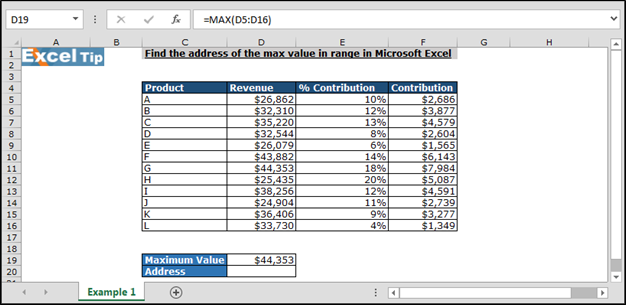
Max function will find out the maximum value.
Cell function will help to get the cell address.
Index and Match function will look up the value and provide the cell to Cell function to return the cell Address.
Let’s take an example and then understand how it will work?
We have product revenue data in Excel in which we want to find out the Maximum value containing cell address. In data column, C contains product name, column D contains revenue, column E contains % of contribution, and column F contains contribution amount.
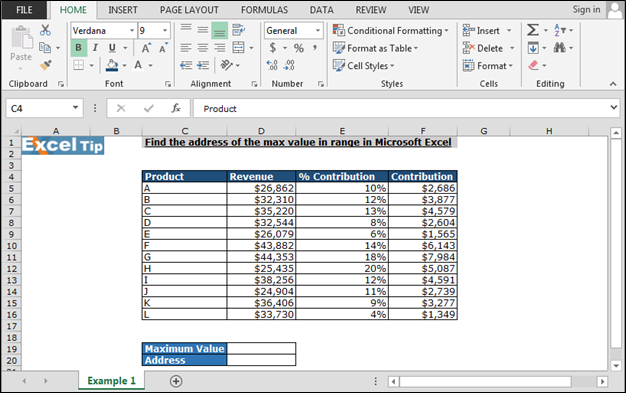
First we will return maximum value, follow below steps:-
Now we will enter the formula to find out the address
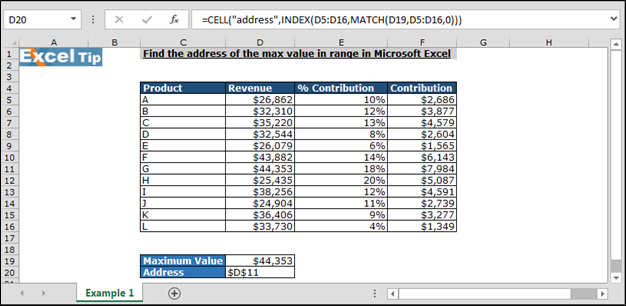
In this way, we can find the address of the value in the range in Microsoft Excel by using the functions.

If you liked our blog, please like us @ Facebook or you can follow us @ Twitter. Also, we are interested in knowing your views on our blogs and what type of blogs you liked the most or where we need to improve in the blogs for your better understanding.
The applications/code on this site are distributed as is and without warranties or liability. In no event shall the owner of the copyrights, or the authors of the applications/code be liable for any loss of profit, any problems or any damage resulting from the use or evaluation of the applications/code.




"Como podria encotrar mediante una formula en una columna el numero maximo Anterior.
Ejemplo: 1-2-45-46-25-75-85-47-78= 85Max , 78Max Min"