

Sometimes, we struggle to find the special character or special text in the large data of Excel. In this article, we will learn how easily we can find out the special character or text in the data.
In Excel, we have so many ways to find out the character or text in a range or data. But here, we will use Find & Search function to find out the character.
Find the character by using the FIND function along with IFERROR function
Find Function will help us to find the specific character, text, value within a cell or range. We use this function in Case-Sensitive.

IFERROR function will help to provide the value as output if any error occurs while performing the Find function.
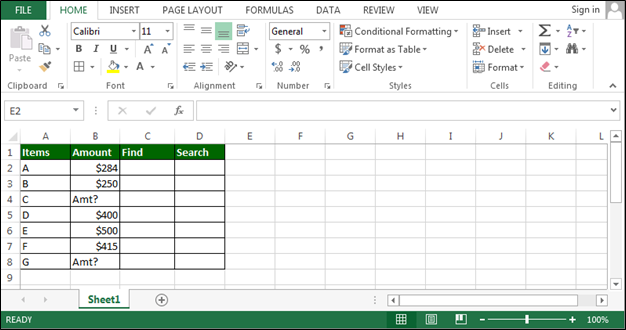
Let’s take example and understand the ways to find out the characters or text.
In Excel, we have Item list with amount but some of the cells are having “?” instead of amount.
To find “?” follow below steps:-

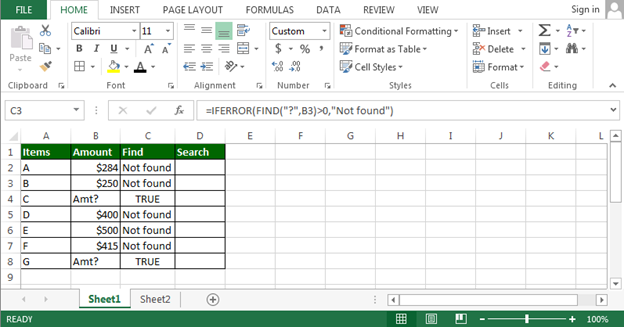
In the above image, we can see that 2 cells are there in which we have “?” character.
Now we will use SEARCH function along with IFERROR function
Again, we use SEARCH function to find the character, text etc. within a range or cell. We don’t use this function in case sensitive.

To understand the procedure, we will take the same example that is mentioned above .
Now follow the below steps:-
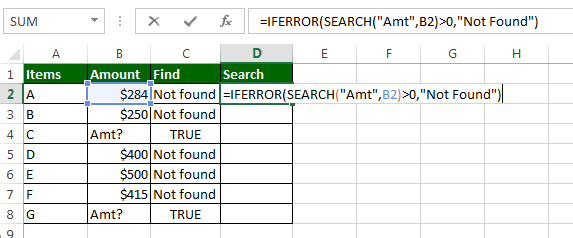

Now we can see in the above image that we have got the same results from both the formulas.
Below are the more examples:-
How to count the specific character in a cell
How to retrieve the text from specific character or text

If you liked our blogs, share it with your friends on Facebook. And also you can follow us on Twitter and Facebook.
We would love to hear from you, do let us know how we can improve, complement or innovate our work and make it better for you. Write us at info@exceltip.com
The applications/code on this site are distributed as is and without warranties or liability. In no event shall the owner of the copyrights, or the authors of the applications/code be liable for any loss of profit, any problems or any damage resulting from the use or evaluation of the applications/code.




I want to search PAN No having its 4th character is "C" from my hole excel sheet please explain
Hi Anil,
you can use conditional formatting with formula to highlight cells contains c at 4th position. Use formula, =SEARCH("c",A1)=4. I have used A1 as an example, you can set your start cell as you want.
I want to search PAN No. having it's 4th letter is "C" from my hole excel sheet. please, explain how to search
=find("g","google is a great search engine"), result is 1. How to find another G letter?
What if special characters are unknown or invisible. Specially form large data set.
- to 10
11 - 20
21-30
Above 31
Is it possible to get these above status by applying IF Condition formula?