

In Microsoft Excel if you want to remove named range, it is a very simple task. First, let’s create a Name Range so that we can understand it in a better way.
Add a Name Range:
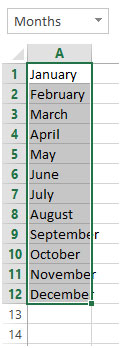
1. Type Months from Cell A1 to A12
2. Select all the months / data
3. In the Name Box type Months
4. This will give the name “Months” to this Range
We need to follow the below steps to delete name range:
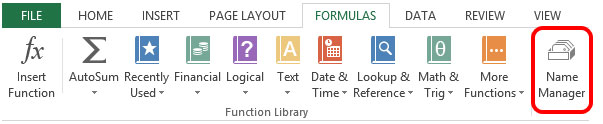
1. Click on the Formulas Tab
2. Click on Name Manager.
3. The shortcut Key is CTRL+F3 on your keyboard.
4. Select the Name Range which you want to Delete
5. Here we have already created the Named Range as “Months”
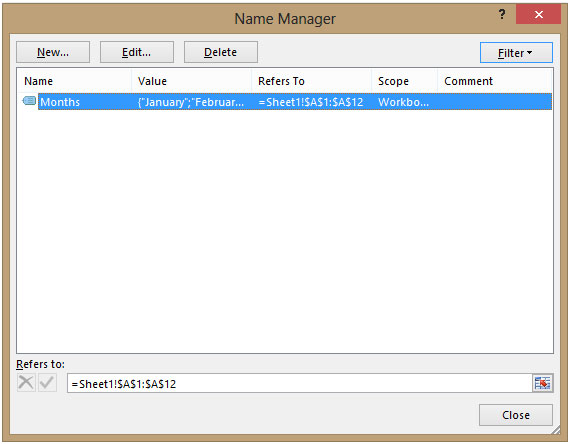
6. Select the Name Range “Months”
7. Click Delete
8. Click on Close to close the Name Manager dialogue box
This will delete the Named Range from the Excel Workbook.
The applications/code on this site are distributed as is and without warranties or liability. In no event shall the owner of the copyrights, or the authors of the applications/code be liable for any loss of profit, any problems or any damage resulting from the use or evaluation of the applications/code.




Thanks. It helps me alot.
not sure if that can be done on MAC 🙁 if yes, please let me also know...
Can you do this on a Mac? I can't find name manager..
Hi
It might not be a bug of ASAP. If I create a named range. afterwards create a table, delete named range and try to rename the table with the name previously used for the named range, excel replies that the name is already in use. so the delete doesn't fully work.
"Hi Paul,
Mobile - that's me! You could be right. I've never run into this before. Is there a dicussion or feedback facility with ASAP? If so, you might want to try them, and then enlighten us back here if you find out what is happening? Interesting that the names might still be there hidden away. Kind of similar to Word with the edits history and hidden text issue perhaps?
Alan."
Thanks (again) Alan, the only thing that worries me is that after the file has been saved, my computer shut down & restarted, it still produces a completely fresh listing with the range names on. Also I've noticed that in the define names menu (it is the same place as yours, I got it wrong, Xl2K on WinXp for reference) when you click the help "?" in the corner then click the delete key it says it deletes it from the range names in workbook "list" not that it is actually deleting the naming of the range. I'm wondering if it remains in the etherea of Excel.
"Hi Paul,
Sounds like a bug in that application to me. BTW, not sure if you have a different version of Excel to me, but try checking under INSERT - NAMES - DEFINE too.
Alan."
If anyone uses ASAP utilities (personally I can't live without it) there is a list all range names function that lists all range names on a new worksheet.Even after deleting all range names in INSERT/DEFINE/DELETE menu it still lists them all. Is this a problem with ASAP or are they still really there?
"Consider the Following code to batch-delete the unused names in a workbook.
Dim i As Integer
For i = 1 To ActiveWorkbook.Names.Count
ActiveWorkbook.Names(i).Delete
Next i "
"Hi,
Thanks for your tips. However, do you know how we can batch-delete the unused (or mis-referring) names in a workbook?
Thanks again.
Hubert"