

I personally, don’t like using the mouse and I prefer keyboard to do tasks. And when you know Keyboard shortcuts, you become a magician for others.
Excel doesn’t only provides simple function to do complex tasks, It also has many useful excel keyboard shortcuts to fast forward the complex and lengthy tasks, and save time of other stuff. You know CTRL+C and CTRL+V hotkeys to copy and past. Let me introduce, you with more excel hotkeys that reduce effort and time consumption.
To select all packed data press CTRL+A. When you press it once, it only selects the table in which curser is right now. When you press CTRL+AA, it selects whole sheet.
Actually this command works different in different conditions. For example, if the curser in an empty cell which is that is not surrounded by any data, it will select whole sheet.
But when it is in a cell that is part of contiguous cells, then it will select whole set of cells.
In formatted table, CTRL+A, it will select table excluding headers. CTRL+AA will select whole table, including headers. When presss CTRL+AAA, entire sheet will be selected.
When your curser is in the data, just press CTRL+SHIFT+L to apply filter.
This command will apply filter to the data set. If your data set has any empty column, the filter will apply to before that empty column. If table has empty columns, select all data or heading and hit this shortcut. Filter will apply. To remove filter, press CTRL+SHIFT+L again.
For Mac It’s CTRL+SHIFT+F.
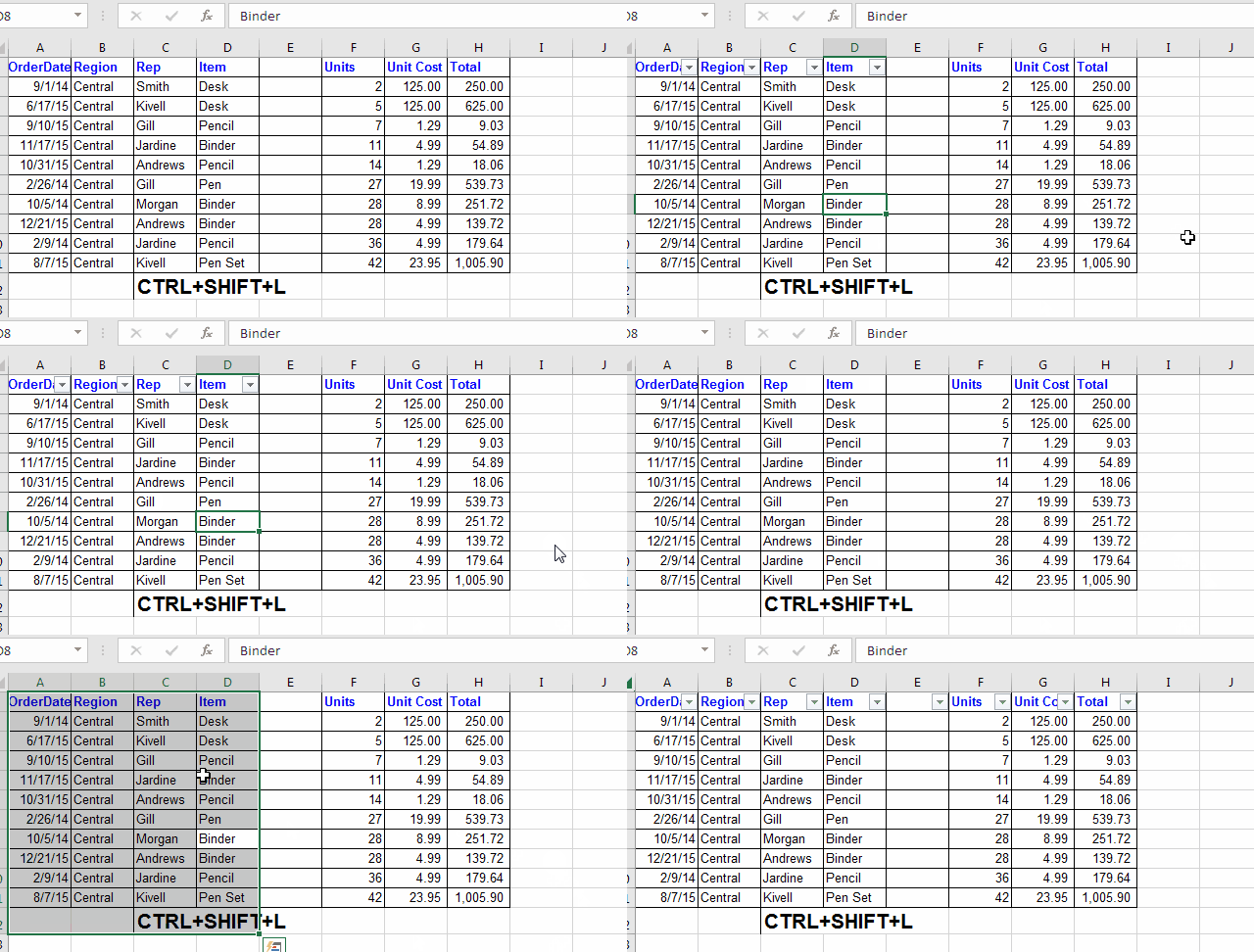
When you apply remove filter using shortcut, excel moves view to top of the table. Or you may use mouse to navigate on sheet (which I don’t prefer). It gets hard, to see where you were.
To go back to the curser press CTRL+Backspace and excel will take you back to active cell.
For Mac, it’s Command+Delete.
While working with big data that contains multiple columns ans thousand rows, moving from one point to another takes too much time. To quickly move from one end to another use CTRL+arrow key shortcut. This command moves you to last non empty cell in a range. Just hold CTRL button and press required arrow key.
CTRL+Right Arrow: Moves the curser to last non empty cell to the right. Stops when encounters a empty cell in way.
CTRL+Left Arrow: Moves the curser to last non empty cell to the Left. Stops when encounters a empty cell in way.
CTRL+Down Arrow: Moves the curser to last non empty cell downwards. Stops when encounters a empty cell in way.
CTRL+Up Arrow: Moves the curser to last non empty cell Upwards. Stops when encounters a empty cell in way.
The above Excel Shortcuts move cursor from one point to another point. If you want to select range between those points, than just add SHIFT key to the shortcut. Hold down CTRL+SHIFT key and press desired arrow key to select range.
CTRL+SHIFT+Right Arrow: Selects the range to last non empty cell to the right. Stops when encounters a empty cell in way.
CTRL+SHIFT+Left Arrow: Selects the range to last non empty cell to the Left. Stops when encounters a empty cell in way.
CTRL+SHIFT+Down Arrow: Selects the range to last non empty cell downwards. Stops when encounters a empty cell in way.
CTRL+SHIFT+Up Arrow: Selects the range to last non empty cell Upwards. Stops when encounters a empty cell in way.
When you want to see, where you enormous or puny data ends, hold down CTRL button and press End key on the keyboard. This shortcut will take you to the last cell of data matrics.
For example, if the last column that contains a data is G, and last row that contains d data is 100, then the last cell is G100 of your data matrics. And there is where this excel shortcut will take you. It is not necessary for G100 to have any data. It could be blank. Use it when you want to check that if there is any garbage data on sheet.
For Mac, It’s Fn+Control+Right Arrow.
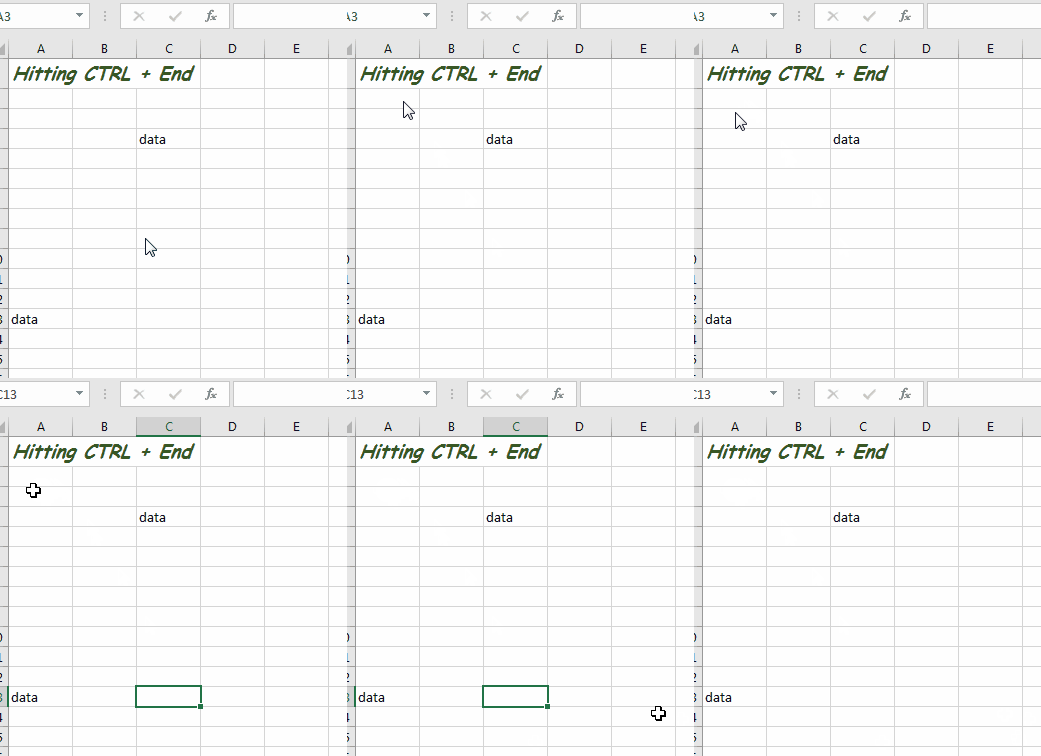
If you just want to, go back at start of the sheet then use this shortcut. It will immediately take you to the A1 cell.
For Mac, It’s Fn + Control + left arrow.
Wherever you are in sheet. If you want to select from that cell to the last cell of data matrics then use this excel hotkey. It will select entire range from active cell to last cell of data matrics in fraction of second.
Having multiple sheets in excel is common. Even by default excel used to have three sheets (now its one in excel 2016). So, navigating on these multiple sheets using mouse will take a lot of time. It’s better to use the shortcut excel provides for navigating on sheets. To Move forwards use CTRL+PageDown. And to move backwards, use CTRL+PageDown shortcut.
For Mac, it’s Fn+Control+Down/Up Arrow.
While working, you often have multiple apps open. In such situation, switching only to excel files is kind of headache using ALT+TAB shortcut. Excel provides a solution to this problem. While working on a excel workbook, use CTRL+SHIFT+Tab move through all open workbooks. This makes it easy to work on multiple files.
Sometimes, you only want to paste specific aspect of source range you copied. For example, only value, only formate, only formula etc. To do so, on windows we can use keyboard shortcut (CTRL+ALT+V). This will open the paste special Dialog box. You can see here several options for pasting. Transpose data, or do arithmetic operations on it.
For Mac, it’s CTRL+Command+V.
There is sequential shortcut too, that is ALT>E>S. This shortcut also opens same Dialog box for paste special. Actually this was shortcut for old version of Excel. And best thing about excel is that it doesn’t discard old shortcut in new versions of excel, so that an existing user can work normally. When you use this command excel will show this info.

If you want to select entire row in which curser is right now, hold shift key and hit space bar. This will select entire row of active cell. For example, if you are in cell B12 and you press this hotkey, 12th row will be selected.
If you have a range selected the all rows of that range will be selected, once you press use this shortcut. For example, if you have selected B11:G12, then row 11 and 12 both will be selected.
If you are in formatted table, then this shortcut will only select the row of the table. If you still want to select whole row of sheet then use CTRL+SPACE>SPACE command. Hold the CTRL key and press space twice.
To Select Entire Column use CTRL+Space hotkey. It will select entire column of the active cell. If you have selected a range in excel, then this command will select all columns of that range.
When You have a whole row selected, just use this shortcut to insert number of rows you have selected. For example if you have 1 row selected then one row will be inserted using this shortcut and if you have 5 rows selected the hotkey will insert 5 new rows above the selected rows.
Similarly if, you want to insert whole column, just select a column and hit this shortcut. This will insert the number of columns you’ve select before selected columns.
Special Case: In tables when press the CTRL+SHIFT++ shortcut, it insert rows. You don’t need to whole row. It will insert rows above selected cells even if you have whole column selected. Then the question arises, how do you insert whole column using shortcut. Well you need to select whole column including headers. Then the same shortcut will insert a column in table.
When want find any text or formula on excel sheet, using Find box is convenient and fast. Instead of going to home tab and then clicking on find option use this shortcut key. Hold down the CTRL button and hit F button on keyboard. This will open the find Dialog box. There are several thing you can do using find Dialog box. That’s a topic itself. We will discuss all of that in a separate article.
To open find and replace Dialog box in use this shortcut. This shortcut will directly open find and replace option, with replace input box active. The data in find box is replaced by data in replace input box.
Well, when you have find box open, you can use CTRL+Tab button to toggle between both of these options.
To copy first cell’s value/formula down the cell in a selected range use this shortcut. This saves a lot of time. Instead copying, selecting and then pasting, just select the range and hit CTRL+D shortcut to fill down the value from first cell in range.
To fill value/formula in selected range, from rightmost cell of a selection use this hotkey in excel. If you have multiple rows selected then value/formula from right most cell will be filled to the edge of selection.
The above to shortcuts are among the most used shortcuts in excel. When you have generic formulas written and you want them to apply to multiple cell, these commands help a lot.
Now, you’re logical mind would say that CTRL+L must fill value to left and CTRL+U should fill up. But no. CTRL+L creates table, and CTRL+U underlines text.
I use this frequently while working on my stats. To sum a range, just select the range, hold down the ALT key and press + key (+=). This will insert a sum function in adjacent cell.
Now, if you have selected a horizontal range say (A1:D1) and all of them have a value in it, then the output will be shown in E1, if it is blank. Other wise in any next blank cell to the right of selection. If the last cell in selection is blank then output will be shown in that cell.
Same goes for vertical selection. If all selection have values then output will be in next cell downwards else in last cell of selection.
This only works for Left ot Right and Up to down. Right to left and Down to Up doen’t work.
There will be times when you will want to delete selected cell, rows and columns. To do so use this shortcut. Hold down the control key and hit - (minus _-) key on keyboard.
If you have some cell/s selected. A list of delete options will appear to select from. The options will be Shift cells left, shift cells up, delete row and delete column. Choose whichever option you need.
When you have one or more rows selected, the same shortcut deletes all selected rows without any confirmation. Same goes for columns.
This is the shortcut for hiding columns of selected cell. Hold the CTRL button on keyboard and hit 0 (from the upper row not from calculator side). This shortcut will immediately hide columns of selected cells. These cell/s can be non adjacent or continuous selection.
Unhide Columns : Select columns so that hidden ranges be among them and hit CTRL+SHIFT+0. This is the shortcut to unhide columns.
Same as hiding columns, this is the shortcut to hide rows in one hit. Press and hold the CTRL key and hit 9 from top row. All rows from selected cells will collapse.
Unhide Rows: Select rows so that hidden ranges be among them and hit CTRL+SHIFT+9. This is the shortcut to unhide rows.
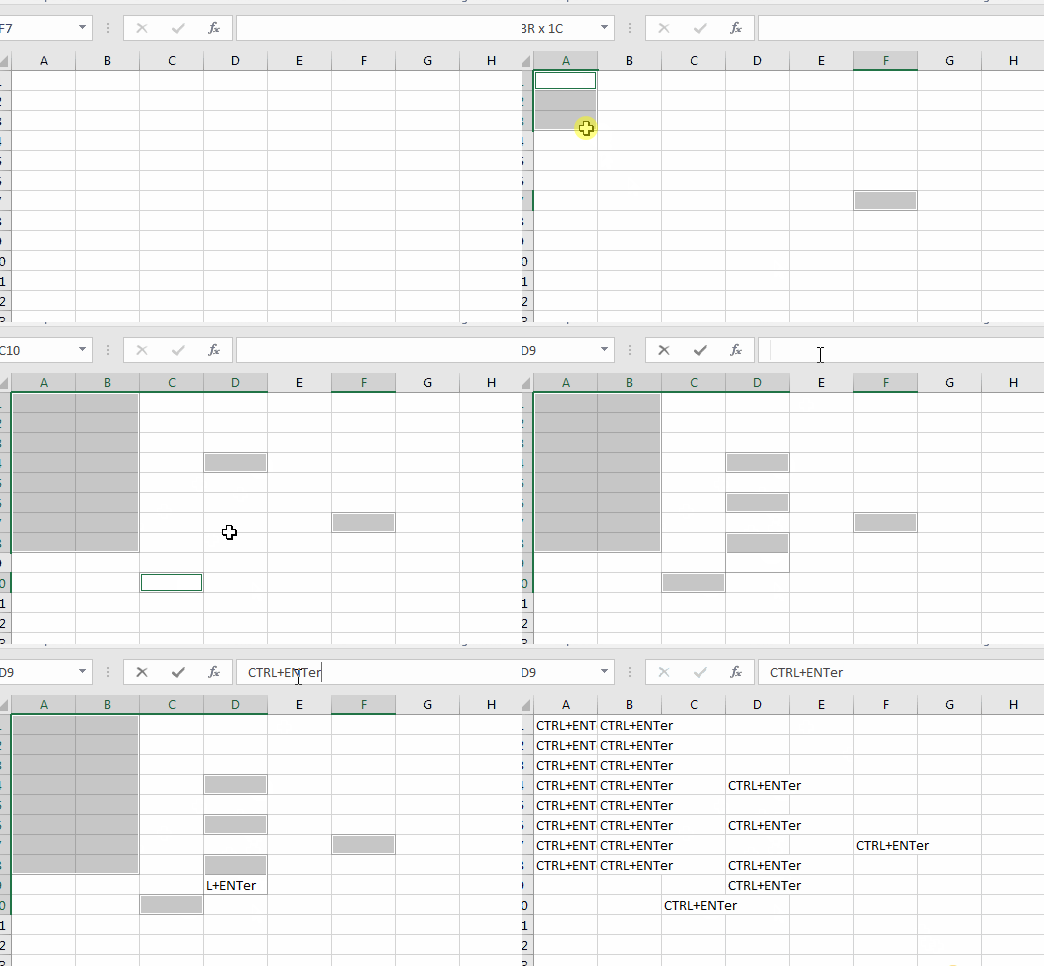
Whether you have selected a range or non adjacent cells using Ctrl+Click in excel, if you want to write in all cells use this shortcut.
Select cells in which you wan t to write. Go to formula box, write whatever you like, Hold down CTRL button and smash the Enter button. Whatever you’ve written in formula box, will be written in all selected cells.
To insert current date, hold down the CTRL button and hit ; (semicolon button, key to the right of L key). This will insert current date of system you’re working.
To insert current time in a cell use hold down CTRL and Shift key and then hit ; button. This will insert the system’s time in excel cell.
IF you want both date and time in a cell, use above two shortcuts in cell one by one. Hit CTRL+; once to enter current date, hit space bar, hit CTRL+SHIFT+; to enter current time. This combination will insert current date and time in a cell. You can formate it later in your desired style.
This excel shortcut is dedicated to formatting in excel for almost everything. While in a field (cell, range, charts, image etc), hit CTRL+1. This excel shortcut open formatting option for the respective field. This gives you freedom from the ribbon on the top, on which you are so dependent when it comes to formatting.
For Mac, it’s Command + 1.
When you do operations on dates and expect an date output but you get a serial number instead. To translate that serial number into date use this shortcut key. This will immediately convert selected cell into dd-mmm-yy formate. For example, if in a cell, you have 43698, and you use this shortcut, you will see 21-Aug-19.
This shortcut converts fraction into its time equivalent. If you’re expecting a time formated value but you don’t get it, just use this shortcut to covert active cells into time formatted cells.
Many times, accidentally, I have used this shortcut to format my numbers into %. I was trying to use something else and suddenly is saw 43 was converted in 4300%. So if you want your fractions to covert into percentage, use this shortcut.
This is useful while calculating percentage. Just divide the part by total and hit this shortcut. You don't need to add *100 in formula.
To covert any number into currency formate, use this excel hotkey. This shortcut adds a $ sign before the number. This is very useful when you prepare financial sheets.
To convert any formatted cell into number formate use this command. Many times, it happens that, we do some operations of adjacent cells and excel takes formate from that adjacent cell. And if you wanted output as a number. Using this shortcut you can quickly get number formatted cell. (the number will have 2 decimal points by default)
To get rid of any number formate and get a general formatting (number without decimal points) use this excel shortcut.
When you’re stuck at any point in excel, use F1 key to access MS excel help. Here you can search a keyword to get details about. For example, if you search VLOOKUP, it will show all ms documented articles on VLOOKUP, such as The VLOOKUP function, Look up values with VLOOKUP, INDEX, or MATCH, How to correct a #N/A error in the VLOOKUP function .. etc.
When you try to edit a formula in a cell without double clicking on it, it overwrites the existing text. Either you double click on cell to get in edit mode using formula bar, in both cases we need to use mouse. Excel provides this shortcut to edit any cell without using mouse. Just move your curser to the cell you want to edit, and press and release F2 button. You’ll be in edit mode.
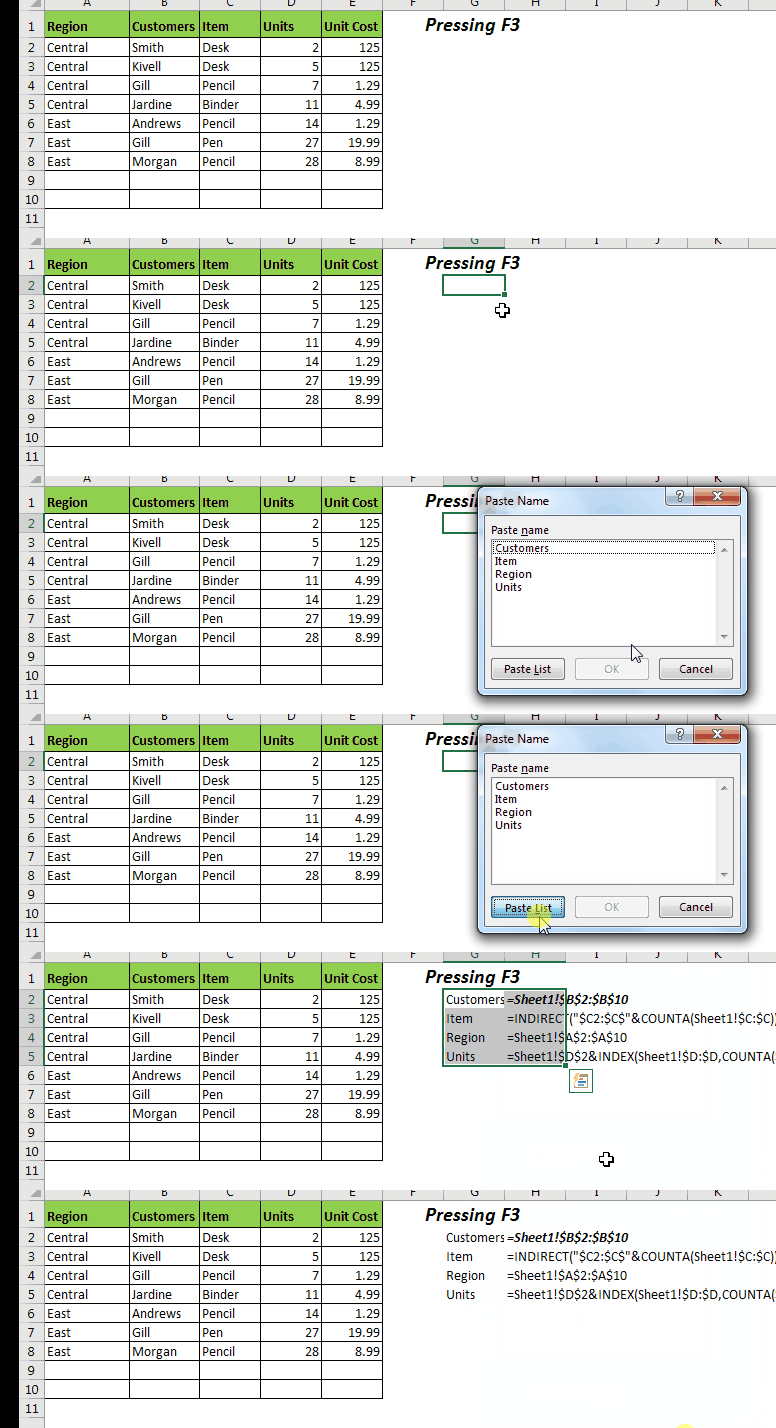
If you have names in your workbook, and you want to get the list of those names on sheet, so that you can easily manage named ranges, use F3 key. This shortcut open the paste names Dialog box in excel. It only works if you have at least one named range in excel.
While working with formula, often you need to specify the reference type. To make Absolute References we use $ sign and for Relative Reference we remove $ sign. To toggle between reference types, we use F4 key. Just select the range in formula and press F4 key. Repeat to change reference type, until you get what you want. You can understand it in brief here: Toggle References in excel.
If you have have done any formatting previously, the f4 key repeats that formatting on currently selected cells. For example if you have filled A1 with color red. Now if you, select C5:D100 and pressed F4 key, then whole range will be filled with red color.
This only repeats one formatting not multiple. For example if you had bordered a cell and then colored it. Then only coloring will happen using F4.
This another shortcut key for Go To Dialog box other than CTRL+G. Since there are two shortcut keys for Go To option, you can override CTRL+G for any macro shortcut. You’ll still have one hotkey for this purpose remaining. The Go To option in Excel has many other features that is a topic in itself. We will explore this feature in future articles soon.
Sometime, you split your screen in different parts to have multiple parts of sheet on screen. To divide screen, you can go to View-> Split. Now you can navigate in all parts independently. Only the selected part moves and other part freeze at their position.
Now to toggle these panes, you can use F6 shortcut key.
If you press F6 key twice when you don’t have split panes, it activates ribbon’s hot keys. Just as alt key does.
This is a life saving shortcut in excel. While preparing reports in excel, I type wrong spelled words and excel does not provide dynamic spell check, which for good. But once I have done I work, I want to check my spellings to avoid embarrassment. The F7 key helps me a lot in excel. This check all selected cells and points out any spelling error in cells. You can choose to correct them or ignore them. This saves a lot of time and effort.
Usually for extending selecting we use SHIFT+Arrow keys as we discussed above. But for any reason, if you are not able to use SHIFT key, use F8 key. Just press and release the F8 key. Now use the arrow keys to select ranges. This locks the active cell as pivot and allows you to move and select range. Once you press it, you can see “Extend Selection” written on status bar of excel. To exit from selection mode, again press F8 button or Esc button on keyboard.

This one is important.
For efficiency or any other reason, when you switch workbook calculation from automatic to manual, the formulas don’t update automatically. To refresh formulas, press F9. it will recalculate workbook and update formulas according to new changes.
Once, I was in an interview. In technical round, I applied the formula and copied it to a range. I saw same result, it all relative cells. I could not figure out, what I was doing wrong. Then my interviewer came and told me how to correct this. Actually, there was no problem in my formula, its just that they had manual calculation on. I didn’t know about it. Did I get the job? No. Why I told you this story. Because I don’t want it to happen it with you.
F10 works same as Alt key. It highlights the keyboard keys for ribbon menu and other things on excel.

You must have added sheets in excel workbook. But do you know that, there are 4 types of objects you can add in excel workbook. They are Worksheet, Chart, MS Excel 4.0 Macro, MS excel 5.0 Dialog. This is a topic in itself, that we will explore soon. For now, the Chart sheet can be inserted using F11 key. This will insert a dedicated sheet that will have chart of selected data only.

This F12 hotkey simply opens the Save As dialog box, same as ALT+F2. You can rename the existing document and save the document in different formats at different location in your computer.
There are plenty of other shortcuts that excel offers to its users. But if I will discuss them all here, this will be a 100 page long article and still some will be left.
Let me know which shortcut you use most in excel and which one is your favorite. And if you’re stuck for any shortcut key, let me know that too.
Popular Articles:
How to use the VLOOKUP Function in Excel
The applications/code on this site are distributed as is and without warranties or liability. In no event shall the owner of the copyrights, or the authors of the applications/code be liable for any loss of profit, any problems or any damage resulting from the use or evaluation of the applications/code.




Nice information and knowledge.