

In this article we will learn how to excel close workbook using VBA in Microsoft Excel 2010.
After your VBA macro / code has performed all the required actions, you would want the macro to either save the file or skip saving it. So here are the options you can set in the code while asking it to close the file. The Close and Open method in VBA can be used to close and open workbooks.
If you want the code to just close the file without saving the changes – then use this line at the end of your code or wherever needed -
ActiveWorkbook.Close (False) or ActiveWorkbook.Close False or ActiveWorkbook.CloseSaveChanges:=FALSE
See the code in this picture below. To copy the code, press Alt + F11 on the keyboard while ensuring that the excel sheet is open. Then right click on Microsoft Excel Objects and select Insert. Then click on Module. Copy over the code given below the picture -
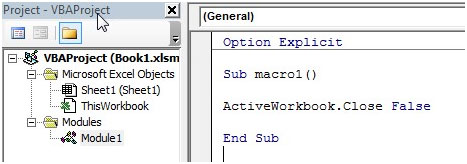
Option Explicit
Sub macro1()
ActiveWorkbook.Close False
End Sub
Note: You can change the text ActiveWorkbook to refer to the name of the workbook or the variable you have used to identify the workbook as per your code.
If you want the code to save the changes while closing the file, then use
ActiveWorkbook.Close (True) or ActiveWorkbook.Close True or ActiveWorkbook.Close SaveChanges:=TRUE
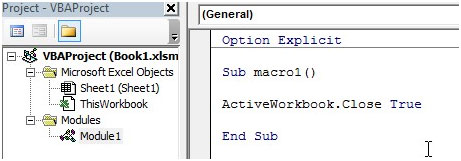
Here is the code –
Option Explicit
Sub macro1()
ActiveWorkbook.Close True
End Sub
However, if you want the user to decide, then you just need to enter
ActiveWorkbook.Close
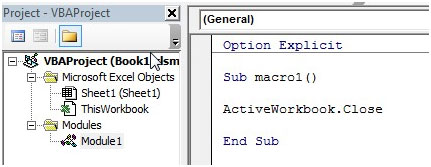
Here is the code –
Option Explicit
Sub macro1()
ActiveWorkbook.Close
End Sub
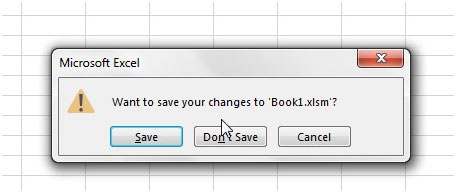
The user will get a popup asking if they want to save the workbook or not.
Workbooks("File1.XLS").Close SaveChanges:=False
This example will close File1.xls and discards any changes that have been made to it.
Conclusion:
If “Application.DisplayAlerts” has been set to False, you will not get any popup and the workbook will directly close without prompting to save.
This popup will appear if “Application.DisplayAlerts” is not set to False anywhere before the excel vba Activeworkbook.Close line of code.
So even if the code requires that you switch off the alerts, ensure that “Application.DisplayAlerts = True” is present before the Activeworkbook.Close line.
If you liked our blogs, share it with your friends on Facebook. And also you can follow us on Twitter and Facebook.
We would love to hear from you, do let us know how we can improve, complement or innovate our work and make it better for you. Write us at info@exceltip.com
The applications/code on this site are distributed as is and without warranties or liability. In no event shall the owner of the copyrights, or the authors of the applications/code be liable for any loss of profit, any problems or any damage resulting from the use or evaluation of the applications/code.




I have an Excel file that I regularly export. This cause the name to always be different, i.e. export-1.xls, export-2.xls. I need a batch file that will close only this file, leaving the other Excel files open. I do not want to save the changes of the export file. I currently use the following.
Sub CloseNoSave()
'Close the workbook without saving it
Rem ThisWorkbook.Close savechanges:=False
Application.DisplayAlerts = False
Application.Quit
End Sub
This closes the file but also closes other open Excel files.
How can I close excel VBA workbook by name?
How to close the workbook without saving the file?
Close workbook and Excell if only one workbook is open:
--------------------------------------------------------------
Dim mCount As Integer
Tel = 0
For Each c In Application.Workbooks()
With c
mCount = mCount + 1
End With
Next c
If mCount = 1 Then
Application.Quit
ActiveWorkbook.Close False
Else
ActiveWorkbook.Close False
End If
End Sub
--------------------------------------------------------------
Amazing! Searching for a solution to close a workbook when a userform is closed for half a day, tip from Tracer Crime worked.
Excellent! Tracer Crimes code worked perfectly!
Try this:
Sub Auto_close()
Application.ScreenUpdating = False
Application.Quit
ThisWorkbook.Close SaveChanges:=True
Application.ScreenUpdating = True
End Sub
Or:
Sub Auto_close()
Application.ScreenUpdating = False
ThisWorkbook.Close SaveChanges:=True
Application.ScreenUpdating = True
End Sub
The "active" workbook is calling the command for another workbook to close, which it does, I have looked with task manager. But it does not save changes as I am expecting it to do. The time never increments.
Thank you!
Worked Perfectly
"This might help you:
If ActiveWorkbook Is Nothing Then Exit Sub
' exits the procedure if no workbook is active "
No workbook is currently active? attempting to close it raises error. How do I detect IF any Workbook is active?
Thank you!
"This might help you:
If ActiveWorkbook Is Nothing Then Exit Sub
' exits the procedure if no workbook is active "
No workbook is currently active? attempting to close it raises error. How do I detect IF any Workbook is active? thanks!