

One file could be linked to one or more other files through formulae. During the course of time, as these workbooks get updated / changed, there could be a need to change the links in these workbooks. Changing the source link allows the user to change the location of the source where the data exists or to change the link to a new workbook altogether.
To change the source link you have to use the “Edit Links” option. This option gives the user a view of all the other files the current file is linked to, so that the user can update or remove the links.
Let’s take an example and understand how we can change the source link.
Example 1: We have data in range A1:E9, which is linked to another workbook. To change the source link follow the below mentioned steps:-

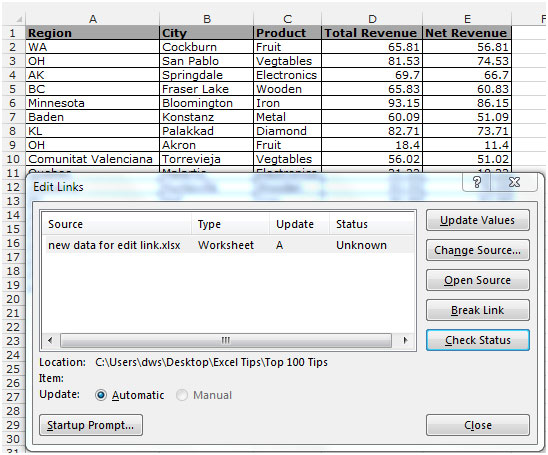

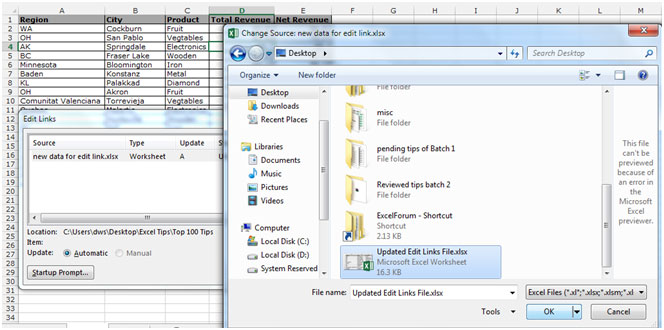
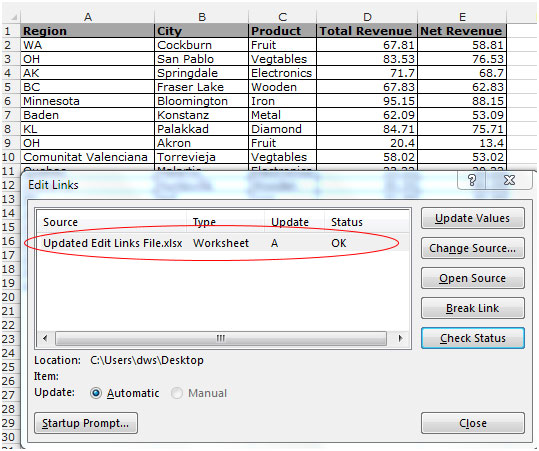
Through the Edit links dialog box, you can also Update Values, Open Source, Break link, and also can check the current status of the link.
Even if you update anything in the linked file, this file will get updated automatically as long as the other file is open. This is an useful feature which you can use while working with multiple workbooks which need to be linked together to pass the information from one to the other.
The applications/code on this site are distributed as is and without warranties or liability. In no event shall the owner of the copyrights, or the authors of the applications/code be liable for any loss of profit, any problems or any damage resulting from the use or evaluation of the applications/code.




All very nice but it doesn't work. This spreadsheet has no links to outside sources, yet when I did a rename and then named it back, this issue comes up. I cannot select the spreadsheet as its own source. So how do I locate the alleged broken links?
Hi,
Is it possible to change the link in function of a selected value?
For example: we have sales figuers per month.
I would like to select the month (form a dropdown list) and in function of my selection, the source should be adjusted.
Please help me!!!
Kind regards
Hi,
I changed my source but it does not change the path? Any thoughts?
RR