

Hi There!
Is your default printer situated in the far corner of the office?
Want to print your sheet from the printer by your side?
You can change it in the print dialogue section but you are too lazy to do that too?
Well, most inventive people are lazy, like you and me.
Don’t worry. I’ve got you. Let’s do it using VBA for once and all…
Below is the code that changes your default printer to your choice of printer and sets back the original printer to the default printer.
| Sub Change_Default_Printer() Set mynetwork = CreateObject("WScript.network") mynetwork.setdefaultprinter "Your Printer Name" 'write your printers name here ActiveSheet.PrintOut mynetwork.setdefaultprinter “original_Default_Printer” ‘set back your original printer to default” End Sub |
Let’s crack each line down.
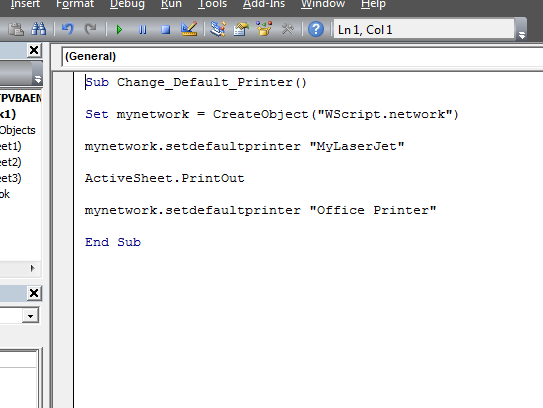
So how was it? Did it work for you? Was it difficult? Let me know in the comments. Stay tuned for more innovative and easy lessons. Bye.
Popular Articles:
50 Excel Shortcut to Increase Your Productivity
How to use the VLOOKUP Function in Excel
The applications/code on this site are distributed as is and without warranties or liability. In no event shall the owner of the copyrights, or the authors of the applications/code be liable for any loss of profit, any problems or any damage resulting from the use or evaluation of the applications/code.




Hi,
I am using excel 2016 64 bits (1909).
I received "object is required" when executing the instruction Set mynetwork = CreateObject(“WScript.network”) .
Why ,
thank you
Luc
How can I code in the fax number to dial from Excel VBA? I can call the Fax and Scan, but then I have to manually type in the phone number. I am using the Fax and scan form a workstation and using Fax and scan from a server if that matters. Thank you for any assistance you can give me on this. Jim.
"I want to select which printer from a list of the printers attached to the PC.
Can do in VB, but cannot see how to do in VBA for Excel
(Preferably 2000)"
"Worked like a dream.
Thanks, for the fast response!"
"I want to select which printer from a list of the printers attached to the PC.
Can do in VB, but cannot see how to do in VBA for Excel
(Preferably 2000)"
It is an old post, but maybe if some else is looking for it
This will give you a dialog box
Application.Dialogs(xlDialogPrinterSetup).Show
Helped me alot too, thanks!