» Calculating the Difference Between Hours
CATEGORY - Excel Time
VERSION - All Microsoft Excel Versions
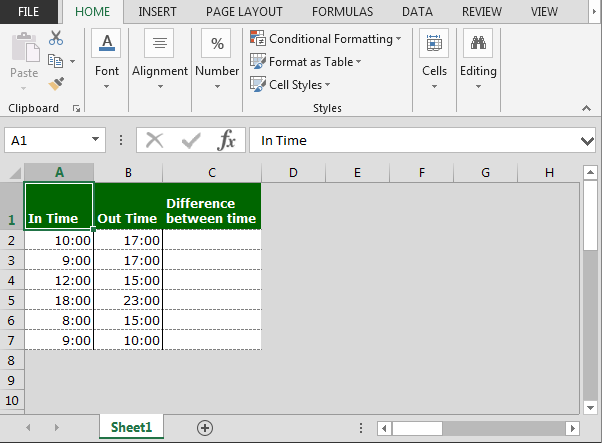
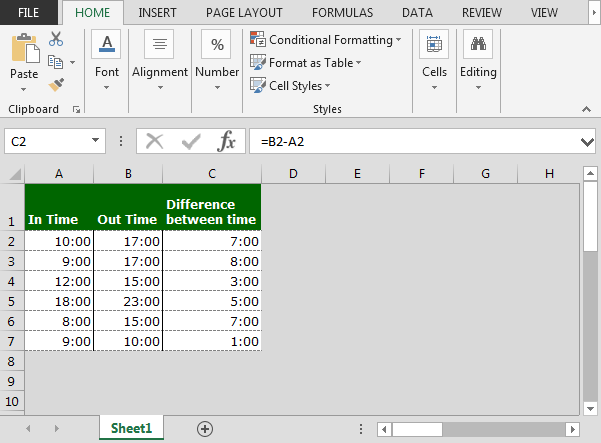
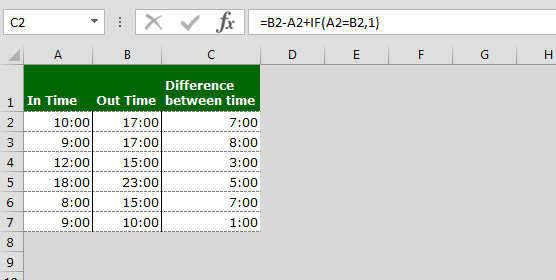
Enter the following formula into a cell:
=D4-C4+IF(C4D4,1)
The number 1 in the IF formula equals 24 when working with time.
For example, in row 6, the calculation is
6.00 - 20.31+ 24.00 = 9.29.

Book Store:
Recommended Books:
- Financial Shenanigans : How to Detect Accounting Gimmicks & Fraud in Financial Reports
- Special Edition Using Microsoft Word 2002
- Preparing the Marketing Plan (Ama Marketing Toolbox Series New Edition)
- The Interpretation of Financial Statements
- East of Eden (Oprah's Book Club)
- Microsoft Windows XP Step by Step (With CD-ROM)
Hours Manipulation in Excel
Mick Ryan Posted on: 31-12-1969
I flew in the RAF for 27 years and have recently tried to audit my logbook additions. The times are in Hrs and 5min increments. It is cumbersome so I was interested in this tip. However, the wrong spreadsheet appears to have been added to this tip. It is the same as for the previous tip and does not relate to the text describing the tip. e.g. cells E4:E8 is hh:mm. Do you have a way of adding columns of hrs and minutes?RE: Mick Ryan
Don Lester Posted on: 31-12-1969
Just format the column to be added as 00:00 then use the SUM() function to tally up the hours and minutes.sum time that spans days
Sandy Posted on: 31-12-1969
If I have two cells with these two date times. How do I add them together to get
the total hours:min (27 hrs 47 min)
4/12/2003 21:30
4/14/2003 1:17
RE :sum time that spans days
AB Posted on: 31-12-1969
Format the cells containg the date : (dd/mm/yyyy hh:mm). Format the cells where the answer will be displayed as follows :([h]:mm). Then just do a normal calculation (e.g. =A2-A1)Confused
Mags Posted on: 31-12-1969
I need to work out difference between 2 dates and times in excel, but in working hours only, ignoring off duty hours (Weekends are working days). i.e working hours are 0800 to 2000 - start date/time 21/04/03 09:00 end date/time 22/04/03 17:00 - but for some rows the actual start time is prior to 08:00 and on others the end time is after 20:00 so the formulas I have tried so far havent worked properly - can anyone help? Military Time
Chad Posted on: 31-12-1969
Is there an easy way to convert hours to read as standard time rather than military time? I am automating time sheets for my emplyees and I am finding it difficult to show 4:00 PM rather than 16:00 PM. -anyone?Reversing Military Time
Nancy Posted on: 31-12-1969
I have a time sheet that "shows" military time. I want it to "show" standard time although it needs military time to calculate the time. Same problem as Chad from Freeport, ILreversing military times
henry Posted on: 31-12-1969
to show local time, use cell format time and select your desired!
Coverting hours and minutes to minutes
Mary Posted on: 31-12-1969
I have a column with hours listed (i.e. 1:00, 1:15, :45, etc.). I need to convert that to just minutes. So 1:00 would equal 60, 1:15 would equal 75, 45 would equal 45. Thank you for your help.RE:Coverting hours and minutes to minutes
Kolyu Posted on: 31-12-1969
Here is my decision:
1. write in column A (for example) hours listed (i.e. 1:00, 1:15, :45, etc.)
2. in cell B1 (or any other you want) write this formula: =VALUE(SUBSTITUTE(TEXT(A1;"HH.MM");LEFT(TEXT(A1;"HH.MM");3);""))+VALUE(LEFT(TEXT(A1;"HH.MM");2))*60
3. Copy & Paste the formula as much as it is necessary
If you have any problems or questions - write to my e-mail: koliu_m@yahoo.com or ICQ: 56468899
I need help....
Lualie Posted on: 31-12-1969
I have information from excel that i need to put into microsoft access. I learned how to transfer the information, but how do i get it so if i put in one keyword the information i need pops up?How to take out break time
Shady Aly Posted on: 31-12-1969
im trying to write a formula that calculate the difference between the start and finish of my staff as well as taking the break time off the total ... eg 9 hours work = 8 pay, 6 work 5.5 pay ... any ideas ??? THANK YOUshow minutes as 1/4, 1/2, 3/4
Lori Hughes Posted on: 31-12-1969
I have a spreadsheet that I'd like to show times that include minutes as 1/4 of an hour, or 1/2 of an hour. EG - 5:15 shows as 5.25 hours; 5:30 shows as 5.5 hours; 5:45 shows as 5.75 hours
Thank you very much for your help.
converting Time into Minutes
Missie Posted on: 31-12-1969
I need to convert time into minutes such as (start 5:20pm Stop 5:50 pm = total minutes (30)
please help
Tip for calcs with hours and to show minutes as 1/4 hour
Felipe Maddaloni Posted on: 31-12-1969
Lori,
You have to explain to Excel that one day has 24 hours. So, first you have to format the cell as [h]:mm. It will show 5:15 in cell A1, for instance. Then, in cell A2, you multiply A1 for 24, and you will have 5,25 hours. Note that the format in cell A2 is general number.
This tip can also be very helpful for those who need to calculate timesheets, employee payments, etc.
setting up excel to calculate time worked
Kim Posted on: 31-12-1969
How can I set up my excel to calculate my time sheet?
HELP PLEASE
Adding Minutes to a Time
Chad Cochran Posted on: 31-12-1969
I am working on a spread sheet that I need to calculate an average time it takes to do something (in minutes) (i.e. Number of Trays Total / Average Trays Per Minute = Minutes it Takes to Fill Trays).
Next, I need to add the mintues to a time(i.e. 6:30 AM + 5 minutes (from calculation above) = 6:35 AM).
Finally I need to add more minutes (time it takes for someone to push a cart from kitchen to hospital unit) to the time we just got (i.e. 6:35 AM + 5 Minutes = 6:40 AM).
Thank you,
Chad.
Help, analysing telephone usage and difference between time rates
Carly M Posted on: 31-12-1969
I am working using functions IF statements and I need to be able to calculate the duration between different times. Day Rate = 08:00 - 18:00, EVE Rate = 18:00 - 08:00 and Wkend Rate = Midnight Fri to Midnight Sun. So for a call starting on Thursday 17:00 and ending on Friday 19:00 would be charged for 1hr at day rate and 1hr at evening rate. How can i display this in Excel. I can break it down into many cells as poss if need be. I am finding this impossible, any experts out theredifference between days
joe arms Posted on: 31-12-1969
6/1/2003 07:00
6/2/2003 13:00
how can calculate the difference betweent these two times with out having to enter the dates over and over?
Reply: difference between days - joe arms from minneapolis, mn wrote on August 11, 2003 5:47 PM EST
Alan Posted on: 31-12-1969
Hi Joe,
All you have to do is subtract one from the other.
For example, using your dates / times above:
B2 contains 6/1/2003 07:00
B3 contains 6/2/2003 13:00
The formula to get the difference between the two is just:
=B3-B2
Obviously the answer we want is one month, 6 hours, and this formula returns 31.25 days (= 31 days, 6 hours).
A month is not a well defined time period (28, 29, 30, or 31 days) so best to avoid ever using it if you can.
The answer of 31.25 days is correct, but most people would prefer 31 days, 6 hours.
To get the cell to display the answer in that *format* (and show minutes for example), just apply the following custom format to the cell:
dd" days", h" hours", m" mins"
If you wanted it displayed in just hours (750 hours), use the following format:
[hh]:mm
Hope that helps,
Alan.
Reply: Adding Minutes to a Time - Chad Cochran from Hattiesburg, MS wrote on July 31, 2003 11:13 AM EST
Alan Posted on: 31-12-1969
Hi Chad,
The basic trick here is to remember that Excel likes to work in days (being equal to 24 hours) as its default time unit.
>I am working on a spread sheet that I need to
>calculate an average time it takes to do something (in
>minutes) (i.e. Number of Trays Total / Average Trays
>Per Minute = Minutes it Takes to Fill Trays).
Okay - to calculate the average time that it takes to do something:
A1 = Total time = 2 hours = 2/24 of a day = 0.083333....
A2 = Total 'events' = 24
A3 = Average time = A1/A2 = 5 minutes = (2/24)/24 = 2/576 of a day = 0.00347222...
If you format cell A3 appropriately, it could display as 0:05 for example - see reply above.
>Next, I need to add the mintues to a time(i.e. 6:30 AM
>+ 5 minutes (from calculation above) = 6:35 AM).
>Finally I need to add more minutes (time it takes for
>someone to push a cart from kitchen to hospital unit)
>to the time we just got (i.e. 6:35 AM + 5 Minutes = 6:40 AM).
Okay, 6:30am will always be 6.5 hours past midnight = N+(6.5/24) where N is any whole number representing the date that you want. If N=0, then Excel will assume you mean 0 Jan 1900 (!), however, perhaps you never actually care about the date?
So:
A5 = (6.5/24) = 0.2708333.... Representing 6:30am (you can format as you prefer - see above)
A3 = 5 Mins = (5/60)/24 = 0.00347222.... (from above)
A6 = A5+A3 = (6/24)+(((30+5)/60)/24) = 0.27430555... = 6:35 hours past midnight
Hope that all makes sense!
Alan.
Difference between times if greater then 1 minute
Chris Posted on: 31-12-1969
How do I write a formula to calculate the difference of 2 cells containing times, but only if the difference is greater than 1 min. example: a1 is 12:00:00 and a2 is 12:01:35 I want b1 to show the difference of 0:01:35, but if a2 is only 12:00:27 I dont want b1 to show the anythingReply: Difference between times if greater then 1 minute - Chris from Spokane, WA wrote on August 20, 2003 1:21 AM EST
Alan Posted on: 31-12-1969
Hi Chris,
If you have those times in cells A1 and B1, then the following formula will do it:
=IF(B1-A1<((1/24)/60),"",B1-A1)
I have assumed that the times are entered using Excel's date / time values, not as, for example, text.
Alan.
Trying to make a time sheet time card
April Posted on: 31-12-1969
I am having problems figuring out how to set my timesheet up. The times are note figuring out correctly and the formulas are note working. HELP
I Day In Out In Out In Out Regular Hours Overtime Hours Make Up Hours Holiday Hours Vacation Sick Other Hours Type Total Hours at Other Rate
Want a cell to report 1 of 3 things
Chris Posted on: 31-12-1969
A1 and A2 are times. Ex 12:00:00 and 12:10:00
So I want C2 to equal 3 different things:
If A1 =A2 I want C3 to say On Time
If A1
If A1>A2 I want C3 to say Early
I tried several formulas but it just returns #VALUE!
I thought the correct formula should be:
=IF(A1=A2,”On Time”)+IF(A1>A2,”Early”)+IF(A1
Please Help
Reply: Want a cell to report 1 of 3 things - Chris from Spokane, WA wrote on August 22, 2003 5:46 AM EST
Alan Posted on: 31-12-1969
Hi Chris,
You are very close - you might need to check those logic checks, since you have two cases for A1 being greater than A2, but that is probably a typo in your post only.
I think you want to try this:
=IF(A1=A2,"On Time",IF(A1>A2,"Late","Early"))
If I misinterpreted the order, then just swap from greater than to less than.
Alan.
Faster inputting
John Music Posted on: 31-12-1969
The spreadsheet I am using has time listed as 07:00. I want to be able to ten key in the times. Is there a lookup formula that could change the 07:00 to 0700?
If so how do I get the one cell to reference the chart?
Reply: Faster inputting - John Music from WA wrote on August 23, 2003 11:50 PM EST
Alan Posted on: 31-12-1969
Hi John,
I don't understand what you want to achieve.
Please could you elaborate a little.
Specifically, you ask if there is some way to change 07:00 to 0700, but at the same time you talk about faster inputting. I would suggest that inputting 0700 is actually faster than typing the extra character to get 07:00, so you would actually be better of just going direct to input 0700.
You also mention a chart. What are you charting?
Thanks,
Alan.
Answer
Andy Posted on: 31-12-1969
http://www.cpearson.com/excel/DateTimeWS.htm#WorkHours