

In this article, we will create a procedure to fetch data from closed workbook to active workbook using VBA code.
Raw data which we want to fetch is present in the range A13:E22 on sheet "Sheet1" in “DataFile.xlsx” file which is placed in the path "C:\Users\Ramandeep\Desktop".
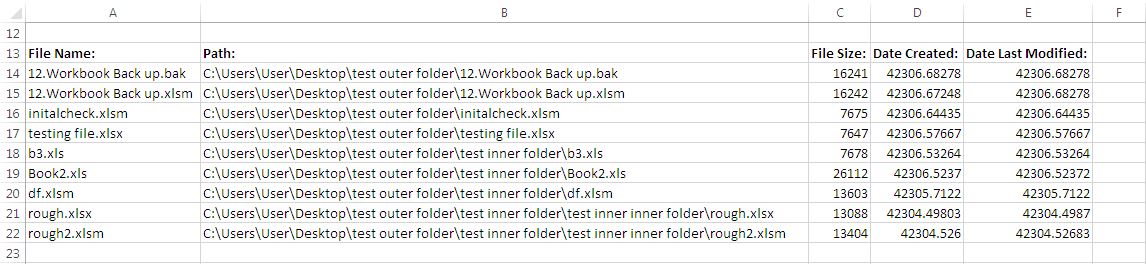
Logic explanation
We have created two procedure in this article:-
CallingMainProcedure
GetValuesFromAClosedWorkbook
CallingMainProcedure procedure
This procedure is used for calling procedure “GetValuesFromAClosedWorkbook”. It assigns values to parameter of “GetValuesFromAClosedWorkbook” procedure.
GetValuesFromAClosedWorkbook procedure
This procedure takes file path and file name of closed workbook as parameters. It also takes sheet name and range from closed workbook as parameter. Using the input parameter’s value, an array formula is entered to range A13:E22 of the active sheet as
{=’C:\Users\Ramandeep\Desktop\[DataFile.xlsx]Sheet1’!A13:E22}
Array formula brings the required data from closed workbook. Once data is fetched to the active sheet, formulas from the sheet is removed by replacing the formulas with the value.

Please follow below for the code
Option Explicit

Sub CallingMainProcedure()

'Calling GetValuesFromAClosedWorkbook procedure
'Specifying the file path, filename, sheet name and range of data
GetValuesFromAClosedWorkbook "C:\Users\Ramandeep\Desktop", "DataFile.xlsx", _
            "Sheet1", "A13:E22"
End Sub

Sub GetValuesFromAClosedWorkbook(fPath As String, _
            fName As String, sName, cellRange As String)

With ActiveSheet.Range(cellRange)
    'Assigning the array formula to the specified range
    .FormulaArray = "='" & fPath & "\[" & fName & "]" & sName & "'!" & cellRange
    'Removing formula from the cell and pasting the values in the cell
    .Value = .Value
End With

End Sub
If you liked this blog, share it with your friends on Facebook. Also, you can follow us on Twitter and Facebook.
We would love to hear from you, do let us know how we can improve our work and make it better for you. Write to us at info@exceltip.com
The applications/code on this site are distributed as is and without warranties or liability. In no event shall the owner of the copyrights, or the authors of the applications/code be liable for any loss of profit, any problems or any damage resulting from the use or evaluation of the applications/code.




1. This required me to open the workbook. A dialogue popped up.
2. How do you do this for an entire folder of files. This seems to require me to run this on one file at a time
3. I.e. i have 10 files, they all have the same "named" cell. I want to pull the value of the named cell in 10 workbooks.
Hi - I tried the code above - modified slightly to include cellrange1 (in open target sheet) and cellrange2 (in closed source sheet).
I am copying a month's bank balances from a saved sheet to a similar range in an open sheet. I call the sub 3 times for 3 different bank accounts. Each time the .FormulaArray line is executed - the windows file directory dialog pops up. It is positioned at the correct directory - but does not appear to recognize the filename. When I double_click on the file it completes the range copy correctly, then loops to the hit .FormulaArray line again and the dialog pops up.
I've tried typing in the actual filename rather than passing it as a parameter. Can't seem to get past this.
Appreciate and suggestions you may have. Thanks.
Hi,
I tried and result value is "#REF" error.
thanks