

If you want to get any information from the user you can use the INPUTBOX-function.
This function displays a dialogbox that lets the user fill inn anything and returns the content as a string.
Sometimes you want to decide what the user is supposed to fill in, instead of accepting any information. That's when you use the INPUTBOX-method :
Sub DecideUserInput()
Dim bText As String, bNumber As Integer
    ' here is the INPUTBOX-function :
    bText = InputBox("Insert in a text", "This accepts any input")
    ' here is the INPUTBOX-method :
    bNumber = Application.InputBox("Insert a number", "This accepts numbers only", 1)
    MsgBox "You have inserted :" & Chr(13) & _
        bText & Chr(13) & bNumber, , "Result from INPUT-boxes"
End Sub
The INPUTBOX-method has a third argument, Type, that decides what the user is allowed to insert in the INPUTBOX-dialog.
Type can be one of the following :
Type :
Accepted input:

0   A formula
1   A number
2   Text
4   A logical value (True or False)
8   A cell reference, e.g. a Range-object
16  An error value, e.g. #N/A
64  An array of values
When we run the macro we will get to see the following input boxes:
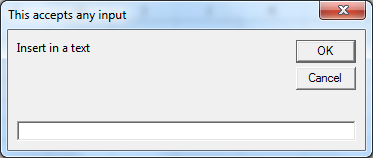
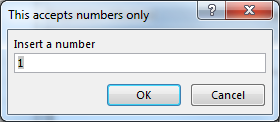
In this way we can get the result through message box.
The applications/code on this site are distributed as is and without warranties or liability. In no event shall the owner of the copyrights, or the authors of the applications/code be liable for any loss of profit, any problems or any damage resulting from the use or evaluation of the applications/code.




"What would be the method to insert a pull-down menu into a cell, allow the user to select a certain item from the list, and then for a comment box to be opened should the user select an item that requires additional documentation/description?
Basically:
1. How do I create the pull-down menu?
2. How do I link a certain item within the pull-down menu so that when it is selected a comments box appears where text could be typed?"