

There may be situations when we need current date and time stamp in Excel. In this article, we will learn how to create date and time stamp by using the functions in Microsoft Excel.
We have multiple ways to create date and time stamp by using keyboard shortcuts for certain functions.
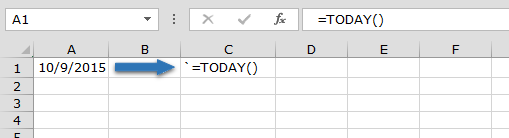
Let’s start by entering date through function:
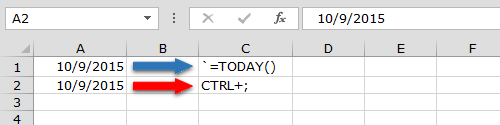
And shortcut to enter the current date is: Ctrl+;
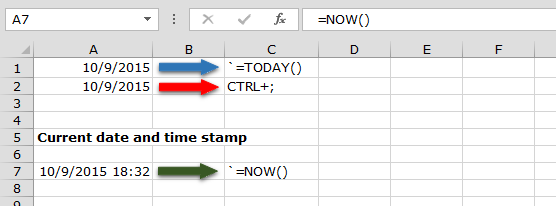
Now enter current time and date by using function:
Let’s take another example and understand date and time stamps:
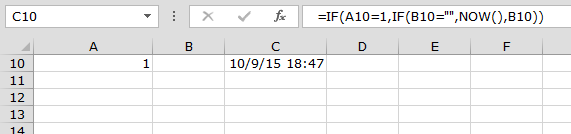
If cell A10 contains 1 and cell B10 is blank then date and time stamp should appear otherwise not.
Enter below given formula:
Thus we can create date and time stamp in the following ways in MS-Excel.
If you liked our blogs, share it with your friends on Facebook. And also you can follow us on Twitter and Facebook.
We would love to hear from you, do let us know how we can improve, complement or innovate our work and make it better for you. Write us at info@exceltip.com
The applications/code on this site are distributed as is and without warranties or liability. In no event shall the owner of the copyrights, or the authors of the applications/code be liable for any loss of profit, any problems or any damage resulting from the use or evaluation of the applications/code.




For Excel 2010, I had to change the formula to read =IF(A2="","",IF(B2="",NOW(),B2)) for it to work.
if some pest in cell A1 current time will auto update in B1 cell..
and if again we are pest some in a2 cell then current time will update in B2 cell.
for example ;
first i pest 781 in A1 time will update 8:41 ..then i pest 782 in A2 current time update B2 cell.
781 8:41 PM
782 8:46 PM
Please provide excel formula
Hi Nivedita,
As per your requirement, we don't see any good solution for you using excel formula. However, in case you are okay to go with VBA solution, following is the simple 1 liner code which would help you to meet your requirement.
1. Open Excel File where you want to have the output
2. Press ALT+F11 to open Visual Basic Editor
3. Create Module or right click on Sheet Object and insert a module
4. Paste/Write the following code
5. Go back to Excel sheet and now you can use "Current_Time_Stamp" as formula to meet your requirement.
Please feel free to let us know in case of any doubt.
Thanks,
Team Excel Forum