

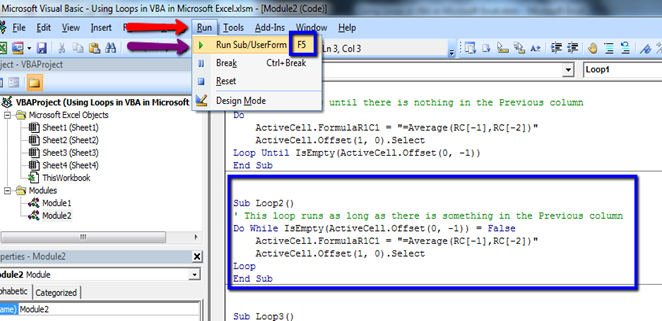
You can run the macros either from the Visual Basic Editor by placing your cursor in the macro and pressing the F5 key, or from Excel by opening the Macros dialog box (ALT+F8) choosing the macro to run and clicking Run. It is best to run these macros from Visual Basic Editor by using Debug > Step Into (by pressing F8) so you can watch them as they work. Instruction If Developer Tab is not in the Ribbon..
How to Insert VBA code in Excel
 How to Run VBA code in Excel
Instead of using several unique variables to store information, you can use an array variable.
When you know how many elements you need to store in the array, you can use a static array variable like this :
Sub TestStaticArray()

' stores 10 names in the workbook in the array variable MyNames()

Dim MyNames(1 To 10) As String ' declares a static array variable

Dim iCount As Integer

For iCount = 1 To ThisWorkbook.Sheets.Count

MyNames(iCount) = ThisWorkbook.Sheets(iCount).Name

Debug.Print MyNames(iCount)

Next iCount

Erase MyNames() ' deletes the variable contents, free some memory

End Sub
Dim MyNames(1 to 10) As String
We have dimension-ize a single veriable MyNames as a String, which can hold 10 item in it. So MyNames veriable is a Array type.
Dim iCount As Integer
We have declared a single variable iCount as a Integer, which can hold only Numeric Integer type Value
For iCount = 1 To ThisWorkbook.Sheets.Count
ThisWorkbook.Sheets.Count will give us Number of Sheets in a Workbook. ThisWorkbook, refers to the Workbook, in which code was written.
MyNames(iCount) = ThisWorkbook.Sheets(iCount).Name
Using a loop, we are assigning, each sheet’s name to a single veriable called MyNames. MyNames is an Array type veriable, so it will store, each sheets name in each item of array.
Debug.Print MyNames(iCount)
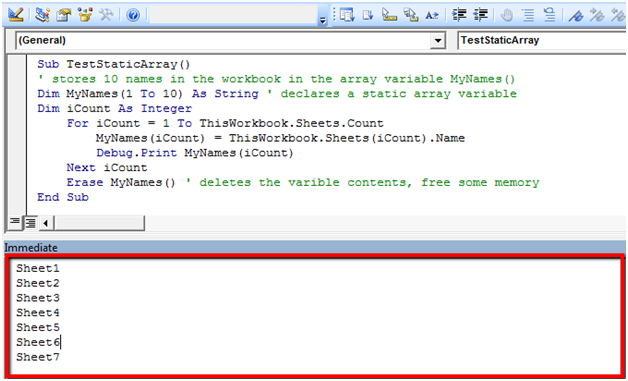
Just after assigning the value into each item of an array, it will print the same in ImmediateWindow, bydefault in the bottom of the VBA window. You can view assignment of each value and display it’s value in ImmediateWindow.
Next iCount
Next is used to tell For Loop in Excel VBA, to repeat the same task again, by increasing the iCount Counter, until iCount reached Total Number of Sheets, in the workbook.
Dynamic array variables are useful when you in advance don’t know how many elements that you need to store information about.
You declare dynamic array variables just like a static array variable, except that you don’t give any information about the array size.
In above example (Dim MyNames(1 to 10) As String) if Number of sheets greater than 10, it will through an error, as MyNames will not able to store more than 10 Item.
Sub TestDynamicArray()

' stores all names in the workbook in the array variable MyNames()

Dim MyNames() As String ' declares a dynamic array variable

Dim iCount As Integer

Dim Max As Integer

Max = ThisWorkbook.Sheets.Count ' finds the maximum array size

ReDim MyNames(1 To Max) ' declares the array variable with the necessary size

For iCount = 1 To Max

MyNames(iCount) = ThisWorkbook.Sheets(iCount).Name

MsgBox MyNames(iCount)

Next iCount

Erase MyNames() ' deletes the varible contents, free some memory

End Sub
Dim MyNames() As String
We have dimension-ize a single veriable MyNames as a String, which is an Array type, due to open & close Paranthesis, after the veriable name, but will not able to store any data in it, as we have not provide its UpperLevel.
ReDim MyNames(1 To Max)
Redim is used to re- Dimension-ize the Array, It will Now assign the upper level of the Array Type Veriable.
In this case,total number of sheets in the Workbook (Max = ThisWorkbook.Sheets.Count)
MsgBox MyNames(iCount)
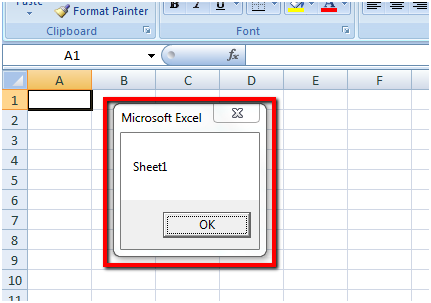
In last example, we have printed the Value in Variables in Immediate Window, this time, we are printing the value in a MessageBox, which will appear like this..
If you know that you will need an array variable with 1000 items, use a static variable. The downside is that you will use memory for a 1000 items every time, also in the cases that you only stores information about 10 items. If you use a dynamic array variable you will use the memory more efficient.
Sometimes it’s not possible to calculate how large the array variable will need to be. In these cases the size of the array variable need to be increased as necessary. When you use a ReDim-statement to change the array variable size, the variable contents is also erased to avoid deleting the variable contents when you Redim the array variable you will need to use the ReDim Preserve-statement.
Sub GetFileNameList()

' stores all the filenames in the current folder

Dim FolderFiles() As String ' declares a dynamic array variable

Dim tmp As String, fCount As Integer

fCount = 0

tmp = Dir("D:\Test\*.*")

While tmp <> Empty

fCount = fCount + 1

ReDim Preserve FolderFiles(1 To fCount)

' declares the array variable again (size+1)

FolderFiles(fCount) = tmp

tmp = Dir

Wend

MsgBox fCount & " filenames are found in the folder " & CurDir

Erase FolderFiles ' deletes the varible contents, free some memory

End Sub
Dim FolderFiles() As String
We have dimension-ize a single veriable FolderFiles as a String, which is an Array type, due to open & close Paranthesis, after the veriable name, but will not able to store any data in it, as we have not provide its UpperLevel.
tmp = Dir("D:\Test\*.*")
Dir command works as a explorer, which can hold name of all files & folder in a directory. You can limit all files to some specific criteria also. Dir("D:\Test\*.pdf”) will limit from all files to only PDF files or extension.
While tmp <> Empty
Instead of For loop in Excel VBA, this time, we are repeating the same action, using Excel VBA WHILE LOOP, where criteria to end loop was set as tmp not equal to empty. So, until, there was any value in tmp veriable, loop will work.
ReDim Preserve FolderFiles(1 To fCount)
Array veriable FolderFiles don’t have any upper level at the starting position. But, in each repetation it will increase its upper level by ReDim command. In first run 1, then 2.. and so on, until fCount.However with each time increasing the upper level, it will lose all already assigned variables. By using Preserve command, we can hold or store the already assigned value.
Wend
Wend used to tell For Loops in VBA, to repeat the same task again, until the criteria met.
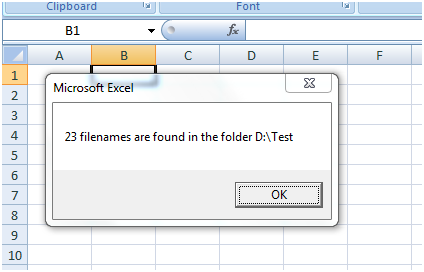
MsgBox fCount & " filenames are found in the folder " & CurDir
At each repetition, fcout will increase with +1, and it final value will benumber of files found on that directory / Folder. CurDir command gives the name of the current Directory. In this case “D:\Test”
The applications/code on this site are distributed as is and without warranties or liability. In no event shall the owner of the copyrights, or the authors of the applications/code be liable for any loss of profit, any problems or any damage resulting from the use or evaluation of the applications/code.



