

In this article, we will learn how to change slash separator in date with period in Microsoft Excel 2010.
To change the slash separator in date with period in Microsoft Excel, we can use Format Cells option.
Format Cells: - We can use this option to change the slash separator in the date with period.
We can find this option with the right click of the mouse, and pop-up will be visible. Then click on Format Cells, or we can use shortcut key Ctrl+1 on the keyboard.
Let’s take an example how we can change the slash separator in date with period in Microsoft Excel.
We have dates in column A with slashes, and we will change the slashes (/) with dashes (-).
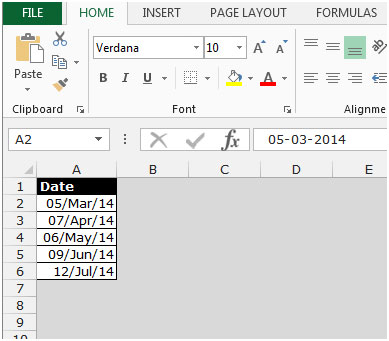
Follow below given steps:-
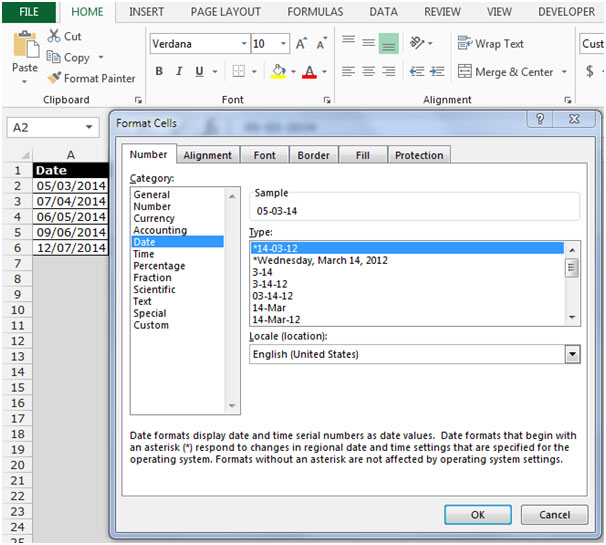

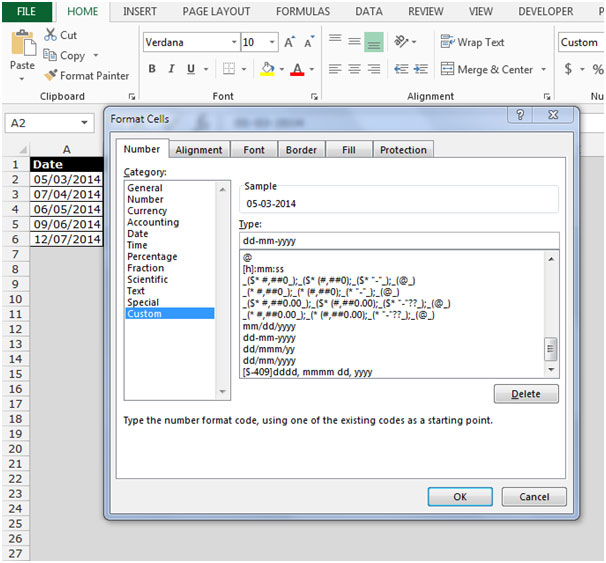

To permanently change the date format, follow the below-given steps:
If you are one of those people who love to use period instead of / and would like to change the default setting for the date format, perform the following steps:
From Windows, choose Start, Settings, Control Panel and Regional Options.
Select the Date tab. In the Date separator box, change the slash (/) to a period (.).
Click Apply and OK.
This is the way we can change the slash separator in date with period in Microsoft Excel 2010 and 2013.
The applications/code on this site are distributed as is and without warranties or liability. In no event shall the owner of the copyrights, or the authors of the applications/code be liable for any loss of profit, any problems or any damage resulting from the use or evaluation of the applications/code.




I want to type the date using periods and have Excel automatically change to slashes
Just set the formatting to slashes as shown above. Excel will automatically change periods to slashes.