

In this article, we will learn How to Calculate the Number of Weekday Hours Between Two Dates in Excel.
Scenario:
Usually Saturdays and Sundays are weekends meaning non working days or non working hours. Sometimes calculating the total work hours between two dates, we can manually calculate the number of days between the days and subtract the number of days and multiply the result with 24 to get hours. This doesn't look easy and can lead to mistakes if the two given dates are too much apart. NETWORKDAYS function has the fixed type of weekend which is Saturday and Sunday. So now we learn the extended version of WORKDAYS function which lets you edit the weekends as per choice.
Number of weekday hours formula in Excel
To get the networking days between dates having holidays use NETWORKDAYS function in Excel. It takes Saturday and Sunday as default holidays.
NETWORKDAYS Function Syntax:
| =NETWORKDAYS (start , end , holidays ) * hours |
Start_date : count of first date
End_date : count of end date
Holidays : [optional] argument in the function
hours : work hours per day
Example :
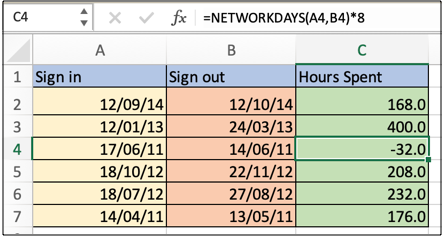
All of these might be confusing to understand. Let's understand how to use the function using an example. Here we have some sample dates where we need to find the total working hours between the two given dates where Saturday and Sunday are non working days and considering no national holidays as working days. Here we have a sign in date, sign out date.
Use the formula:
| =NETWORKDAYS(A4,B4)*8 |
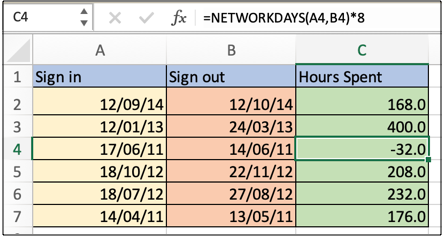
As you can see, formula returns weekdays or working hours in excel. You must be wondering why there is a negative hours, and it can't be so. It means the start date is after the end date. Negative value also finds out the defaulter here.
Here are all the observational notes using the formula in Excel
Notes :
Hope this article about How to Calculate the Number of Weekday Hours Between Two Dates in Excel is explanatory. Find more articles on calculating values and related Excel formulas here. If you liked our blogs, share it with your friends on Facebook. And also you can follow us on Twitter and Facebook. We would love to hear from you, do let us know how we can improve, complement or innovate our work and make it better for you. Write to us at info@exceltip.com.
Related Articles :
How to use the NETWORKDAYS function in Excel : Returns the working days between the two given dates using the NETWORKDAYS function.
How to use the WORKDAYS function in Excel : Returns a workday date value after days added to the start_date using the WORKDAYS function in Excel.
Count holidays between dates in Excel : count non working days between the two given dates using the DATEDIF and NETWORKDAYS function in Excel.
Extract days between dates ignoring years in Excel : count the days between the two dates using different functions and mathematical operation in Excel
Count Birth Dates By Month in Excel : count the number of dates lying in a particular month using the SUMPRODUCT and MONTH function in Excel.
SUM price by weekdays in Excel : sum price values corresponding to the number of dates in a particular weekday using the SUMPRODUCT and WEEKDAY function in Excel.
Popular Articles :
50 Excel Shortcuts to Increase Your Productivity : Get faster at your tasks in Excel. These shortcuts will help you increase your work efficiency in Excel.
How to use the VLOOKUP Function in Excel : This is one of the most used and popular functions of excel that is used to lookup value from different ranges and sheets.
How to use the IF Function in Excel : The IF statement in Excel checks the condition and returns a specific value if the condition is TRUE or returns another specific value if FALSE.
How to use the SUMIF Function in Excel : This is another dashboard essential function. This helps you sum up values on specific conditions.
How to use the COUNTIF Function in Excel : Count values with conditions using this amazing function. You don't need to filter your data to count specific values. Countif function is essential to prepare your dashboard.
The applications/code on this site are distributed as is and without warranties or liability. In no event shall the owner of the copyrights, or the authors of the applications/code be liable for any loss of profit, any problems or any damage resulting from the use or evaluation of the applications/code.



